I get a lot of questions about the gear I use, so I’ve collected it all here on a single page.
A couple of quick notes:
- Just because I use something doesn’t mean I recommend it to everyone. I make stuff for a living and have been fortunate enough to upgrade equipment over time. If you are starting out, there are many great options that cost less.
- This page uses affiliate links.
- Some of these products are sponsors of 512 Pixels and/or Relay in the past/present/future. However, unless noted, I’ve paid for everything on this list.
Computing
My computer is a space black 14-inch MacBook Pro with an M4 Max. Everything — including the Studio Display — runs through a CalDigit TS4 Thunderbolt dock. The laptop is closed to the left of the screen, sitting in a Twelve South BookArc.
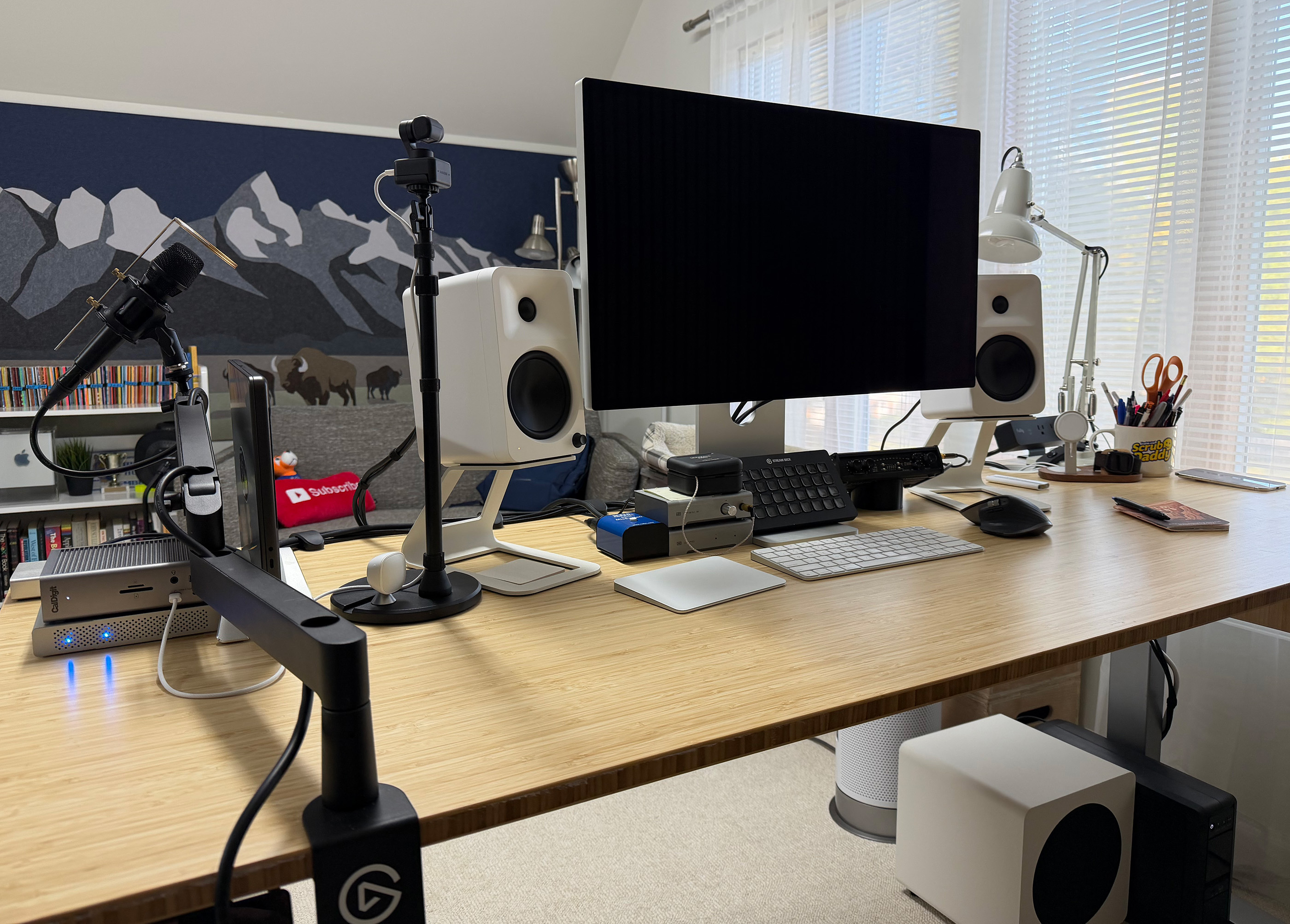
This is the rough flow of things.
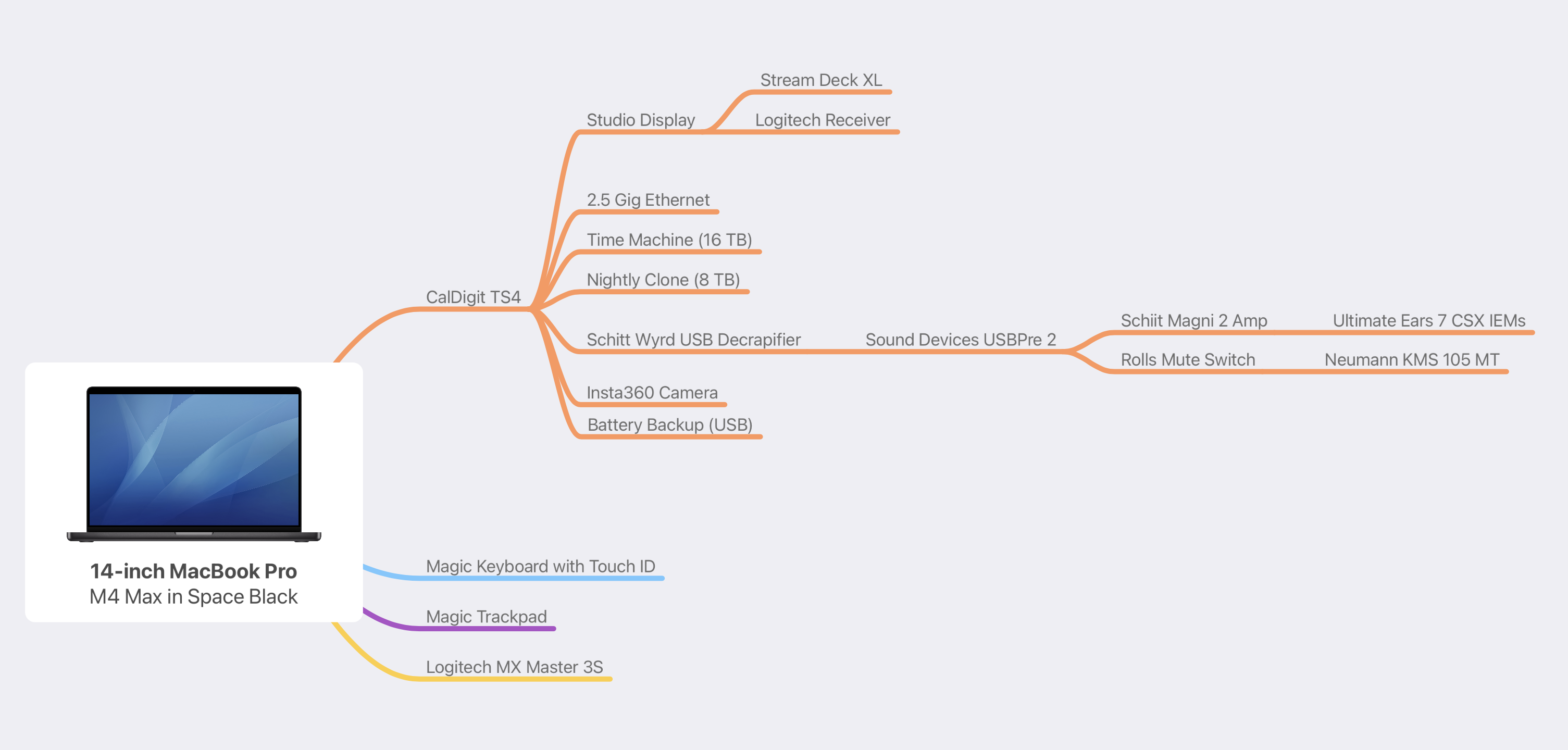
The computer lives atop a Jarvis Bamboo Standing Desk, I generally stand for the first few hours of the day or whenever I have a lot of administrative work to knock out.
Under the display is my Stream Deck XL, and next to it are a set of Kanto ORA4 140W powered reference speakers paired with the Kanto SUB8VMW sealed 8-inch powered subwoofer. My thanks to John Siracusa for suggesting the Kanto gear. This stuff is pricey, but it sounds great, and having both my speakers and podcasting gear attached over USB is pretty sweet.
For input devices, I use a Magic Trackpad, Magic Keyboard with Touch ID, and a Logitech MX Master 4. The trackpad is basically just for gestures.
For a webcam, I’m using the Insta360 Link. It’s an amazing little 4K camera, and I’ve been really happy with it for Zoom calls or the occasional video podcast.
In terms of backups, I use a combination of Time Machine, Backblaze, and Carbon Copy Cloner.
On the mobile front, I use an iPhone Air in Cloud White and an 11-inch M4 iPad Pro. I wear an Apple Watch Ultra 3 in black almost every day night. I use it track my steps with Pedometer++ and my sleep with Sleep++.
I dabble in 3D printing, and have a Prusa MK4 set up in the office. I’ve mostly made a lot of oddball stuff for organizing things in my office and around the house.
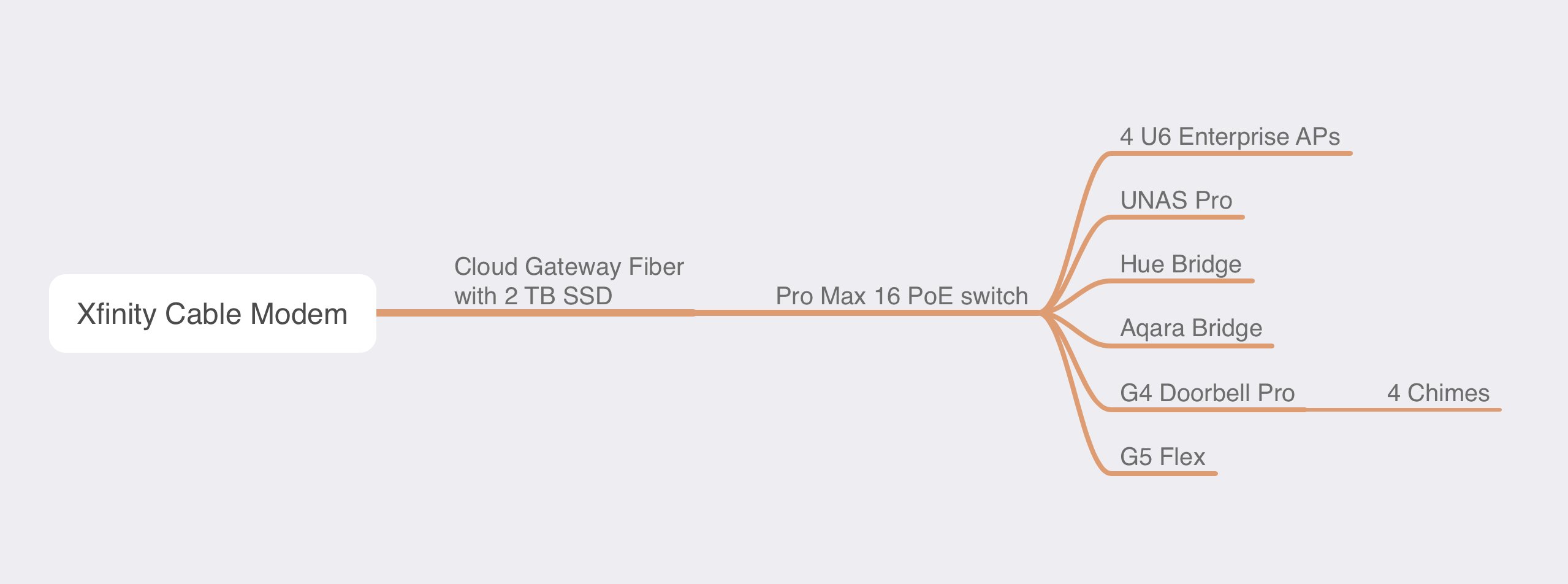
My network is built with a bunch of Unifi equipment:
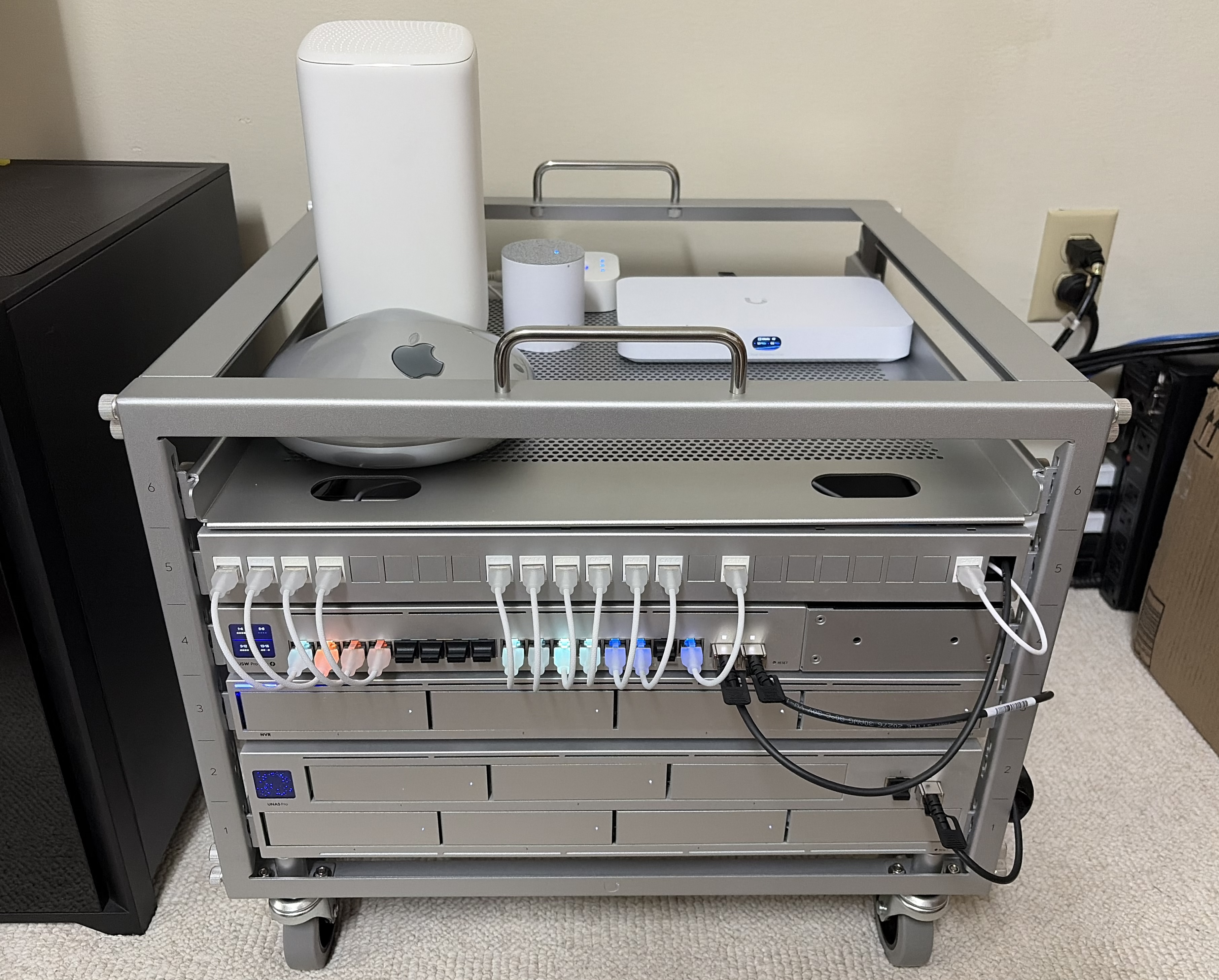
This is the rough setup of my network.
Podcast Recording
I make podcasts for a living. This is my setup at my desk:
- A Neumann KMS 105 MT Condenser Microphone XLR microphone with this shock mount, on a Elgato Wave Mic arm.
- The microphone is plugged into a Rolls mute switch, and then into a Sound Devices USBPRE2 interface.
- My headphones used to be the boring but reliable Sony MDR-7506s, but I now use a set of custom Ultimate Ears 7 CSX in-ear monitors.
Remember when I said I couldn’t recommend my gear to most people? The USBPRE2 is awesome, but it is obscenely expensive. My go-to recommendation is the very-good-and-affordable Tascam US-2×2 USB Audio Interface. On the microphone front, I am a big fan of the Shure BETA 87A. If you need something really affordable, check out this post by Jason Snell on Six Colors about the Audio-Technica ATR2100 microphone.
I record my audio (and what I hear via Zoom) using Audio Hijack and I edit in Logic Pro.
Podcasting on the Road
We sometimes host live recordings of Relay shows. Beyond that, I sometimes find myself recording while traveling for work or pleasure. I’ve put together a pretty robust “mobile” setup over the years:
- I have a set of Shure 87A microphones for our live shows. We have them in some pretty simple table-top stands with big heavy weights to keep them from tipping over.
- The mics are run to a Sound Devices MixPre-10 which is one of the very few interfaces that can record onto an SD card and send audio out over USB. The device is powered via USB-C, straight into my MacBook Pro, where I capture the audio via Audio Hijack Pro.
- If we are in a theatre, I route audio out of the headphone jack of the MixPre-10 to the house via XLR through a Radial ProD2 direct box. I’ve joked that this is my favorite piece of tech I own, and I may mean it. It’s built like a tank and does its job very well.
- All of this gear is crammed into a Pelican 1510 case for flights. This case is amazing. It is incredibly well made and will fit into most overhead bins without any issue. My wife spray-painted the word “Relay” in gold across the front of it to make mine.
Blogging
The site runs on WordPress.
I write 512 Pixels in iA Writer and publish via MarsEdit or the web, depending on which platform I’m using at the moment.
Software
Here’s a list of a bunch of apps and services I rely on every day:
- Email: Mimestream on the Mac and iOS (thanks to a private beta), hooked up to Gmail and Google Workspace.
- Notes: Apple’s Notes app for just about everything; Tot for a quick scratchpad.
- Task Management: Apple Reminders on iOS; GoodTask on macOS.
- Photos: Stock iOS camera app; iCloud Photos Library.
- Calendar: Apple’s stock Calendar app. Personal calendars are in iCloud; work calendars are hosted via Google.
- Cloud file storage: Dropbox for almost everything; iCloud Drive for a shared folders with my wife.
- RSS: ReadKit everywhere, syncing with Feedbin for that sweet send-newsletters-to-my-RSS-reader workflow.
- Contacts: The stock contacts app. Work and personal contacts all mixed together in my iCloud account. It’s a mess in there.
- Browser: Mostly Safari, but also Chrome.
- Chat: Slack for work, Discord for hanging out with Relay members, iMessage for everything else.
- Read It Later: GoodLinks, which I love.
- Research tools: I have a lot of computer history stuff stored in DEVONthink.
- Time tracking: Timery, powered by Toggl
- Office work: Mostly Google Docs and Sheets; iWork when I need more. I really try to avoid Office.
- Shopping lists: Shared Reminders lists with my wife.
- Music: Apple Music through my Kanto setup, AirPods Pro 2, or a series of HomePod minis.
- Podcast listening: Overcast is the GOAT.
- Podcast creation: Calling in Zoom; recording in Audio Hijack; editing in Logic Pro; MP3 creation in Forecast
- Password management: At home, 1Password for Families and Teams at work.