Bonus Kbase Article of the Week: If You See ‘Disk Not Ejected Properly’ on Your Mac Pro (2023)

Apple Support:

Certain models of internal SATA drives might unexpectedly disconnect from your computer after your Mac wakes from sleep. This can occur if your Mac automatically goes to sleep or if you manually put your Mac to sleep. If you see a message that your disk was not ejected properly, you can restart your Mac to reconnect to the drive.

Apple is aware of this issue and resolution is planned for a future macOS update.

To avoid the bug, Apple recommends turning on the “Prevent automatic sleeping when the display is off” option in System Settings.

via MacRumors Joe

Introducing the 2024 Apple History Calendar

2024 Apple History Calendar

For the last two years, I’ve successfully created beautiful wall calendars focusing on parts of Apple’s business. For 2022 I did hardware, and for 2023, software.

The 2024 Apple History Calendar will complete the trilogy, focusing on Apple retail and the company’s services business.

These dates cover everything from Apple’s earliest ideas about the Internet to the latest in it’s growing collection of services, complete with key dates in the history of the Apple Store as well.

The calendar features a custom design and measures 20×13, and comes with a pre-punched hole to hang it on your wall. Each month highlights a bunch of these important dates, paired with photographs taken by me of items in my Apple collection, a custom illustration for the cover and more.

The calendars will be printed here in Memphis, TN. Campaign orders will fulfilled by me and a small team of family and friends, and shipping will begin in October, in plenty of time for the new year, with digital downloads will go out in November.

If you are one of the 1200 people backed my campaign last year, I hope you’ll enjoy this calendar just as much as you did the previous one. If you’re new to this project, then welcome!

All of the information can be found on the campaign page. Go check it out!

A Watershed Moment

Federico, writing at MacStories:

I’m going to be direct with this story. My 30-minute demo with Vision Pro last week was the most mind-blowing moment of my 14-year career covering Apple and technology. I left the demo speechless, and it took me a few days to articulate how it felt. How I felt.

It’s not just that I was impressed by it, because obviously I was. It’s that, quite simply, I was part of the future for 30 minutes – I was in it – and then I had to take it off. And once you get a taste of the future, going back to the present feels … incomplete.

I really wish I had been able to try it at WWDC. Everyone who did seems changed somehow.

Apple’s Original Vision Products Were a Line of CRTs

The Apple Vision Pro may be ushering in the era of spatial computing, but like many other Apple products, it’s using a name steeped in history.

Ok, steeped may be a little strong, but Apple has had other products with “vision” in their names over the years. Seven products, to be exact, and all of them are long-forgotten CRT displays:

  • AudioVision 14 Display
  • AppleVision 1710 & AppleVision 1710AV
  • AppleVision/ColorSync 750 & AppleVision/ColorSync 750AV
  • AppleVision/ColorSync 850 & AppleVision/ColorSync 850AV

The AudioVision 14 Display came out in 1993, and was built around a Sony Trinitron CRT, as were all the other products in that list. The AudioVision 14 Display was Apple’s first “multimedia display,” and was equipped with a microphone, stereo speakers and two ADB ports for plugging in accessories.

Apple published a Q&A on the product that is still on its website today. This part jumped out at me:

Q: How does AudioVision differ from just adding separate high quality speakers and a high quality microphone?

A: While AudioVision’s sound performance is equivalent to many highly priced speaker and microphone alternatives, the all-in-one integrated hardware and software solution offers several advantages you just can’t get by adding on separate components. This integration advantage translates into simplicity of purchase and set-up, convenience in usage, and software Flexibility.

If that doesn’t explain Apple’s love of all-in-one products, I don’t know what does. Heck, that answer could be used to describe my Studio Display.

I even found an ad for the display, which normally sold for $790.
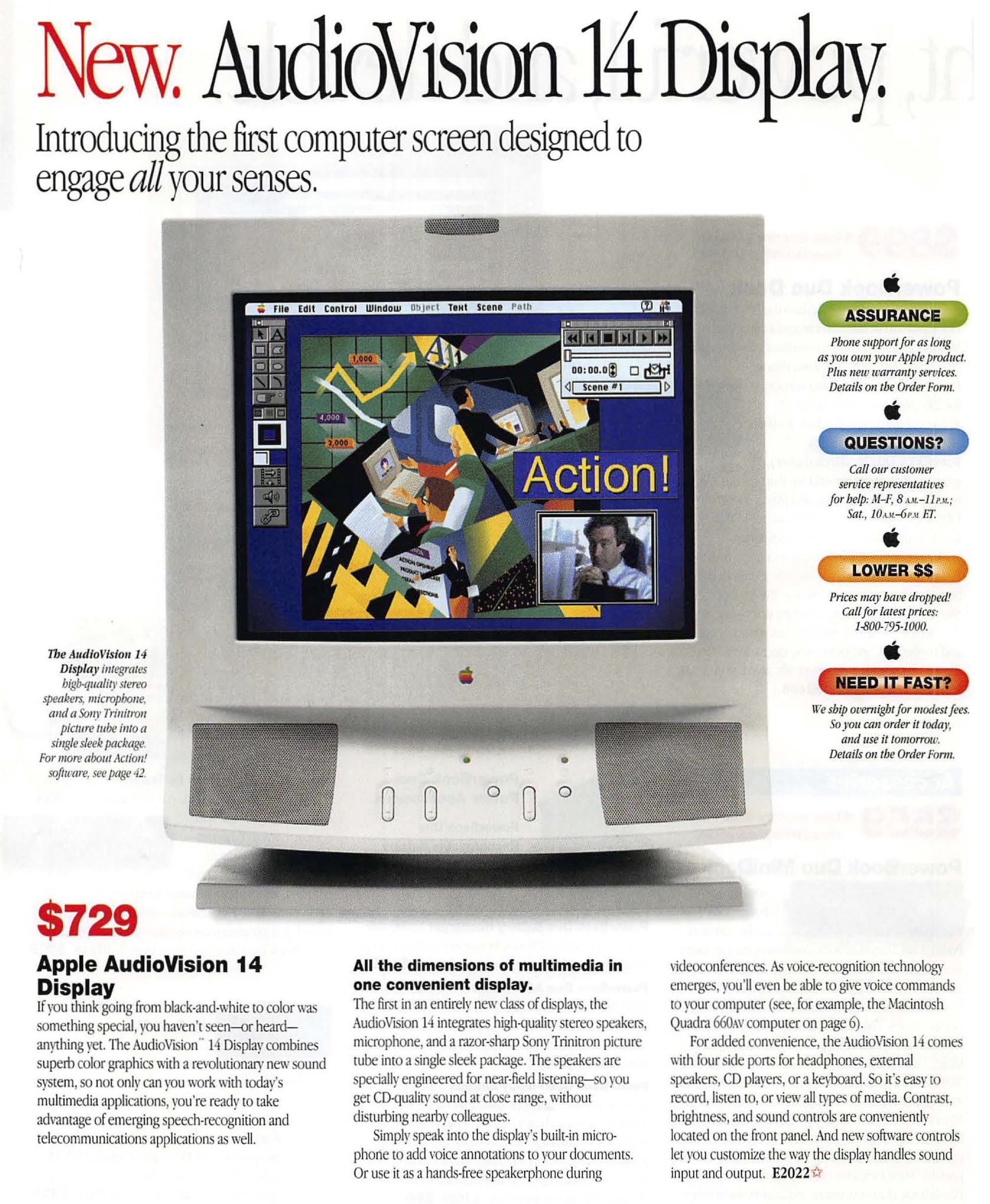
Ad for the AudioVision 14 Display

This product used the the HDI-45 connector for getting information to/from the user’s Mac with just one cable. As the name suggests, this was a 45-pin connector, and it carried analog RGB video, analog stereo audio signals (both in and out), ADB and S-video. This connector was found on the back of the the Power Macintosh 6100, 7100 and 8100 and was only ever used with the AudioVision 14 Display.

Yikes.

This display ended up being a one-off, being replaced with the AppleVision 1710 and the AppleVision 1710AV.

Before we get to those, we should talk about the naming of these products. There were three generations of “AppleVision” displays, and models with “AV” in their name included a built-in microphone and a set of speakers and generally cost $200 or so more.

The 1710 line shipped with a color 17 inch (16.1″ viewable area) Trinitron CRT and started at $999. The AV model ran $1,159 a big step up from the old AudioVision 14, but in those days, you paid dearly for every inch of CRT on your desk. These two displays were sold from August 1995 to August 1997, alongside the Power Macintosh 7200/75, Power Macintosh 7200/90, Power Macintosh 7500/100 and Power Macintosh 8500/120.

In 1997, Apple released ColorSync, its color management solution for Mac OS. ColorSync is a story for a different time, but to fully support it, Apple replaced the 1710 and 1710AV with two new displays: the AppleVision/ColorSync 750 and the AppleVision/ColorSync 750AV.

These two monitors shipped in August of 1997, retaining the 16-inch (viewable) CRT and required Mac OS version 7.1 or later.

The real highlight of the line was the AppleVision/ColorSync 850 and 850AV, which boasted a 20-inch (19-inch viewable) Trinitron. These shipped in May 1997, for $1,849 and $1,999, respectively. Here’s a bit from the press release:

Apple Computer, Inc. today introduced the new high-performance, AppleVision 850 AV and AppleVision 850 color displays for publishers, multimedia authors, photographers, and other professionals who rely on consistent visual performance and color accuracy, as well as for users of spreadsheet and page-layout applications who require a large display that supports very high resolution. Both displays incorporate Apple’s proven DigitalColor technology for state-of-the-art color accuracy, which is achieved through a patented internal calibration system that adjusts color over time with minimal user interaction. The displays support Apple’s ColorSync technology for color matching across multiple devices such as color printers and scanners by allowing display profiles to be created on the fly. Both displays also feature extensive, easy-to-use software control of screen geometry, mode switching, and color settings.

“The AppleVision 850 AV and AppleVision 850 displays truly complement our professional Power Macintosh computer systems,” said Phil Schiller, Apple vice president of product marketing for desktops, servers and displays. “When you combine one of these new displays with a Power Mac 9600 or 8600 for professional publishing or media authoring, you are getting some of the very best in graphics performance, image quality, color accuracy and industrial design.”

The product’s manual shows off the media controls that appeared on the chin below the display itself, as well as the rest of the display’s features:
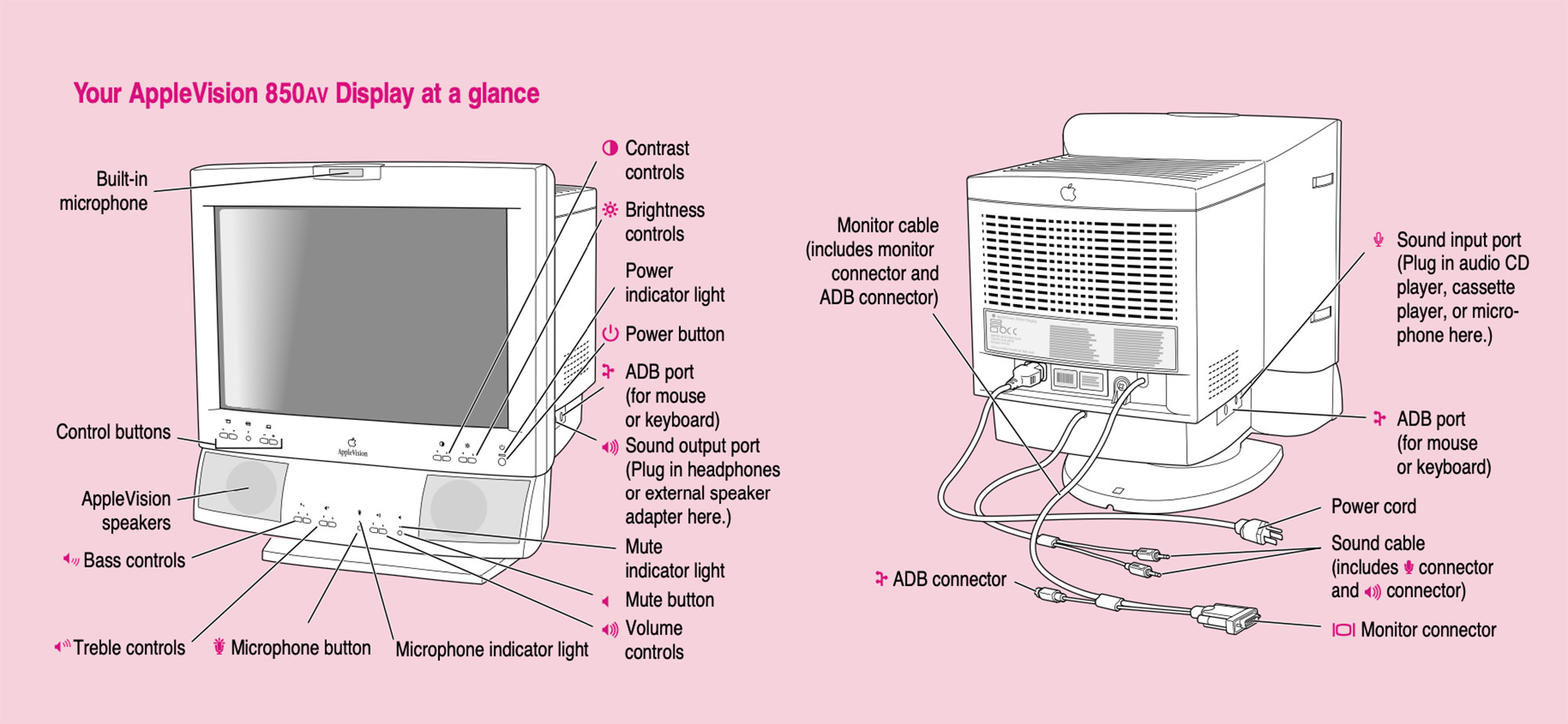
850AV Graphic

You may be wondering what’s up with the rather long “AppleVision/ColorSync” name. This was a bit of a bandage to cover up the fact that Apple changed the name of these products on March 11, 1998:

Apple Computer, Inc. today announced a TCO upgrade to the currently shipping monitors for design and publishing professionals. Available in 17- or 20-inch configurations, the Apple ColorSync Displays now meet the strict international TCO 95 standards for recyclability,1 low emissions and power consumption. Additionally, the announcement completes the renaming of the displays from AppleVision 750 (17-inch) and AppleVision 850 (20-inch) to Apple ColorSync Display. The new naming more effectively communicates the advantages of the systems’ color calibration capabilities to customers.

I wasn’t really paying attention to Apple back then, but the name change makes sense to me. In the 1990s, desktop publishing was Apple’s bread and butter, and ColorSync was a big part of that, even if it did mark the end of the company’s “vision” branding, at least for a while.
  1. If you are like me and had no idea what “TCO” means, this should help. 

Kbase Article of the Week: AppleVision, ColorSync 20-inch Displays: Multiple Monitor Support

Apple Support:

Question: I purchased two AppleVision Monitors and am trying to set them up, but my computer only has one ADB port on the back. I tried connecting the ADB cable from the first monitor to the side of the second monitor, but that did not work. Then I tried using a third party ADB splitter cable and the second monitor came up in 640×480 only. How do I set them up correctly?

Answer: To set up two AppleVision displays with a computer that has a single ADB port, be sure to use the recommended Apple shielded connector cable (ADB splitter cable), part number M5556LL/A. This is the only officially supported method of connecting two AppleVision Displays to a single Macintosh ADB port. Setup instructions are in the User Manual for the display.

When some third-party ADB splitter cables are used, AppleVision software may be unable to recognize one or both monitors as AppleVision displays. As a result, the screen resolution of the unrecognized monitor(s) will revert to 640×480, and the AppleVision control strip and control panel will not allow you to select any other resolution besides 640×480.

A Developer’s View of Vision Pro

Underscore David Smith:

Last week at WWDC I was extraordinarily fortunate to be one of the very few people in the world to try out Vision Pro for myself. The 30 minute session I had with it has been described in tremendous depth in lots of places (the best likely being Myke’s discussion on Cortex), so I won’t go into the content of that demo itself, but instead focus on what I think this platform means for developers, and [spoiler alert] why I’m incredibly excited to get started developing for it (and think you should too).

Sponsor: MarsEdit 5

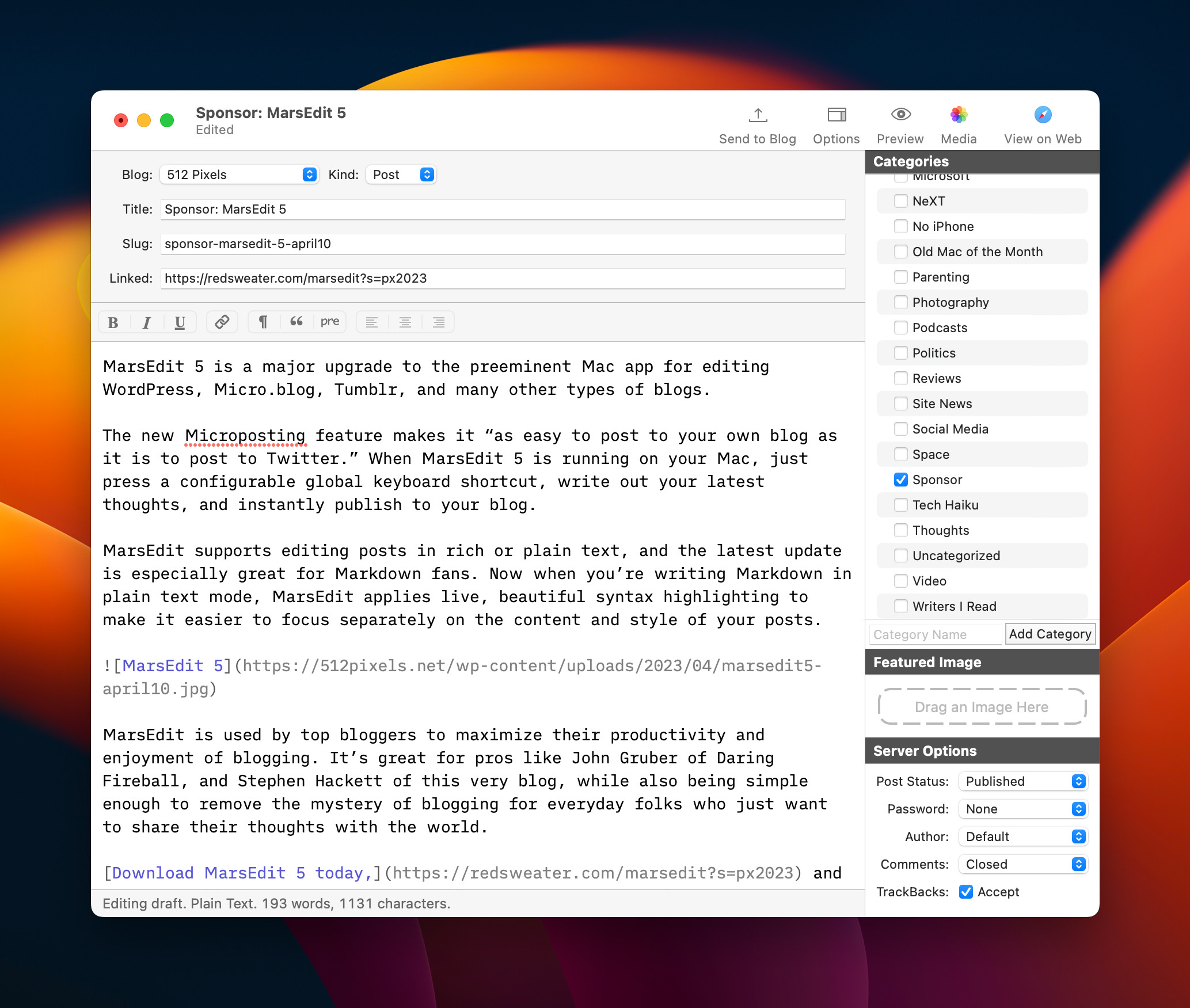
MarsEdit 5 is a major upgrade to the preeminent Mac app for editing WordPress, Micro.blog, Tumblr, and many other types of blogs.

The new Microposting feature makes it “as easy to post to your own blog as it is to post to Twitter.” When MarsEdit 5 is running on your Mac, just press a configurable global keyboard shortcut, write out your latest thoughts, and instantly publish to your blog.

MarsEdit supports editing posts in rich or plain text, and the latest update is especially great for Markdown fans. Now when you’re writing Markdown in plain text mode, MarsEdit applies live, beautiful syntax highlighting to make it easier to focus separately on the content and style of your posts.

MarsEdit 5

MarsEdit is used by top bloggers to maximize their productivity and enjoyment of blogging. It’s great for pros like John Gruber of Daring Fireball, and Stephen Hackett of this very blog, while also being simple enough to remove the mystery of blogging for everyday folks who just want to share their thoughts with the world.

Download MarsEdit 5 today, and see what all the hype is about. It’ll make you a better blogger!

The Vibe is Good

I’m writing this in the lobby of my hotel in Cupertino, a couple of hours before I fly home to Memphis and I am here to report that the vibe at WWDC is good.

Electric, even.

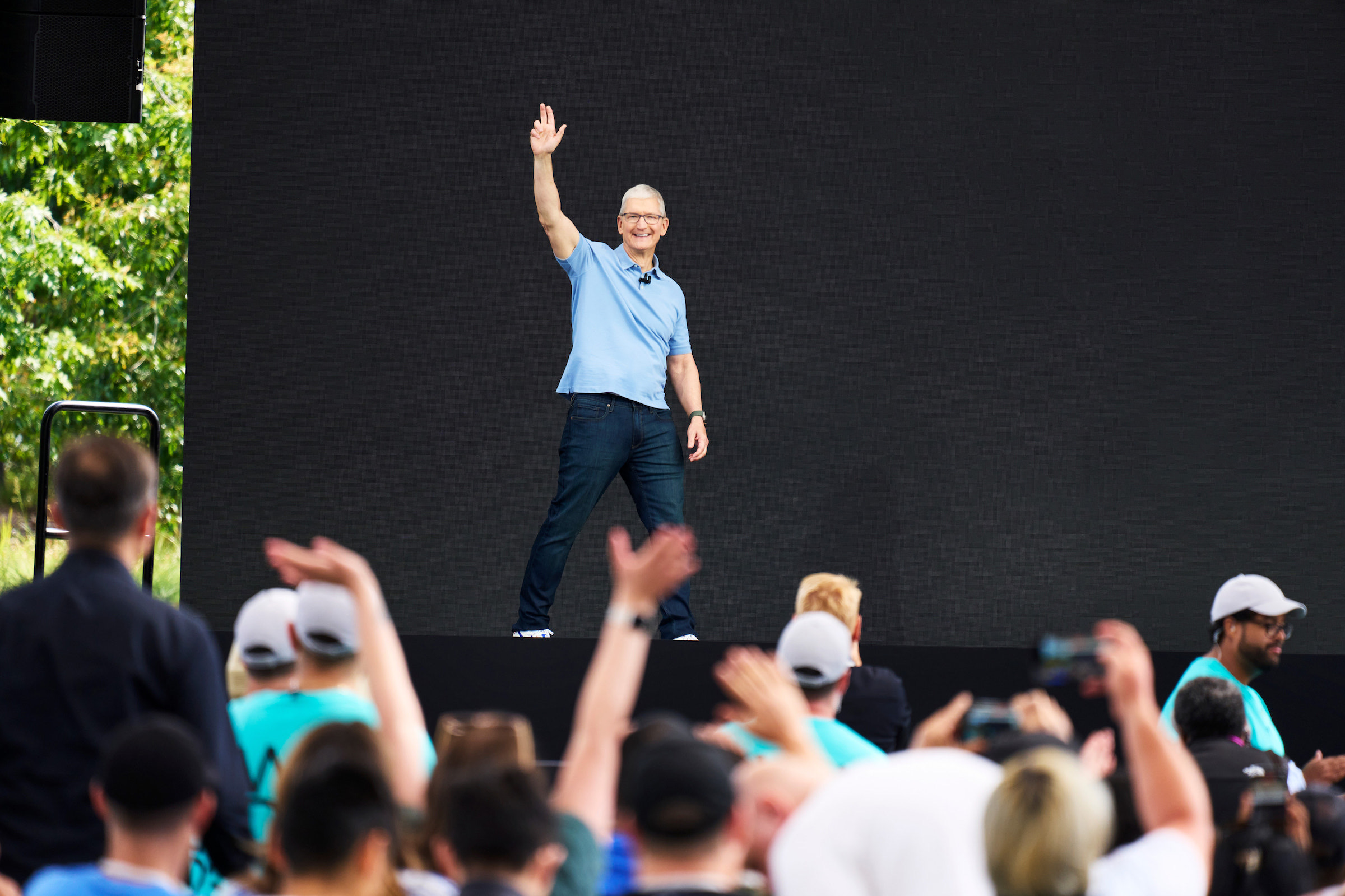
Tim Cook has amazing arms.

The Annual March

For several years, Apple has been really good at keeping features across its platforms in step with one another. 2023 is shaping up to be no different, with core improvements coming to the company’s various operating systems at the same time, each tuned to the particular form and function of their host devices.

I think it’s past time Apple rework its keynote strategy, building these videos around features and not OSes, but that’s a blog post for a different day. For now, users can move between their Apple devices more fluidly and quickly than ever.

This has been one of Apple’s goals for its ecosystems for a long time,1 but the company has become more clear about it in recent years.

That’s not to say that these various platforms are merging. Each one still has its own flavor, with features that make sense for the context in which they are used. NameDrop comes to mind, making it easy to quickly share contact information to/from an iPhone and/or an Apple Watch. When I’m at my Mac, I have other ways to share my contact information that don’t involve bumping my MacBook Pro against someone’s iPad.

(And that doesn’t even take into account the new Macs which are all exciting in their own ways.)

Apple’s Vision for the Future

As good as the new OSes look, Apple Vision Pro stole the show this year, and it seems completely justified. I didn’t get to use it this week, but everyone who did is freaking out about it. The technology seems incredibly impressive, blowing away everything else in this space.

I feel pretty good about what I wrote back in April:

Apple’s rumored broad approach with the new device could prove to be a wise one. By supporting most of the things its customers use their iPads and iPhones for, more folks may look at the headset and think, “This does something that is important to me,” and be willing to entertain a purchase.

If the headset is pitched as the next great gaming platform, many people would not be interested in it. Likewise, if it’s heralded as just a new way to work remotely and connect with colleagues, a bunch of people would write it off.

In a sense, every new product needs to be broad now, because consumers assume that everything is a computer that can do computer things. Splashing cold water on the headset’s upcoming announcement because it appears to lack a killer app feels premature to me. Doing a bit of everything is mere table stakes now.

I didn’t have “spatial computer” in mind when I wrote that, but the way Apple is talking about the product shows this thing is about more than just content or just gaming or just productivity. I don’t know if visionOS is the future of personal computing, but it is certainly an intriguing and promising prospect.

It’s an also exciting prospect for developers. It’s been a long time2 since there’s been a new platform that is so fundamentally different than what came before. At launch, I’m sure there will be a lot iPad apps floating around in AR, but I am much more excited about what new apps this type of computing will enable. From talking with developers this week, it’s going to be a lot of fun to see what works well on the Vision Pro.

Together Again

On a personal note, seeing my friends at Relay FM and beyond is what makes this trip so special. When I first showed up at WWDC 2013, I knew a handful of people and we were on the verge of launching The Prompt. This year, we recorded Connected and Mac Power Users at Apple Park.

I’m an introvert, but I really missed being in Cupertino for a few days every June during the pandemic. Last year felt like a trial run, but this year felt much more like the old WWDC. I can’t wait to come back in a year, probably with a very fancy headset packed away in my bag.


  1. This dates back to iOS 8 and Yosemite’s first batch of Continuity features. 
  2. This summer marks 15 years since the App Store launched. 

Apollo Shutting Down June 30

Christian Selig, writing on Reddit:

Eight years ago, I posted in the Apple subreddit about a Reddit app I was looking for beta testers for, and my life completely changed that day. I just finished university and an internship at Apple, and wanted to build a Reddit client of my own: a premier, customizable, well-designed Reddit app for iPhone. This fortunately resonated with people immediately, and it’s been my full time job ever since.

Today’s a much sadder post than that initial one eight years ago. June 30th will be Apollo’s last day.

I’ve talked to a lot of people, and come to claims with this over the last weeks as talks with Reddit have deteriorated to an ugly point, and in the interest of transparency with the community, I wanted to talk about how I arrived at this decision, and if you have any questions at the end, I’m more than happy to answer. This post will be long as I have a lot of topics to cover.

There is no way around it: this sucks. Reddit leadership showed its true colors here: dishonesty, ugliness and greed.