Apple has announced a pair of new iPad and a new Apple TV. This week, the guys talk through the news and try to make sense of the new iPad lineup.
How to Move a Space Shuttle ⇢
I really enjoyed this video about Endeavour’s final mission:
New iPads ⇢
This morning Apple announced their all-new iPad and iPad Pro lineups via press release and a short announcement video. The new iPad (non-Pro) features new colors and an updated square-edge design that brings it in line with the rest of Apple’s modern iPads and iPhones. The iPad Pro has been upgraded to Apple’s M2 chip, and supports a new “hover” mode on the Apple Pencil. Apple also unveiled a new Magic Keyboard Folio accessory, which includes a detachable keyboard with a trackpad and function keys.
There’s a lot to like about each of these new products, but the details reveal some very strange decisions on Apple’s part.
Don’t Polish Your Apple Watch Ultra ⇢
This poor Watch didn’t do anything to deserve such mistreatment.
Kbase Article of the Week: Mac OS X: Script Editor Has Two Choices for Saving Compiled Script ⇢
Speaking of weird bugs and scripts, here’s Apple Support on a weird bug that was present in an early version of Mac OS X 10.2:
When using Script Editor to save a new file, there are two choices for compiled script.
When you choose Save As or save a script for the first time, you see two choices for the format:
- compiled script
- Compiled Script
The choices produce identical scripts. It does not matter which format you choose; they only differ in the capitalization. This is to expected [sic] to be corrected in a future version of Script Editor.
Here is John Gruber, writing about the issue on Daring Fireball:
Sounds good. Too bad it’s completely wrong.
It ends up that the two formats are very different indeed. The lowercase “compiled script” writes the compiled script in the resource fork of the file (which is the traditional format, used since AppleScript’s inception); the uppercase “Compiled Script” writes the compiled script in the file’s data fork (a new format, introduced with Mac OS X).
Both choices write the same script data, but the resulting files are very different indeed. Most apps that read compiled script files only understand the traditional resource fork format. (Notably, this includes BBEdit and Mailsmith; I first saw this bug referenced on the Mailsmith-Talk mailing list over a month ago.)
If you save a script using the “Compiled Script” data fork format, then try to execute it in an app which doesn’t understand the format, you get an error message complaining about an “unexpected end-of-file”.
The bug in Script Editor is excusable; the Knowledge Base article, however, is not. It’s just plain wrong, and it’s been up for over three weeks.
Now it’s been up for over 20 years, but I guess it’s not as critical of an issue as it once was.
The Terrible Tale of iTunes 2
A tweet from Mr. Macintosh over the weekend reminded me of one of the worst bugs Apple shipped in an application update.
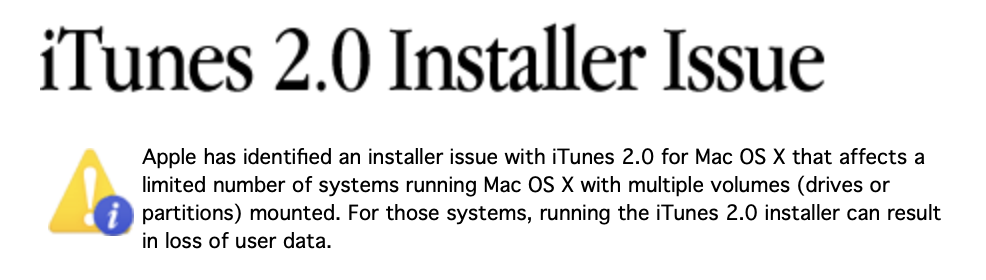
Version 2 of iTunes was going to be a big deal, including support for the just-announced iPod and the addition of an equalizer with cross-fading.
Things did not go well. Here’s a bit from Adam Engst, dated November 12, 2001:
After releasing the new version late Friday night, Apple hastily pulled the Mac OS X installer Saturday morning due to a problem where, in some situations involving multiple volumes named in specific ways, the installer could delete a large number of files. Needless to say, this is a bad thing, and there have been reports of Apple quietly offering to buy file recovery software or even pay for DriveSavers recovery of affected hard disks. A revised installer, with the designation iTunes 2.0.1, was released before the end of the weekend.
Apple put up a support page just about the issue:
Apple has identified an installer issue with iTunes 2.0 for Mac OS X that affects a limited number of systems running Mac OS X with multiple volumes (drives or partitions) mounted. For those systems, running the iTunes 2.0 installer can result in loss of user data.
While this error is highly unlikely to affect most users, Apple strongly advises that anyone who has downloaded the 2.0 version of iTunes for Mac OS X, as well as anyone who has a beta version of iTunes 2.0 for Mac OS X, immediately remove the iTunes.pkg installer file from their system.
The reason this issue happened is pretty interesting. Here’s Engst again:
The specifics of how this happened have been discussed at length in TidBITS Talk and similar forums, but roughly speaking, the installer Apple used to install iTunes in Mac OS X apparently relied on a shell script that assumed the previous version of iTunes would be in the Applications folder. Since everyone’s disks have different names, the script figured out the name of the disk, appended the path to the iTunes application, and then deleted all the files in the iTunes folder. Unfortunately, the script didn’t take into account the fact that people might put spaces in their disk names, particularly that they could put spaces at the beginning of the disk name. Since the space separates arguments in Unix commands, a command that would delete a single file is suddenly broken in the middle, transforming it into a command that can delete an entire disk. The problem can be avoided in Unix merely by enclosing the command in quotes, but that didn’t happen initially.
I wasn’t using OS X very much in the fall of 2001, but even six years later when I became a Mac Genius, I heard horror stories about this. Just check out this blog post from the time for a look at some of the carnage.
Sponsor: TextExpander ⇢
Get your team communicating faster so they can focus on what’s most important. With TextExpander your team’s knowledge is at their fingertips.
Get your whole team on the same page by getting information out of silos and into the hands of everyone that needs to use it. You can share your team’s knowledge across departments so your team is sending a unified message to your customers and isn’t spending time reinventing the wheel.
Here’s how it works:
Store It: Keep your company’s most used emails, phrases, messaging, URLs and more right within TextExpander.
Share It: Get your whole team access to all the content they need to use every day. Organize it by department and
Expand It: Deploy the content you need with just a few keystrokes on any device, across any apps you use.
It’s that easy!
TextExpander is available on Mac, Windows, Chrome, iPhone, iPad. Learn more and get 20% off by visiting this page.
Mac Power Users #662: Navigating Apple Maps ⇢
Apple Maps has matured from its rocky start back a decade ago into a robust alternative to Google Maps. This week, David and I go on a roadtrip through the service’s history, features and more.
On More Power Users, the longer and ad-free version of the show, we talked through Apple Maps’ horrific launch
On Starting Simple
You can’t go too long in this corner of the Internet without running into a report or rumor about Apple’s AR headset plans. As an example, here is The Verge’s Adi Robertson, writing about a feature that is supposedly coming with the new hardware:
Apple’s rumored virtual and augmented reality headset will reportedly use iris scanning tech for logins and payments, according to The Information. The report, which cites two people involved in developing the headset, says the scanning is supposed to make it easier for multiple people to use the headset with their own accounts.
The eye-scanning system echoes iOS tools like Apple’s fingerprint or Face ID logins, and it would take advantage of the device’s many cameras. It would also help differentiate Apple’s offering from its main competitor: the Meta Quest Pro, which the company formerly known as Facebook announced earlier this week. The Quest Pro features inward-facing cameras that can track eye and face motion, but it doesn’t (at least at this point) use them for authentication. According to The Information, Apple will also use downward-facing cameras to capture users’ legs, a part of the body Meta is still figuring out.
In reading this report, I was struck by something: the level of complication required for new products to meet has changed drastically over the years.
When the iPod was introduced 21 years ago, it was a music player that synced with iTunes. It shipped with a couple of games, but “1,000 songs in your pocket” pretty much summed it up.
Over the years, the iPod gained a bunch of features, like a color screen, a stopwatch, the ability to sync photos and ultimately even play video. By the end, users could also sync their contacts and calendars to the device, create playlists on the go and much, much more.
That was a different era; just contrast the original iPod with the original Apple Watch, which was pitched as something just shy of a full iPhone replacement. Over the years, it gained new capability, such as LTE support and its own App Store, to make it more independent from the phone.
I suspect Apple’s headset will be much closer to the original Apple Watch than it will the original iPod. We expect our devices to all sorts of things now that were mere dreams back in 2001.
With this explosion in features, a challenge arises. At first, it wasn’t clear how Apple thought about the Watch. Over the years, the company has focused more and more on fitness and notifications and has spoken less about the fashion and computing angles that once dominated Apple Watch presentations.
Will the headset’s launch be as cloudy as the Watch’s? I honestly don’t know, but I hope Apple remembers those early Watch years, because the “why would I need this” factor with the headset is going to be a way bigger deal then it was in 2014 when the Apple Watch was introduced. If Apple can boil the headset story down to a few simple, clear points, the product will be better understood by the market, and that’s only a good thing.
Doom Running in Notepad ⇢
Getting Doom running on weird hardware is all-time favorite hobby of some on the Internet, but this takes things to the next level.
Guided Frame ⇢
Steven Aquino, writing at Forbes, about a feature that shipped with the new Pixel 7 and Pixel 7 Pro:
A marquee feature of the Pixel 7 series is what Google calls Guided Frame. The feature, an interplay of hardware and software, works with Android’s TalkBack screen reader to help guide a Blind or low vision person to get into the best positioning for a good selfie. Guided Frame also smartly leverages haptic feedback to assist in confirmation that you did the right thing. For many disabled people, the double dose of sensory input — clinically known as bimodal support, referring to two forms of sensory experience — is not only technologically adroit. Haptics is one way to make use of a device’s panoply of sensors, but the practical application these little buzzes have for people who can’t rely on pure visual feedback is not superfluous. It’s actually extremely useful.
Once the “sweet spot” is found, the system automatically hits the shutter button.
Accessibility should allow anyone to access all of the features of these devices, and this is a good example of something that should have been for a long time now.
Artemis I Gets New Launch Windows ⇢
NASA is targeting the next launch attempt of the Artemis I mission for Monday, Nov. 14 with liftoff of the Space Launch System (SLS) rocket carrying the Orion spacecraft planned during a 69-minute launch window that opens at 12:07 a.m. EST. Artemis I is an uncrewed flight test to launch SLS and send Orion around the Moon and back to Earth to thoroughly test its system before flights with astronauts.
Inspections and analyses over the previous week have confirmed minimal work is required to prepare the rocket and spacecraft to roll out to Launch Pad 39B at Kennedy Space Center in Florida following the roll-back due to Hurricane Ian. Teams will perform standard maintenance to repair minor damage to the foam and cork on the thermal protection system and recharge or replace batteries on the rocket, several secondary payloads, and the flight termination system. The agency plans to roll the rocket back to the launch pad as early as Friday, Nov. 4.
Backup launch windows include:
- Wednesday, Nov. 16 at 1:04 AM Eastern
- Saturday, Nov. 19 at 1:45 AM Eastern