It is amazing how quickly this has become routine.
Flashback #16: ROKR: The iTunes Phone ⇢
This time on Flashback, Quinn and I look at another Motorola phone. This one was introduced by Steve Jobs:
A year and a half before the iPhone was introduced, Apple took the stage to announce a very, very different product: the iTunes phone, built in partnership with Motorola.
…it wasn’t good.
My thanks to our sponsors:
- Technology Untangled: Join Michael Bird as he untangles innovation through a series of interviews, stories, and analyses with some of the industry’s brightest brains.
- Command Line Heroes: Epic true tales of people revolutionizing the technology landscape. Season 7 is out now.
Watchsmith 2.0 ⇢
Underscore has a new version of his excellent Watchsmith app out today, with a bunch of new features including a bunch of new complications, updated workout metrics a Golden Hour calculator and more. If you wear an Apple Watch, you should take some time to check this out.
Connected #340: Very Good at Being Computers; Very Bad at Being Humans ⇢
I’m back on Connected after a few days off last week:
Stephen cleans out the Connected inbox, Federico questions the meaning of an idea and Myke checks out a new task manager. Then, a discussion about the ramifications of technology reminding us of painful past events or encounters.
On Connected Pro, The Passionate Ones were born. That’s … a long story.
My thanks to our sponsors for this rather serious episode:
- Hullo: A simple, natural pillow designed for comfort. Try it for 60 days.
- PDFpen, from Smile: Powerful PDF editing on your Mac.
- Squarespace: Make your next move. Enter offer code CONNECTED at checkout to get 10% off your first purchase.
On Digital Reminders of Painful Memories ⇢
Lauren Goode has published an amazing piece at Wired about calling off her wedding, yet being reminded about it over and over from algorithm-powered services from Facebook, Pinterest and even Apple:
I still have a photograph of the breakfast I made the morning I ended an eight-year relationship and canceled a wedding. It was an unremarkable breakfast—a fried egg—but it is now digitally fossilized in a floral dish we moved with us when we left New York and headed west. I don’t know why I took the photo, except, well, I do: I had fallen into the reflexive habit of taking photos of everything.
This column really hit me hard.
Over the last several years, I’ve been dealing with something similar. While not a broken engagement, I’ve been stopped in my tracks any time I come across — or am shown by a computer — photos of the time before our oldest son was diagnosed with brain cancer. When a photo would show up, I would tell my phone I didn’t want to be reminded of it anymore, but it would still be burned into my brain hours or even days later.
That diagnosis came when he turned six months old, but in photos leading up to it, I can see the symptoms clearly. His head is often turned to the side. He can’t quite lift his eyes to meet the camera.
Of course, back then, we didn’t know these were signs of something life-threatening. In fact, we didn’t know enough about the world of neurology to notice them at all. The truth is, no normal parents would have seen them.
Like the slow-growing fractures in a doomed relationship, these symptoms were subtle and hard to detect until one day they weren’t, and he was suddenly having an MRI.
When the Photos app creates a memory with one of those pre-diagnosis photos, it hits me like a train. I feel guilt and shame that we didn’t see things sooner. I focus on those feelings rather than the good. The truth is that his cancer was caught, he underwent life-saving treatment at St. Jude and today he is 12 years old and doing well.
However, I’d rather sink into the misery of the past than feel the warmth of hope and thankfulness here in the present.
At the end of 2019, I knew this was a problem that needed addressing. I felt chained to the past, unable to move forward. It was like a weight threatening to pull me under and to be perfectly honest, I would have been okay with that outcome most days. I was barely treading water, and I needed help. I saw my doctor and restarted medication, and have been working on dealing with these issues in the safe bounds of therapy, armed with a PTSD diagnosis. Some weeks it feels like I’m digging through wet sand, watching it slump back into the pit, but progress is being made thanks to many people in my life.
I share this to say this: if you like me have memories that you can’t move past, there’s hope. The darkness doesn’t have to win.
Kbase Article of the Week: Formulas and Functions Help ⇢
Use formulas and functions in tables in the iWork apps—Numbers, Keynote, and Pages. You have access to more than two hundred fifty functions that you can use in your formulas to perform calculations, retrieve information, or manipulate data.
Clubhouse Announces Creator Payments ⇢
Today, we’re thrilled to begin rolling out Payments—our first monetization feature for creators on Clubhouse. All users will be able to send payments today, and we’ll be rolling out the ability to receive payments in waves, starting with a small test group today. Our hope is to collect feedback, fine-tune the feature, and roll it out to everyone soon.
A user can select a creator and the amount they want to send. They give Clubhouse a debit or credit card for payment, then the money is sent:
The person sending the money will also be charged a small card processing fee, which will go directly to our payment processing partner, Stripe. Clubhouse will take nothing.
Unwritten: Apple will take nothing. I wonder how this will play out.
Sponsor: Loopback from Rogue Amoeba ⇢
With Loopback, it’s trivial to pass audio from one application to another on your Mac. Need to play a recording into Zoom? Add sound effects into a podcast? Include music in a streamed event? Loopback gives you the power to do just that with just a few clicks. It’s like a high-end mixing board, right inside your Mac.
Loopback creates virtual audio devices, which merge audio from multiple applications and input devices into a single source. These virtual devices appear on your Mac just like a real, physical device, and can be selected for use in any audio app on your Mac. It’s incredibly powerful.
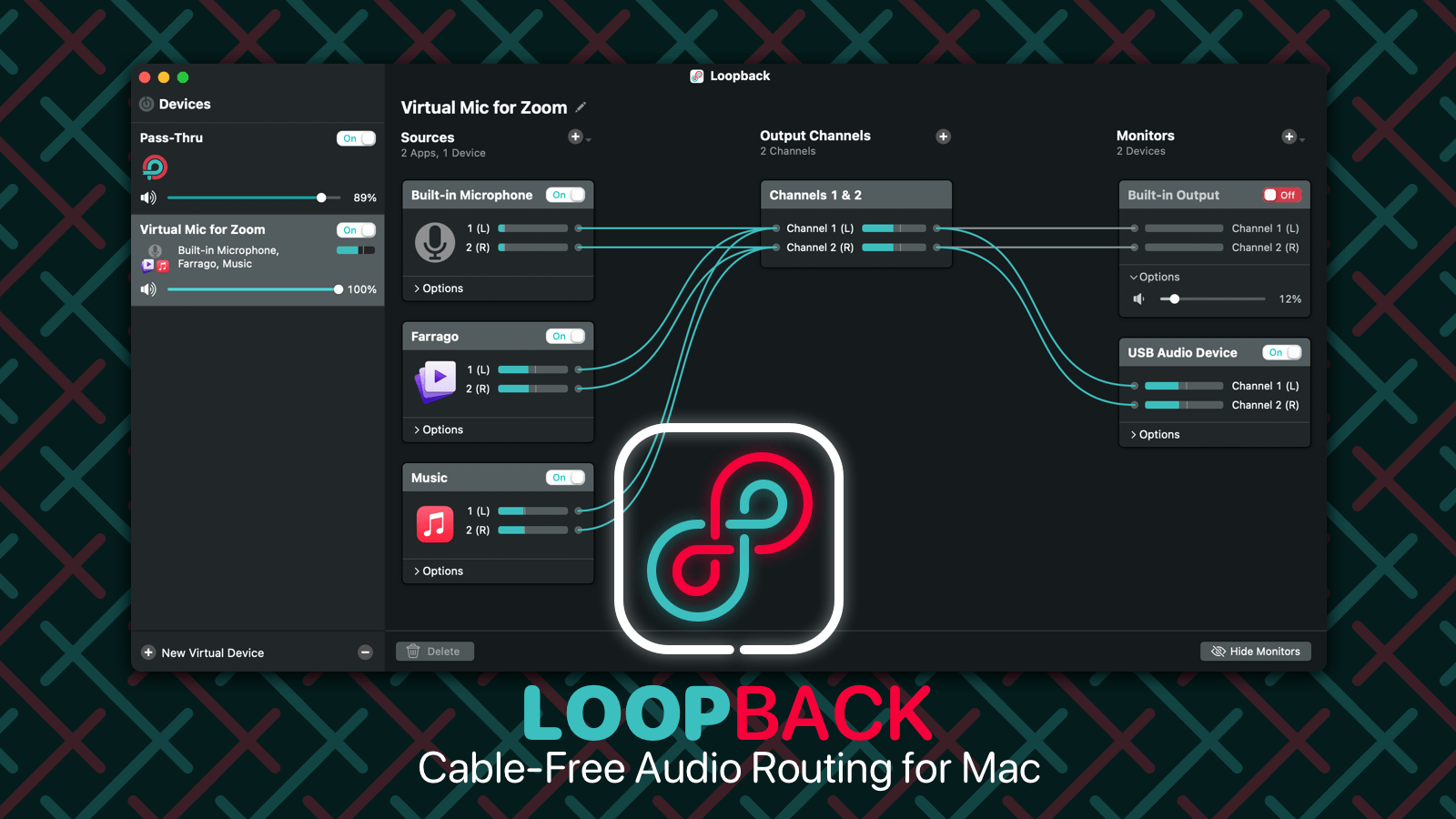
Fortunately, it’s also incredibly easy to use. Loopback’s intuitive wire-based setup makes it easy and obvious to understand exactly how your virtual devices work. Configure, adjust, and experiment, just by clicking and dragging.
Whether you’re a podcaster, a live performer, a tabletop gamer, or even just someone stuck on too many Zoom calls, Loopback can help you. Check out Loopback today, with a free trial. Through April 30, 512 Pixels readers can save 21% with coupon code HACKETT21.
Speaking of Intel… ⇢
In scrolling through Jean-Louis Gassée’s Intel coverage I just linked to, I came across this from Matt Richman, written back in 2011:
When Apple makes the switch to ARM, they will have total control of their own destiny – just the way they like it.
Intel 2.0 ⇢
Jean-Louis Gassée has gathered a decade of writing about Intel, and it was a lot of fun to back through his old columns. I think Intel’s next chapter could be one of the most interesting stories in the technology industry, and this is good background to have when thinking about the company.
Mac Power Users #582: Radio and Podcasts and Books, Oh My… with Shelly Brisbin ⇢
This week on Mac Power Users, our friend and colleague Shelly Brisbin returns to the show to explain how she applies power user workflows to working across multiple mediums throughout a normal work week.
For More Power Users, David issued me a challenge concerning the Apple Watch.
My thanks to our sponsors:
- Sanebox: Stop drowning in email!
- DEVONthink: Get Organized — Unleash Your Creativity. Use this link for 10% off.
- The Intrazone, by Microsoft SharePoint: Your bi-weekly conversation and interview podcast about SharePoint, OneDrive and related tech within Microsoft 365.
- TextExpander from Smile: Get 20% off with this link and type more with less effort! Expand short abbreviations into longer bits of text, even fill-ins, with TextExpander from Smile.
Koombea
My thanks to Koombea for sponsoring 512 Pixels this week. They do web development and mobile app development work that can make your product or app stand out.