Liftoff #95: The Red Flag

A huge space policy announcement it the central theme on this episode of Liftoff:

Vice President Mike Pence has challenged NASA to return to the moon within five years.

Jason and I respond to the news with … a lot of questions.

My thanks to our sponsors:

  • ExpressVPN: High-Speed, Secure & Anonymous VPN Service. Get 3 months free with a 1-year package.
  • Squarespace: Make your next move. Enter offer code LIFTOFF at checkout to get 10% off your first purchase.

macOS 10.14.4 Breaking Google Account Authentication for Some

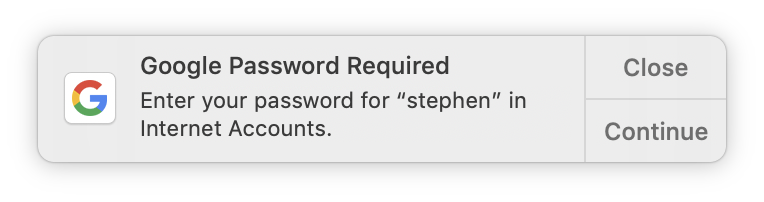
After upgrading my MacBook Pro to macOS 10.14.4 this morning, macOS has been asking me to re-authenticate the G Suite accounts I use in Mail.

For some background, I use Mail with one regular Gmail account and two G Suite accounts. Both of the latter asked to be logged back in, weirdly, hours apart:

Update: A few hours later, my regular Gmail account asked to be logged in again, too.

As pointed out by Greg Pierce, I am not the only one, and for some users, the problem is a lot worse than being asked to sign in again:

The issue puts me in an endless loop. I get a notification “Google requires completing authentication in Safari.” This takes me to a Sign in dialog where I enter email account and password. Password is correct and accepted, after which I’m back in the loop again asking to enter Google Password.

If I login to my Google account in Safari I can see the recent events that I signed in without any problems on this Mac, but Apple Mail does NOT connect and I am back in the endless loop.

Oddly I can add events to the Google Calendar for the account so apparently something is amiss strictly with Apple Mail.

Yikes.

Apple’s March 25 Event

There’s a lot to process about today’s event, but in the meantime, here’s some stuff you should check out:

Keynote Details

Apple News

Apple Card

Apple Arcade

Apple TV

Mac Power Users #475: Something Smells Funny

This week on MPU:

The guys work their way through some feedback, Stephen has feelings about his Apple Watch and David has switched notes apps … again.

This was my first “feedback” episode of MPU, and I had a lot of fun with David on it.

My thanks to our sponsors:

  • The Omni Group: We’re passionate about productivity for Mac, iPhone and iPad.
  • 1Password: Have you ever forgotten a password? You don’t have to worry about that anymore.
  • Luna Display: The only hardware solution that turns your iPad into a wireless display for your Mac. Use promo code POWER at checkout for 10% off.
  • Squarespace: Make your next move. Enter offer code MPU at checkout to get 10% off your first purchase.

The Late 2012 iMacs

Yours truly, over at MacStories:

The recent iMac updates brought additional power and flexibility to Apple’s all-in-one desktop, but didn’t redesign or modernize the iMac as we’ve known it for many years.

As the 21.5- and 27-inch machines are here to stay for at least a while longer, I thought it would be a good time to look back at the first of their kind, introduced at a press event in October 2012.

On Time Tracking

I went into 2019 with a lot of plates in the air, and a lot of change, having joined Mac Power Users. My schedule felt chaotic, so I restarted time tracking, something I haven’t done since 2015 when I first went independent with Relay FM.

My app of choice for this has been Toggl, but the tools aren’t the point; knowing how your time is spent is.

My friend Quinn Rose has been going though something similar, as she recently wrote:

Since I actually know how long tasks take me, I’m better at planning my days. Noticing where I was productive and where tracking dropped off helped me realize that I’m not very productive in the evening, so now I exercise after work instead of before, which increases my overall productive time and helps me get to the gym more consistently. Also, instead of wildly overestimating my ability to get things done, I’m checking off my full to-do list more days than not. I’m actually filling a work day and understanding when is best to be productive, instead of trying to “power through” a task even when I’m uninspired and distracted.

One thing I have noticed, even a few weeks in, is that my work feels more focused. I have a tendency to hop around from one task to another to another, sometimes in rapid succession. When I have to start and stop timers, it makes me settle into a specific task for longer, and I think that’s better for my brain, despite it being a little unnatural still. There’s a lot to this, and I’m still learning, but it’s been interesting. Here’s Quinn again:

Some time tracking tools automatically track what you do on your computer, which would certainly be even more accurate than the program I’m using now. However, even though Toggl can’t tell if I’m on Twitter, the timer forces me to actively choose to work or not work. If that timer is running but I’m on Instagram, I know that I’m cheating. It’s a neat psychological tool for holding myself accountable.

While I’m just a few weeks into this new habit, I am already reaping benefits from it. If you feel overwhelmed or overworked, having real data can help you make better decisions, and that is never a bad thing.