I suspect there will be one of these in the Hackett household sooner rather than later.
Sofa Gains Podcast Playback ⇢
The excellent media-tracking app Sofa has been updated to include a podcast player, complete with chapter support, playlists, a CarPlay app, widgets, and loads of settings. It looks great.
A Fresh Coat of Paint
Later this year, 512 Pixels will turn seventeen years old. Over the years, it has had several looks, and today there’s a new one.1

The overall structure of the site is unchanged, but the colors and some of the typefaces are all new. For the first time in a long time, there is no orange used in the design. In its place is #213A49, a dark blue that I love. To go with it is EB Garamond for titles, navigation, and even the site logo.
Speaking to the logo, gone is the simple outline of a compact Mac, replaced by a friendly Mac rendered by my friend Jelly. He does all the artwork for Relay’s St. Jude campaign, and it’s a thrill to have his work here on the site as well.
I adore this new look, and I hope you will too.
Exploring Apple’s Accessibility Efforts ⇢
The history of Apple’s accessibility work dates back to the early days of the Mac, and while the iPhone took a little while, it’s now the standard-bearer when it comes to accessibility in the smartphone world.
Technologies like VoiceOver that shipped on the iPhone 3GS and the Apple Watch’s ability to detect and warn you about loud noises are important for everyone, even as the impact of those features is felt in different ways for different people.
The newest episode of Twenty Thousand Hertz explores these technologies and features, and covers Apple’s current work to inform users about hearing loss, and then give them tools to combat it. That comes in the form of hearing aid integration, but also things like the multiple audio modes present on the AirPods Pro 2, including protection from loud noises and assistance when in a conversation. Pretty remarkable for the earbuds that I always have in my pocket.
This sort of work is Apple at its very best.
Connectgrade 546: Letting the Literal Light In ⇢
This week on the show, Jason Federico and I address some follow up, then saddle up for the Rumor Roundup before answering a round of listener questions.
Project Mulberry ⇢
I am all for Apple Health being able to collect and connect to more information, but an Apple-built AI agent designed to “replicate” your doctor feels like a bridge way too far.
Sponsor: DEVONthink: Store, Organize, and Work the Smart Way ⇢
Today more than ever we’re all drowning in a flood of information. News, research, social media. And while most of it is probably less important, we need to identify what actually is, keep it, and organize it. Only then it becomes “knowledge” that we can work with to create something new.
DEVONthink is the tool and the place for this. It keeps all your documents in databases right on your Mac, iPad, or iPhone, and gives you an environment full of pro-grade tools that let you work with them right inside the app.

The possibilities are almost endless: Integrate live content from the web and make scan searchable. Cross-references make your document collection a true knowledge network, your personal Wiki. Use smart groups, smart rules, AppleScript, and much more to automate repeating tasks. DEVONthink’s search function is legendary, and so it its focus on privacy.
Don’t spend hours on searching — again — for the research paper that would make your thesis a masterpiece or that web page that’d help you save the oceans. Download DEVONthink today and try it. And then use it to make the world a better place.
Readers of 512 Pixels can get 20% off of DEVONthink. Go check it out!
Mac Power Users 790: Wandering Around The Verge, with David Pierce ⇢
This week’s MPU was a lot of fun to record:
David Pierce is Editor-at-Large at The Verge. This week, he talks with Stephen and David about the hardware and software he relies on for work, the overall state of Apple in 2025, and his complicated feelings about his new SodaStream.
Restoring an LC630 ⇢
iiiDIY has a great video about getting a LC630 cleaned up and running again:
Running an LLM on a 12-inch PowerBook ⇢
Andrew Rossignol has done what I was sure was impossible:
I have been diving into the world of large language models (LLMs), and a question began to gnaw at me: could I bring the cutting-edge of AI to the nostalgic glow of my trusty 2005 PowerBook G4? Armed with a 1.5GHz processor, a full gigabyte of RAM, and a limiting 32-bit address space, I embarked on an experiment that actually yielded results. I have successfully managed to achieve LLM inference on this classic piece of Apple history, proving that even yesteryear’s hardware can have a taste of tomorrow’s AI.
Andrew has the TinyStories 110M Llama2 LLM up and running inference on a 12-inch PowerBook. As hot as those things got running AppleWorks, I am in awe that he got this working. I’ve got a couple of 12-inch PowerBooks… maybe I should get one off the shelf…
Connected 545: Initially, I Was Happy ⇢
WWDC 2025 has been announced, so it’s time to get silly and read too much into the event’s artwork.
In other news: Federico goes on a quest for the perfect earbuds for dictation, and Stephen asks him about his Mac mini usage.
On Connected Pro, a look at Apple’s upcoming deal with Nvidia and why the companies had a falling out years ago.
Lumon Terminal Pro
There’s a new (old?) computer at apple.com/mac:
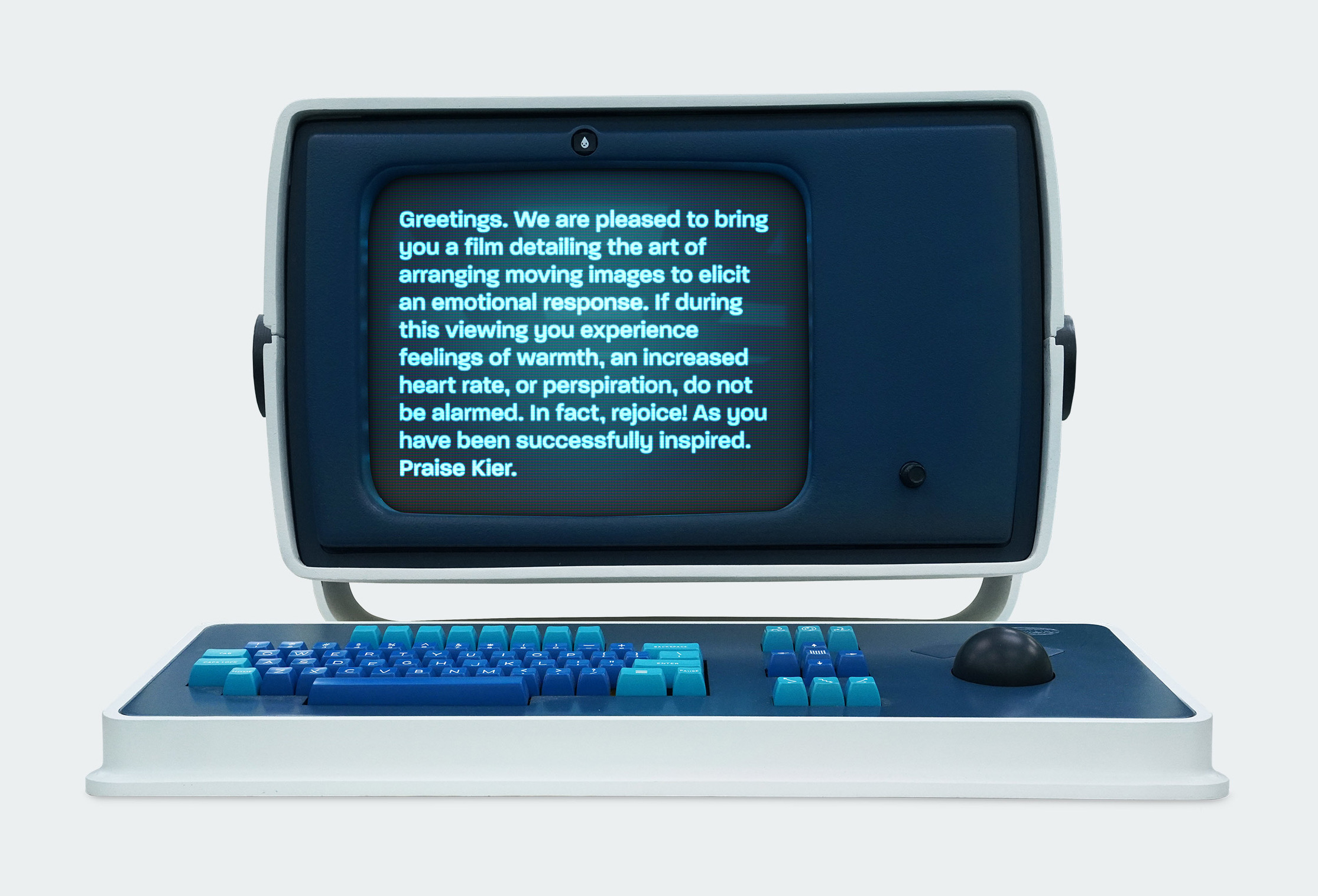
(It’s nice to have such a colorful finish on a Pro device!)
The page links to a new video showing how the Mac is at the heart of Severance’s production.
I really think this is the best show I’ve watched since Breaking Bad or Mad Men ended. I love it, and can’t wait for the third season.