RSS Sponsor: Interact: Do more with your contacts

Interact empowers you and your contacts to get more done in less time, with features like group management, one-tap contact creation, and easy communication.

Interact works directly with your iOS Contacts accounts, adding features not available in the built-in iPhone and iPad Contacts app, like:

  • Group management. Create and manage membership in groups.
  • Capture contact information from plain text anywhere with the system with the Contact Scratchpad. The Scratchpad automatically recognizes phone numbers, emails, addresses and much more to easily turn an email signature or other block of text into a complete contact record.
  • Send group emails and messages with attachments from photos or files from Dropbox, iCloud Drive, Google Drive or any other iOS document provider.

And best of all, since Interact works directly with iOS Contacts, any done in Interact is immediately reflected throughout iOS wherever contacts are used.

Get Interact on the App Store today!

Memphis’ revamped Apple Store opens at Saddle Creek

As previously reported, Memphis’ Apple Store was set to move across the street from its original location into a brand-new space that is among the first of its kind here in the United States.

This morning, the store re-opened. I decided to hang out with some local Apple fans at the opening event, and check out the new store.

As shown in the renderings, the front of the 4,000-square ft. space is more or less just giant sheets of glass, allowing sunlight to pour into the store:

The effect is rather impressive; it’s hard to tell where the store ends and the sidewalk outside begins.

Inside, the store has familiar elements, but they’re put together in some new and interesting ways. Products are still displayed on large wooden tables, but they’re now laid out in a large grid:

Down each side of the store is what’s called an “Avenue.” The idea is to allow visitors to “window shop” select accessories and smaller items, like iPods. Here in Memphis, one Avenue held cases for the iPhone and iPad, while the other was dedicated to Watch and audio accessories:

These bays can be changed out independently of each other, and can house anything from products to video screens to even live plants. They have a few hidden tricks, too. If a visitor wants to buy a dark blue iPhone case, the clerk simply pulls on the sample case that’s visible on the wall, sliding open a drawer full of products for sale. I immediately thought of a safety deposit box when I saw it.

Likewise, the headphones rest on wooden spheres, and their audio cables auto-retract into the cavity behind the panel when a shopper is done trying them on:

While the back of the old Memphis store housed the Genius Bar — and a theatre before that — Genius appointments now take place at the tables on the sales floor. Technicians can now sit down with their customers and work together, instead of having the Bar as a barrier between them. This is a change that I’ve heard praised from Geniuses all over the country, and as much as I’ll miss the Bar I stood behind so many years go, I respect this change.

In it’s place is a giant video screen, rumored to cost over $1 million. It shows clips of various Apple products in a loop, and is pretty damn impressive. I can imagine that after dark, this will be visible from the street quite easily, despite being at the back of the store.

The screen is a rare showing of hubris in what’s an otherwise understated space. In fact, there’s no logo on the front face of the store. Rather, an Apple logo has been screened onto the casing around the window, but is only visible if you’re right at the glass:

Today was my first store opening. While I was present for several Mac OS X launches and the first two iPhones as an employee, it was more than a little weird to be applauded and high-fived for entering what is, at the end of the day, a retail store. That said, I’ll give Apple this: it’s a beautiful one.

Fixing an endless ‘The Messages database is being upgraded’ dialog box

After a rocky day, I rebooted my MacBook Pro last night, and when I went to open Messages, I was greeted with this error message:

Messages is updating…
The Messages database is bring upgraded, please wait while it finishes or Quit Messages and relaunch it later.

Comma splice aside, I let it this sit overnight, with no change this morning. Clearly something had happened to my Messages.app database, but it didn’t seem like it was going to fix itself. Here’s what I did to get the app going again:

  1. Quit Messages
  2. Kill the IMDPersistenceAgent process via Terminal with killall IMDPersistenceAgent
  3. Searched my user Library > Messages folder for anything with Messages, iMessage, or iChat in the name and deleted it.
  4. Emptied the Trash.
  5. Cleared the preferences cache by running killall cfprefsd in Terminal
  6. Restarted the Mac.

After this, opening Messages brought it to the setup screen. I logged back in with my accounts and am now off to the races. While I don’t like that Messages imploded, at least it was fixable without major surgery.

On choosing an iPad Pro size

David Sparks, on considering which size of iPad Pro is better:

The new 9.7 inch iPad Pro has some additional features in terms of a better camera and a screen that adjusts ambient light but none of that is really a reason to choose one over the other for most people. To me, the big question is whether you want it really big or just kind of big. I can understand why some people hate the big iPad because of the unwieldy screen size but I’m just so damn productive with it.

I agree with David; the 12.9-inch size is what finally unlocked something for me when it comes to working on iOS. Coupled with the bigger on-screen keyboard, I simply don’t want to go back to the 9.7-inch size.

Mac OS X turns 15

On March 24, 2001, Apple launched Mac OS X 10.0 Cheetah, the first non-beta release of the company’s new operating system.

To celebrate its 15th birthday, I’ve rounded up some links worth checking out:

On podcasting with an iPad

Jason Snell, writing about the new USB 3 Camera Adapter:

So once the applause from Phil Schiller mentioning iPads and podcasting on stage dies down, where does this leave us? If you’re someone who wants to record a podcast in person using an iOS device and a USB mixer or microphone, you’re set. But most of the podcasts I do are conversations that are conducted over the Internet, usually using Skype. And for the iPad to be a viable device for those kinds of podcasts, Apple needs to update its software.

This hardware is a good step, but as Jason writes, we’re not there yet. I’ll still be using my Mac to record my podcasts for the foreseeable future.

Connected 83: It Looked Like a Liam

This week on Connected:

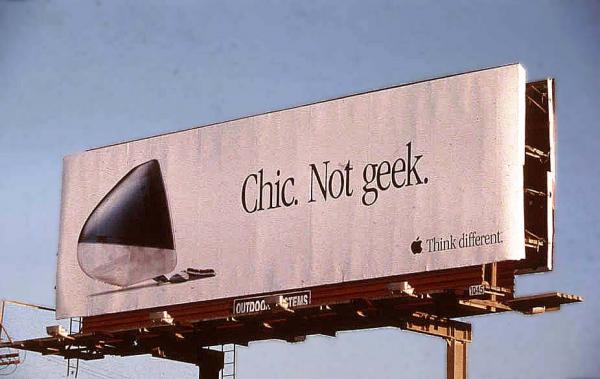
In the aftermath of Apple’s iPhone SE and iPad Pro event, the boys assemble to talk the news, Stephen’s growing army of iMac G3s and Apple’s naming struggles.

Come for the image in the show notes, stay for the roundup and commentary on this week’s Apple event.

My thanks to our sponsors this week:

  • Memberful: receive a $50 credit towards a paid plan.
  • Squarespace: Enter offer code WORLD at checkout to get 10% off your first purchase.
  • Igloo: An intranet you’ll actually like, free for up to 10 people.

Apple’s “40 Years in 40 Seconds” Video Annotated

On today’s Upgrade, Jason Snell suggested that I should post annotations based on Apple’s “40 Years in 40 Seconds” video. So here we go:

This is a fun way to take a trip down memory lane. I find it notable that the only mid-90s, Jobs-less Apple items that made the list besides the PowerMacs and PowerBooks were the QuickTime and Newton. Rough day for you Performa fans.

Today’s new Apple hardware

Today’s Apple event brought two new hardware products, in addition to several accessories.

While neither the new iPhone or iPad are something I’m personally about to run out and buy, I think both show that the company knows that there’s value to be found in having variety, and a good product at several different price/size points. In short, both the new iPad and iPhone take the latest technology Apple has to offer and put them in smaller and cheaper products.

Take the 4-inch smartphone market. Apple said today that it sold 30 million 4-inch iPhones in 2015. This means 30 million customers picked up 2013’s iPhone 5s. Clearly there’s demand for a product in that category, and Apple wants to be able to offer something to those users that isn’t three years old.

Anyway, onto the news…

Apple Watch

Today, Apple marked another event with another batch of new Apple Watch bands.

There are new colors for the sports and leather bands, and a sick looking space-black Milanese loop for sale now. Additionally, a new $49 “Woven Nylon” band is out, offered in several colors. These use rubber lugs like the Sport band, so should look better with the aluminum Apple Watch Sport than bands that use stainless steel lugs.

Oh, and when paired with one of the new nylon bands, the 38 MM Apple Watch Sport is now just $299, while the 42 MM is $349.

iPhone SE

Surprising exactly no one, one of the two big main products announced is the new iPhone SE, which is essentially an iPhone 6S in a 5/5S case, minus 3D Touch.

Clearly there’s a market for a new 4-inch iPhone, and while it’s not for me, my wife will be cross-grading from an iPhone 6S she just can’t adjust to using quite happily.

There were rumors that the iPhone SE’s industrial design would be a blend of the 6 and and 5S, but in reality, it looks just like the latter. This means, unless you buy the Rose Gold model, there’s no quick way to tell the SE from the 5S. There’s no way around it: the SE looks old. Based on the tech inside, my guess is that this device will stick around past the introduction of the iPhone 7, but by then it’s really going to look outdated.

The question is, of course, why Apple didn’t introduce a new case with this phone? Does the company doesn’t think they’re going to sell enough of these to make the investment worthwhile? Is it to keep case compatibility for those who may be upgrading from an iPhone 5S?

9.7-inch iPad Pro

If you took all the goodies from the iPad Pro, but stuffed them into the familiar 9.7-inch chassis we’re used to seeing with iPads, you’d get this new iPad Pro.

If I wrote captions, this one would be something like: “WTF ~CAMERA BUMP~ WTF.” But I’m still workshopping that a bit.

This new tablet supports the Apple Pencil, and can be paired with a new, smaller Smart Keyboard. It comes complete with the 4-speaker sound system Apple introduced last year, too.

This iPad Pro has a trick up its sleeve with its display. Not only is it brighter and less reflective than any previous iPad, but it comes with what Apple’s calling “True Tone:”

It uses advanced four-channel ambient light sensors to automatically adapt the color and intensity of the display to match the light in your environment. Which means reading is more natural and comfortable — almost like looking at a sheet of paper.

This seems genuinely cool, but why doesn’t the flagship 12.9-inch model have it? Was it not ready in the fall? It’s a small slight, I’ll admit, but part of my brain is sad that my iPad Pro doesn’t have it.

The pricing and product matrix for the iPad family continues to be confusing. This new, smaller iPad Pro doesn’t replace the iPad Air 2. In fact, that tablet is still for sale, at a new lower price of $399.

The 9.7″ Pro starts at $599, making this the first time ever that Apple doesn’t have a model occupying the $499 price point.

Accessories

In addition to the new hardware above, Apple quietly shipped a couple of accessories for the iPad lineup:

  • Lightning to USB-C Cable: Available in both 1 meter and 2 meter variants, MacBook owners can now plug their iOS devices in without the need of an adaptor. It’s shocking this has taken as long as it has.
  • Lightning to USB 3 Camera Adapter: The $39 adapter can be used to import photos to an iPad at USB 2 speeds (USB 3 if you have the 12.9-inch iPad Pro), or for using other USB devices with an iPad, such as an Ethernet adaptor or USB-powered microphone. Schiller made a comment about podcasting via this adapter, but until iOS 9/Skype can share audio for recording, it still doesn’t work for many of us.
  • New Smart Covers for the 9.7-inch iPad Pro: Those of us with the 12.9-inch model are still stuck with grey or white, which is lame.

No Macs

There was no mention of the Mac during the event, so those mythical thin-and-fast Skylake MacBook Pros and possible Retina Thunderbolt Displays are still a thing of nerdy dreams.