Pedometer++ 6.2

There’s a new version of Pedometer++ rolling out now that makes it easy to see your step count over time:

Pedometer 6.2

David and I have been talking about this feature for a while now, and it is exciting to see it shipping. I love being able to scroll back and see my progress over the years, and it’s easy to share a graph from the app.

Pedometer++ 6.2 also allows you to import your complete Apple Health history. Before now, the app only fetched recent step count data when installed for the first time, but we realized that the new Trends feature would be much more compelling with a complete picture of your step count data. Importing historic Apple Health data is fast, and can be done from the in-app settings screen.

Pedometer++ 6.2 is rolling out in the App Store now.

Kbase Article of the Week: Use Categories in Mail on iPhone

Apple Support:

In iOS 18.2 or later, the Mail app automatically sorts your email messages into categories to help you find and manage messages quicker.

  • Primary: Find personal messages and time-sensitive information.
  • Transactions: Keep track of your confirmations, receipts, and shipping notices.
  • Updates: Catch up on news, newsletters, and social updates.
  • Promotions: Browse your coupon and sales emails.

The rollout of this feature is weird. Mail categories are only on the iPhone, and while the feature shipped with iOS 18.2, it’s not part of Apple Intelligence, as it runs on phones older than the 15 Pro.

(Or maybe it is, as this feature is not in the EU?)

Like Gmail’s categories before it, this feature is not for me. It makes me feel like I’m checking multiple inboxes instead of just one. I turned it off the second it showed up, and you can, too:

  • Go to the Mail app on your iPhone.
  • Tap the More button at the top of the screen, then choose List View.

The iPod at 5 and ‘The Google’

I was recently moving some files around and came across a column I wrote for my college newspaper. I was on the design side of the paper1 and didn’t get to write that much. In the fall of 2006, I was given a short-lived column covering the tech news, and this entry is from October 25.

iPod at 5

This week, the geek world was all about one word.

iPod.

Monday marked the fifth anniversary of Apple’s beloved music player. On Oct. 23, 2001, Steve Jobs, CEO of Apple, stood on a stage in California and introduced the world to a 5GB, $399 device that would play music back faster and easier than a Walkman.

Today, the iPod can hold up to 80GB, and play music, as well as show pictures and movies.

After month of being behind almost every other laptop maker, Apple released an updated version of its pro laptop, the MacBook Pro, with Intel’s latest mobile processors.

Somewhat lost in the hoopla about the iPod’s birthday and new Macs was what would have been today’s biggest story in Geekdom – the release of Firefox 2.0.

The popular browser, known for its safety and large collection of available plug-ins and extras, now sports better safety features (including phishing detection that can help keep your private information safe), better tab management, better handling of RSS news feeds and something new called “Session Restore,” that lets users re-open a tab they may have accidentally closed, or if Firefox or your computer crashes, users can re-open all the tabs they had open at the time of the crash.

Also, the search bar on Firefox comes with extra search engines built-in. Now, instead of just searching Google, users can search Yahoo! and Answers.com. All of this new ness in Firefox is wrapped in a new user interface, which brings Mac-like shiny buttons to the browser.

Firefox is not the only browser to be updated recently. Microsoft started shipping the newest version of Internet Explorer. Now at version seven, the update added many features that IE has lacked for several years, including security measures, tabbed browsing, and support for more complicated web site designs. Webmasters have been complaining for years that sites will often work fine in every browser expect Internet Explorer. Hopefully, that will be different now.

Speaking of Microsoft, the company is promising its next-generation operating system, named “Windows Vista” to consumers who buy PCs this holiday season.

Starting tomorrow, PCs sold with Windows XP and Office 2003 on them will be bundled with a coupon for a free or reduced upgrade of their software. Vista, which will be released in January – six years after XP was released, sports a brand new user interface, improved security features, a new search tool, Windows Gadgets (small applications that tell users the weather, upcoming events, etc.), an updated version of Microsoft Office and better backup software built-in.

President George W. Bush made it in the tech news this week as well. In an interview with CNBC, the president said he does not use e-mail because of the political liability.

He said of Google and Google Earth, “One of the things I’ve used on the Google is to pull up maps. It’s very interesting to see that. I forgot the name of the program, but you get the satellite and you can like, I kind of like to look at the ranch on Google, reminds me of where I want to be sometimes. Yeah, I do it some.”

Be sure to note that he referred to the Internet giant as “the Google.”

The bloggers had fun with that one this week.

Oh yes, Google. As the Helmsman reported, Google bought YouTube for a mere $1.65 billion. Since then, 29,549 videos have been pulled off the site, after Japanese copyright holders complained that their work was hosted on the site illegally.

Illegal file on YouTube?

Get out.


  1. The Dogcow on this page is the giveaway 

Silo Renewed for Two More Seasons

From the Apple TV+ Newsroom:

Following the acclaimed second season premiere of “Silo,” today Apple TV+ announced that the global hit, world-building drama has been renewed through season four. The fourth season of “Silo” will bring the series to its final, thrilling chapter, telling the complete story of Hugh Howey’s New York Times bestselling trilogy of dystopian novels. Starring and executive produced by Rebecca Ferguson, “Silo” season two is now streaming globally on Apple TV+, and new episodes premiere every Friday through January 17, 2025.

I rewatched the first season ahead of the current season, and fell in love with this show all over again. I’m glad the team behind it will be able to wrap it up on their own terms.

Sponsor: PowerPhotos by Fat Cat Software

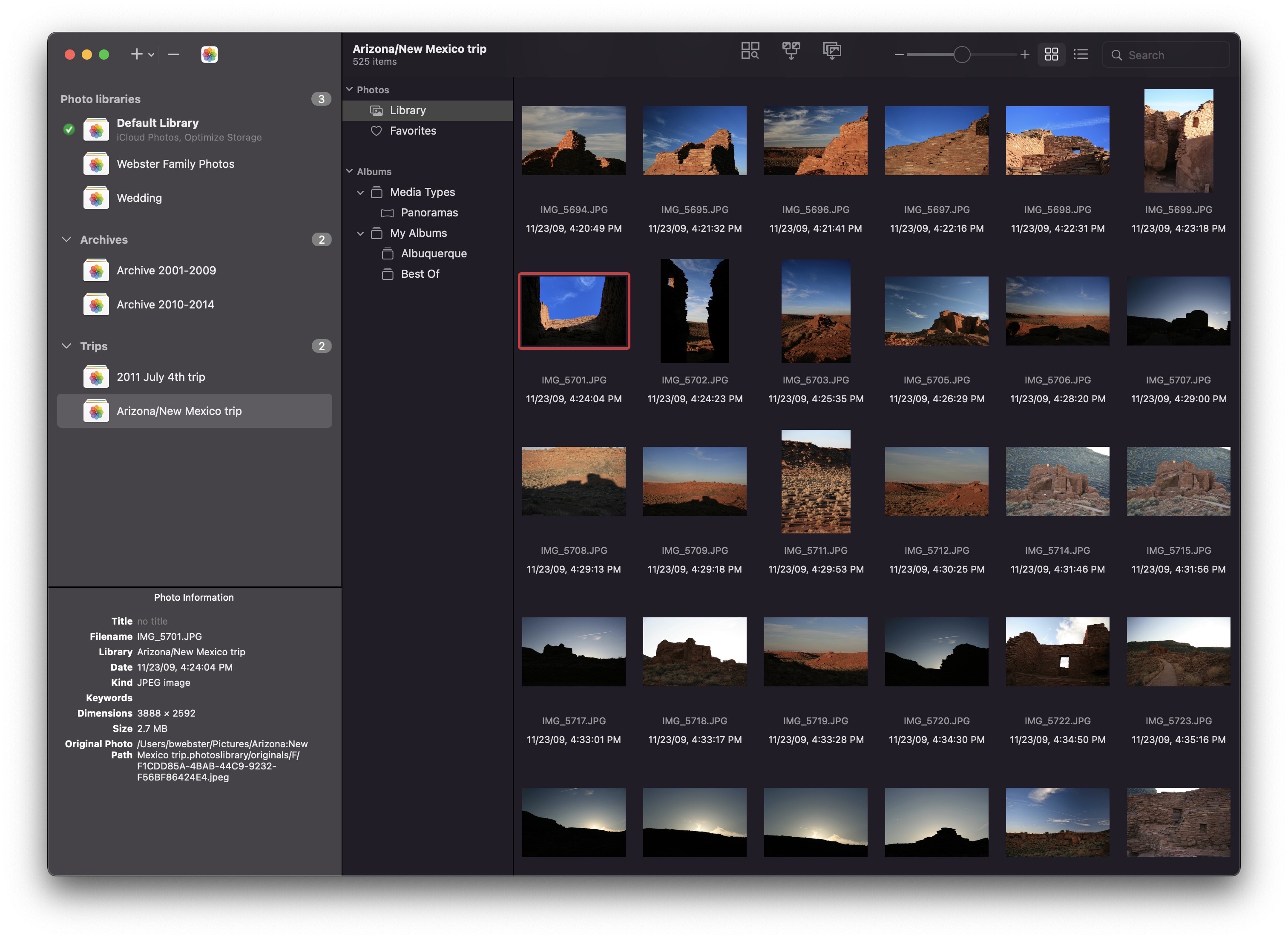
PowerPhotos is the ultimate toolbox for Photos on the Mac. It works with the Apple Photos app, filling in missing features that Photos itself doesn’t provide.

PowerPhotos allows you to work with multiple Photo libraries and store them wherever you want, including on an external drive or a network drive. Split up your giant library into smaller ones by copying photos and albums with a simple drag-and-drop, preserving metadata such as descriptions and keywords along the way. You can free up space on your laptop’s drive or save space on iCloud while keeping all your photos in the Photos app.

PowerPhotos

Or, if you already have multiple libraries, use PowerPhotos to merge them together while weeding out duplicates along the way. PowerPhotos also features a powerful duplicate photo finder, a browser to let you see your libraries side by side in multiple windows, multi-library search, advanced exporting, converting old iPhoto/Aperture libraries, and more.

PowerPhotos 2 can be downloaded for free and offers many of its features for free. Purchasing a license unlocks advanced features such as library merging, deletion of duplicate photos, and unlimited photocopying and exporting.

Existing PowerPhotos 1.0 or iPhoto Library Manager users can use their serial number to upgrade for 50% off the regular price, and 512 Pixels readers can use the coupon code 512PIXELS to receive a 20% discount.

The Story Behind Rogue Amoeba’s Audio Engine and Modern Macs

I use several of Rogue Amoeba’s apps on a near-daily basis. They are critical to my work as a podcaster, and my Mac would be noticeably less useful without them.

With the transition to Apple silicon, installing these programs became much more complicated, and I feared that Apple was pushing tools like Audio Hijack, Loopback, and others off the platform.

In the background, it seems like the folks at Rogue Amoeba were living in fear as well:

Beta versions of MacOS 11 broke ACE, our then-current audio capture technology, and the damage looked permanent. When we spoke briefly to Apple during WWDC 2020, our appeals for assistance were flatly rejected.1 We spent weeks attempting to get ACE working again, but eventually we had to admit defeat. ACE as we knew it was dead in the water, and all options for replacing it involved substantial reductions in functionality. Though we did not discuss it publicly at the time, things looked grim for the future of our products.

Thankfully, cooler heads in Cupertino prevailed, and a two-step plan was discussed. ACE would be given a stay of execution, even if users had to jump through a bunch of hoops to install it.

The second step has finally come to fruition. Here is Paul Kafasis again:

That brings us to the beginning of this year, when the two-part plan first proposed in 2020 was finally nearing completion. With that in mind, we announced our intention to streamline the first-run experience for all of our audio capture apps. We promised that soon, the painful setup process would be a thing of the past.

We thought we could see the finish line, but we had really only completed the first 90% of our work. We still had to complete the second 90%, transitioning our apps to use ARK, our next-generation audio capture backend. This involved many more months of working around myriad issues, reporting bugs to Apple, and waiting for MacOS updates to fix them. For those of us here at Rogue Amoeba, this past year was a very long one indeed.

Installing Rogue Amoeba’s apps is now much simpler for those running macOS 14 or later, and I’d bet everyone at Rogue Amoeba is sleeping much better now.

Apple Intelligence Notification Summaries Generating Fake News

Graham Fraser at the BBC:

This week, the AI-powered summary falsely made it appear BBC News had published an article claiming Luigi Mangione, the man arrested following the murder of healthcare insurance CEO Brian Thompson in New York, had shot himself. He has not.

A spokesperson from the BBC said the corporation had contacted Apple “to raise this concern and fix the problem”. 

Apple declined to comment.

I used notification summaries during the beta of iOS 18.2, but ended up turning them off. I felt like I was reading everything twice, and saw summarization errors all over the place. None of them were as spicy as this Mangione example, thankfully.

A Look at Apple Intelligence’s Image Creation Tools

iOS 18.2 is rolling out today, bringing the next wave of Apple Intelligence features with it.1

The splashiest feature is Image Playgrounds, which allows users to create images based on photos in their image libraries:

Image Playgrounds

(Don’t look too closely at my hand in the image on the right.)

Apple’s system will not create realistic images, and is instead limited to two styles: “Animation” and “Illustration,” as you can see here:

Stephen in Image Playgrounds

I suspect Apple didn’t want to go anywhere near the issues that arise when your AI can generate lifelike images, but I also suspect their technology can’t pull it off anyway.

I find Genmoji — the feature for creating custom emoji within Messages — to be much more compelling and fun. I honestly wish the Image Playgrounds app would make images in this style:

Genmoji

Here’s a collection of Genmoji I have made over the last several weeks, with my personal favorite, which Apple Intelligence generated when I used a prompt that said “AI on the mind.”

Genmoji artwork

(Federico Viticci in a cowboy hat is a close, close second.)

I’m not that impressed with what Apple has done here, but I think that’s okay.

I am glad Apple is not creating lifelike images with these tools, but of course, many services are doing that. This week, OpenAI launched SORA, its video creation tools. We are all running headlong into a world where being able to tell real news apart from the fake is going to be harder than ever, and that’s troubling. But hey, at least I got to make a ripped John Voorhees Genmoji with my iPhone!


  1. For full coverage of the release, don’t miss the stories by Federico and Niléane on MacStories. 

The Power Mac 4400

In November 1996, Apple released the Power Macintosh 4400 with a starting price of $1,725. Also sold as the Power Macintosh 7220, it’d be easy to write this machine off as just another grain of sand on the beige beach that was Apple’s product line in the 1990s. I mean, just look at this thing, pictured here with an Apple-branded CRT:

Power Mac 4400

If you were around the Mac line in the late 1990s, your blood probably ran cold when you saw the 4400’s name in the above headline. 

The 4400 was introduced as an inexpensive “small business” computer. As a way to cut costs, Apple did everything it could to bring its manufacturing costs down. Instead of using a pre-existing enclosure, as was the company’s go-to move, it used something much worse.

Tom Geller wrote:

We looked at a pre-release version of the 4400 and found it to be a strange bird, indeed. Strange, that is, in the Apple brood; when compared with PCs it fits right in with the flock. It is contained in a stock desktop PC case fitted with Apple’s distinctive curved nose piece. The back (featuring one each of SCSI, modem, printer, ADB, microphone, sound-out, RJ-45 Ethernet and monitor ports) is industrial-looking, while bent sheet metal fills the case’s insides, sharp edges and all. The IDE drive sits on end, while the Comm II slot (occupied with an Ethernet card) and two PCI slots reside in a riser card. For the first time, Apple has abandoned automatic switching in the power supply, a small cost savings at the expense of international users’ convenience.

Mac users were used to a certain level of fit and finish that this model lacked. The 4400 felt cheap, and with the floppy drive on the left side, it looked almost alien to the Mac faithful.  Even worse, it lacked the auto-inject feature found on other Mac models.

In 2009, Macworld put the 4400 on a list titled “Six Worst Apple Products of All Time,” reflecting on the case design. Here’s Adam Engst:

The Power Macintosh 4400 was Apple’s feeble attempt at a cheap Mac knockoff. It had a sharp-edged metal case and more industry-standard components than other Macs, and it was horrible. It crashed all the time, had a particularly loud fan, and (oddly) had its floppy drive on the left side-convenient for maybe 10 percent of the population.

While the outside was undoubtedly terrible, Apple also cut corners inside the machine. The 4400 was built around the “Tanzania” motherboard design, which was used in numerous Mac clones of the era. The board supported the PowerPC 603e processor and up to 160 MB of RAM, but it came with some odd features, as  Eric Schwarz wrote about in 2005:

The motherboard … only had one EIDE bus, so you could only have the CD-ROM drive and the hard drive internally, despite the power supply’s extra strength. Other clones, such as the Motorola StarMax, also used a similar motherboard (the Tanzania architecture), but added things such as PS/2 ports or VGA.

Seeing PS/2 ports on the back of a Mac is next-level weird, so we can be thankful Apple didn’t include them on the 4400. The IDE bus meant that drives were slower than those in SCSI-equipped Macs.

The 4400 could run System  7.5.3 through Mac OS 9.1, but even there, there is fine print to pay attention to, as System 7.5.5 wouldn’t boot on this machine. In 1998, Apple released an update for Mac OS 8.1 to patch issues associated with the Tanzania design:

The Power Macintosh 4400 Update contains two patches for Mac OS 8.1. The first patch corrects a memory corruption problem caused by Mac OS Extended (HFS+) that results in systems that will not boot after being upgraded to Mac OS 8.1.  The symptom is a hang during startup (for example, when the Happy Mac icon appears, or when the “Welcome to Mac OS” screen appears, or while the extensions are loading). This problem can occur even if there are no Mac OS Extended volumes in use.

The second patch corrects an obscure problem with the ATA Manager. The symptom is what appears to be a hung system — the mouse pointer will move but the system does not respond (it is in an infinite loop).  If you are using a PC Compatibility Card, you will not be able to switch back to the Mac OS environment. This update also corrects this problem. This update modifies the system file to correct the Mac OS Extended problem and installs the “4400 ATA INIT” extension to correct the ATA Manager problem.

When the update is installed, the system version in the “About This Computer” window will be listed as “Mac OS 8.1” and “System Enabler 4400 Update”. 

Some folks have gotten Mac OS X to run on the 4400, but I can’t imagine how slow that must be, even with hardware changes like drop-in CPU upgrades, a faster GPU, and even swapping the hard drive for something like a CF or SD card. 

Apple would eventually ship a few different models of the 4400, including the original 4400/160 and the slightly faster 4400/200. The latter could be equippedwith an optional 166 MHz DOS card containing 16 MB of RAM and a Cyrix 6×86processor. 

The Power Mac 4400 was discontinued in February 1998 after the Power Mac G3 desktop hit the market. Time has not been kind to this machine, and I think this headline from r/VintageApple sums it up nicely:

Acquired a Power Macintosh 4400/200 today. What in the Gateway 2000 is this thing?


This article originally appeared as a column in the newsletter for 512 Pixels members.