This week on the world’s greatest podcast:
WWDC24 has been officially announced and rumors about iOS 18 are swirling. The guys also talk about Myke’s Meta Ray-Bans, Federico’s Apple Pencil settings, and Stephen’s least-used Apple device.
This week on the world’s greatest podcast:
WWDC24 has been officially announced and rumors about iOS 18 are swirling. The guys also talk about Myke’s Meta Ray-Bans, Federico’s Apple Pencil settings, and Stephen’s least-used Apple device.
Kristof Gruber, Product Engineer at Craft:
Entering a new platform only happens a few times in a developers life. It is a rare and delicious event, when you step in the realm of something genuinely new. If you are fast, you can feel yourself like the explorers in old times. Everything is new, and flexible; the new platform doesn’t yet have established patterns, which gives you plenty of space to experiment.
We, at Craft, already had this chance once, when we started using Mac Catalyst, a wonderful technology, which allowed us to bring our iOS app to the Mac. Since then, we are using a common code base for building all our apps on all the platforms we support: iOS, iPadOS, and macOS. With the introduction of visionOS, we could build on these solid foundations.
The blog post goes on from there, detailing the team’s approach — and challenges — in tuning Craft for visionOS users. It’s a fascinating read.
There have been other credit card-sized Find My trackers on the market, but I believe this is the first rechargeable one. Bonus points for being compatible with MagSafe.
Update: Nomad wasn’t the first to have a rechargeable tracker in this class. The Chipolo CARD Spot, which I had in mind when writing this, is not rechargeable.
Today, Apple unveiled the lineup for its annual Worldwide Developers Conference, including Keynote and Platforms State of the Union, and shared more information about what developers will learn and experience all week. The free online conference brings the global Apple developer community together to provide them with insights into the latest technologies, tools, and frameworks coming to iOS, iPadOS, macOS, tvOS, visionOS, and watchOS. Throughout the week, developers will be able to hear from Apple engineers, designers, and other experts through more than 100 technical sessions, in-depth consultations, and live forums for guidance on building even more innovative and platform-differentiating apps and games across all Apple products.
I think it is going to be a big year across a bunch of these platforms. visionOS is set to receive its first major update since launching earlier this year, and Apple is widely expected to have AI-powered features spread across its operating systems. It should be an exciting year.
Steve from Mac84 has the best advice I’ve seen for what to do when unboxing a new (to you) vintage computer:
Do you want to try an ad blocker that’s easy to set up, easy to keep up to date, and with pro features available when you need them?
Then download Magic Lasso Adblock – the ad blocker designed for you.
Magic Lasso Adblock is an efficient and high-performance ad blocker for your iPhone, iPad, and Mac. It simply and easily blocks all intrusive ads, trackers, and annoyances in Safari. Enable it to browse in bliss.
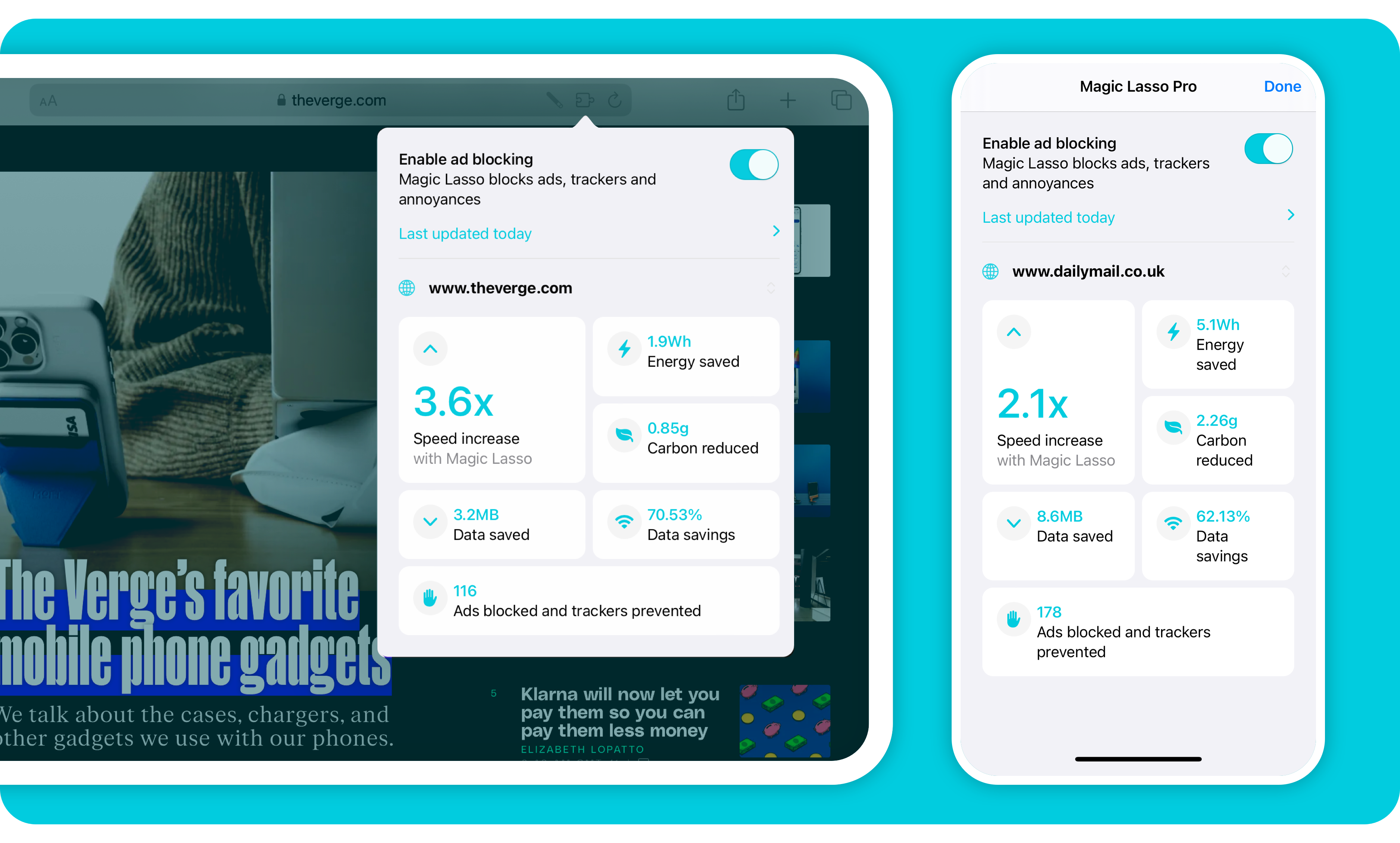
Unlike other ad blockers, Magic Lasso Adblock respects your privacy, doesn’t accept payment from advertisers, and is 100% supported by its community of users.
Download Magic Lasso Adblock from the App Store, Mac App Store or via the Magic Lasso website.
iMessage is one of the stickiest parts of the Apple ecosystem, and this week, the guys discuss some of its features, explore its security credentials, and share some tips for making it run smoothly.
If you don’t want a bunch of AI nonsense showing up in your Google results, Ernie Smith’s new project may be for you. He writes over on Tedium:
Forget AI. Google just created a version of its search engine free of all the extra junk it has added over the past decade-plus. All you have to do is add “udm=14” to the search URL.
This can be done by setting up a custom search engine in your browser (if supported), a handful of extensions, and a new website, udm14.com. That last option is the only viable one for Safari users, sadly.
Update: Good news for Safari users: you can use StopTheMadness Pro to append the magical &udm=14 to your search results!
Google has begun rolling out AI-powered search results, and it’s not going super well. While many of the screenshots floating around social media are probably fake, there are some real examples that are pretty troubling, as Kylie Robison reports for The Verge:
Imagine this: you’ve carved out an evening to unwind and decide to make a homemade pizza. You assemble your pie, throw it in the oven, and are excited to start eating. But once you get ready to take a bite of your oily creation, you run into a problem — the cheese falls right off. Frustrated, you turn to Google for a solution.
“Add some glue,” Google answers. “Mix about 1/8 cup of Elmer’s glue in with the sauce. Non-toxic glue will work.”
(Google pulling from an Onion article about eating rocks is also pretty wild.)
Kyle Orland, writing at Ars Technica:
Factual errors can pop up in existing LLM chatbots as well, of course. But the potential damage that can be caused by AI inaccuracy gets multiplied when those errors appear atop the ultra-valuable web real estate of the Google search results page.
“The examples we’ve seen are generally very uncommon queries and aren’t representative of most people’s experiences,” a Google spokesperson told Ars. “The vast majority of AI Overviews provide high quality information, with links to dig deeper on the web.”
I think anyone paying attention to LLMs would have seen this coming, yet Google shipped it, on some of the most valuable real estate on the web. I wonder how folks there are feeling now that the company is scrambling to manually remove some results.
Chance Miller has more over at 9to5Mac:
Earlier this week, Apple released iOS 17.5.1 to address a rare problem where deleted photos would reappear on a user’s device after installing iOS 17.5. In the release notes, Apple said this was caused by “database corruption.” The company has now confirmed a few additional details to 9to5Mac to further clarify the situation.
One question many people had is how images from dates as far back as 2010 resurfaced because of this problem. After all, most people aren’t still using the same devices now as they were in 2010. Apple confirmed to me that iCloud Photos is not to be blamed for this. Instead, it all boils to the corrupt database entry that existed on the device’s file system itself.
According to Apple, the photos that did not fully delete from a user’s device were not synced to iCloud Photos. Those files were only on the device itself. However, the files could have persisted from one device to another when restoring from a backup, performing a device-to-device transfer, or when restoring from an iCloud Backup but not using iCloud Photos.
Miller goes on:
In a now-deleted post, a Reddit user last week alleged that their photos reappeared on an iPad they sold to a friend, despite them having erased the content of that iPad prior to selling it. Apple tells me that this claim was false.
That report smelled fishy to me from the start, and I’m glad it turned out to be untrue. Now the company should address the recent issue with folks having their Apple IDs locked.
Stephen has a new username, Myke has a new iPad, Sonos has new headphones, Federico has a new MacPad screen, OpenAI has new drama, and Microsoft has a new vision for the PC.
Filipe Espósito, writing at 9to5 Mac:
Back in 2020, Apple offered selected developers a custom DTK Mac mini with the A12Z Bionic chip inside, so that they could develop apps for the Apple Silicon platform. After the official launch of the M1 Macs, developers had to return their DTK Mac mini to Apple, which scrapped the machines. But one of these scrapped DTKs was successfully restored.
The video is almost an hour long, but goes into great details about this curious little machine:
Now I want two developer transition kits in my collection.