iOS and iPadOS 17.2 revolve around two kinds of enhancements: there are a series of updates to built-in apps (mostly Messages, Music, and Camera) and various tweaks to widgets; then, there’s the brand new Journal app for iPhone, which aims to reinvent the practice of journaling for iOS users with a built-in solution that’s deeply integrated with the OS and apps.
All Hail the Worm ⇢
Kenneth Chang has a wonderful piece for The New York Times walking through the history and usage of NASA’s iconic logo:
Last month, NASA welcomed Richard Danne to its headquarters in Washington to celebrate work he had done nearly half a century ago.
Mr. Danne never studied the stars. He never built a rocket.
But he and his design partner, Bruce Blackburn, came up with one of the most recognizable elements of the space agency: the logo known as the “worm,” with the acronym N-A-S-A spelled out in bold, sinewy, orange-red letterforms.
Come for the design history; stay for the amazing photos:

Sponsor: MarsEdit 5 ⇢
MarsEdit 5 is a major upgrade to the preeminent Mac app for editing WordPress, Micro.blog, Tumblr, and many other types of blogs.
The new Microposting feature makes it “as easy to post to your own blog as it is to post to Twitter.” When MarsEdit 5 is running on your Mac, just press a configurable global keyboard shortcut, write out your latest thoughts, and instantly publish to your blog.
MarsEdit supports editing posts in rich or plain text, and the latest update is especially great for Markdown fans. Now when you’re writing Markdown in plain text mode, MarsEdit applies live, beautiful syntax highlighting to make it easier to focus separately on the content and style of your posts.
You can even load in your site’s CSS to see exactly how your post will appear on the web:
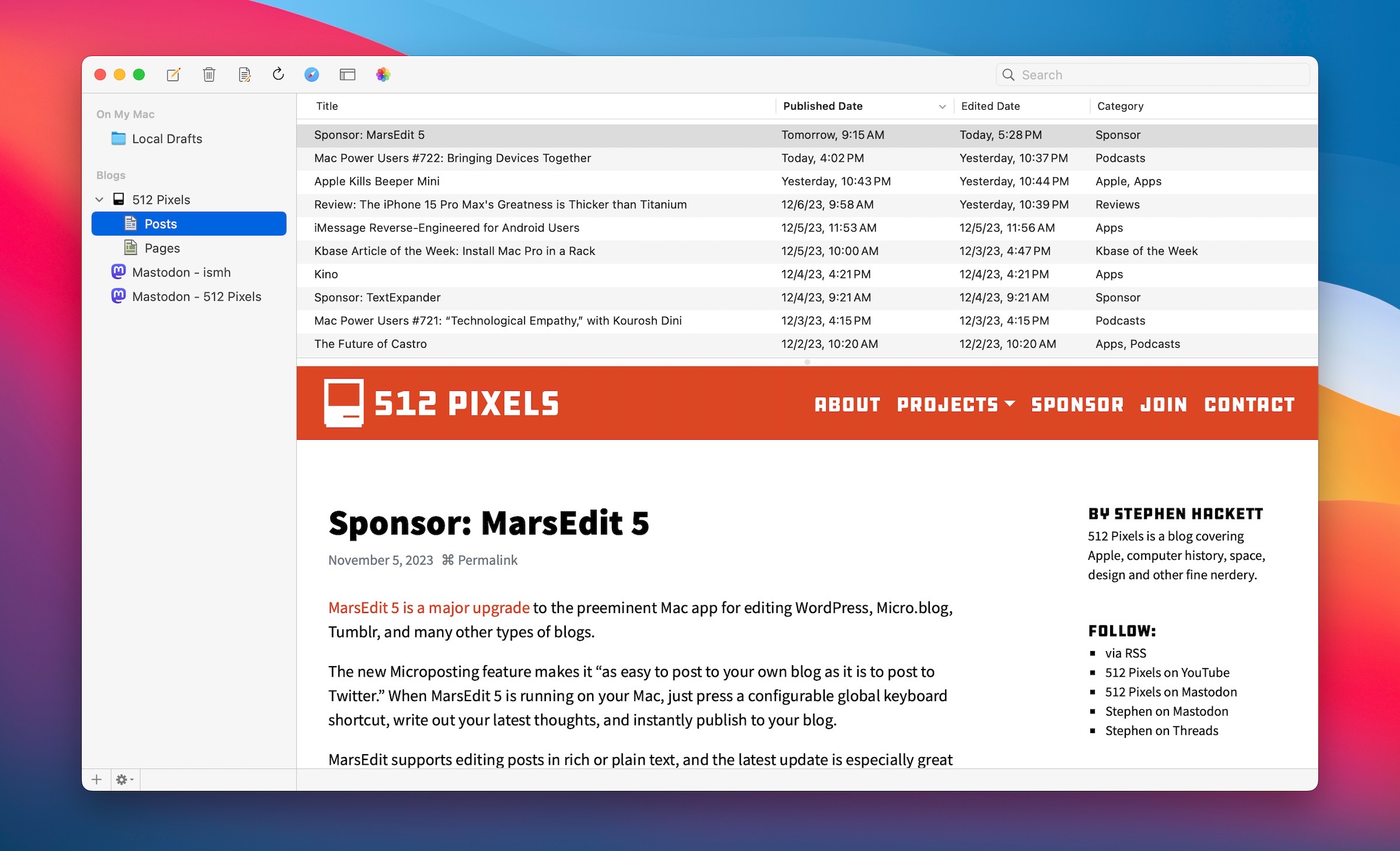
MarsEdit is used by top bloggers to maximize their productivity and enjoyment of blogging. It’s great for pros like John Gruber of Daring Fireball, and yours truly, while also being simple enough to remove the mystery of blogging for everyday folks who just want to share their thoughts with the world.
MarsEdit 5.1 just shipped and features all-new support for publishing to Mastodon! Now you can use the same app you use to write and publish to your main blog, to write and publish to your Mastodon microblog. Check out the announcement at this link!
One app, limitless publishing opportunities.
Download MarsEdit today, and see what all the hype is about. It’ll make you a better blogger!
Mac Power Users #722: Bringing Devices Together ⇢
On this feedback episode of MPU, we revisit Apple Notes, talk about Name Drop and David shares the good news about a new battery pack.
Apple Kills Beeper Mini ⇢
It took less time than I expected, but Apple has responded to the recent news that part of iMessage had been reverse-engineered, opening the door to blue bubbles on Android. Here’s David Pierce:
A few days after the team at Beeper proudly announced a way for users to send blue-bubble iMessages directly from their Android devices without any weird relay servers, and about 24 hours after it became clear Apple had taken steps to shut that down, Apple has shared its take on the issue.
The company’s stance here is fairly predictable: it says it’s simply trying to do right by users, and protect the privacy and security of their iMessages. “We took steps to protect our users by blocking techniques that exploit fake credentials in order to gain access to iMessage,” Apple senior PR manager Nadine Haija said in a statement.
Here’s the statement in full:
At Apple, we build our products and services with industry-leading privacy and security technologies designed to give users control of their data and keep personal information safe. We took steps to protect our users by blocking techniques that exploit fake credentials in order to gain access to iMessage. These techniques posed significant risks to user security and privacy, including the potential for metadata exposure and enabling unwanted messages, spam, and phishing attacks. We will continue to make updates in the future to protect our users.
Review: The iPhone 15 Pro Max’s Greatness is Thicker than Titanium
Obviously the iPhone 4 is in the iPhone Update Hall of Fame. Its Retina display was game-changing, and now we enjoy pixel density that once seemed like science fiction.
The iPhone 6 and 6 Plus, despite their rather lackluster design, are also in the Hall of Fame. They were the first big iPhones, and took Apple’s sales numbers into the stratosphere.
Then there’s the iPhone X, which totally redefined the iOS experience while ditching the home button and embracing a full-screen design with Face ID.
Most years, it’s easy to guess where the new iPhone will end up: either in the Hall of Fame or a phone that was good, but within a few years will be hard to remember clearly.
With the iPhone 15 Pro and Pro Max, Apple has muddied the waters. I honestly can’t tell if this is a really good normal iPhone update or a pretty good big update that we’ll remember for years to come.
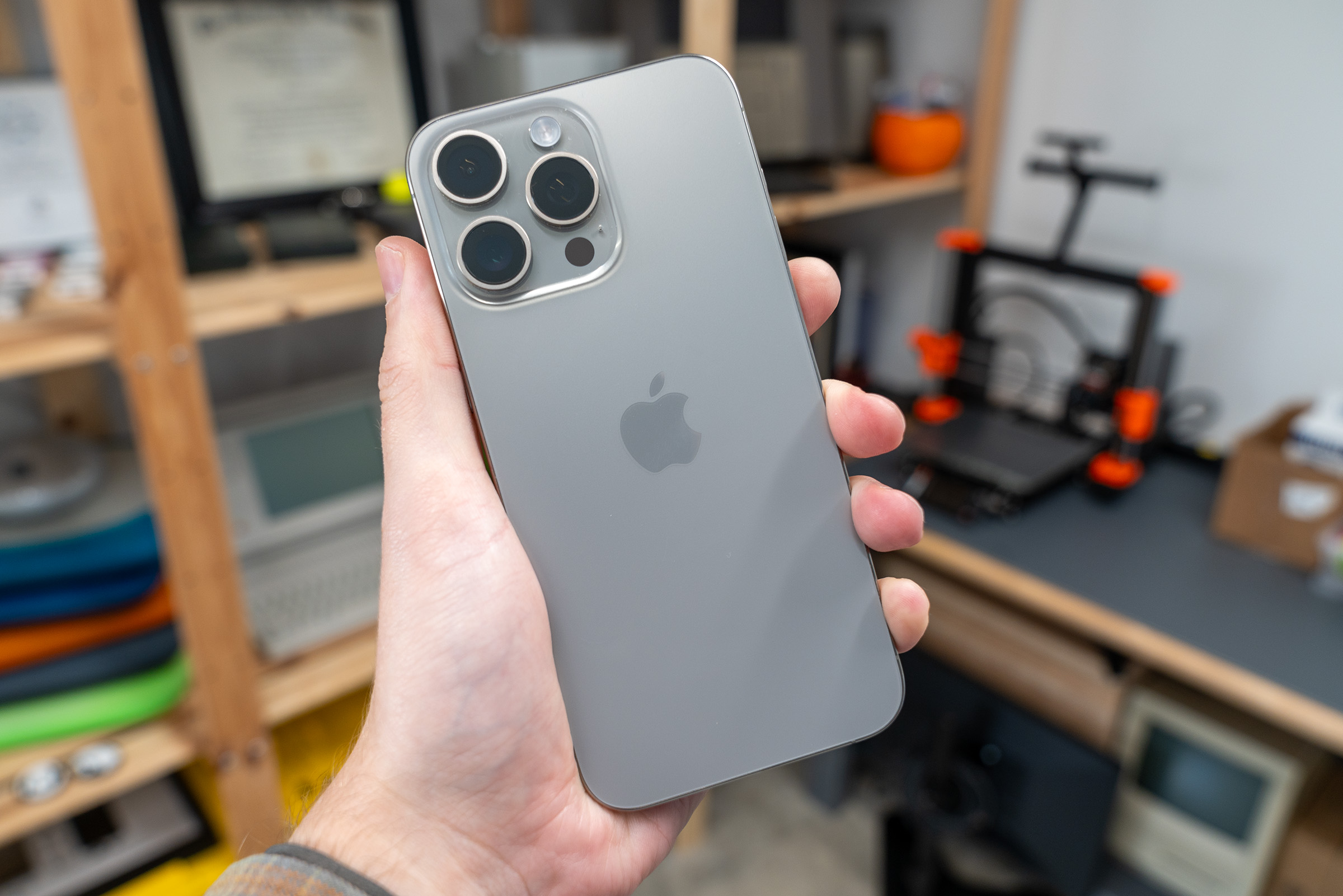
Design
The iPhone 15 Pro brings a lot of new elements — quite literally — to a design that’s mostly familiar.
The Dynamic Island that first washed up on shores with the iPhone 14 Pro has really come into its own here in 2023. It’s taken longer for developers to adopt Live Activities and the Dynamic Island than I think Apple expected, but I am loving my uses for it now:
- Controlling Podcast and music playback
- Following sporting events with Sports Alerts
- Monitoring Instagram background uploads
- Keeping up with weather via CARROT
- Trying to ignore timers1
Dating back to the iPhone X, Apple has used stainless steel to set the high-end phones apart from their aluminum-clad cousins. This made the phones heavier, and made the exterior rails true fingerprint magnets.
I loved this aspect of the iPhone X, especially in white/silver. By the time I started carrying the Pro Max, I was over it. The phones just got too dang heavy.
Apple addressed this by replacing the stainless steel frame and rails with a mix of aluminum on the inside and titanium on the outside. Mercifully, Apple’s metallurgy work has greatly evolved since the Titanium PowerBook had to be painted.
These new materials have let the iPhone Pro line shed a noticeable amount of weight:
- 12 Pro: 189 grams
- 13 Pro: 204 grams
- 14 Pro: 206 grams
- 15 Pro: 187 grams
- 12 Pro Max: 228 grams
- 13 Pro Max: 240 grams
- 14 Pro Max: 240 grams
- 15 Pro Max: 221 grams
Here are just this year’s phones:
- 15: 171 grams
- 15 Plus: 201 grams
- 15 Pro: 187 grams
- 15 Pro Max: 221 grams
Apple has been successful in bringing the weight down, but in the hand, the difference feels to be greater than the numbers would indicate.
If you remember how light the iPhone 5 felt compared to the iPhone 4 or 4S, you’ll understand how I felt when I first picked up the new Pro Max at Apple’s event back in September.
There is one difference, though. The iPhone 5 felt almost hollow; the 15 Pro Max feels dense. Coupled with the slightly rounded edges on the otherwise flat sides, this make-it-feel-light-around-the-edges is a trick that Apple has used before. With products like the original iPad and the iPhone 3G, it was obvious what Apple was trying to do, but with the modern flat-back design it’s harder to pull off well. Apple nailed it, though, and these are the best feeling iPhones in a long, long time.
Visually, the titanium sides look great. If you’ve ever seen a titanium Apple Watch Edition, you’ll be familiar with the brushing Apple does with its titanium. The brushing isn’t quite as dark as on those old Apple Watches, but your mileage will vary based on the finish you choose.
Over the years, I’ve had mostly alternated between light and dark phones, with one stop in Sierra Blue Land a few years ago:
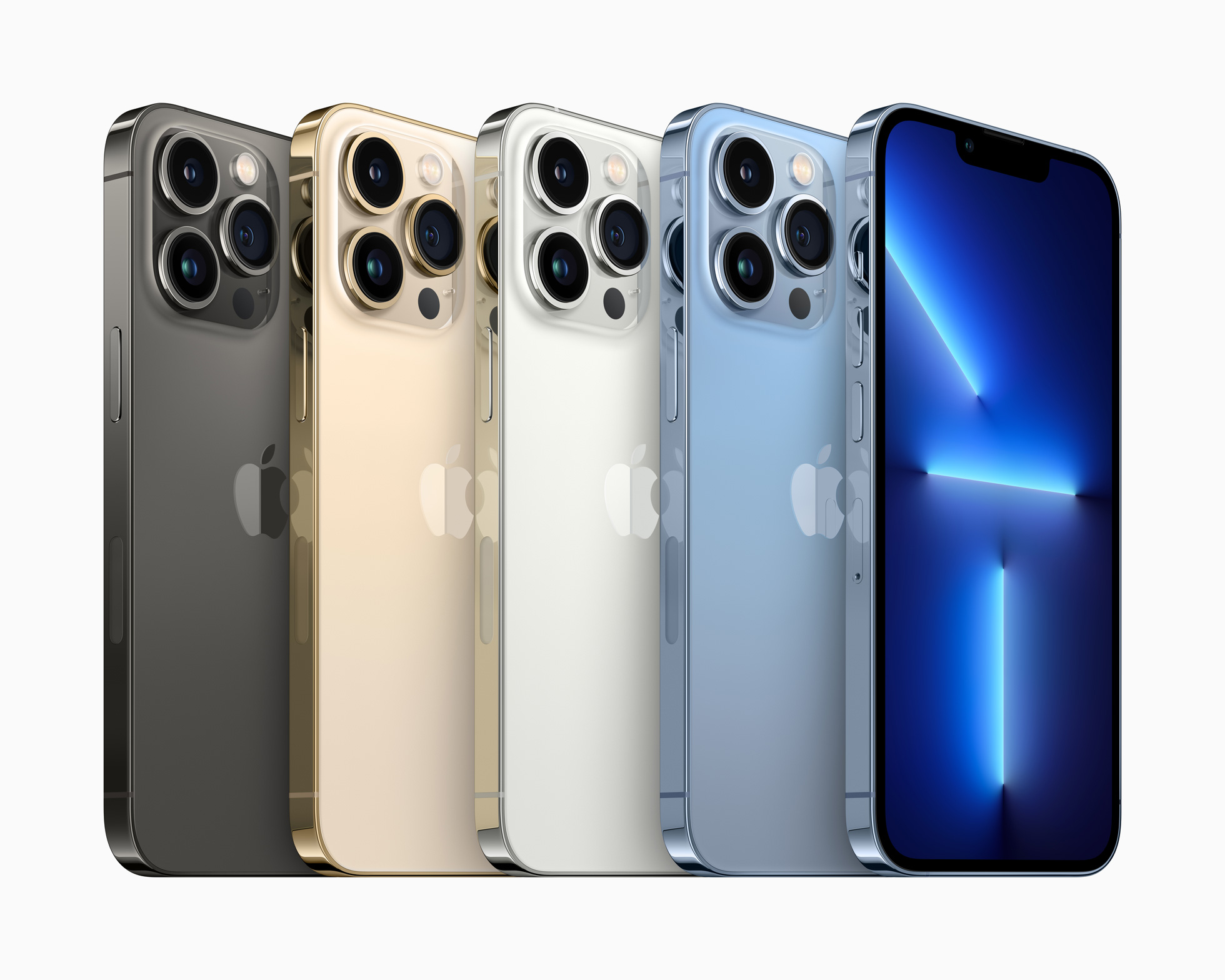
These phones so look so shiny now.
Personally, I adore the Natural finish on this phone. I knew right away at the hands-on area in the Steve Jobs Theater that it was the choice for me.
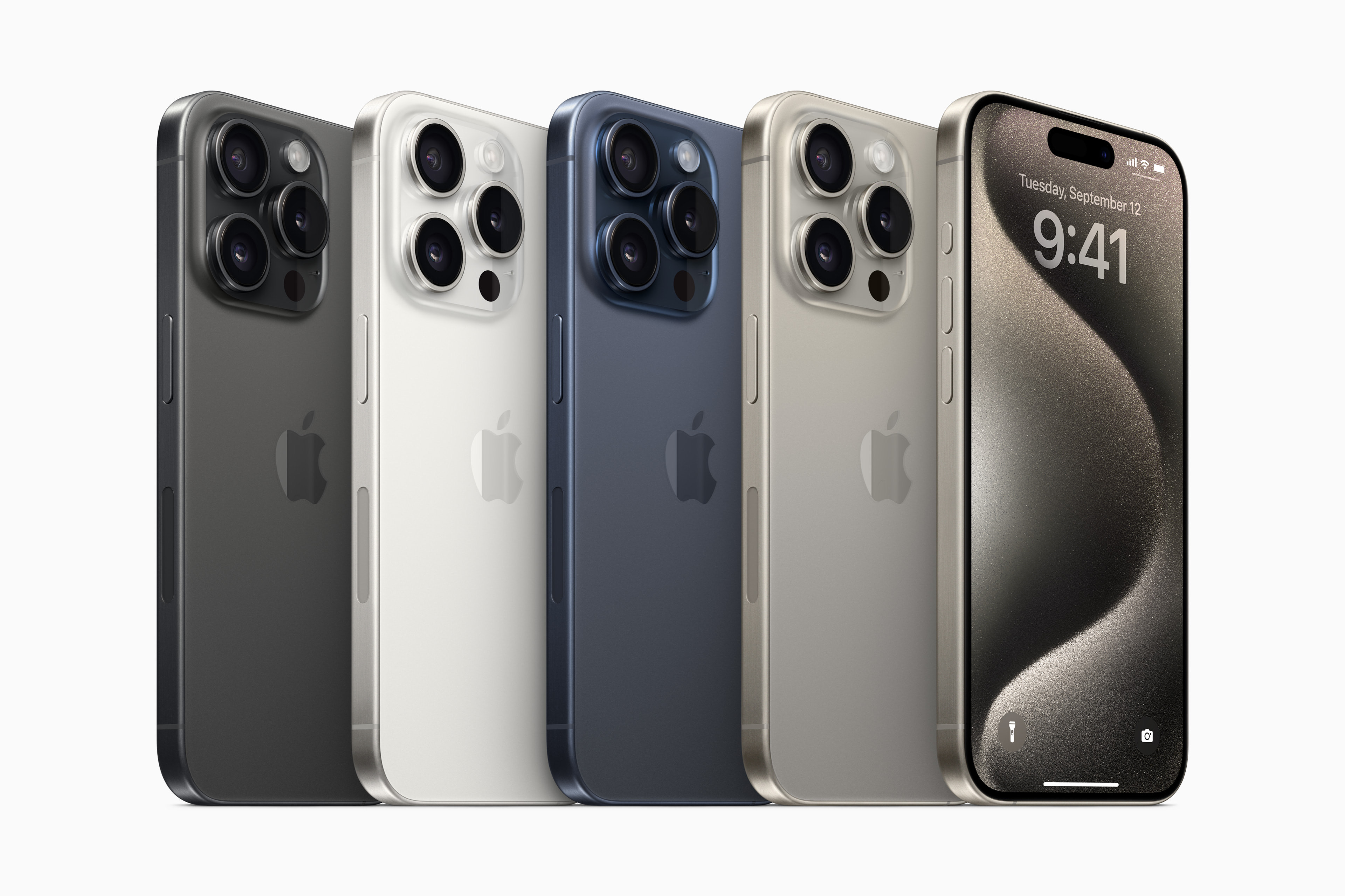
From left to right: Black Titanium, White Titanium, Blue Titanium, and Natural Titanium. And yes, those are the official names.
USB-C
The most important design change to the iPhone 15 Pro comes on the bottom edge.
At this point, we don’t need to relitigate the strategy around Apple’s Lightning connector, but I will say that I the backlash against this connector change doesn’t seem to be nearly as loud as the move away from the 30-pin Dock Connector (and to Lightning) proved to be.
With Apple taking their sweet time in adopting USB-C, the standard had time to get established before the iPhone joined the party. The truth is that people already have USB-C devices in their lives, including from Apple. For many of us, the iPhone was the sole reason we carried Lightning cables around.
If all this port change meant was that the iPhone uses the same port as everything else in my life, it would be a huge win.
The USB-C on the 15 and 15 Plus looks the same as the one on the Pros, but the standard models are limited to USB 2.0 speeds. That’s the same speed supported by Lightning and my ancient iMac G4 from 2003: a measly 480 Mbps.
Meanwhile, the Pros support USB 3 at speeds up to 10 Gbps, which is so much faster that it’s hard to believe the same connector supports both speeds.
I don’t love that the regular iPhone 15 line is hamstrung by these speeds; maybe next year all of the iPhones will support USB 3 or greater.
For now, USB 3 unlocks some fun new things on the Pro phones, including recording video footage directly to external storage. I won’t ever fully tap into this, but I am glad it is there on a device with “Pro” in the name.
Cameras
We have come a long way from the single, small camera bump that appeared on the iPhone 6. That flat-topped mountain of technology continues to impress, though. The main camera of the iPhone can do amazing things, and the ultra-wide camera continues to be a lot of fun, but like those old Mazda ads, this year’s Pro Max is all about the zoom zoom.
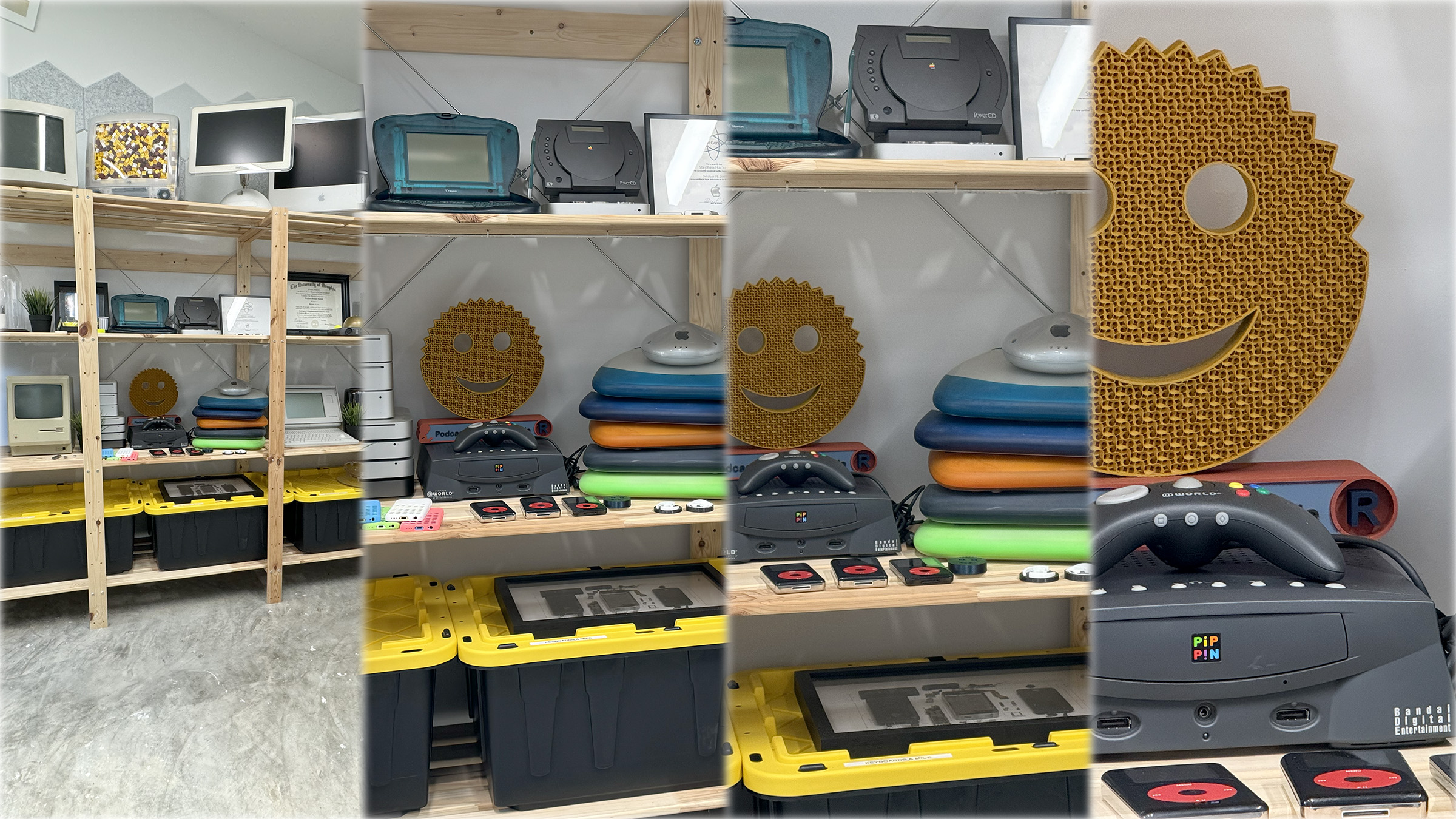
Apple is very proud of how the new telephoto camera works:
We created a state‑of‑the‑art tetraprism design — a folded glass structure below the lens — to reflect light rays four times over. This allows light to travel for longer in the same space, giving you a new focal length that really goes the distance.
To support the tetraprism design, we pioneered a 3D sensor‑shift optical image stabilization and autofocus module that moves in all three directions. Our most advanced stabilization system ever delivers twice as many microadjustments as before.
The ability to punch in so far without needing messy digital zoom changes the types of photos and videos the iPhone is capable of creating. It’s great in a wide range of situations, but especially for capturing sports and school plays, in my experience at least.
There one downside to all of this, as John Gruber mentioned in his review:
One hitch with the iPhone Pro Max having a 5× telephoto lens is that if you really want a 3-4× focal length for framing, it needs to be digitally zoomed from the main camera. In my testing this doesn’t seem to make much difference, but more talented photographers might disagree. I tend to think that when I do want a long lens with extra reach, I might as well go really long.
Of course, the iPhone 15 Pro, in addition to being the wrong size, also lacks Apple’s fancy telephoto hardware. For some, 3× may be a better fit, or 5× may not be worth the size of the Pro Max.
I don’t know when Apple will be able to bring all that fancy tetraprism to the smaller phones, but I think most people will be happy once they do.
The main camera, now at 48MP for the second year in a row, comes with some new tricks, including automatically creating 24MP images, using as much data as it can from the full sensor. This camera can also output 48MP files and zoom to 2× just by cropping the sensor.
I have been thrilled with most of the photos I’ve taken with this new camera phone. Color and HDR feel more natural than some previous models, and I find myself manually tweaking exposure or focus less and less over the years.
The iPhone’s camera system is more than hardware, of course. There are billions of transistors and millions of software actions taking place every time we take a photo on one of these things. It’s hard to know what part of the stack is making a difference year to year, but the iPhone 15 Pro Max is really doing a good job here.
(I don’t shoot a lot of video, but those reflections of light we all see in iPhone video have got to go.)
Action Button
My iPhones have been on silent for as long as I’ve worn an Apple Watch, so the loss of the mute switch is no real loss for me. I imagine most people will use it to mute their device or to quickly access the camera, but I’ve got it wired up to a very simple Shortcut to get data into Todoist as quickly as possible, and it works wonderfully. I love that Apple made this button programmable.
Performance
iPhones have been so fast for so long, it’s basically impossible for me to push one hard enough to find the limits. Everything is instant almost all of the time.
As always, though, I’d love more battery life. I can easily make it a day on my 15 Pro Max, but would love to more easily make it two days.
Subjectively, this iPhone’s battery life seems more unpredictable than what I have experienced in the past few years. Some days, my phone will just be hot and burning through battery without a clear indication as to what is going on. A restart will set things right, but I’ve had to bounce into Low Power Mode a few times a month since upgrading. This could be an iOS 17 thing, but when Apple controls both the hardware and software, the latter will usually come up in a review of the former.
A Look at Some Cases
There was a lot of digital ink spilled over Apple’s FineWoven cases, which have replaced the previous leather products.
I got the FineWoven case at launch, and have not been impressed. It picks up lint, stains easily and looks far too cheap for a $59 case. Thankfully, there are other options and I have tried quite a few:
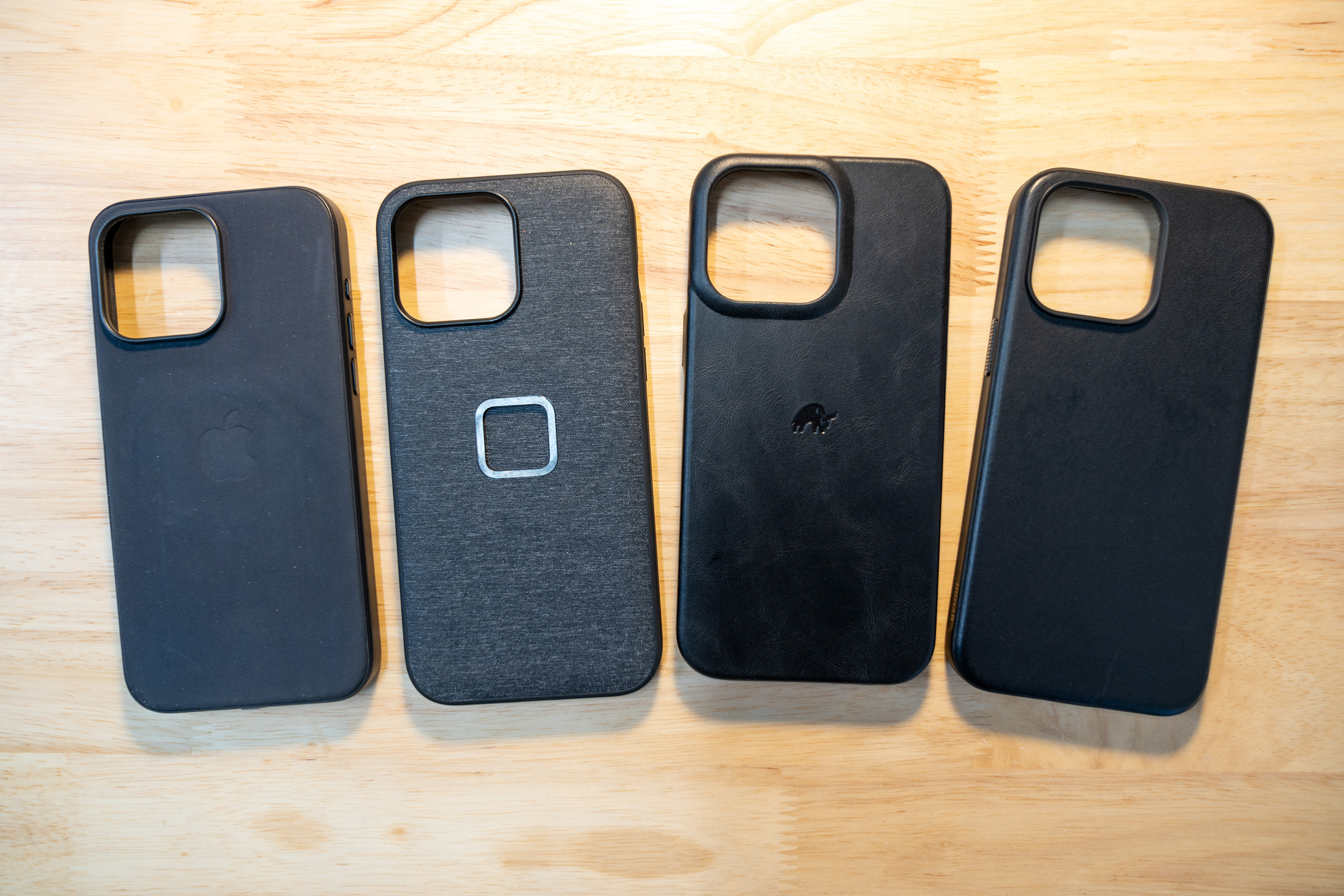
Here are some thoughts to correspond with that photo, going from left to right:
- Apple FineWoven case: After very sporadic use, mine already looks pretty trashed. I hope Apple is already working on something new.
- Peak Design Everyday Case: This case is awesome for snapping into a wide range of accessories. I’ve got Peak Design’s mounts on each of my bikes and love the system.
- Bullstrap MagSafe case: I got this after hearing good things from a bunch of folks, but I don’t like it. The rounded edges make the phone feel bigger than needed, and I don’t like having the little logo on the back.
- Nomad Modern Leather Case: This is my daily driver. The black leather looks and feels great, the buttons are nice and click, and the sides are scooped in, making the phone feel narrower than it does in other cases.
A Sidebar on the Whole Regular/Pro Lineup
Apple is now several years into the two-lineup strategy when it comes to new iPhones. Like the 14 before it, the 15 gets a mix of old and new tech. This year, the Dynamic Island and USB-C both appeared on all new iPhones, even if it’s all powered by last year’s system on a chip.
I have only two types of iPhone buyers in my life: nerds who buy a new phone every fall, and people who buy a new phone every 3-5 years when I tell them to or when something breaks. Even then, only a subset of those folks end up with the newest new iPhone. There are a lot of “new” iPhone 12 and 13 customers out there.
I say all of that to say this: we should not be shocked when the new mainstream iPhone model sells in smaller numbers than the Pro phones, especially at launch. The vast majority of people who will buy an iPhone 15 won’t even be in the market for a new phone for another 12, 24 or 36 months. By then, a new iPhone 15 or a refurbished iPhone 15 Plus will be a great deal, and those users will be very happy with them.
I think Apple’s quite happy having a steady supply of older-but-still-pretty-great iPhones for sale for years beyond their announcement date. As weird as it may seem to some nerdy folks, this strategy seems to be working just fine.
Legacy
We may not know how the iPhone 15 Pro and Pro Max stack up historically for a few more years, but for now, I am quite happy with mine.
The updated design is fantastic. This phone is the best looking and feeling model in a long time. USB-C brings the iPhone into the modern era, letting it interact with a much wider ecosystem. The updated camera system unlocks new workflows and expands what is possible with just an iPhone in my pocket.
In its best years the new iPhone lets you do something you couldn’t do before. The 15 Pro Max meets that mark.
- I am so happy to report that this complaint got fixed recently. ↩
iMessage Reverse-Engineered for Android Users ⇢
The folks behind Beeper — in partnership with a high-school student — have reverse-engineered Apple’s iMessage system and have shipped it in an Android app. Here’s a bit from the Beeper blog:
Now you can send and receive blue bubble texts from your phone number. As soon as you install Beeper Mini, your Android phone number will be blue instead of green when your iPhone friends text you. It’s easy to join iPhone-only group chats, since people can add your phone number instead of your email address. All chat features like typing status, read receipts, full resolution images/video, emoji reactions, voice messages, editing, un-sending, and more are supported.
Unlike every other attempt to build an Android app like this (including our first generation Beeper app), Beeper Mini does not use a Mac relay server in a data center. Instead, the app connects directly to Apple servers to send and receive end-to-end encrypted messages. Encryption keys never leave your device. No Apple ID is required. Beeper does not have access to your Apple account. Learn more about how Beeper Mini works.
Jacob Kastrenakes at The Verge has more:
Other services — including Beeper’s previous iMessage implementation — would relay messages through a Mac hosted in the cloud. That poses real security problems, as recently exemplified by Sunbird and its Nothing-branded spinoff, Nothing Chats. Nothing’s app was launched and pulled in just four days after serious security issues were discovered; Sunbird pulled its app shortly thereafter.
Beeper Mini avoids some of those problems because it’s operating in a fundamentally different way. Its developers figured out how to register a phone number with iMessage, send messages directly to Apple’s servers, and have messages sent back to your phone natively inside the app. It was a tricky process that involved deconstructing Apple’s messaging pipeline from start to finish. Beeper’s team had to figure out where to send the messages, what the messages needed to look like, and how to pull them back down from the cloud. The hardest part, Migicovsky said, was cracking what is essentially Apple’s padlock on the whole system: a check to see whether the connected device is a genuine Apple product.
Quinn Nelson has a video up about the app and the open-source project that is powering most of it. He shows it running on a laptop running Linux, which is wild:
Reverse engineering is protected in the United States, but Apple may still make moves to shut this down. One could argue that this project isn’t worth the company risking the bad PR that would come with squashing Beeper Mini, but time will tell. The fact that Beeper charges $1.99/mo for the app may end being a liability in the long run.
Kbase Article of the Week: Install Mac Pro in a Rack ⇢
I don’t often think about the rackable Mac Pro, but I can’t wait to own one in about 20 years.
Kino ⇢
The folks behind Halide are making a new video capture app for the iPhone, named Kino. What Halide is to RAW photos, Kino should be for log video.
Sponsor: TextExpander ⇢
TextExpander’s customizable and shareable snippets of text allow your team to fly through repetitive tasks quickly by expanding the things you type regularly — all you have to do is type a short abbreviation and TextExpander does the rest of the work for you.
Here’s How It Works:
- Create It: Collect your most commonly used emails, phrases, messaging, URLs, and more to create snippets and templates in TextExpander that are always accessible with a quick search or abbreviation.
- Share It: Give your team or different departments across your company access to the content they need to use every day.
- Use It: Expand the content you need with just a few keystrokes on any device, across any app you use — no APIs or integrations needed.
- Optimize It: Add customizations like fill-ins and optional sections to keep that human touch. Anytime you make changes to snippets they update everywhere so your team is always on the same page.
It’s that easy!
Check out TextExpander and say goodbye to repetitive typing.
Mac Power Users #721: “Technological Empathy,” with Kourosh Dini ⇢
Dr. Kourosh Dini is an author, musician and psychiatrist who uses Apple gear to improve the lives of those he works with. This week on MPU, David and I speak with him about his tools, including DEVONthink, OmniFocus and more.
The Future of Castro ⇢
After the very bad week the Castro app had, there’s a new blog post up sharing more details:
First and foremost, we sincerely apologize for the app downtime and any distress it has caused. Initially, we had believed it was a quick backend fix, but unfortunately, the issues turned out to be more complex than anticipated, requiring extensive work.
During this time, there were rumors circulating about Castro’s future. We want to make it clear that any communication or publication regarding the app’s future is not official and does not represent Castro’s views.
While it is true that we have experienced departures within our company, we want to assure you that we are actively working with a lean dedicated team to address these challenges. We apologize for any unnecessary panic that may have arisen from these conversations.
We believe in transparency with our community and want to share with you that we are actively seeking a new home for Castro with new owners. Our goal is to continue providing you with the app you love, but with even better features and improvements.