Mac Power Users #540: Subroutine in the Brain

This week on MPU, we hosted a feedback episode that included talk about WWDC and more:

David and Stephen talk more about email and working from home, but also get into what it takes to make a MacSparky Field Guide and some weird problems they’ve recently encountered with their tech.

My thanks to our sponsors:

  • 1Password: Have you ever forgotten a password? You don’t have to worry about that anymore.
  • Setapp: More than 180 powerful apps for your Mac. Try it free for a week.
  • The Intrazone by Microsoft SharePoint: Your bi-weekly conversation and interview podcast hosted by the SharePoint team
  • DEVONthink: Get Organized — Unleash Your Creativity. Use this link for 10% off.
Backblaze

My thanks to Backblaze for sponsoring the site this week.

Backblaze offers unlimited computer backup for Macs and PCs for just $6 a month (no gimmicks or add-ons or gotchas included). This means they will backup your movies, music, photos, videos, projects, and all the data you have! You can restore files from anywhere in the world and directly download them from the web or their mobile apps. You can also have your backup sent to you via hard drive and have it overnighted right to your home! Never worry about finding lost versions or deleted files, you can extend your retention period to 1 Year or Forever!

Apple Outlines Details of WWDC 2020

Apple PR:

Now in its 31st year, WWDC20 will be the biggest WWDC to date, bringing together the global Apple developer community of more than 23 million in an unprecedented, virtual way, from June 22 to 26. Apple today shared the WWDC20 lineup, including keynote and Platforms State of the Union timing, and information on how developers can learn about the future of iOS, iPadOS, macOS, tvOS, and watchOS, and engage with Apple engineers.

Here’s what the schedule looks like:

  • Keynote at June 22, 10 a.m. PDT, streamed from Apple Park to YouTube, Apple’s website and more
  • State of the Union at June 22, 2 p.m. PDT, streamed via the Apple Developer app and the Apple Developer website
  • Labs from June 23 to 26. These won’t be live, but will be posted each day at 10 a.m. PDT.
  • 1-on-1 Developer Labs will also run June 23-26, by appointment only. Apple will publish more details next week, but they are available only for paying members of Apple’s developer program.

In addition to this, Apple is launching a redesigned forum for developers:

The all-new Apple Developer Forums will connect the developer community with more than 1,000 Apple engineers to answer questions and engage in technical discussions. Starting the first day of WWDC, anyone can search and view the forum discussions to follow along, and Apple Developer Program members will be able to post their own questions and learn directly from Apple experts.

As much of this is brand-new, I’m very curious to as how it will go.

What Software May Look Like in the ARM Transition

Gus Mueller:

With all the recent rumors flying around about the Mac transitioning to ARM processors, I’ve seen some assertions about what this means for software going forward. I thought I could chime in on this as someone who’s been developing software for the Mac for a long time, including the last architecture transition from PowerPC to Intel.

Let it be stated that I have no knowledge of what Apple’s internal plans are. These are educated guesses based on my years of experience of working with Apple and Apple’s frameworks. And maybe this is all for nothing, since this transition might not even happen!

A good read that makes me even more excited about WWDC.

Connected #298: You Bought a Monument

This week on Connected:

The guys would be sad that have been replaced by AI, but the results are too funny to be upset. Then, Federico has thoughts about ARM Macs, Myke makes a bet with Stephen and rumors of a new iMac are discussed.

Also, iBooks Author and iTunes U are dead.

My thanks to our sponsors:

  • Pingdom: Start monitoring your website performance and availability today, and get instant alerts when an outage occurs or a site transaction fails. Use offer code CONNECTED to get 30% off. Offer expires on January 31, 2021.
  • ExpressVPN: High-Speed, Secure & Anonymous VPN Service. Get 3 months free with a 1-year package.
  • Miro: The online collaborative whiteboard platform. Sign up for a free account today.

iTunes U Being Discontinued at the End of 2021

Apple:

Apple has been hard at work building the next generation of apps for both teachers and students:

  • Classroom turns your iPad into a powerful teaching assistant, helping teachers guide students through a lesson, see their progress, and keep them on track.

  • Schoolwork helps teachers save time and maximize each student’s potential by making it easy for teachers to share class materials, get students to a specific activity in an app, collaborate with students, and view student progress.

In addition to Classroom and Schoolwork, Apple also introduced Apple School Manager to enable IT Administrators to easily manage iPads, Macs, Apple TV, Apple IDs, books, and apps, while ensuring data is kept secure and private. Apps such as Pages, Numbers, Keynote, GarageBand, iMovie, Clips, and Swift Playgrounds have education-specific features that are used regularly by teachers and students.

With this in mind, Apple will discontinue iTunes U at the end of 2021. iTunes U will continue to be available to all existing customers through the 2020-2021 educational year.

Bradley Chambers has more details. He’s one of my go-to reads when it comes to Apple’s education products.

Apple Killing iBooks Author in Favor of Pages

Apple, in an email to book publishers:

Thank you for being a member of the iBooks Author community. We have some news to share with you about the future of book creation.

Two years ago we brought book creation into Pages. With key features such as the ability to work on iPad, collaborate with others on a shared book, draw with Apple Pencil, and more, Pages is a great platform for making books.

As we focus our efforts on Pages, iBooks Author will no longer be updated and will soon be removed from the Mac App Store. You can continue to use iBooks Author on macOS 10.15 and earlier, and books previously published to Apple Books will remain available. If you have iBooks Author books you’d like to import into Pages for further editing, we have a book import feature coming to Pages soon.

There is a corresponding support document with more information.

While Pages doesn’t have every feature iBooks Author did, iBooks Author was buggy and slow. If I were to take on another book project, I don’t think I’d miss the old application.

Pastel

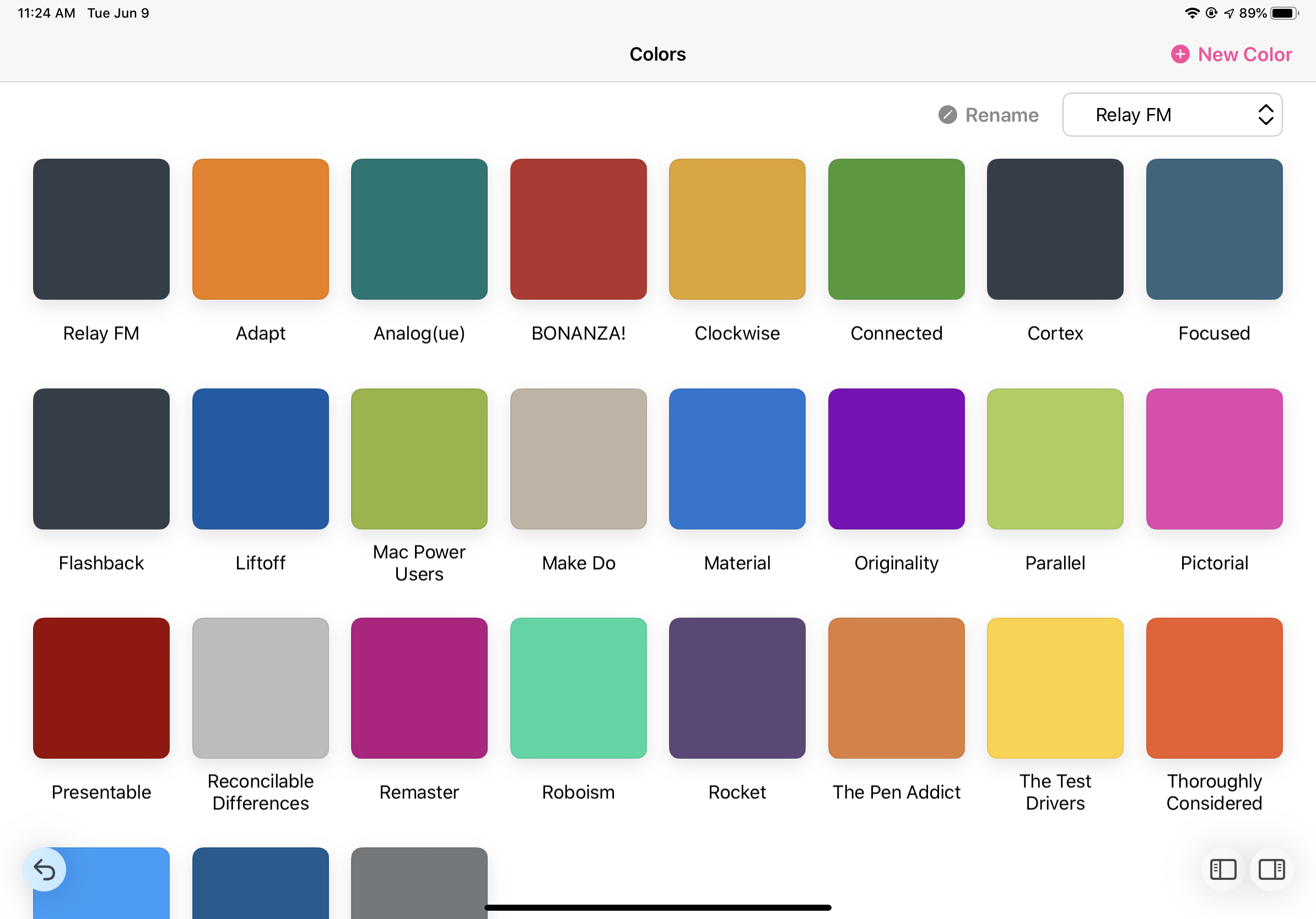
Pastel is a new iOS app from Steven Troughton-Smith that makes working with colors easy. The app comes with some pre-loaded collections, but it’s easy to make your own. I took some time to enter the colors for all of our podcasts over on Relay FM, and also made a collection of colors I use here on 512 Pixels:

This makes grabbing the value for any of these colors super easy. To my shame, I was just keeping the hex values in Apple Notes until this app came along.

While I added these colors manually, Pastel has some neat tricks up its sleeve for collecting color information. It can be used to sample images from Photos or Files manually, but the app can also analyze images and pick out the dominant colors itself.

You can copy out RGB and hex codes, but also codes to use in Objective-C, Swift and SwiftUI. If you’re working on an app, this is a great tool to keep up with these assets. You can also drag and drop colors from Pastel into other apps that support it, like Mindnode or the iWork apps.

Collections can even be used to create custom Apple Watch faces, which is a cool bonus.

Pastel syncs your library via iCloud, and there’s a Mac app coming soon. It’s free to download and use with up to 20 palettes; to unlock more there is an one-time in-app purchase of $4.99.

Report: New iMac Coming

Sonny Dickson, with some fun iMac news:

The current iMac design was unveiled way back in 2012, and while I still think the all-in-design is great for a lot of users, there’s no doubt that it could use a refresh. Adapting the Pro Display XDR’s design to the iMac would be sweet.1

However, the inside of the iMac also is need in an overhaul. The iMac is the only shipping Mac without the T2 security chip, and the only one that ships with spinning hard drives. It’ll be nice to see the iMac modernized.

How this works with today’s report in Bloomberg that the ARM Mac transition is going to be announced at WWDC. I would be really surprised if any ARM Macs ship this summer, but why wouldn’t they want to usher in a new design with the new chipset? When Apple switched to Intel, most of the new Macs looked like their outgoing PowerPC siblings,2 but that doesn’t have to the be the case this time.


  1. Just as sweet? A new external 5K display… 
  2. Other than the MacBook, which replaced the 12- and 14-inch iBook G4. 

Kbase Article of the Week: If Your iPhone, iPad, or iPod touch Won’t Turn on or is Frozen

Apple Support:

If your device has a frozen screen, doesn’t respond when you touch it, or becomes stuck when you turn it on, learn what to do.

I’ve had this happen a couple of times on my 11 Pro, and I can never remember the button presses needed to reset it:

  • iPad models with Face ID: Press and quickly release the Volume Up button. Press and quickly release the Volume Down button. Then press and hold the Power button until the device restarts.
  • iPhone 8 or later: Press and quickly release the Volume Up button. Press and quickly release the Volume Down button. Then press and hold the Side button until you see the Apple logo.
  • iPhone 7, iPhone 7 Plus, and iPod touch (7th generation): Press and hold both the Top (or Side) button and the Volume Down buttons until you see the Apple logo.
  • iPad with Home button, iPhone 6s or earlier, and iPod touch (6th generation) or earlier: Press and hold both the Home and the Top (or Side) buttons until you see the Apple logo.

Mac Power Users #539: Back to Email

This week on Mac Power Users:

David has finally roped Stephen into talking about email. Topics include email services, apps and strategies. Later in the show, they are joined by Rosemary Orchard and Myke Hurley to hear about two specific apps they use every day.

My thanks to our sponsors:

  • 1Password: Have you ever forgotten a password? You don’t have to worry about that anymore.
  • DEVONthink: Get Organized — Unleash Your Creativity. Use this link for 10% off.
  • TextExpander from Smile: Get 20% off with this link and type more with less effort! Expand short abbreviations into longer bits of text, even fill-ins, with TextExpander from Smile.
  • Squarespace: Make your next move. Enter offer code MPU at checkout to get 10% off your first purchase.