Apple Newsroom, back in 2001:
“Mac OS X is the future of the Mac, and we hope it will delight our customers with its unrivaled power and ease of use,” said Steve Jobs, Apple’s CEO. “The Public Beta has generated incredible feedback and support from Mac users and developers, which has helped us to make Mac OS X the most advanced operating system ever.”
If you didn’t get to use the first version of Mac OS X, these screenshots can give you a good feeling for what it was like.
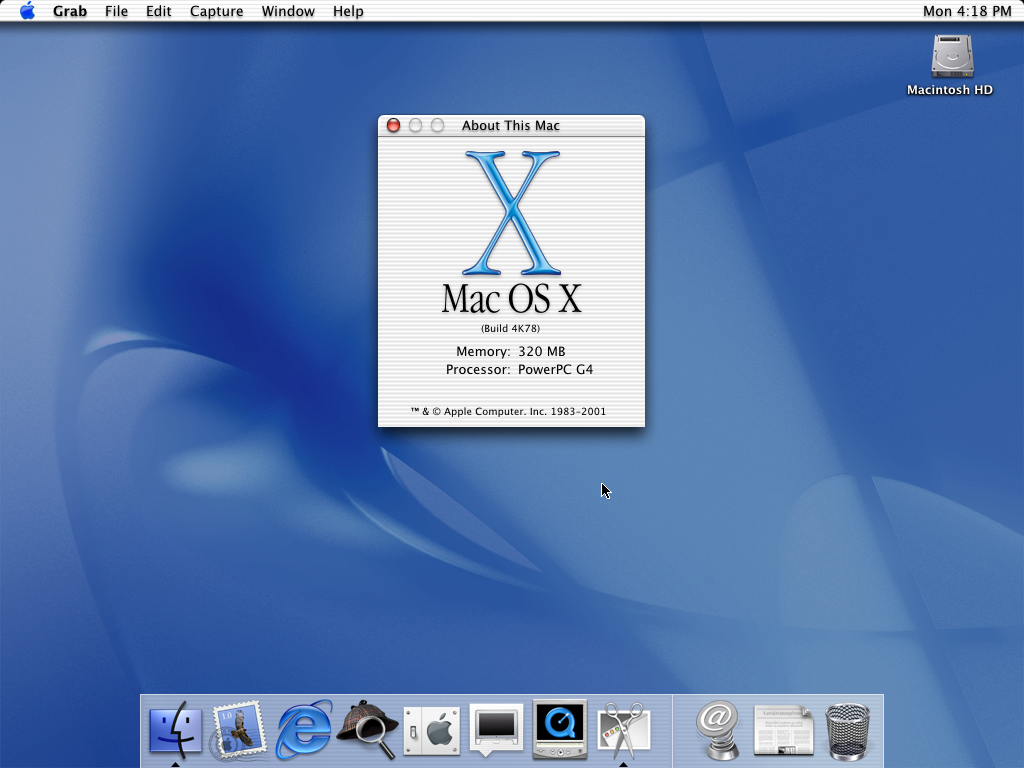
That original Aqua interface came with a cost, as John Siracusa wrote in his review of the operating system:
Despite the official release status of 10.0, The Mac OS X user interface is still clearly a work in progress. The biggest lapses are the system-wide interface responsiveness issues and the hobbled Finder. The Dock is a close third, presenting a sort of UI logic puzzle in which optimizing its usage for one of its functions (application switching, launching, Apple menu replacement, Control Strip functionality, etc.) causes it to become sub-optimal for one or more of its other functions. Thankfully, third party utilities are quickly arriving on the scene to help experienced users create the environment they need to be productive.
Overall, the user experience of OS X is not as pleasant or as simple as that of classic Mac OS. The number and severity of bugs alone would likely turn a novice off, especially those surrounding the still-necessary classic environment. Novice users shouldn’t have to know or care what classic is, why it’s frozen, and how to recover. And much of the time, the provided GUI methods (force quit, etc.) don’t work as expected anyway, leaving a trip to the command line and the
killcommand as the only alternative.The unresponsive interface will be noticed by everyone. Many features are slow enough that even plodding grandmothers will be confused by the apparent lack of response to their input (when resizing a list-view window, for example). And there’s still the “why can’t I do anything now?” experience, especially in the Finder during network-related operations. Grandma doesn’t care that she can still switch to another application and continue working if the next thing she needs to do is in the Finder, which is currently locking her out because she chose to mount her iDisk.
As in every one of the previous OS X releases, the score-card remains the same. Even taking into account the increased stability and superior multitasking potential, Mac OS X does not yet live up to the level of user interface excellence set by the technically inferior Mac OS 9.
Over the years, Mac OS X’s user interface matured as Mac hardware was able to catch up with what Apple’s designers were doing. We’ve since seen Brushed Metal, linen and stitched leather, and now Liquid Glass.
Of course, user interfaces — both good and bad — come and go. What Mac OS X really did was set Apple’s entire software organization on solid ground. Rebuilding the Mac’s operating system atop the technology developed at NeXT not only saved the Mac itself, but paved the way for iOS and Apple’s other platforms we love and use to this day.