This week on Mac Power Users, we sort through some follow-up before sharing their origin stories and reacting to a surprise or two.
Bonus Kbase Article of the Week: Get a Depth and Water Seal Test for your Apple Watch Ultra ⇢
If you have Apple Watch Ultra and want to check that its depth gauge and seals are working properly, you can get a Depth and Water Seal Test from Apple.
You might want to send your Apple Watch Ultra for a Depth and Water Seal Test if:
- You’d like to check the functionality of the depth gauge in your Apple Watch Ultra.
- You might have caused unseen damage to your Apple Watch Ultra — for example, by crashing while bicycling, or hitting your watch on a rock during a hike.
Having broken an Apple Watch in a bike crash and another one cliff jumping at a lake, I have to say that being personally attacked by a support article is new to me.
Announcing the Rogue Amoeba Historic Screenshot Archive ⇢
For the past several months, I’ve been working on a secret project with my friends over at Rogue Amoeba:
20 years ago today, on March 3, 2003, Rogue Amoeba released Audio Hijack Pro 1.0. This was a crucial event in the company’s history, as sales grew a much higher level, taking Rogue Amoeba from a hobby to a viable business.
On this anniversary, it seems fitting for us to unveil something else special: the Rogue Amoeba Historic Screenshot Archive. It’s an in-depth collection of images and information about key versions from our 20+ years in business, and we think it’s well worth a look.
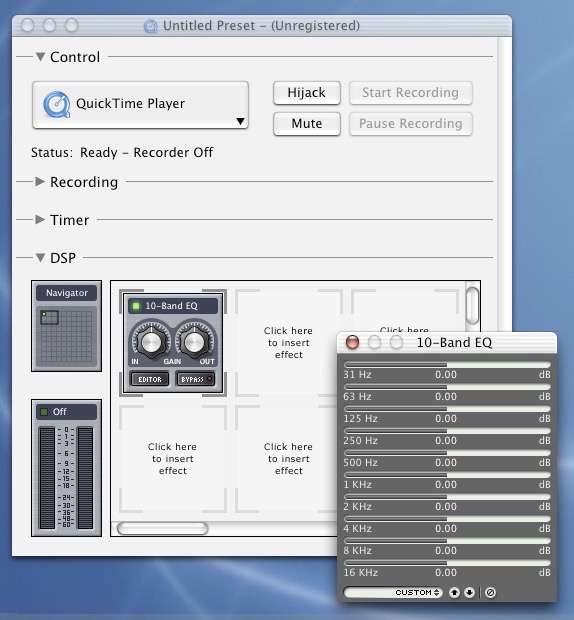
Over on his blog, Paul Kafasis wrote a bit more about the project:
It’s quite gratifying to be able to look back on our work, which now spans more than two decades.
It can also be humbling and amusing, and thus worth writing about on this mildly-popular humor site.
It was a ton of fun to spend time with twenty years worth of indie Mac development history. I think you’re going to love scrolling through the archive on Rogue Amoeba’s website.
Pedometer++ 5.0 ⇢
Earlier this week, Underscore David Smith launched version 5.0 of his excellent step-tracking app, Pedometer++, which I have used (and loved!) since its debut back in 2013.
Here’s David on his blog, writing about about the new features:
There is a delightful freedom in building an app tailored for your own personal preferences. This app is perfect for how I hike. During its development I have enjoyed countless long hikes into nature and find that it is a worthy companion of those adventures.
Tweetbot and Twitterrific Updated One Last Time
When Twitter shut down third-party clients in January, it not only left out in the cold the users of those apps, but the developers too. Many of those apps were significant sources of revenue for the teams behind them, and that income was cut off capriciously, without any warning.
One additional complication is that some clients had shifted to a subscription-based system in recent years, with users paying by the month or the year. Since those subscriptions were generally prepaid, users ended up in a situation where they essentially no longer had access to the app they’d paid for.
Twitter’s kneecapping of third-party clients didn’t just mean that their future revenue was gone — it meant revenue they’d already collected from App Store subscriptions would need to go back to customers in the form of prorated refunds for the remaining months on each and every user’s annual subscriptions. Consider the gut punch of losing your job — you stop earning income. It’s brutal. Now imagine that the way it worked when you get fired or laid off is that you’re also suddenly on the hook to pay back the last, say, 6 months of your income. That’s where Tapbots and The Iconfactory are.
I can’t recall a situation like this, with an ecosystem of third-party clients collecting subscriptions and then having the first-party service yank the carpet out from under them — and their customers — with zero warning or sunset period. A proper sunset period would have allowed such third-party partners — and developers like Tapbots and The Iconfactory were indeed partners of Twitter— to stop accepting new subscriptions and renewals, and allow existing subscribers to run out the clock with service for the period they already paid for.
Connected #439: People Like You are Killing Blogs ⇢
Federico has launched Apple Frames 3.1, Myke is worried about a secret plan set in motion by Stephen and Bing has thoughts on Apple’s Books app.
On Connected Pro, two very embarrassing stories from my life.
Chromium Boasts Battery Gains for MacBook Users ⇢
François Doray, a software developer on the Chrome team:
With the latest release of Chrome, we’ve made it possible to do more on your MacBook on a single charge thanks to a ton of optimizations under the hood. In our testing, we found that you can browse for 17 hours or watch YouTube for 18 hours on a MacBook Pro (13″, M2, 2022) And with Chrome’s Energy Saver mode enabled, you can browse an additional 30 minutes longer on battery. Of course, we care deeply about all our users, not just those with the latest hardware. That’s why you’ll also see performance gains on older models as well.
I really hope this pans out in real-world usage.
Kbase Article of the Week: Apple Adjustable Keyboard & Compatibility with A/UX 3.x ⇢
Is the Apple Adjustable Keyboard compatible with A/UX 3.x?
No, the Apple Adjustable Keyboard does not work completely with A/UX
3.0 or 3.0.1.Because the CommToolbox tool(s) are built into the kernal with the keyboard
IDs, some of the keys, such as arrow keys and ‘~’, key do not
respond with the same ANSI escape sequences as they do in CommandShell.The problem has been reported and is known to A/UX engineering.
Amazing.
Sponsor: TextExpander ⇢
TextExpander’s customizable and shareable snippets of text allow your team to fly through repetitive tasks quickly by expanding the things you type regularly — all you have to do is type a short abbreviation and TextExpander does the rest of the work for you.
Here’s How It Works:
- Create It: Collect your most commonly used emails, phrases, messaging, URLs, and more to create snippets and templates in TextExpander that are always accessible with a quick search or abbreviation.
- Share It: Give your team or different departments across your company access to the content they need to use every day.
- Use It: Expand the content you need with just a few keystrokes on any device, across any app you use — no APIs or integrations needed.
- Optimize It: Add customizations like fill-ins and optional sections to keep that human touch. Anytime you make changes to snippets they update everywhere so your team is always on the same page.
It’s that easy!
Check out TextExpander and say goodbye to repetitive typing.
25 Years Ago, Apple Killed the Newton
When Steve Jobs made it back to Apple, the company had dozens of products that would not survive the company’s move to a much simpler product matrix. In a sea of forgettable Macs and accessories, the biggest loss was the Newton.
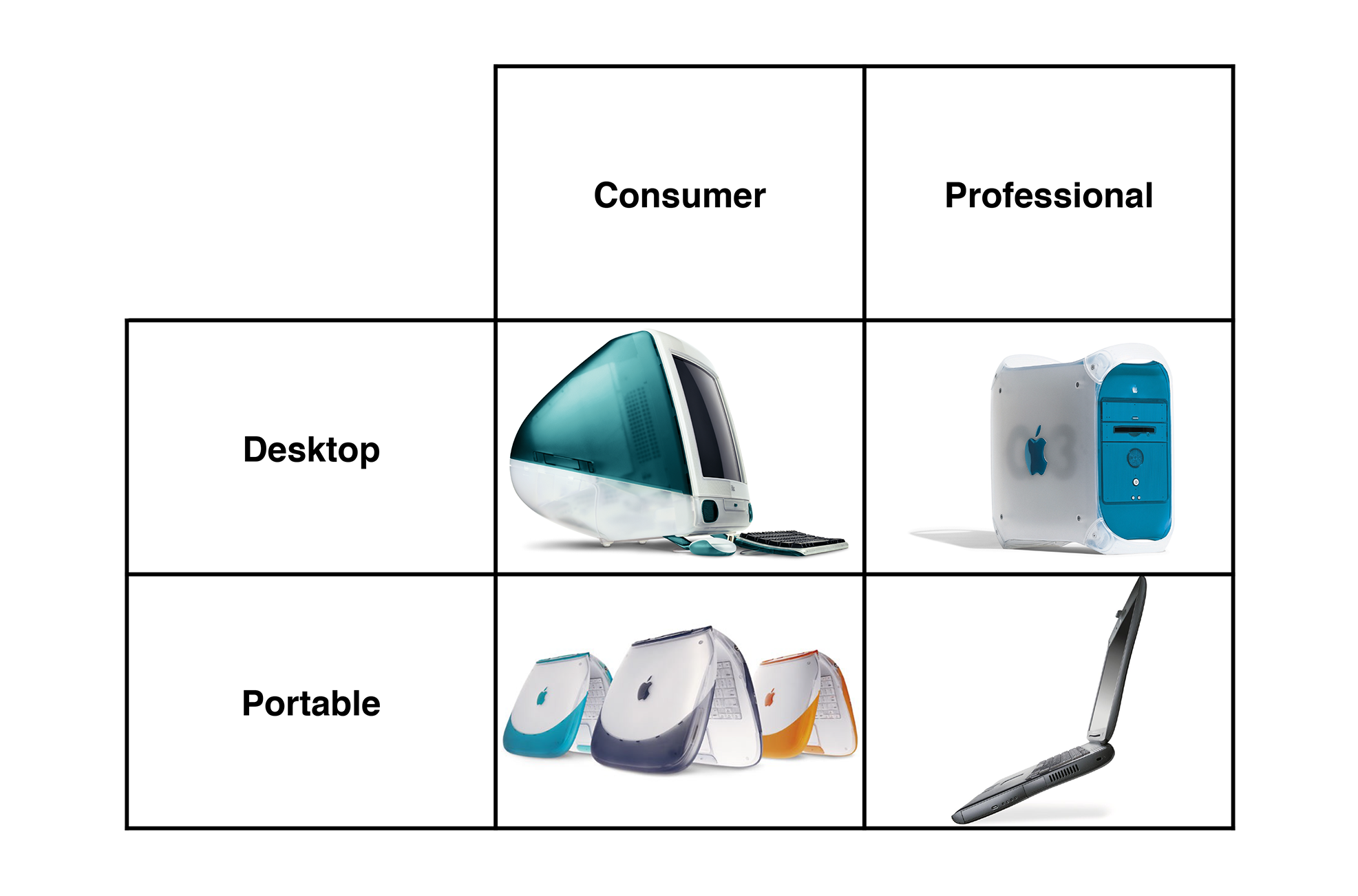
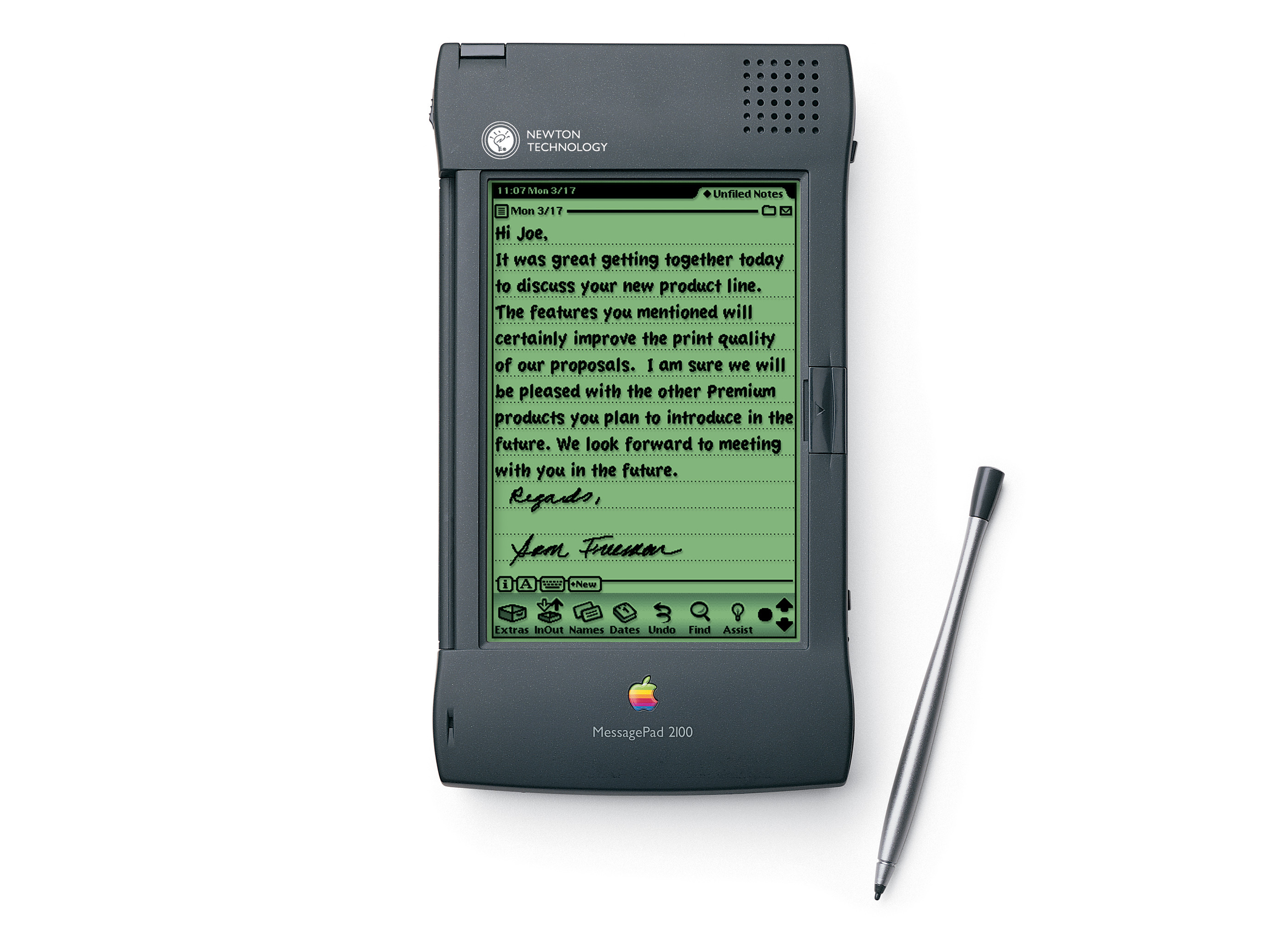
Here is the announcement itself, in its entirety:
Apple Computer, Inc. today announced it will discontinue further development of the Newton operating system and Newton OS-based products, including the MessagePad 2100 and eMate 300.
“This decision is consistent with our strategy to focus all of our software development resources on extending the Macintosh operating system,” said Steve Jobs, Apple’s interim CEO. “To realize our ambitious plans we must focus all of our efforts in one direction.”
Apple is committed to affordable mobile computing, pioneered by the eMate, and will be serving this market with Mac OS-based products beginning in 1999.
Apple will continue to market and sell its current inventory of MessagePad 2100 and eMate 300 computers, as well as to provide support for their installed base of users. The Company is committed to working with its customers and developers to ensure a smooth transition to Mac OS-based products.
In hindsight, it’s easy to poke fun of the Newton, but its user base was passionate about the platform, and didn’t take the news well. A small crowd of them showed up at Apple’s Inifinite Loop campus to make their point known, as was reported by CNET at the time:
As Newton developers gathered outside Apple Computer (AAPL) headquarters today to protest the computer maker’s decision to discontinue the handheld device, company executives responded in low-key fashion.
Apple reserved space in its parking lot and supplied cookies, pastries, coffee, and other drinks to Newton protesters on what has turned out to be a crystal-clear day after yesterday’s rainfall.
Perhaps 100 protesters turned up, carrying signs reading “Newton forever,” “Newton is my pilot,” and “I give a fig for the Newton.”
The article goes on:
Apple has scheduled a teleconference Tuesday with Newton developers to answer questions and hear their feedback.
Meanwhile, Apple is offering a number of sweeteners to lure the Newton developers to the Mac platform, including a free membership in the Apple developers program.
[…]
“We understand it was a tough decision and they’re disappointed,” said Apple spokeswoman Rhona Hamilton. “Part of our giving them some space today is to appreciate that it’s a technology that people like and we discontinued it.
“But it is very unlikely that we will change this decision because it was a business decision,” she added. “We hope to convert them to using the Macintosh platform.”
In the June 1998 edition of Pen Computing Magazine, David MacNeill1 wrote a comprehensive history of the platform, then got into some of the possible reasons for its death. He also pointed out that customers weren’t the only ones on the losing end of the decision:
Though Newton owners certainly have good cause to be angry with Apple, developers have been hit the hardest by the untimely death of the Newton platform. Many hard-working companies lost their reason for existing overnight, and have suffered substantial financial losses as a result. Though less visible than commercial software companies, we know of quite a few Newton-specific development efforts involving years of work on vertical market solutions that will never ship due to a lack of hardware.
“Hundreds of businesses have been hurt by Apple’s decision to kill the Newton,” says Newton consultant Josh Weisbuch. “Companies such as Transport Data were well into the development of a ruggedized handheld for the emergency medical and law enforcement industries. Renaissance Digital was working with Children’s Hospital here in Boston to create a completely Newton-based otolaryngology department.”
Many developers rode the “Newton is dead” rumor roller coaster throughout 1997 and 1998, and ended up losing tons of money spent on damage control when their big customers got spooked. Many Newton evangelists reluctantly recommended that Apple remove its logo from Newton devices to make them more palatable to corporations. “Apple never understood the critical importance of vertical markets in creating new markets and still can’t justify investing in creating them,” says John Covington. “It’s one of the reasons I left Apple.”
Many were not happy about this change in direction, but as someone once said, focus is about saying no. If the Apple of 1998 needed to do anything, it was focusing what was working well.
If you want to read more about the Newton, I rounded up some great links a few years ago.
- His whole series on the Newton serves as a great time capsule. ↩
Mac Power Users #681: Cloudy with a Chance of Beachballs ⇢
In the 12 years since its debut, iCloud has grown from a relatively simple service to one that is the glue holding the Apple ecosystem together. This week, David and I talk about the various components of iCloud, how they work, and what to do when they don’t.
What Do You Get When You Combine a ThinkPad 701C and Framework Laptop with an iPad Display? ⇢
You get something wonderful. Karl Buchka writes:
I’ve been working on this project on and off for the last six months or so. There’s still lots left to do, but I did the first major mock-up today and I’m pretty pleased with the outcome so far.
TL;DR summary:
- Framework powered Thinkpad 701C
- iPad 7 display panel (2160×1620)
- Fully working original keyboard and trackpoint
- Ports/peripherals: 3x USB-A, 2x USB-C, 1x GigE, headphone jack, Wifi, Bluetooth
Here’s a photo of the project:
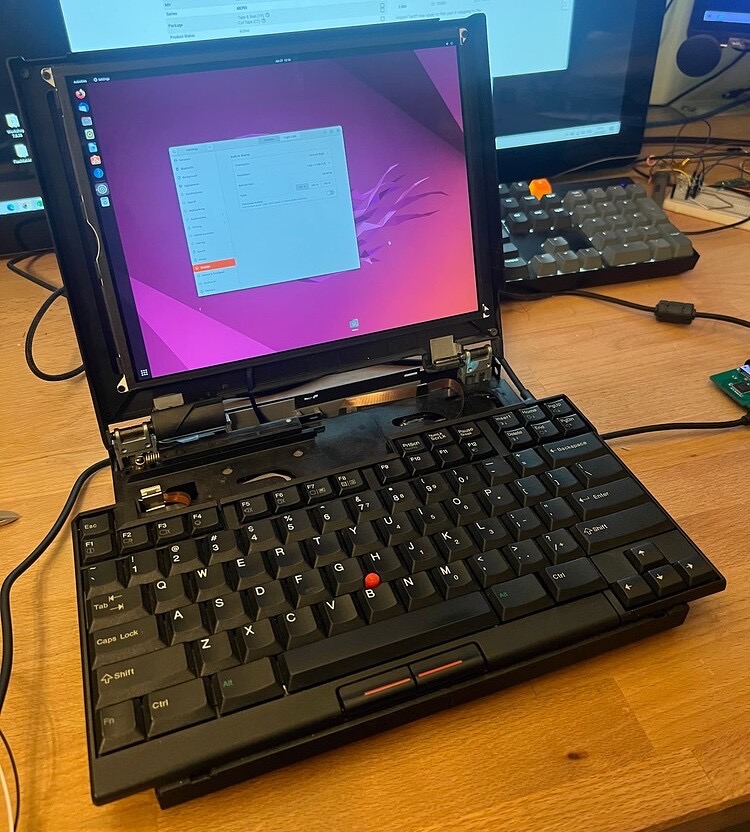
If you aren’t familiar with the ThinkPad 701C, it’s one of my all-time favorite laptop designs for two reasons:
- I love ThinkPads.
- It’s bonkers.
The 701C came with a foldout keyboard that let the laptop be compact when closed and feature a full-sized keyboard. LGR has a thorough review of the machine on YouTube:
Inside, Buchka stuffed the components from a Framework notebook, which was designed to be as upgradable and repairable as possible. Using an iPad panel as the display is the perfect finishing touch.
via 512 Pixels reader Zac