512 Pixels reader Brian sent me a screenshot they took way back on Mac OS X 10.0, showing that Apple’s current struggle with transparent user interface elements isn’t anything new:
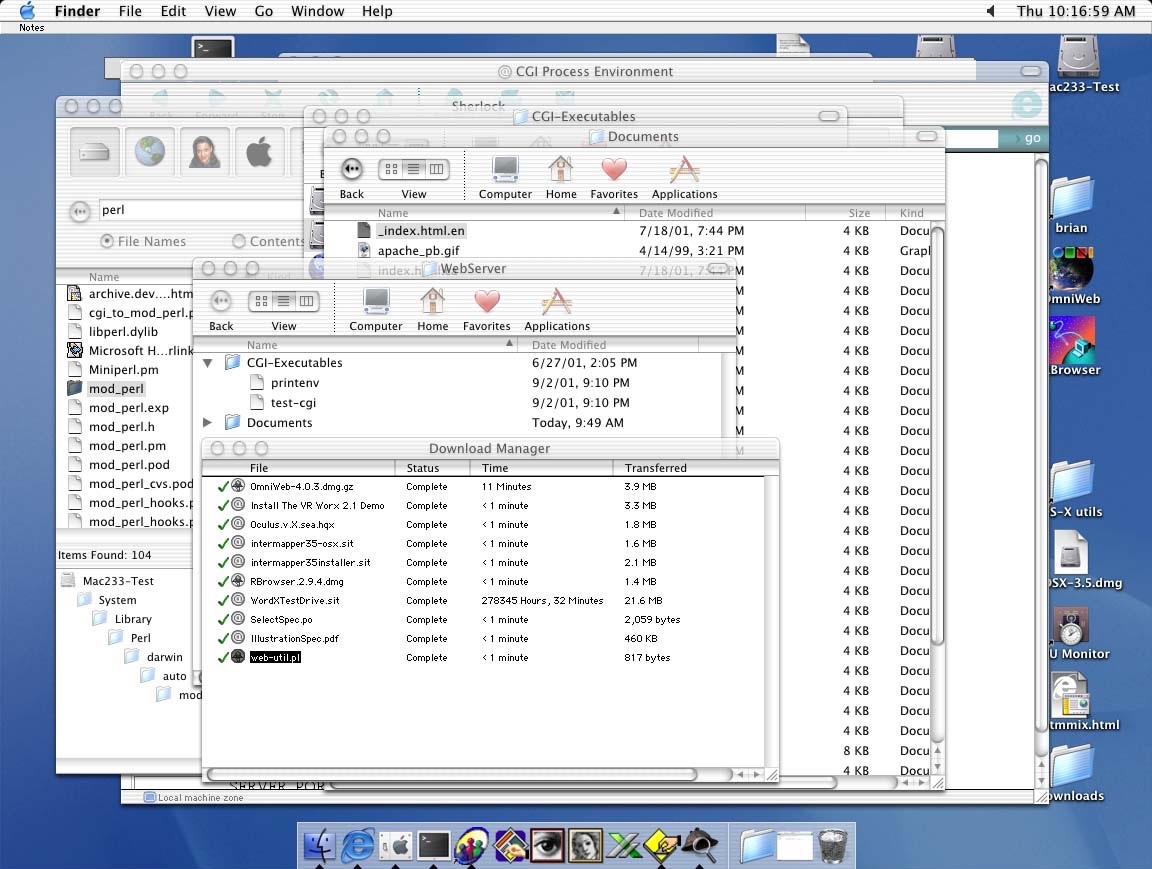
512 Pixels reader Brian sent me a screenshot they took way back on Mac OS X 10.0, showing that Apple’s current struggle with transparent user interface elements isn’t anything new:
Clipboard managers are one of those utilities you don’t realize you need until you try one. And for years, they’ve all felt the same—catch-all junk drawers where your copy/paste history goes to die.
Quip takes a different approach. It’s a clipboard manager and text expander for the Mac, iPhone, and iPad, built to feel native, private, and actually enjoyable.

With the new Liquid Glass design in macOS and iOS 26, Quip looks like it belongs in Apple’s world of apps. Smooth animations, frosted transparency—it’s modern and responsive in a way most utilities never are.
And now, with Apple Intelligence, Quip can do things no other clipboard manager can:
Suggest the right collection for new items, based on your existing setup.
Learn your patterns over time to filter out the junk you don’t want—like 2FA codes, random strings, or boilerplate text.
All of it happens on-device, privately and securely.
Quip has even more features: iCloud sync, a beautiful searchable history, OCR text capture on macOS, and Super Shortcuts for fast text expansion anywhere.
If you live in copy and paste, Quip makes it smarter.
Try it free on the App Store or learn more at bzgapps.com/quip.
Underscore, writing last week:
Five years ago, a TikTok video changed my life.
And I can say that without any hyperbole.
I remember watching Widgetsmith rocket to the top of the App Store, and I could not have been more excited for Dave as it was happening. It’s a thrill to work on such a large project now.
Our 7th annual 12-hour live show raising money for St. Jude is coming up on Friday! Please tune in and donate:
Today, Apple launched iOS 26. Over at Cross Forward, we’ve got major updates to three of our apps today:
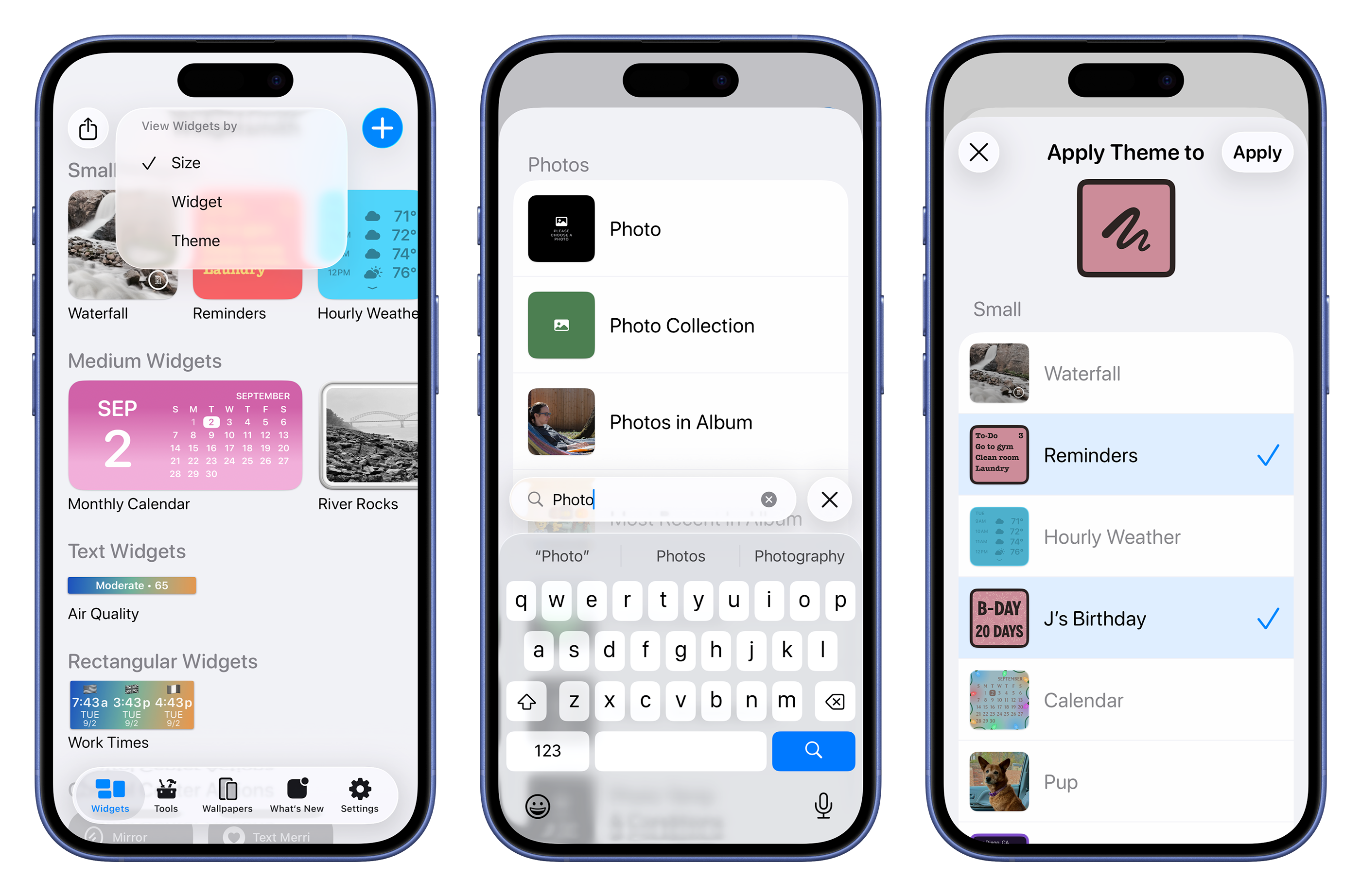
This is a big one. Widgetsmith’s design has been updated for Liquid Glass, but we took that opportunity to make meaningful improvements across the app:
Widgetsmith 8 is in the App Store now.
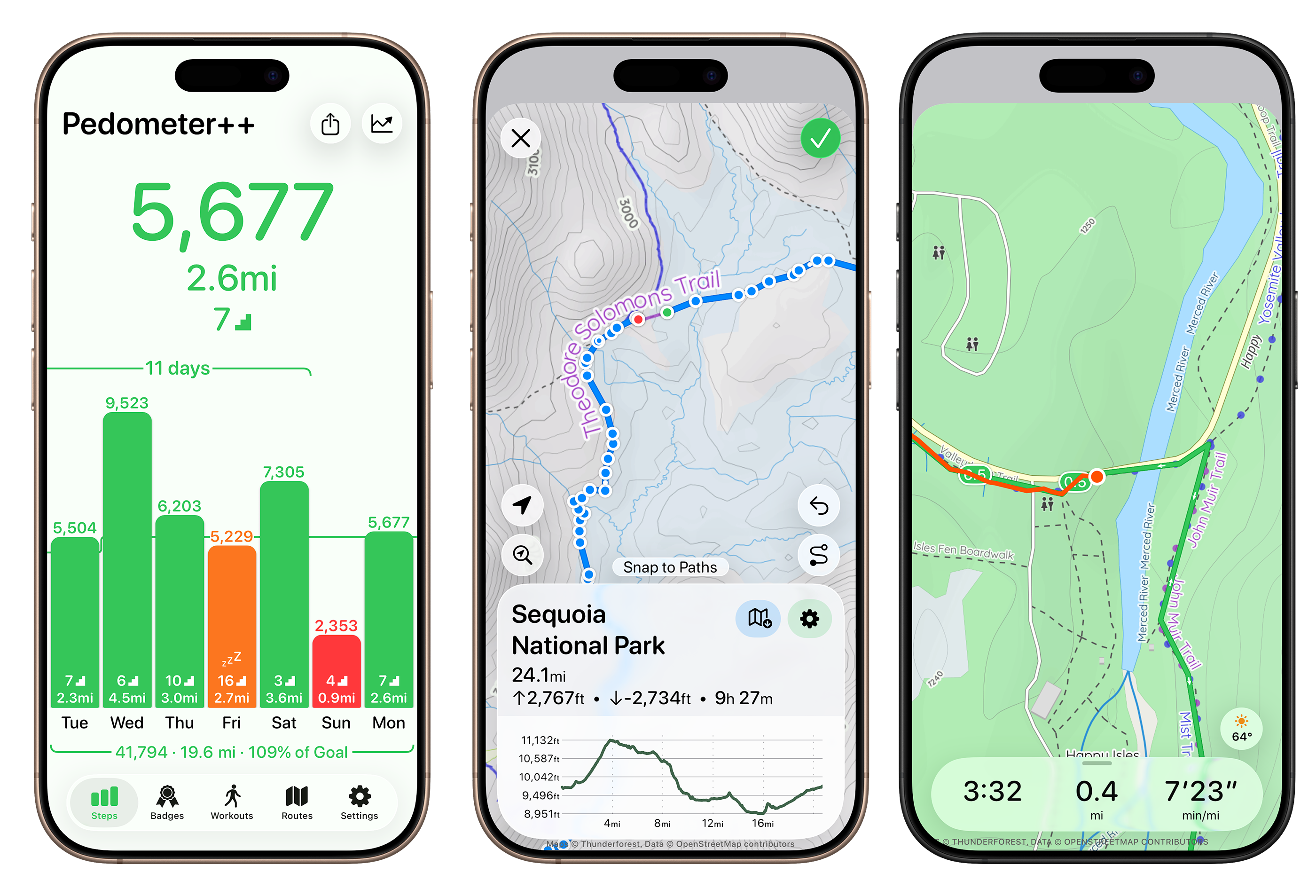
Pedometer++ 7 sports an updated design that I really love. My favorite little touch is that the main screen with your step count gets a tinted background to reinforce where you are in comparison with your goal for the day.
Maps are much improved in this release as well, with an updated color palette for the light map tiles, and the addition of a new dark mode tile set. We worked with an actual cartographer (!!!) on these, and it shows.
Pedometer++ 7 is in the App Store now.
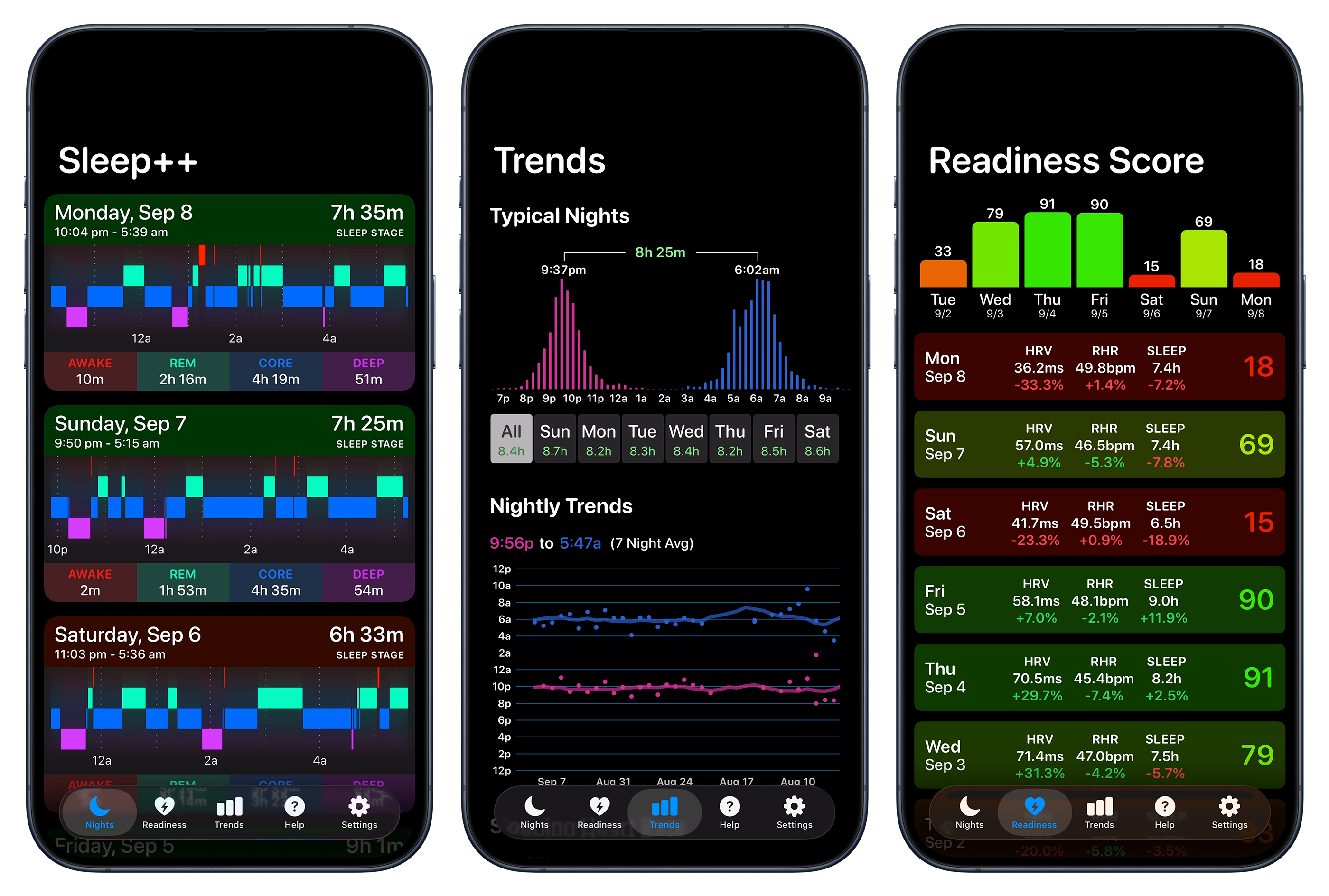
In addition to the updates to Widgetsmith and Pedometer++, Sleep++ has also been updated for Liquid Glass, and I think it looks great:
macOS 26 Tahoe is two things at once: It’s the broadest and most productivity-focused update for macOS in years, while also taking collateral damage from Apple’s broader design ambitions on its other platforms.
It features the biggest update to Spotlight ever, including direct access to app actions and Apple’s first-ever built-in clipboard manager. Shortcuts adds deep automation support and direct access to AI models, changing the game for many aspects of Mac automation productivity. These are features that will delight Mac users and help them work better.
Unfortunately, they’ll be productive while using a tweaked design that’s not nearly as prominent as it is on the iPhone and iPad, but still has to be labeled as a net loss for the Mac.
Ticci is back with a comprehensive look at iOS and iPadOS 26:
There was a lot riding on Apple’s software strategy in 2025. Now that we’re entering the final phase of the Apple product launch year, I believe that, in hindsight, their three key moves from the first half of 2025 are – at least from a marketing perspective – the best approach they could have followed.
First, the new AI Siri features were officially delayed to “the coming year”, and at WWDC, executives explained why they needed more time than anticipated to get them right. Then, Apple unveiled a new design language that – to varying degrees of success – unifies its user interfaces across platforms. Finally, the company embraced the iPad’s modular nature with a complete reimagining of the device’s software in iPadOS 26, borrowing from the decades-long traditions of macOS to bring new windowing and multitasking features to the tablet. You have to hand it to Apple PR: that’s a pretty effective marketing strategy to, once again, steer the public conversation and attention to a place that’s more comfortable for Apple.
But my reviews aren’t about marketing; they’re about the reality and everyday practicality of using these operating systems. Beyond the renewed promise of Apple Intelligence and a future version of Siri, what is it actually like to use the new AI features shipping in iOS 26 today? Once the novelty of Liquid Glass wears off, does the new design meaningfully improve our interactions with apps? Is iPadOS 26 truly the miracle answer to all of our iPad woes that we thought it could be at WWDC?
These are the questions I hope to provide an answer to with this review.
I look forward to these every year, and this one doesn’t disappoint. I suggest reading it on an iPad with a nice cup of coffee.
I spent a large part of my weekend making over 150 screenshots, just for you.
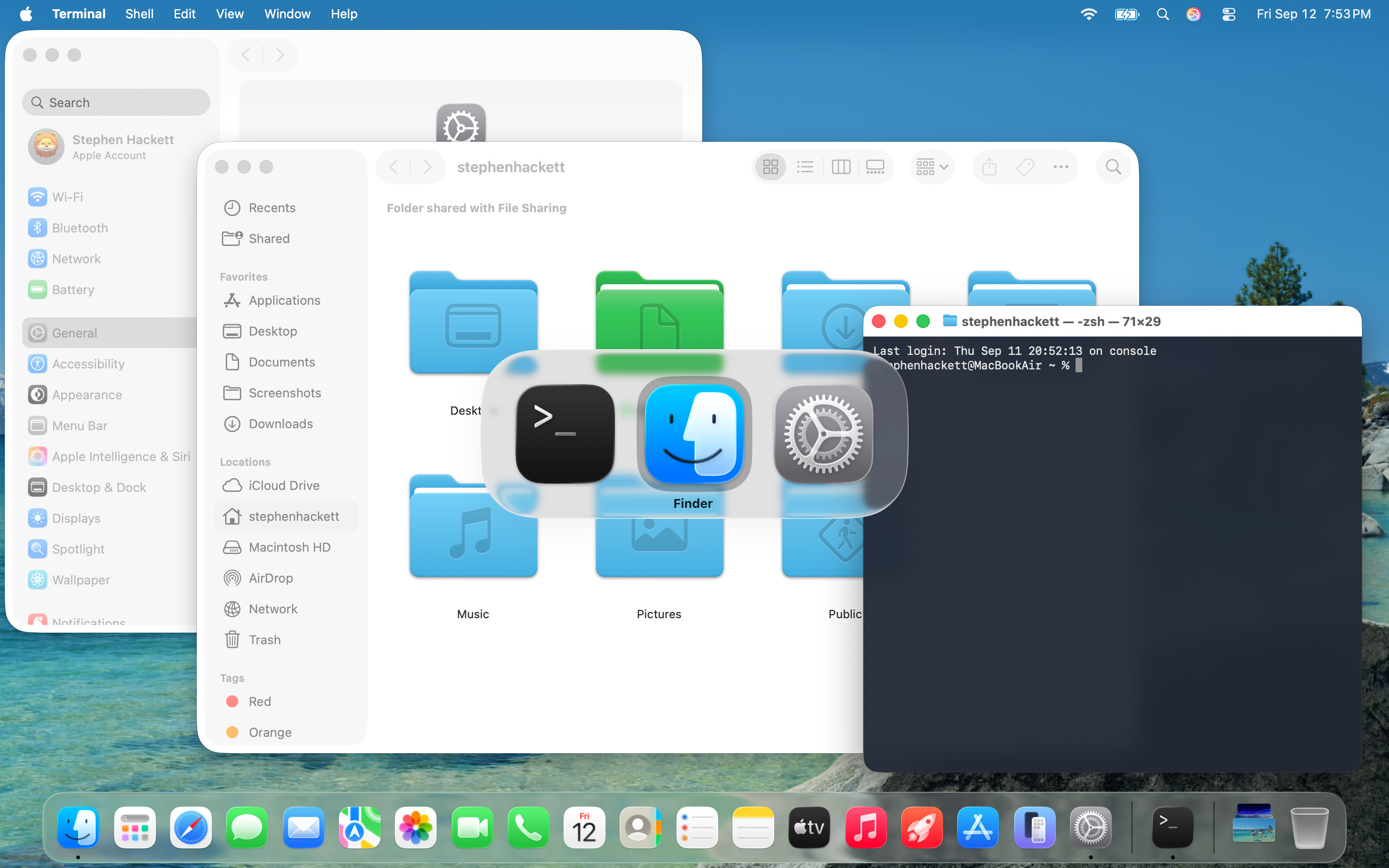
I mostly like Liquid Glass on iOS and iPadOS, but it feels like macOS got a lot less time in the oven than the mobile operating systems did. For example, toolbar buttons still really stick out, and I wish app icons weren’t all in squircle jail:
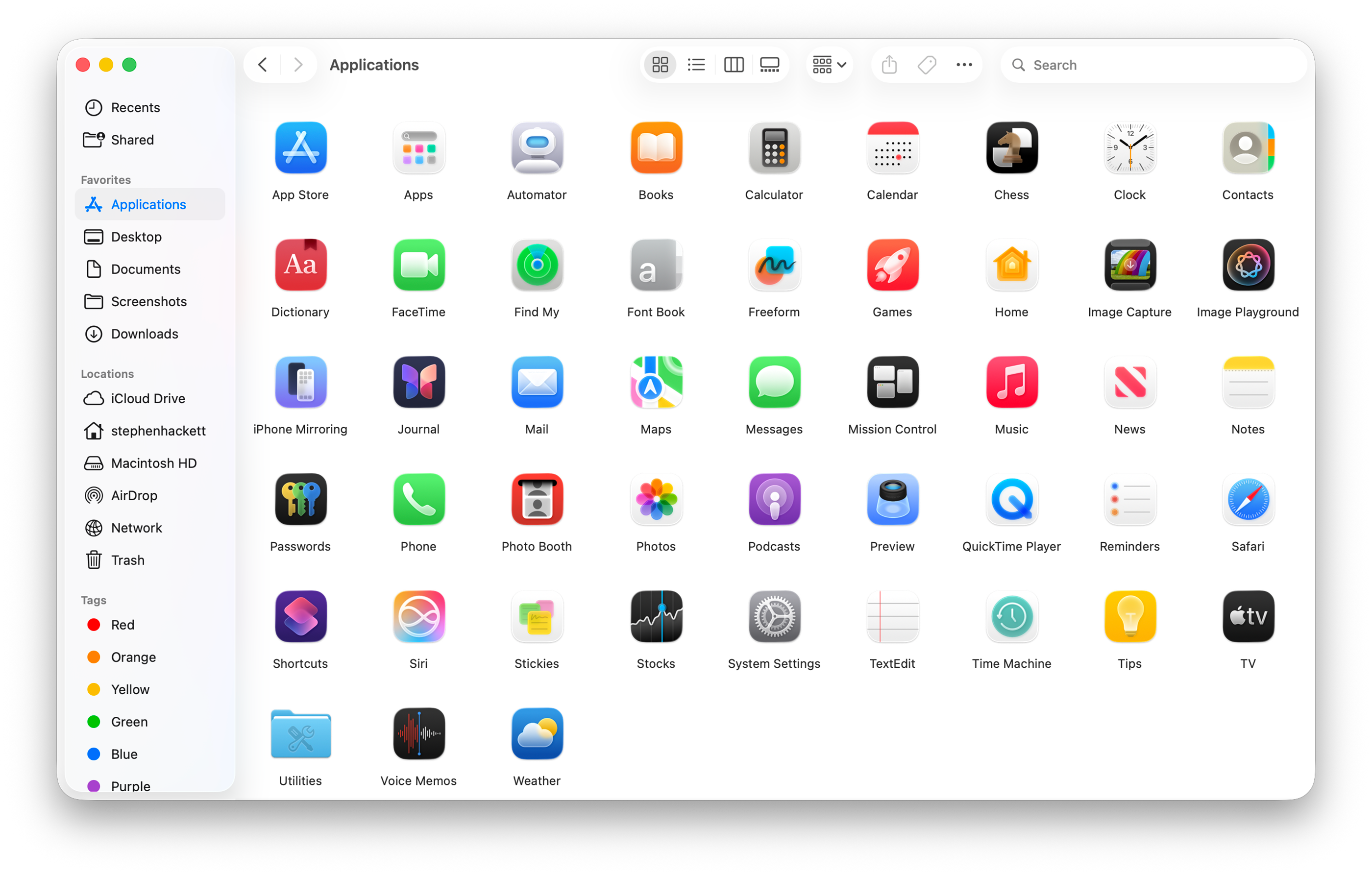
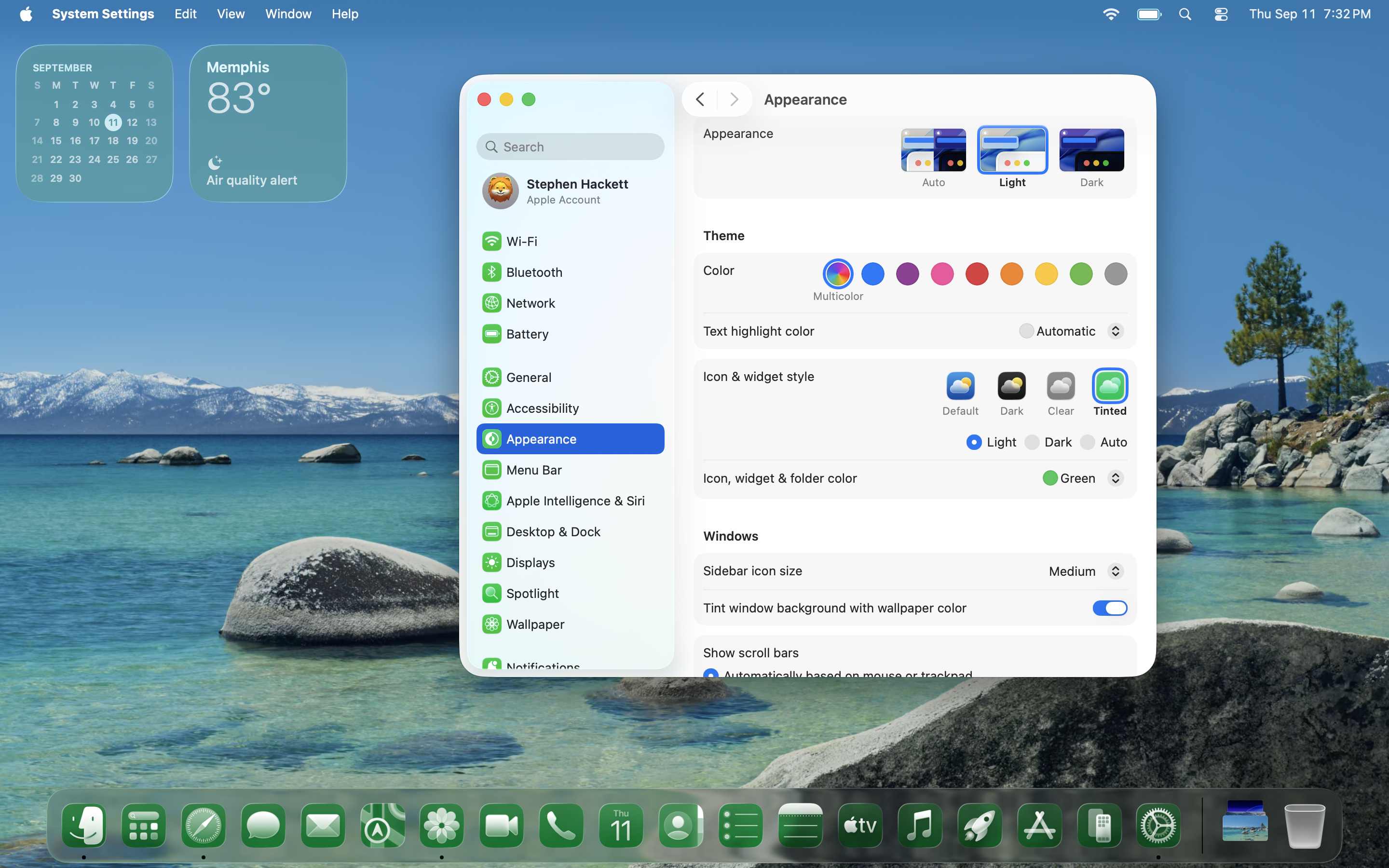
Like previous years, I have various sections of screenshots for you to check out, but with a new addition this year: Icon & Widget Styles.
The macOS Screenshot Library is sponsored by Rogue Amoeba. Head to rogueamoeba.com to learn more and download their free trials today.
I know this puts me in a very specific age bracket, but I did almost of all my writing in high school in AppleWorks 6 and still miss it.
It’s wild that we’ve been watching iPhone events for nearly two decades now, but it’s true, and over that time, things have fallen into a predictable pattern:
That was certainly true this time, and yet I was more excited going into this iPhone event than I have been in the last few years. That excitement remains after the event, and it’s because Apple played to its strengths in a way that it hasn’t in a while.
Contrast this feeling with how the fallout over Siri and Apple Intelligence continues to haunt the company. I think WWDC 2024 is going to echo through the halls of Apple history for years to come. While Apple Intelligence was mentioned several times during Tuesday’s live stream,1 the company was there to discuss its hardware portfolio, something that even in the world of AI and services, is important to Apple and its customers.
Despite some rumors — and my desires — of a naming scheme shift to match iOS 26, this year’s iPhones fall in line with their older siblings, and pick up the 17 name.
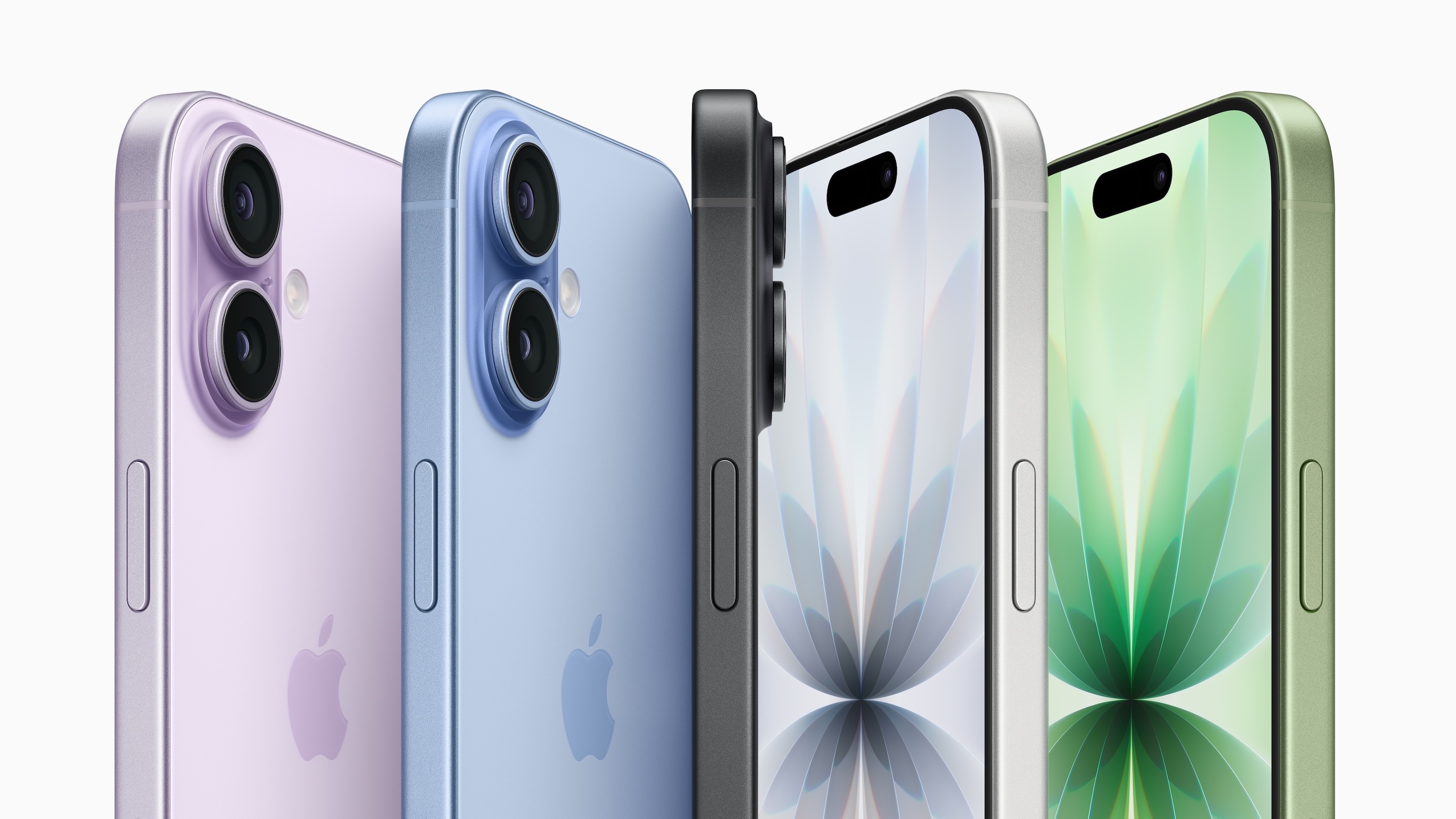
The iPhone 17 is the best entry-level iPhone ever. The addition of ProMotion and the always-on display addresses the most common complaints people have had about the base model. The new screen will go a long way in modernizing this device; I would never consider going back to a phone without an always-on display, even if I do turn off ProMotion.
It’s worth noting that basically every other display specification is the same between all four phones this year:
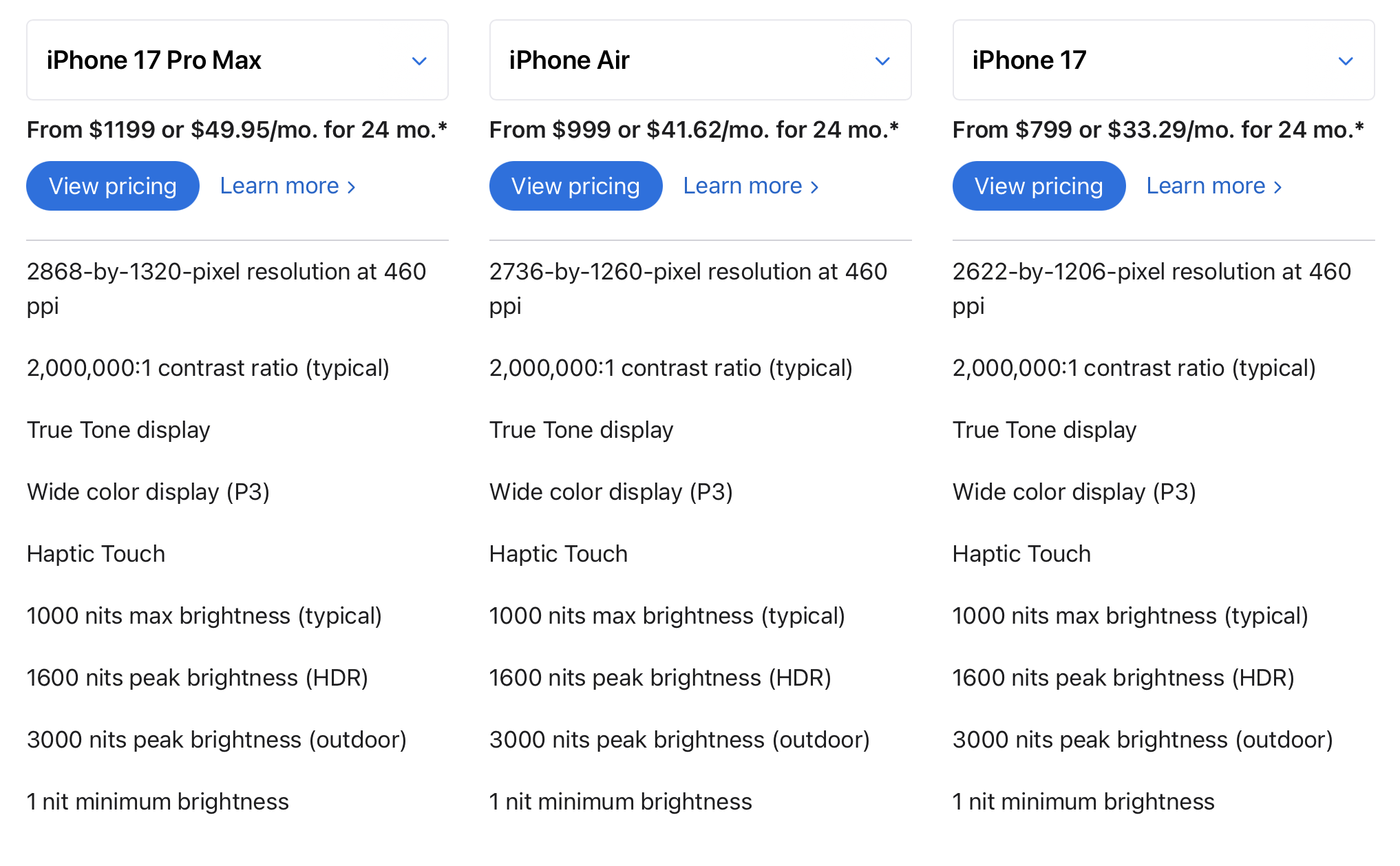
The iPhone 17 picks up the same selfie camera improvements as its siblings, meaning users can take portrait or landscape images much more easily, and with a 48 megapixel sensor for the back camera, those photos should look great too.
For that price, users can get an iPhone that has features previously reserved for the Pro, in a more durable design. Several times throughout the event, Apple touted its use of Ceramic Shield 2 on the front of these new phones. While the other phones have the original Ceramic Shield on their backs for the first time, that’s missing from the 17. I suspect that will come in the future.
On the inside, the 17 is no slouch. There’s no reason to doubt that the A19 is another in a long line of Apple silicon wins. Hopefully, the thermals can be kept under control, but I don’t think the 16 struggled with that the same way the 16 Pro did.
Interestingly, the iPhone 17 did not pick up the new “iconic plateau” that dominates the industrial design of the Air and 17 Pro. I suspect that will come in the future as well, but for now, it does make the 17 look much more like the 16 than its classmates look like the 16 Pro.
However, that is not going to be an issue for consumers looking to pick up an iPhone 17 in any way. Most people buy an iPhone when their old one breaks, and when they do, they are in for a treat at $799.

Since the 11 Pro first appeared back in 2019, I’ve opted for either the Pro or Pro Max to get as much camera performance as I could out of my iPhone. The 17 getting a larger sensor didn’t paint Apple into a corner with the Pro, as shown by the fact that all three rear sensors are 48MP this year for the first time.
This does lead to the slightly funny business of how Apple is claiming this three-camera system is like having five cameras on the back of the phone, at .5x, 1x, 3x, 4x, and 8x levels of optical zoom. Jason Snell chimed in on Six Colors:
Here’s what’s happening: Apple’s put 48 megapixel sensors in every single one of the cameras on its flagship iPhones. This started with the iPhone 14 Pro, and Apple has adjusted it quite a lot over the last few years. Those 48 megapixels can be processed in all sorts of ways. Apple can capture all 48 megapixels, or capture multiple binned 12-megapixel frames that gather more light and fuse them with a larger capture to create an optimal 24 megapixel image, or it can just use the pixels at the very center of the sensor to create a technically-optical “zoom” at a lower-resolution.
These different techniques allow Apple to balance image quality, file size, and the desire of the user to zoom in on scenes. They also allow Apple to market the 4x zoom on the iPhone Pro’s telephoto sensor as going to 8x, since if you go to 4x and then crop the center of the sensor data, you’ve effectively got an 8x optical zoom. Boom, two cameras! And now all three cameras can do it, so three becomes six! Throw in two macro modes and you’ve found how three iPhone 17 Pro cameras become eight, and how one iPhone Air camera becomes “four lenses in your pocket.”
My experience has been that these various optical lengths are good. These sensors are big and dense enough to pull these tricks off, and I have no reason to think that the 17 Pro will let me down here.
The housing around those cameras is the focus of much of the conversation I’ve seen over the last couple of days. This design isn’t novel; the Google Pixel and others have been using a full-width camera bar/bump/visor/plateau for years, and for good reason. It allows for more room inside the phone, and to my eye, it looks better than the back of previous iPhones. The camera plateau on my iPhone 16 Pro is already more than 50% across the back of the device; going all the way makes a lot of sense to me.
The inside of the phone has also seen significant changes, starting with its construction. The circle that began with the steel iPhone X and continued with the Titanium iPhone 15 Pro is now complete with the aluminum iPhone 17 Pro.
This time, though, Apple has turned to its love of unibody design, which the first MacBook Air introduced way back in 2008. I want one of these bare chassis parts to have on my desk:
This unibody and the use of Ceramic Shield should make this iPhone very durable, which is great because the last thing I want to do is put an orange iPhone in a case.
Every once in a while, an Apple product comes along that shouldn’t be possible. The iPhone 4 and iPhone X come to mind, as do the iMac G4, original MacBook Air, and the 12-inch MacBook.
I’m putting the iPhone Air on that list.
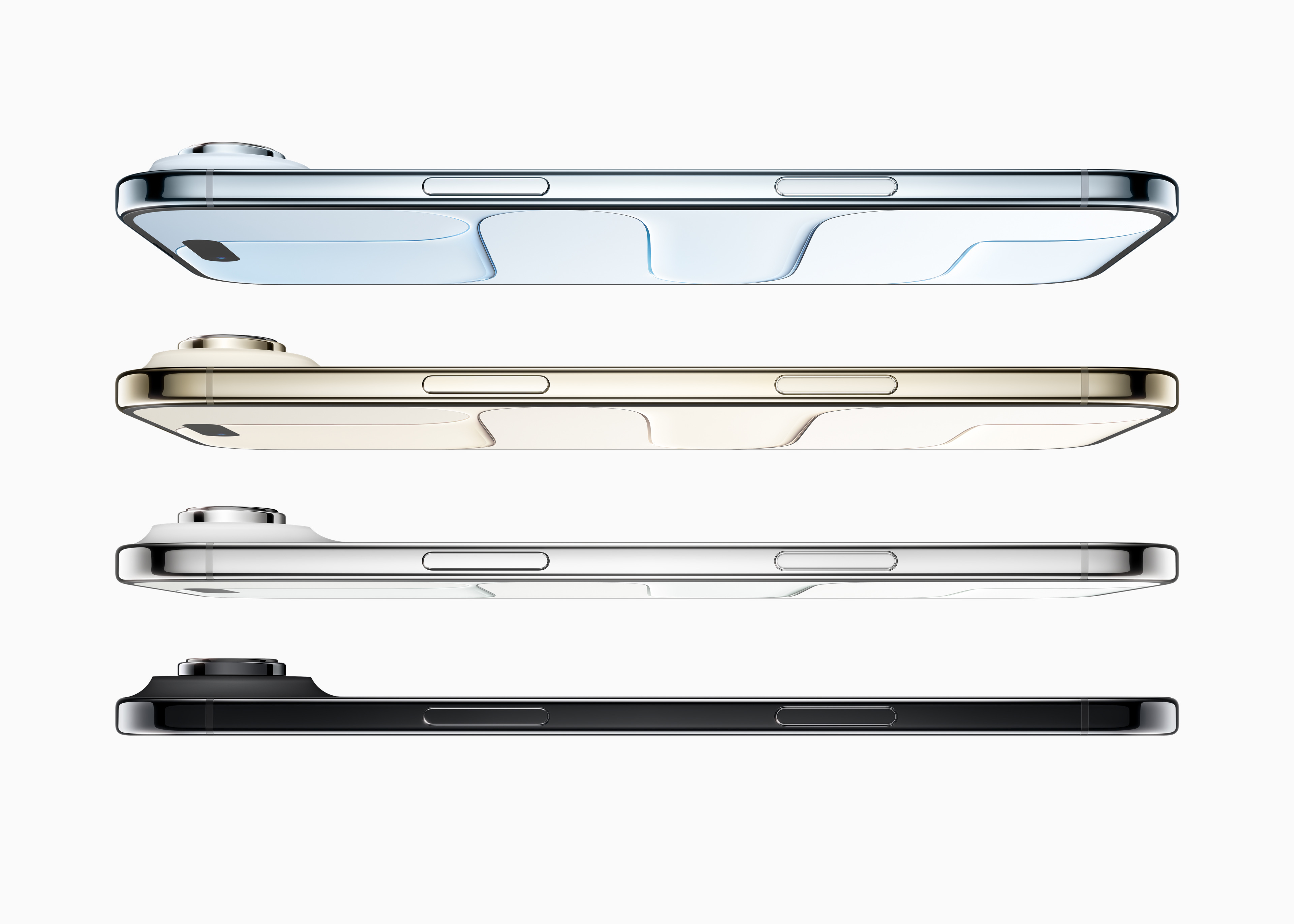
I still shudder thinking about an iPhone without buttons or ports, but seeing the iPhone Air makes me think that Apple is thinking about it. Heck, the USB-C port on the bottom of the phone is slightly off-center on the Z-axis to (probably) accommodate the screen. Sadly, like the iPhone 17, the iPhone Air’s USB-C port is stuck running at ancient USB 2 speeds, despite the Air using the same A19 Pro SoC as found in the Pro.
While funny, that’s not a terrible trade-off for something so thin. I’m more bummed about the lack of a bottom speaker.
This is all made possible due to some breathtaking engineering. The entire logic board, SoC, cameras, and more are all packed into the plateau:

This makes me think of the time Steve Jobs compared the logicboard of the MacBook Air to a No. 2 pencil, or when, years later, that logic board dwarfed the one in the 12-inch MacBook.
Surely this is why the iPhone Air has just one camera. I assume Apple didn’t want to make the plateau taller, eating into battery space below it, and there’s no room for another lens to the side of the single 48MP camera.
Every product is a balance of trade-offs, but rarely are they so apparent. That makes this phone the most interesting iPhone in years.
Also interesting is its place in the lineup. It sits in the spot previously held by the 14, 15, and 16 Plus, which replaced the 12 and 13 mini. Apple has struggled with this 4th slot, and we’ll see if the Air is the right product at the right time. I suspect it will have its fans, but concerns of battery life and durability will keep some people away. Apple seems confident those aren’t going to be issues, but is also selling a new MagSafe Battery that only works with the Air.
Lastly, there is the name: “iPhone Air.” No 17 to be found. Will we see an iPhone Air 2 next year? That’s for Joz to know and for us to find out next year.
There have been a lot of words written and podcasted about what the iPhone price would be in our … current environment.
Apple doesn’t like to just come out and say, “Welp, prices are higher now.” The company places an inordinate amount of pride in releasing upgraded products at identical price points. But this year, it raised iPhone prices, sort of, kind of.
Again, we dive into The Snell Zone:
Start with the iPhone Air, which begins at $999, a slot that was previously occupied by the iPhone Pro and a full $100 more expensive than the iPhone Plus, which it’s replacing in the product line. Apple has converted one of its two base-model phones into a new boutique mid-range model with a fancy design; we’ll see how that works out for them. My gut feeling is that it’ll do better than the iPhone mini or iPhone Plus did, but I don’t know if that’ll be enough to satisfy Apple.
Then there’s the iPhone 17 Pro, which now starts at $1099, up from the $999 starting price introduced with the iPhone X. Apple has gone to great lengths to point out that the $1099 price is the same as the similarly-configured iPhone 16 Pro model last year, because the iPhone 17 Pro has 256GB of base storage, and the iPhone 16 Pro started at 128GB. Yes, of course, this is true, and it allows Apple to claim that it’s not really raising prices, but is just continuing to fill the old slots.
It doesn’t change the fact that the iPhone Pro can’t be bought for less than $1099, though.
As I mentioned, this crop of iPhones really shows what Apple is best at. There are some big hardware swings in these phones, no doubt the result of years of work. For that work, customers will get better battery life, brighter displays, more stunning photos and videos, and the best privacy and security in the industry.
If you listen to the rest of the industry, these things matter less than they ever have. Some believe we’re hurtling toward a rule of AI-powered devices that will replace things like the iPhone. As a result, Apple is part of a dying breed of companies just trying to wring the remaining drop of profit out of their businesses.
Take the closing of Ben Thompson’s piece on the event as an example of this thinking:
Apple, to be fair, isn’t selling the same sugar water year-after-year in a zero sum war with other sugar water companies. Their sugar water is getting better, and I think this year’s seasonal concoction is particularly tasty. What is inescapable, however, is that while the company does still make new products — I definitely plan on getting new AirPod Pro 3s! — the company has, in the pursuit of easy profits, constrained the space in which it innovates.
That didn’t matter for a long time: smartphones were the center of innovation, and Apple was consequently the center of the tech universe. Now, however, Apple is increasingly on the periphery, and I think that, more than anything, is what bums people out: no, Apple may not be a sugar water purveyor, but they are farther than they have been in years from changing the world.
I don’t make it a habit to bet against Ben, but I’m also not convinced by this line of thinking. Even if some magical AI-powered hardware comes along and knocks the smartphone off its throne, it’s going to be years away, and it’s going to happen very slowly. AI is nowhere close to being able to do the massive range of tasks that lead people to pull their phones out of their pockets.
Instead, I think the cooling effect the world has felt around the launch of new iPhones is an unavoidable side effect of a mature market. Of course, new iPhones aren’t as exciting now as they were ten years ago. The same thing happened to personal computers and even cars. Sometimes, great things come along, but most years these markets hum along. I don’t think what we’re seeing with the iPhone is a result of AI changing the world, but rather of time marching on.
Maybe the future is AI and flying cars and computers on our faces, but we’ve been promised those things for a long time, and if/until that future comes, Apple is going to keep making the most important device in our lives better and better.
With the dust settling from Apple’s event, the guys score their picks, covering the iPhone Air, 17, and 17 Pro, as well as new AirPods and Apple Watches.
Identity 4 has had a Macintosh Plus for years, but was unhappy with its bulk and heat generation, so they did something wild:
I ought to make a rack-mounted version of this computer so it can fit cleanly in my studio rack cabinets along with all my other conveniently packaged gear. I will even give it a sleek look and a clever name, something like Racintosh Plus… Hahaha yeah that’s pretty funny.
The amount of work that went into this is really something else.