
Federico was featured in the App Store, Federico shipped an Obsidian plugin and Federico has questions about Elgato’s new foot pedal.
512 Pixels
The Curious Case of Dropbox and macOS 12.3
Earlier today, Dropbox alerted its customers about an upcoming change to its Mac app:
Dropbox is actively working on full support for the upcoming macOS 12.3 (Monterey) release and will begin rolling out a beta version in March 2022.
If you choose to update to macOS 12.3, you may have issues opening online-only files in third-party applications on your Mac. As a temporary workaround, you can open online-only files directly in Finder.
Dropbox is already in hot water with some Mac users for its slow adoption of Apple silicon, and its resource-hungry nature on macOS.
This email and support document didn’t help things, and in no doubt led even more people to check out Maestral, an open-source macOS Dropbox client that has gained popularity over the last few months.
It seems that this issue, at least, is due to changes Apple is making in a future version of macOS Monterey, according to Joe Rossignol:
Dropbox did not provide any further details, but Microsoft recently said macOS 12.2 will be the last version that supports its own cloud storage service OneDrive’s current online-only files implementation. Microsoft said OneDrive will be getting a new online-only files experience that is “more integrated with macOS” and “will have long-term support from Apple,” adding that the current version is built on several technologies that are “now deprecated.”
Altogether, it appears likely that Apple has given cloud storage services like Dropbox and OneDrive advanced notice about system-level changes that will affect online-only files starting with macOS 12.3.
That Microsoft document includes this:
macOS 12.2 will be the last version that supports the classic Files On-Demand experience. For future macOS versions, this means:
- Files On-Demand will default to on for all users and cannot be disabled.
- Devices will migrate automatically to the new Files On-Demand as soon as they receive a macOS update. You cannot delay this update without also delaying an update to macOS.
- Both our Standalone and App Store versions of OneDrive will have the same behavior.
- Users running a developer or beta version of macOS will have the same experience as a release version of macOS.
I don’t know why Apple would change this feature, but it’s not hard to look at this as a move against services that compete with its own iCloud Drive feature. Given the scrutiny the company already faces when it comes to anti-competitive behavior, I’d sure like to see a better reason for this change, especially if iCloud Drive retains features similar to what Dropbox and Microsoft offer.
Update: The macOS 12.3 beta is out and includes this change, which is the removal of the kernel extension Dropbox and Microsoft were using. It’s been pointed out elsewhere that this change was announced back in 2019. Even so, I still believe all three companies could have done a better job rolling this news out. Apple should be more clear when changes coming to macOS will impact the user experience of folks using iCloud alternatives, and the likes of Microsoft and Dropbox shouldn’t be making the switch to the new file provider API at the very last minute.
Kbase Article of the Week: iDVD 6: Photos are Missing from iDVD Project After Upgrading⇢
After you open a project in iDVD 6 that you created in an earlier version of iDVD, an alert indicates that photos used in slideshows, backdrops, or drop zones are missing. You may be prompted to locate the missing items.
To prevent this issue from occurring, update to iDVD 6.0.4 or later.
Out of all of the iLife apps I used back in the day, I think iDVD seemed the most magical. The fact that I could burn a DVD, complete with menus, on my Mac was so, so cool.
Mac Power Users #624: Apple Apps That Need Some Polishing⇢
Apple ships a wide range of applications across its family of operating systems. However, over the years, they have received uneven amounts of support and attention from the company. This week on MPU, David and I talk about some of these apps and which ones could use some love from the folks in Cupertino.
AirBuddy 2.5⇢
The newest version of Gui Rambo’s wonderful menu bar app for managing Bluetooth devices comes with some real goodies, as John Voorhees writes:
Connecting to your devices and handing them off to another Mac is noticeably faster with AirBuddy 2.5. Open your AirPods’ case, and the app’s UI for connecting appears immediately. As I covered with version 2.0, AirBuddy can also transfer your Apple trackpad, mouse, and keyboard connection to another Mac, using a feature called Magic Handoff. Today’s update introduces version 2.0 of that feature, which is faster and has been reliable in my testing. The latest version of the feature will even attempt to wake a target Mac up if it’s in sleep mode. Handing off input devices isn’t something I do regularly, but it can be handy if you work across a desktop and laptop Mac or run a headless Mac server, for example.
It also comes with a new widget for showing battery levels, optional battery alerts and support for Shortcuts on the Mac.
AirBuddy 2.5 is a free update to the $9.99 app. If you live in a Bluetooth-heavy world, it’s a no-brainer.
Unite 4⇢
My thanks to Unite 4 for sponsoring 512 Pixels this week. It turns any website into a lightweight, customizable app in mere seconds on your Mac. 512 Pixels readers get 20% off this week when you purchase Unite 4 at bzgapps.com/unite512 or when you use the promo code ‘512Pixels’ at checkout.
Apple Should Bring Back Dashboard
A few years ago, I wrote about the now-dead Dashboard, which was was in macOS for a long, long time:
While not as flashy or important as Tiger’s keystone feature, Spotlight, Dashboard still enjoyed a big push from Jobs on stage.
A user could tap a keyboard shortcut or visit a hot corner and Dashboard would activate, dimming the screen and flying in widgets. Adding new ones could be done with a click of the mouse.
(My Titanium PowerBook’s GPU couldn’t render the water ripple effect that played when a new widget was added to Dashboard. However, college roommate’s aluminum PowerBook could do it without breaking a sweat. I was insanely jealous of him for about 72 hours after we both installed Tiger in our dorm room.)
Jobs pitched widgets as mini-apps that let you look up a quick bit of information without ruining your workflow or train of thought. They allowed for quick interactions. They were present when you needed them, and disappeared when you didn’t.
The original design of Dashboard was very of its time. Just soak this in for a minute:
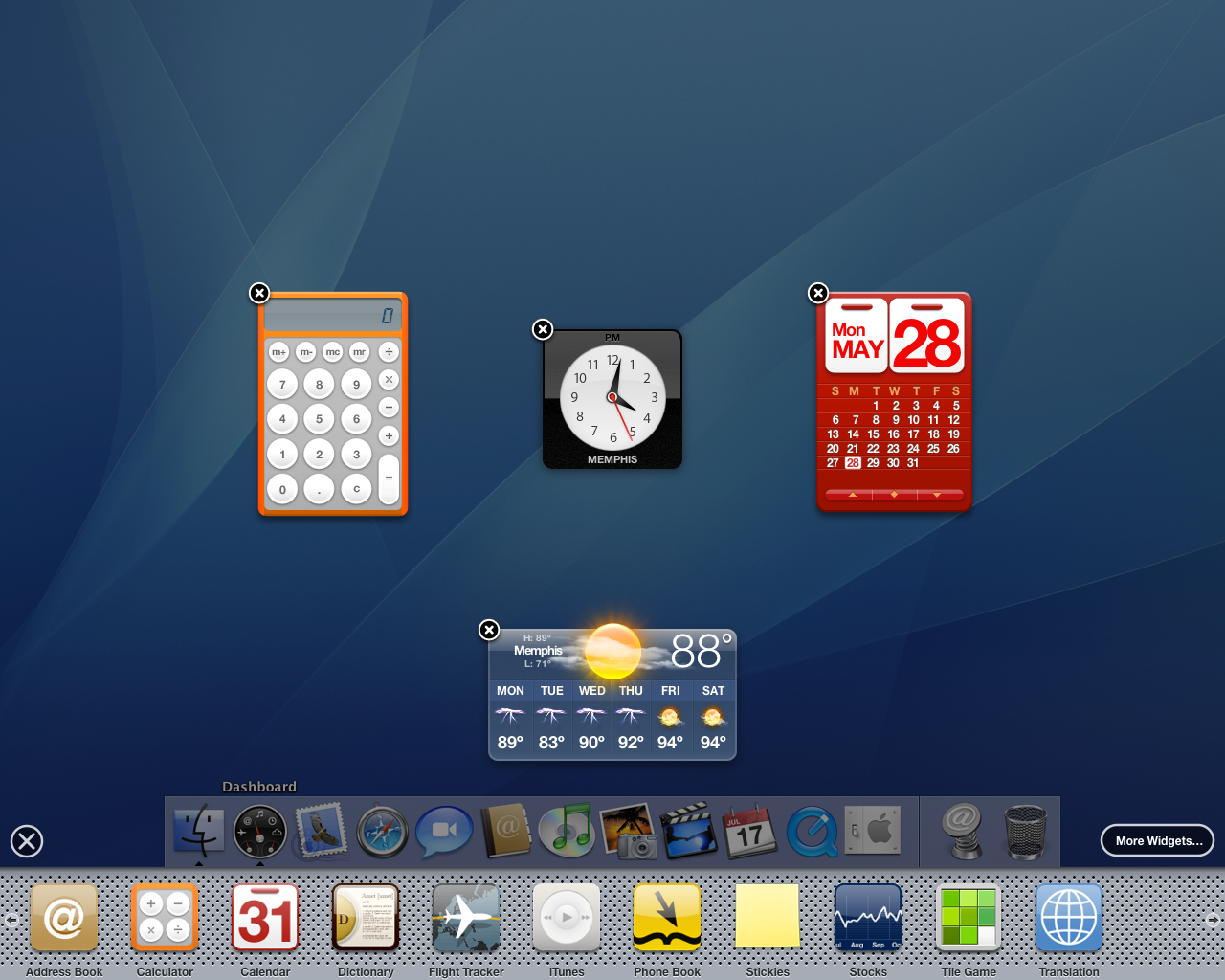
The design of Dashboard got toned down over time, and eventually it wasn’t even enabled by default on clean macOS installations. Keyboards that once shipped with a dedicated Dashboard shortcut were slowly phased out. By the time Apple finally pulled the plug on Dashboard in macOS Catalina, most of the widgets that once graced this corner of the OS had died off. The party had packed up years earlier, leaving just a small percentage of users still relying on the feature.1
Apple killed off Dashboard at exactly the wrong time. Just one year after Catalina killed Dashboard, Apple started allowing developers to bring their iOS widgets over to the Mac in macOS Big Sur. Sadly, they all got stuffed into the slide-out Notification Center user interface:
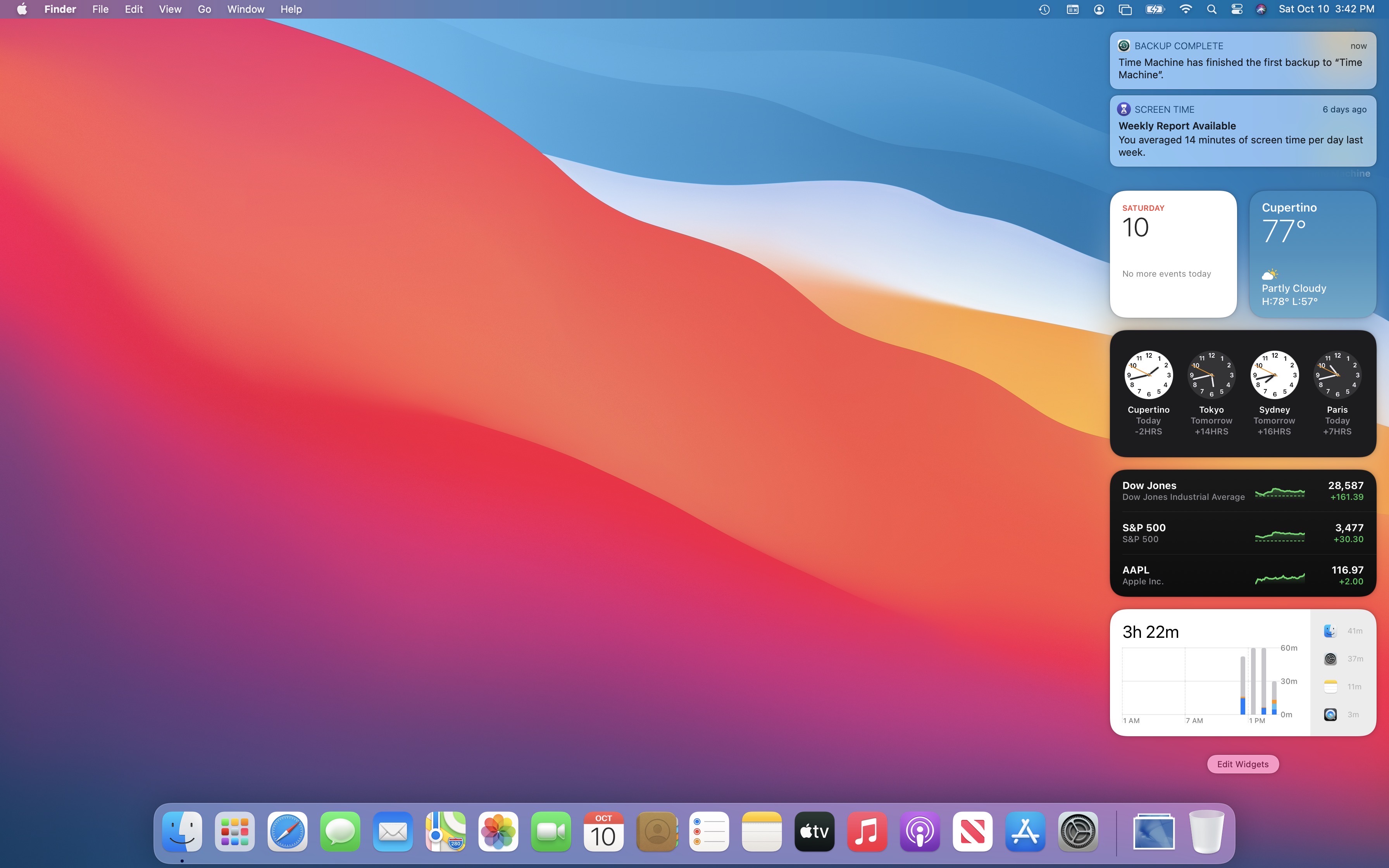
Notification Center is a real mess. Even on a Pro Display XDR, you get three visible notifications. That’s it. Anything older is hidden behind a button, regardless of how many widgets you may have in the lower section of the Notification Center column:
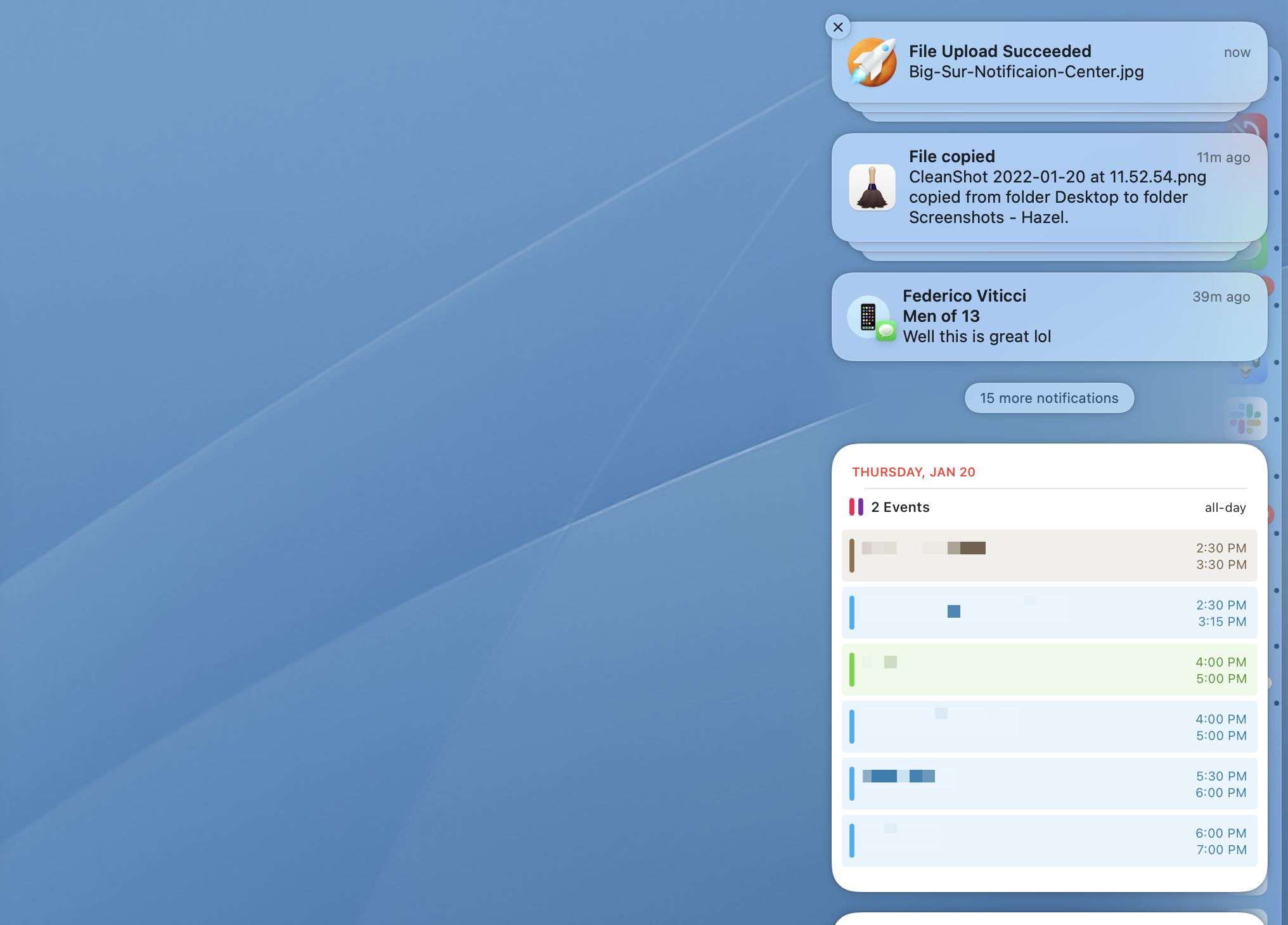
Apple needs to rethink this and let this new class of widgets2 breathe, being able to use the entire screen like the widgets of yore could. Bringing back Dashboard is an obvious solution here, and I’d love to see it make a return.
Update: Steve Troughton-Smith tweeted this in reply to my post:
Widgets need a permanent home in the Mac UI, not hidden off in a Notification Center nobody looks at anyway. Alternative would be massively improving Launchpad to work much more like SpringBoard, and allow you to set that in place of your desktop.
I thought about the Launchpad angle for a while, and I can see how turning it into a more iPad-like experience would be neat. A single place to get info from your widgets and launch a few favorite apps would be better than what we have now.
However, I think Apple has backed off the idea of needing to turn the iPad and Mac into each other, at least from a user interface standpoint. If Launchpad were to be updated to support widgets, I think it would remain an overlay to the macOS interface, not become the new center of it.
The One Where Federico is in the Mac App Store⇢
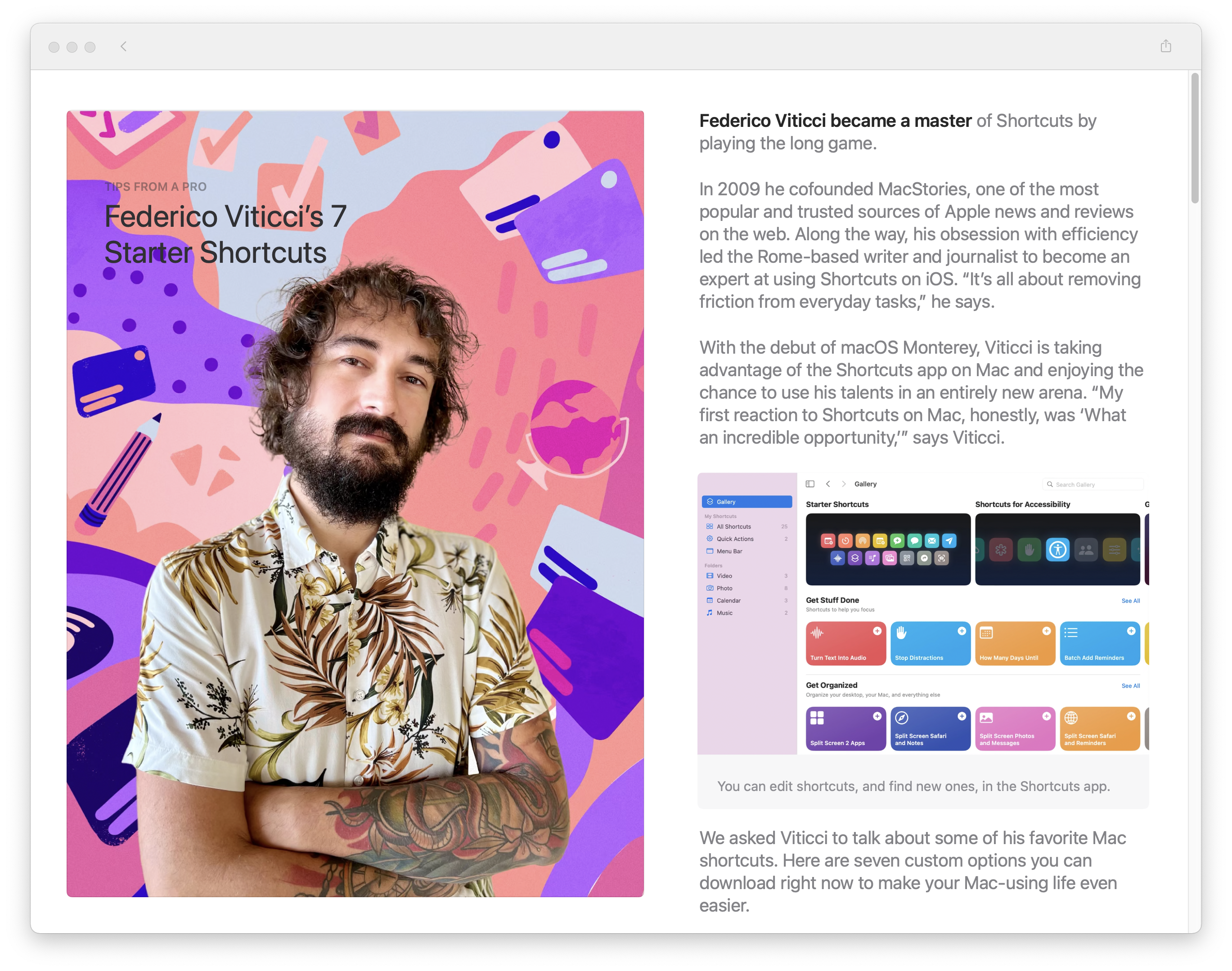
My buddy (and Connected co-host) Federico has been featured in the Mac App Store:
Federico Viticci became a master of Shortcuts by playing the long game.
In 2009 he cofounded MacStories, one of the most popular and trusted sources of Apple news and reviews on the web. Along the way, his obsession with efficiency led the Rome-based writer and journalist to become an expert at using Shortcuts on iOS. “It’s all about removing friction from everyday tasks,” he says.
With the debut of macOS Monterey, Viticci is taking advantage of the Shortcuts app on Mac and enjoying the chance to use his talents in an entirely new arena. “My first reaction to Shortcuts on Mac, honestly, was ‘What an incredible opportunity,’” says Viticci.
I mean, just look at this guy. Couldn’t be happier for him.
Connected #381: Roast my iPad Home Screen⇢
This week on the show, we offer up our iPad home screens for roasting after the unboxing of the year.
Free Legacy Google Suite Accounts Coming to End July 1⇢
If you have the G Suite legacy free edition, you need to upgrade to a paid Google Workspace subscription to keep your services. The G Suite legacy free edition will no longer be available starting July 1, 2022.
To maintain your services and accounts, review the information below and upgrade by May 1, 2022. Upgrading to Google Workspace takes just a few steps with no disruption to your users. After you upgrade you can use your new subscription at no cost until at least July 1, 2022.
If you choose to wait, Google will begin upgrading subscriptions automatically on May 1, 2022. We will upgrade your organization to a new Google Workspace subscription based on the features you currently use.
Inevitable, but probably a bummer if you are still holding onto one of these accounts.
Let’s Find Out⇢
Matthew Bischoff has written something that really encapsulates what I loved about my time in Apple Retail. They worked in Retail a few years after my stint from 2006-2008 was over, but this really grabbed me:
My training for the job involved being clapped at a lot while donning the signature blue T-shirt in a room full of folks learning how to sell iPhones and iPads and create Apple “customers for life”. Our teacher was a blond-haired, blue-eyed surfer-turned-computer salesman named JB who wore white earbuds as a necklace. As he taught from the printed material and screened Apple videos for the class, he kept harping on one point that’s stuck with me in the decades since.
I don’t know, let’s find out
JB taught us that there was no way we could know everything there is to know about every Apple product, let alone every app that runs on them, and every way they can fail. He taught us that rather than making up an answer, guessing, or shrugging our shoulders, we should instead say, “I don’t know, let’s find out”. Admitting that we didn’t know was the first step. Then, we were to find out together with the customer by walking over to a Mac and looking up the answer or pulling in another employee who might know the answer.
The lessons in Matthew’s post go way beyond selling devices at an Apple Store. We should all be more willing to learn together.
Kbase Article of the Week: If the Battery in Your 2016 or 2017 MacBook Pro Won’t Charge Past 1%⇢
A very small number of customers with 2016 and 2017 MacBook Pro computers have experienced an issue with the battery not charging past 1%.
The battery health status on these devices will also indicate “Service Recommended.” If the status indicates that your battery is Normal, your battery is not affected by this issue.
If your 2016 or 2017 MacBook Pro exhibits these behaviors, contact Apple to get your battery replaced, free of charge. Your computer will be examined prior to service to verify that it is eligible for the free battery replacement.
Apple has also released a macOS update that prevents this issue from happening to other 2016 and 2017 MacBook Pro computers. Please update to macOS Big Sur 11.2.1 or later or install the macOS Catalina 10.15.7 supplemental update.