
In this feedback episode, David and I revisit Dropbox, photo management, calendar sets and more. More Power Users members will enjoy an ad-free show with an added segment in which I talk to Sparks about the first month of his post-legal career and how MacSparky Labs has gone so far.
512 Pixels
Matt VanOrmer, on the Elgato Stream Deck Pedal⇢
Elgato recently announced the Stream Deck Pedal, offering yet another way to trigger automation workflows for those of us addicted to using the mouse as little as possible. My buddy Matt has a nice review up on his blog:
The first thing I noticed when the package arrived was how much larger the box was than I was expecting — the Pedal has a 10"x7" footprint and weighs a surprisingly-chunky two pounds, owing in no small part to the rigid steel sheet forming its bottom plate. The rest of the Pedal is made of hardy matte plastic with a pleasant texture on the top surface, so your (hopefully-socked) feet have something grippy to register on. One subtle yet essential design element in an otherwise-uncomplicated three-button pedal is the slight elevation of the left and right pedals over the middle button sandwiched between them — about a quarter-inch of tactile feedback that makes tapping the wrong button pretty difficult to do.
SoundSource from Rogue Amoeba⇢
My thanks to Rogue Amoeba for sponsoring 512 Pixels this week. Their app SoundSource lives in your menu bar, and provides you with superior control over all your audio. As you may imagine given the company’s reputation, it’s very, very good.
Download the free SoundSource trial, then purchase today. Through the end of February, 512 Pixels readers can save 22% with coupon code 512SS22.
Apple’s 27%⇢
As pointed out by MacRumors among other sites, Apple has updated its developer website to include details concerning payments outside of the App Store, which are now available for dating apps in the Netherlands, via a court order.
I didn’t think Apple would make this process easy for developers. It wants to keep as many of these apps in the App Store as possible, but some of the details here are just ridiculous.
Check out the text the company is going to require developers to show on a modal sheet prior to allowing users to go outside the App Store to make a payment:
Title: This app does not support the App Store’s private and secure payment system
Body: All purchases in the
App Nameapp will be managed by the developer "Developer Name." Your stored App Store payment method and related features, such as subscription management and refund requests, will not be available. Only purchases through the App Store are secured by Apple.
Ticci nailed it:
This is perfect* – it’s implying-without-technically-saying-it that other payment services aren’t “private and secure”.
Apple mastering the art of legalese is where we’re at in 2022. Proper regulation can’t come soon enough.
*ridiculous and downright user-hostile https://t.co/RglO0FjcUX
— Federico Viticci (@viticci) February 4, 2022
Connected #383: The Jeremies (February 2022)⇢
Before Federico guesses the names of this year’s new emoji, the guys talk about Apple’s recent betas and deal with some follow-up. Pour a glass of bean juice and enjoy!
On the ad-free ( and longer!) version of the show, the full story of Myke’s emoji creation is told.
Carrot Weather 5.5 Brings New Radar and Customization⇢
The newest release of Carrot Weather incudes a huge overhaul of the app’s radar feature. In addition to looking amazing, these changes mean there’s a new level of customization and information in this tab of the app. I’ve really enjoyed using it on the beta, and if you’re a Carrot Weather user, you should go update. If you aren’t, now’s a great time to start using the best weather app for iOS.
John Voorhees has more over on MacStories:
The entire maps UI has been redesigned and expanded with the same sort of deep customization options found throughout the rest of the app. It’s an excellent update that’s all about visual design, so get ready for a bunch of screenshots.
Don’t miss this Twitter thread outlining the new features.
Kbase Article of the Week: Apple Remote Desktop 1.1 Update⇢
Apple Remote Desktop 1.1 for Mac OS 8.1 - 9.2.2 can be downloaded from this document.
The Apple Remote Desktop client update improves reliability and delivers enhanced support for Copy hard Disk on computers running Mac OS 9.
The Apple Remote Desktop v 1.1 administration software must be used to manage any computer running this new version.
Apple Remote Desktop 1.1 Admin can only administer Apple Remote Desktop 1.1 clients. If clients are still running 1.0 or 1.0.1 the ARD 1.1 Admin will show that clients are either “– unavailable –” or it may say “– Old ARD Software –.
In case you were wondering, Apple Remote Desktop is still around. Version 3.9.5 is $80 in the Mac App Store, where it has a 2-star rating.
Mac Power Users #625: Apple as the Measuring Stick, with Austin Evans⇢
This week on Mac Power Users, YouTuber and podcaster Austin Evans drops by the show to talk about his content business, how Apple is competing in the wider marketplace and the gear he uses to get work done with a growing team.
I’ve been a fan of Austin’s channel for a long time, and it was great to have him on the show.
Sponsor: SoundSource from Rogue Amoeba⇢
Do you use audio on your Mac, in any way? If so, SoundSource is for you. It lives in your menu bar, and provides you with superior control over all your audio.
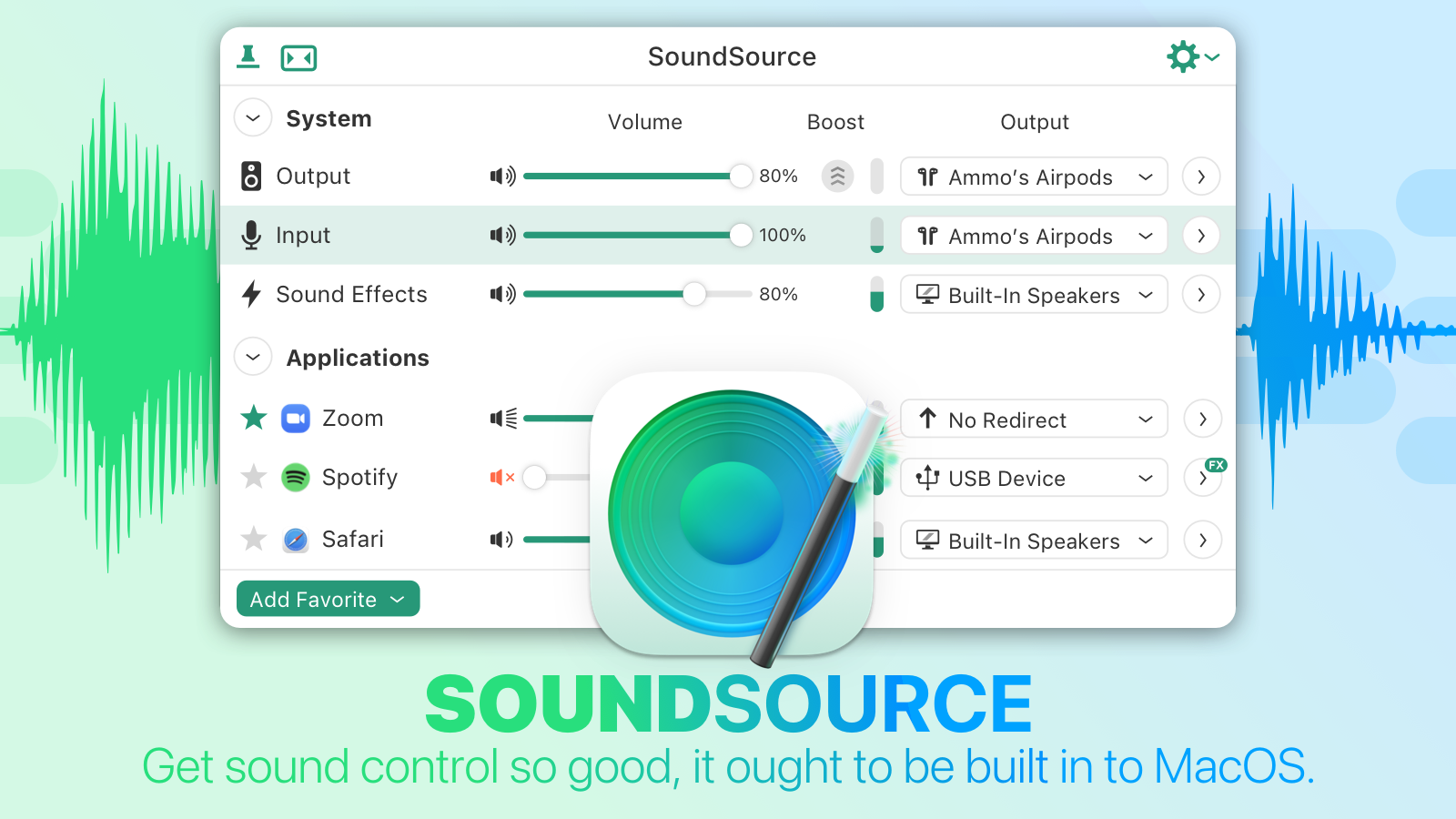 Per-application control: Change the volume of any app relative to others, and play individual apps to different audio devices.
Audio effects, anywhere: SoundSource has great built-in effects, like Magic Boost and Volume Overdrive features, as well as a built-in 10-band equalizer to sweeten sound. Advanced users will love the ability to apply Audio Units to any audio.
Fast device access: Adjust settings for your Mac’s Output, Input, and Sound Effects audio devices, instantly. Change levels, tweak the balance, and even switch sample rates, right from the menu bar. You may never need to open the Sound System Preference again!
Download the free SoundSource trial, then purchase today. Through the end of February, 512 Pixels readers can save 22% with coupon code 512SS22.
Challenger Artifacts Recovered⇢
Artifacts that were recovered from the fallen space shuttle Challenger and prepared for presentation to the President of the United States have been recovered again, 36 years later, after they surfaced at auction among the collection of a NASA liaison to the White House.
Little is known about how or why the late James Foster Fanseen, who died in 2000, had come into possession of the small American flag and crew patch that were mounted to a plaque and inscribed to “Ronald Reagan, President of the United States.” Once recognized for what they were, though, the artifacts were restored to the proper hands, now at the Reagan Presidential Library and Museum in Simi Valley, California, collectSPACE has learned.
Apple Posts Record Quarterly Results⇢
Apple’s latest quarterly results are out. And they’re big. It was an all-time revenue record, at $123.9 billion. The company made a record $34.6 billion in profit.
Mac revenue also reached a new all-time high at $10.9 billion, and iPhone revenue also peaked at $71.6 billion. The iPad’s revenue was $7.2 billion, down sequentially and year-over-year, but still among the five best iPad quarters in recent years.
Services kept its upward growth path, setting a new record at $19.5 billion, and Wearables/Home/Accessories likewise set a new record at $14.7 billion.
macOS 12.3 Beta Brings Promised Changes to Dropbox, OneDrive⇢
Straight from the release notes:
The kernel extensions used by Dropbox Desktop Application and Microsoft OneDrive are no longer available. Both service providers have replacements for this functionality currently in beta.