Sponsor: SheetPlanner: The Ultimate Tool for Organizing Information, Managing Projects and Getting Things Done

SheetPlanner helps you organize information, manage your projects, and schedule your tasks and activities with unparalleled power and flexibility.

Get organized…
Organize information using the Outliner to provide structure. Populate the start, finish and progress columns to create a schedule and track progress. Add custom, text, number, date, symbol, list and picture columns to track additional information.

Make a plan…
Visualize tasks with start and finish dates on the Timeline. Change the Timeline scope to get a high level view of your project over multiple years or zoom in to weeks or even days for more precision. See the progress of each task in the Timeline. Customize the color of Timeline bars. Preview and print the Timeline.

Get things done…
Use filters to focus on what’s important, due today, due tomorrow, or whatever criteria you determine. View filtered tasks in the timeline, month and yearly calendar. Check items off as they are completed in the outline, timeline, month or year views. Hide completed items to stay focused.

You can download SheetPlanner from the Mac App Store, where a 21-day trial is available.
Mac Power Users #555: iOS 14 Extravaganza

This time on a jam-packed episode of Mac Power Users:

iOS 14 is here, bringing new features like widgets, the App Library, increased privacy and a lot more. This week, David and Stephen review the release and talk about how Apple could take some of these features farther in the future.

It’s been a long time since Apple radically changed the home screen experience on the iPhone, and I have to say, it’s been a lot of fun exploring the possibilities.

On More Power Users, we pulled back the technical curtains on Relay FM’s recent Podcastathon for St. Jude, and David shares a story of woe.

My thanks to our sponsors:

  • 1Password: Have you ever forgotten a password? You don’t have to worry about that anymore.
  • TextExpander from Smile: Get 20% off with this link and type more with less effort! Expand short abbreviations into longer bits of text, even fill-ins, with TextExpander from Smile.
  • Mint Mobile: Cut your unlimited wireless bill to $30 a month.
  • Hover: Make a name for yourself. Get 10% off any domain name.

Weighing In and Long-Term Follow-Up

Dr. Drang:

In yesterday’s post, I mentioned that it took me a year to finally get around to writing a script I’d been thinking about. Today’s post is one whose seed was planted almost two years ago.

In October 2018, Myke Hurley and Stephen Hackett were in Chicago for a Relay FM event that I attended. During the event, they recorded this episode of Ungeniused, their podcast about weird articles on Wikipedia. In honor of the city they were in, the article they chose was “Raising of Chicago,” which describes how, in the 1850s and 1860s, the roadways and buildings of the city were elevated as much as six feet to get them up out of the muck and allow decent drainage of both stormwater and wastewater.

An informative post, no matter when it showed up.

Windows XP Included Incomplete Aqua-like Theme

Tom Warren at The Verge, writing about some half-finished themes found in this week’s XP source code dump:

One is labeled “Candy” and includes a design that closely resembles Apple’s Aqua interface that was first introduced at the Macworld Conference & Expo in 2000. Although the theme is incomplete, the Windows XP Start button and various buttons and UI elements are clearly themed to match Apple’s Aqua.

Connected #313: Trojan Horse in My Phone

This week:

Federico is using Base64 to make wallpapers, Myke’s iPad mini is out of space and Stephen is upset about Apple’s new GMT watch face. Also discussed: what iOS 14 is doing to our home screens and what others are doing with widgets.

My thanks to our sponsors:

  • Ahrefs: SEO Tools & Resources To Grow Your Search Traffic. Get a 7-day trial for just $7.
  • StoryWorth: Record your family stories. Get $10 off your first purchase.
  • Readdle: Essential productivity apps. iOS 14 ready.

On Widget Shaming

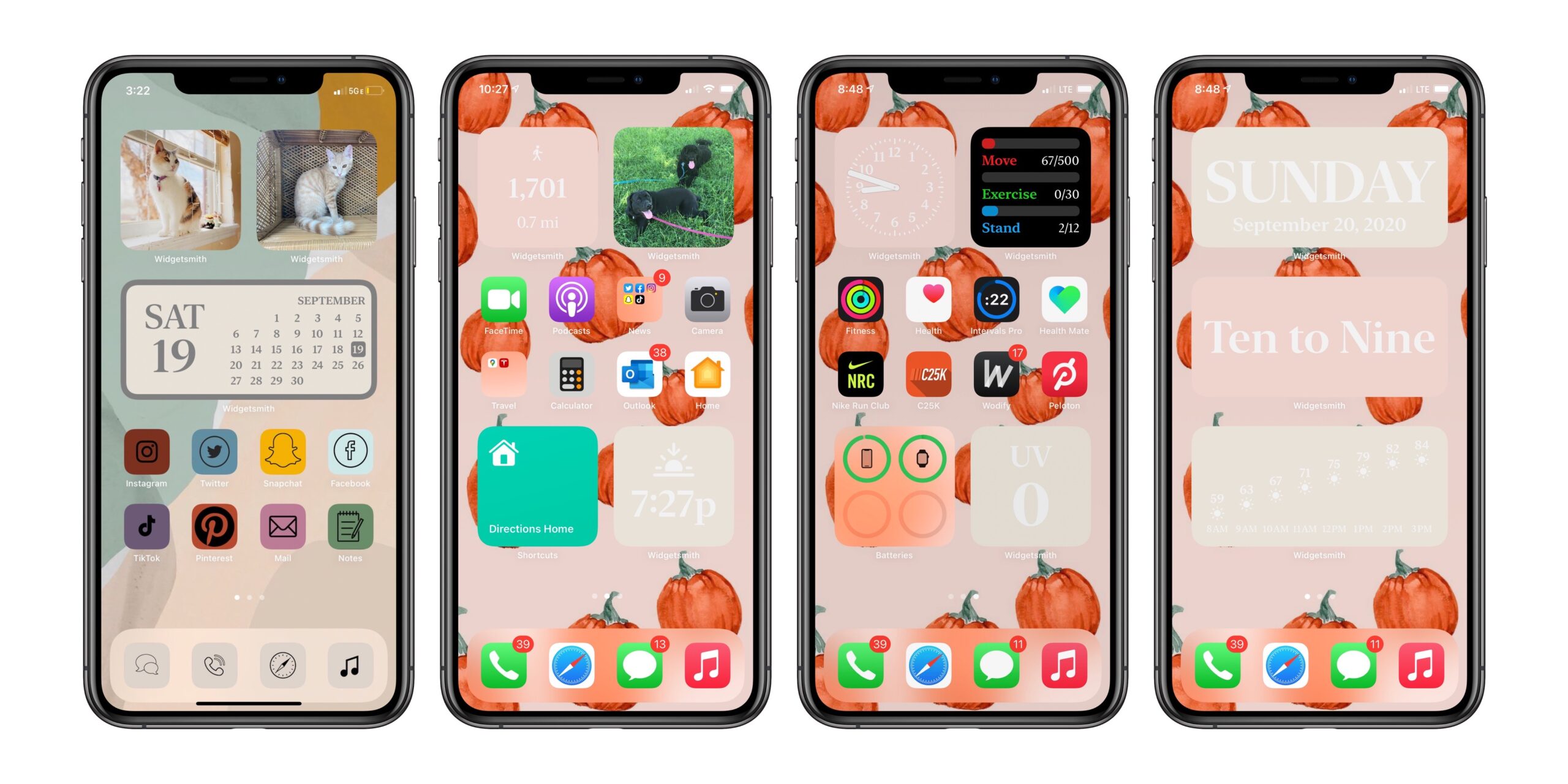
iOS 14 and apps like Widgetsmith have unlocked a new world of iPhone home screen customization. Many of us on the nerdier side of things have been a bit surprised when seeing images like this, from 9to5Mac:

However surprised those in our community may have been, it’s clear that this is a big deal. How-to guides have not just shown up on tech blogs looking for some of that sweet SEO, but users are uploading videos and screenshots across TikTok, YouTube, Instagram and Twitter.

I think this is fantastic, and not just because David Smith is a friend of mine. It’s clear that iPhone users have wanted the ability to customize their home screens, and now that widgets are here in iOS 14, the dam has been broken.1

Not everyone is a fan of this. I’ve seen a bunch of tweets and even messages to Relay’s feedback email addresses bemoaning this new trend. It’s clear to me that some in the Apple world aren’t a fan of the #iOS14AestheticAF movement, and are complaining that these users are ruining what makes the iPhone great in their minds.

Which is ridiculous. Customization and expression has always been part of personal technology, from this, to MySpace, to putting an Apple sticker on your car, to even picking what brand of home computer you bought in the 1980s. People have always used technology to project something about themselves into the world — just like people do with tattoos, clothes, cars and more.

Another take is that this sort of customization is bad for Apple’s brand. I disagree with this point of view as well. Apple’s brand has become too sterile, and I think it could use more color and personality. This does that, and I genuinely think this sort of customization will only make people love their iPhones more, which is great for Apple.

While this may not be for you, complaining that people are going down this road is not a good look. We should welcome more customization and personalization of the technology we spend hours a day with. We should be excited that a developer like David has built something that has gone viral. We should encourage Apple to do more in these areas, and evoking the name of Steve Jobs or rolling one’s eyes at this is short-sighted at best, if not something much worse.


  1. Now do custom watch faces, Apple. 

Liftoff #133: The World’s Most Expensive WeWork

This week on Liftoff:

The recent announcement of phosphine being detected in Venus’ atmosphere could have a major effect on future scientific missions, so Jason is excited about space blimps again. Then, Stephen walks through NASA’s most recent Artemis roadmap, and the guys discuss what the future of the program could look like if the White House changes hands next year.

It’s never aliens, but it always Congressional budgets.

My thanks to our sponsors:

  • Tuparev Technologies: Opportunities for Astronomy Masters or PhD students to work on tools for the 21st Century. Learn more now.
  • ExpressVPN: High-Speed, Secure & Anonymous VPN Service. Get an extra three months free.