Sponsor: micro.blog

Micro.blog offers blog hosting, native macOS and iOS apps, and a welcoming community built around independent microblogs that can be used for short- and long-form writing. Start a microblog with your own domain name, then add photos, full-length posts, or even a shared blog for work or family.

They also think that podcasts and short videos could be valuable tools for teachers who are adapting their lesson plans for online classes. If you’re a teacher, email them for six months of blog and podcasting hosting at no charge.

You can learn more about Micro.blog here.

Dark Noise 2

My favorite white noise app for iOS just got even better. Here’s the developer, Charlie Chapman:

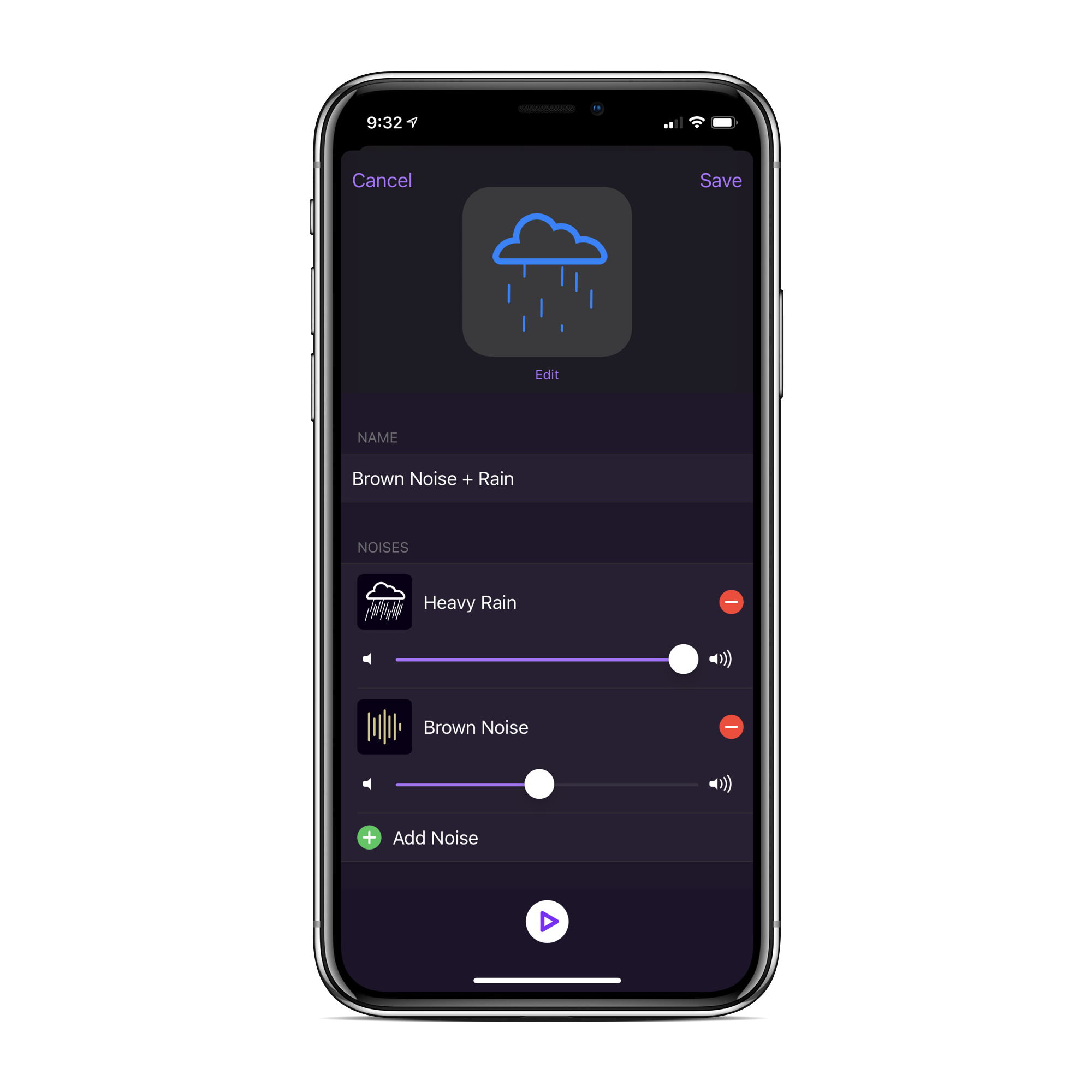
Dark Noise 2 is the next major evolution of the best ambient noise app on iOS. Mixing sounds has been the most requested feature since launch and I’m excited to announce it’s finally here! A lot of work went in to maintaining the simplicity and tight iOS integration Dark Noise is known for and I’m very proud of the results. Along with iCloud syncing, new sounds, new icons, and loads of bug fixes this is the biggest update to date.

The sound mixing is very cool, and allows for tons of customization. During the beta cycle, my go-to has been heavy rain with a bit of brown noise mixed in:

Dark Noise is available on the App Store for $5.99, which is well worth it in my opinion.

Mac Power Users #545: State of the Apple Watch

This week on MPU:

The Apple Watch has undergone massive changes since its introduction in 2014. This week, Stephen and David review some of that history, then launch into a conversation of the platform’s strengths and weaknesses and how they use their Watches.

Don’t miss the longer-than-expected list of watchOS apps we’re using.

My thanks to our sponsors:

  • 1Password: Have you ever forgotten a password? You don’t have to worry about that anymore.
  • TextExpander from Smile: Get 20% off with this link and type more with less effort! Expand short abbreviations into longer bits of text, even fill-ins, with TextExpander from Smile.
  • Squarespace: Make your next move. Enter offer code MPU at checkout to get 10% off your first purchase.

iOS 14, iPadOS 14 and watchOS 7 can Randomize MAC Addresses

Apple Support:

To communicate with a Wi-Fi network, a device must identify itself to the network using a unique network address called a media access control (MAC) address. If the device always uses the same Wi-Fi MAC address, network operators and other network observers can more easily relate that address to the device’s network activity and location over time. This allows a kind of user tracking or profiling, and it applies to all devices on all Wi-Fi networks.

To reduce this privacy risk, iOS 14, iPadOS 14, and watchOS 7 include a feature that periodically changes the MAC address your device uses with each Wi-Fi network. This randomized MAC address is your device’s private Wi-Fi address for that network—until the next time it joins with a different address.

It is not super common to find a support document about upcoming software releases, let alone documents that include a link to the public beta website, but the contents of this article are really interesting beyond that.

Device privacy is obviously huge to Apple, but there are a lot of network registration systems that use a device’s MAC address to grant access or to tie a device to an account holder. While not necessarily the best practice, it remains a common enough practice that network and managed device admins will have to deal with this coming this fall.
My Favorite Features of iOS 14

I’ve been running the iOS 14 beta for a little while on both my iPad Pro and iPhone 11 Pro, and wanted to highlight some of my favorite features:

  • Widgets: I am loving having my calendar, weather and Shortcuts out on my home screen. This will only get better when third-party applications start adding support for them later this year. While they take up spots I used to have apps in, being able to ditch an app’s icon is a nice side effect.
  • Folders in Shortcuts: One of the first things I did was organize my shortcuts into several folders. These folders can then be turned into widgets. Organization bliss!
  • Changes in Mail: Nah, JK. Apple never adds features to Mail.
  • Pinned threads in Messages: I love that this feature works both with individuals and groups, and as a bonus, they sync across devices, including Macs running Big Sur. My only wish is that the layout was a little more dense; I’d like to have four across, not just three.
  • Compact UI elements: No phone call can take over the screen now!

Connected #303: Computer Pictures Photo Album

This week on Connected:

Federico is back from the beach with thoughts about iOS 14’s App Library, Stephen has way too many albums in Photos and Myke is going to order some LEGO. All of this is overshadowed by some important news about the show.

On Connected Pro, we talked about my kids’ upcoming tech needs for school and Federico’s secret side project.

My thanks to out sponsors:

  • Hover: Make a name for yourself. Get 10% off any domain name.
  • Bombas: Super comfortable socks for you and someone in need. Use this link for 20% off.
  • ExpressVPN: High-Speed, Secure & Anonymous VPN Service. Get 3 months free with a 1-year package.

macOS 10.15.6 Released

It’s in Software Update now. Here’s what is new:

Apple News:

  • Local news in your Today feed provides extensive coverage of San Francisco, the Bay Area, Los Angeles, Houston, and New York City
  • More stories available from local news providers with a subscription to Apple News+
  • our daily newsletter from Apple News can now be personalized with stories that reflect your interests

This update also includes bug fixes and other improvements:

  • Adds a new option to optimize video streaming on HDR-compatible Mac notebooks for improved battery life
  • Fixes an issue where the computer name may change after installing a software update
  • Resolves an issue where certain USB mouse and trackpads may lose connection

Liftoff #128: Summer of Mars

This time on Liftoff:

There are three missions bound for Mars launching this month, and Jason walks through them each. Then, Stephen gives a NASA budget update and the two get into some space law … and guidelines.

My thanks to our sponsors:

  • Squarespace: Make your next move. Enter offer code LIFTOFF at checkout to get 10% off your first purchase.
  • ExpressVPN: High-Speed, Secure & Anonymous VPN Service. Get 3 months free with a 1-year package.

Sponsor: TextExpander

TextExpander boosts your business productivity by allowing your team to communicate smarter, faster, and more consistently across all your channels. The app is built with collaboration in mind—instantly insert snippets of text into emails, messages, documents, and anywhere else you can type. You can even turn snippets into forms with fill-in fields to personalize your content.

TextExpander is available for Mac, Windows, Chrome, iPhone and iPad. 512 Pixels readers get 20% off their first year.

Mac Power Users #544: The Notes Roundup

This week on MPU:

The market for note taking applications is huge. There are options that just deal in plain-text, apps that serve as “everything buckets,” and still others focused on automation. This week, David and Stephen cover some of the better options out there and share how they keep up with various bits of digital information in their lives.

My thanks to our sponsors:

  • 1Password: Have you ever forgotten a password? You don’t have to worry about that anymore.
  • Miro: The online collaborative whiteboard platform. Sign up for a free account today.
  • The Intrazone by Microsoft SharePoint: Your bi-weekly conversation and interview podcast hosted by the SharePoint team
  • DEVONthink: Get Organized — Unleash Your Creativity. Use this link for 10% off.