CleanMyMac X Now in the Mac App Store

Oleksandr Kosovan, the CEO of MacPaw, sharing the news that CleanMyMac X is now on the Mac App Store:

In 2018, CleanMyMac X switched to a subscription model — a ubiquitous way of getting apps on the Mac App Store. The same year (2018), Apple significantly improved the store itself with a new design and curated content. The fact that the Mac App Store became much better and that it supported subscriptions, made us work on building CleanMyMac X for the Mac App Store.

As you would imagine, there are some differences between the App Store and non-App Store version, but if you prefer the App Store for purchasing Mac apps, this is good news.

Kbase Article of the Week: iMac: Pressing Apple USB Keyboard Power Button Does Not Turn on Computer

Apple Support:

Press the power button on the front on the iMac computer instead.

You can use the Apple USB Keyboard with all iMac computers, but the circuitry that enables the keyboard’s Power button is not present on the models listed above. Therefore, pressing the Power button on the keyboard will have no effect.

Then, there’s this gem:

The parenthetical product descriptions (Summer 2000) and (Summer 2001) refer to the summer of the Northern Hemisphere.

Good to know, Apple.

Backstage

Big Relay FM news today:

Backstage is a members-only podcast from Relay FM. Each month, co-founders Myke Hurley and Stephen Hackett will give a behind-the-scenes look at what it takes to run the network, and share their knowledge to help you create a podcast or start a creative project.

Backstage is published in our normal Members Only feed, but we’ve made the first episode available for everyone. If you aren’t a member, now’s the time to sign up!

Sponsor: SoundSource from Rogue Amoeba

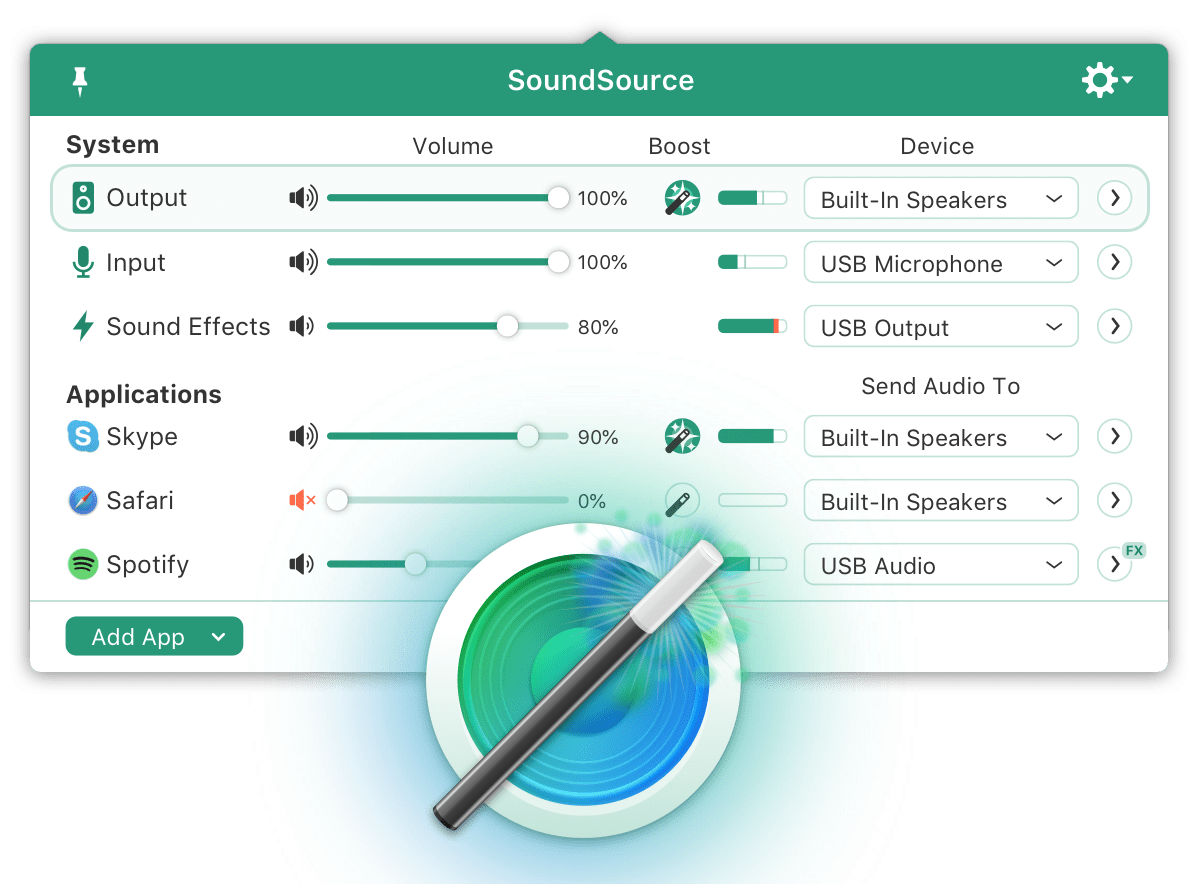
SoundSource gives you powerful control over all the audio on your Mac, right from your menu bar. Get per-application volume controls that let you mute your browser, or send music to one set of speakers and everything else to another. Improve sound quality with built-in effects, and support for Audio Unit plugins as well. Fast device access puts all the settings your Mac’s audio devices are just a click away.

One more thing … have a DisplayPort or HDMI device that fails to offer volume adjustment? SoundSource can help there too. It gives those devices a proper volume slider, and the Super Volume Keys feature makes your keyboard volume controls work as well. Neat!

Check out SoundSource today, with a free trial! Rogue Amoeba has extended their April sale – through May 15th, 512 Pixels readers can save 20% with coupon code 512XX.

Mac Power Users #533: Feeling Frisky with my Money

This week on Mac Power Users:

On this feedback episode, David shares some about an upcoming studio move, and Stephen talks about recent experimentation with a teleprompter. Also on the docket: connected home cameras, more on working from home and the iPhone SE.

My thanks to our sponsors:

  • Sanebox: Stop drowning in email!
  • The Omni Group: We’re passionate about productivity for Mac, iPhone and iPad.
  • Setapp: More than 180 powerful apps for your Mac. Try it free for a week.
  • Freshbooks: Online invoicing made easy.

Five Years of Apple Watch

This anniversary snuck up on me, but thankfully plenty of other folks have put together some great content marking the date.

Of course, Rene Ritchie has a great video up:

… and here are some links worth checking out:

My Impressions of the Magic Keyboard for iPad Pro

I received a Magic Keyboard for my 2018 11-inch iPad Pro yesterday, so this is not a full review, but rather a series of impressions.

The first thing I noticed is how much more solid this thing is then the Smart Keyboard Folio I’ve used for years. Of course, that includes the weight, but the overall build quality feels much, much better. This thing is stiff and exact, whereas the old style always felt a bit flimsy at times.

Speaking of weight, here are some numbers for you, at least according to my cheap kitchen scale:

  • Bare 11-inch iPad Pro with LTE: 479 grams
  • Magic Keyboard: 592 grams
  • The Whole Shebang: 1,078 grams

For comparison, the old Smart Keyboard Folio weighs 316 grams.

A lot of the Magic Keyboard’s quality is thanks to the hinge. It glides open easily, but I do wish it would let the iPad tilt back a little farther. The adjustability is nice compared to the old keyboard, but I’d like to see more range out of this one.

Of course, the Magic Keyboard is part keyboard and part stand. When you take the iPad off of it, the case is left behind, standing upright, as some sort of testament to your mobile productivity.

Taking the iPad off isn’t as easy as you would think. The magnets are incredibly strong. I think I could sling the keyboard around pretty well before my iPad would want to break free.

There is one downside of the new design, in that the keyboard can no longer fold back behind the iPad. Until I popped this new case on, I didn’t think about how often I used the previous keyboard in this fashion. I suspect I’ll be removing my iPad from the keyboard and carrying my iPad around without a case a lot more than I used to when I’m wandering around the house.

The keyboard itself feels fantastic. The keys have a surprising amount of travel for a device like this, and really do feel like the keyboard on the 16-inch MacBook Pro and new MacBook Air. The addition of backlighting is just icing on the cake.

When compared with a MacBook Pro, this keyboard does feel a little cramped. Keys around the edges are smaller than on the Mac, but are not all that different from the Smart Keyboard. However, this thing feels tighter then the old one. I think it is because the rest of the experience is so much like a traditional notebook.

I have owned a 12.9-inch iPad Pro before, and while it is not for me, I can’t help but wonder if the keyboard experience would be a little better. The main key caps are the same size between the two, but I keep hitting = when I reach for Delete.

Lastly, there’s the trackpad. It’s about an inch and a half tall and just shy of four inches across. That’s tiny compared to what is on Macs, but it is big enough to work well with iPadOS, even if I would like more room. I suspect both the keyboard and trackpad feel more laptop-like on the larger iPad Pro.

I bet that I will adjust over time, but right now, I find myself forgetting about the trackpad. I will be mid-gesture on the screen and think “Oh yeah, there’s a trackpad now.”

I don’t think the Magic Keyboard is going to radically change the amount of time I work on my iPad Pro; I am still a Mac-first kind of guy, but when I do reach for my iPad, I’ll do so knowing that the experience will be better than ever.

Bloomberg: ARM Macs Coming in 2021

Mark Gurman, Debby Wu and Ian King:

The Cupertino, California-based technology giant is working on three of its own Mac processors, known as systems-on-a-chip, based on the A14 processor in the next iPhone. The first of these will be much faster than the processors in the iPhone and iPad, the people said.

Apple is preparing to release at least one Mac with its own chip next year, according to the people. But the initiative to develop multiple chips, codenamed Kalamata, suggests the company will transition more of its Mac lineup away from current supplier Intel Corp.

These chips, according to the report, will be fabricated by TSMC on a 5-nanometer process, and would utilize the same approach Apple has on its mobile devices, pairing high-performance with high-efficiency cores:

The first Mac processors will have eight high-performance cores, codenamed Firestorm, and at least four energy-efficient cores, known internally as Icestorm. Apple is exploring Mac processors with more than 12 cores for further in the future, the people said.

In some Macs, Apple’s designs will double or quadruple the number of cores that Intel provides. The current entry-level MacBook Air has two cores, for example.

I am excited about this, despite having a Xeon-powered Mac Pro under my desk as I type.