Rene Ritchie Going Indie

Rene Ritchie is joining the indie ranks:

He’s launching a new channel (as the old one is part of the iMore brand) and I’ve already subscribed.
Mac Madness 2020: Round Quarterfinal Winners & Semifinal Voting Open Now

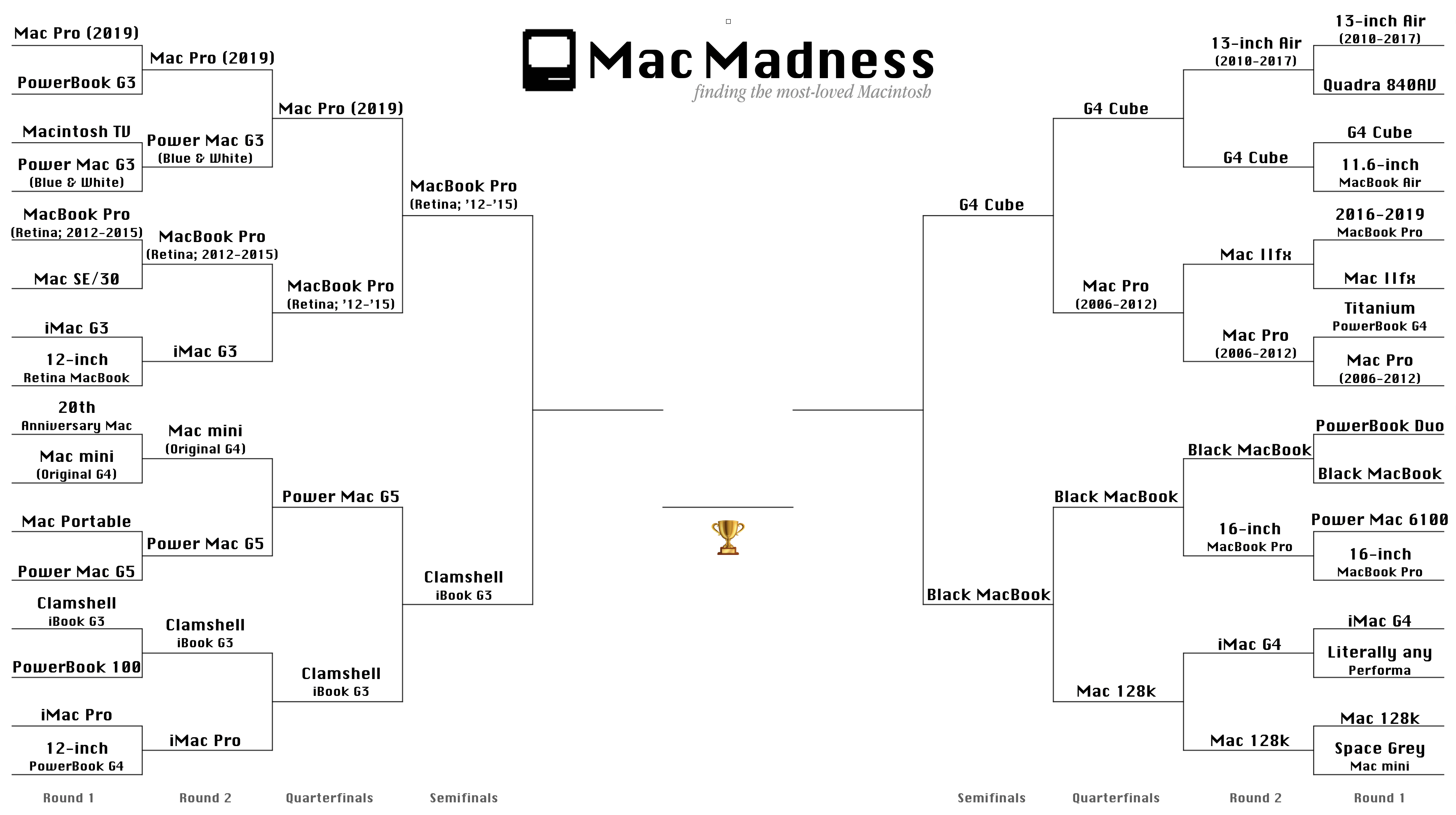
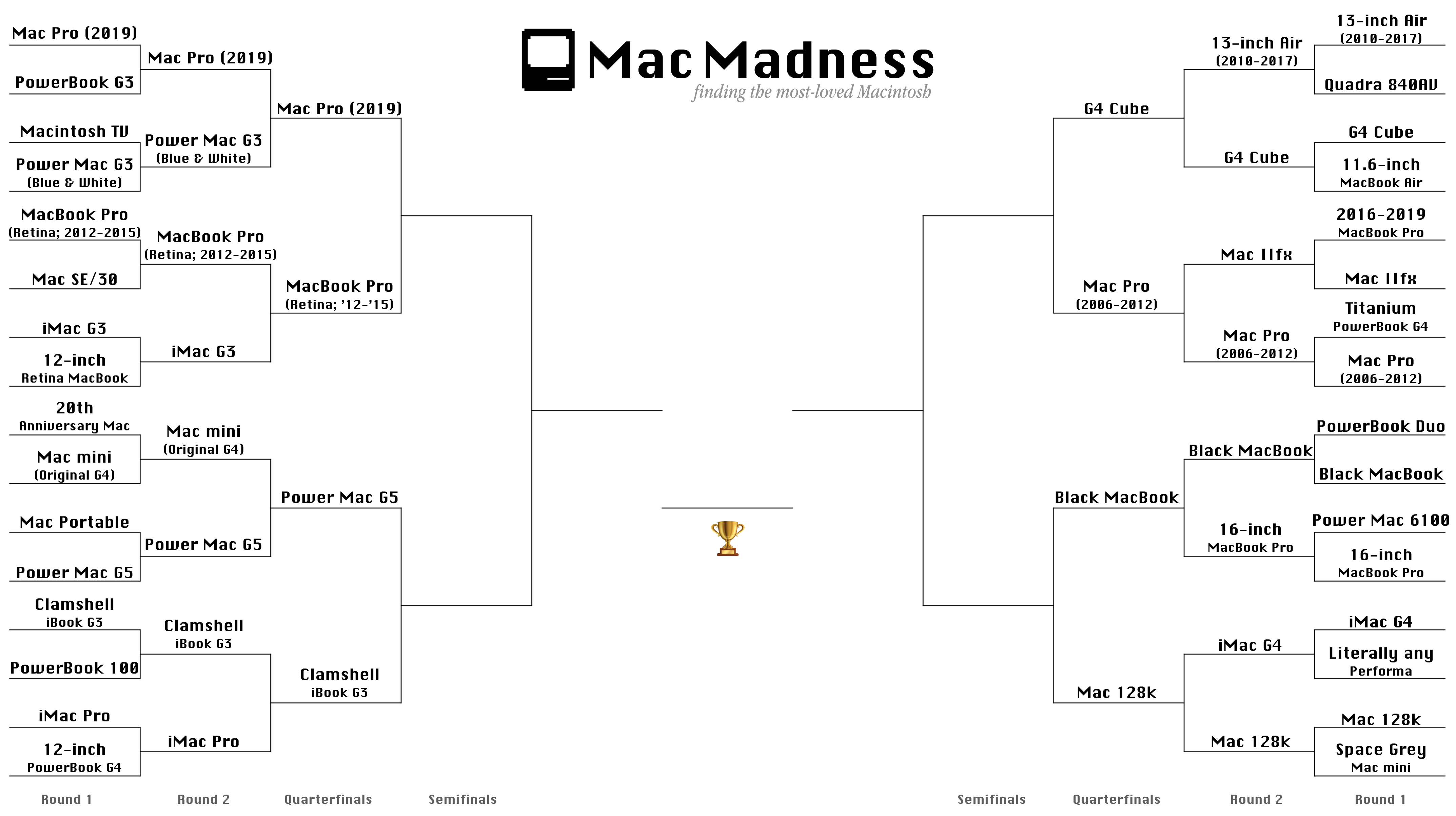
Wow, we are really moving along now! I’m back to report the winners of the quarterfinals:

As you can see, both Mac Pro models in the bracket lost out this round, as did the Power Mac G5 and the original Macintosh. Tough day for desktops, as there’s only one left in the fight: the Power Mac G4 Cube!

(click bracket to see larger version)

Go vote in the Semifinals now! Voting will close on Tuesday, March 31.

Raw Numbers for the Quarterfinals

Mac Pro (2019) — 39.2%
2012-2015 Retina MBP — 60.8%

Power Mac G5 — 45%
Clamshell iBook G3 — 55%

G4 Cube — 53.2%
2006-2012 Mac Pro — 46.8%

Black MacBook — 53.3%
Original Macintosh — 46.7%

Apple Launches COVID-19 Screening App and Website

Apple Newsroom:

Apple today released a new screening tool and set of resources to help people stay informed and take the proper steps to protect their health during the spread of COVID-19, based on the latest CDC guidance. The new COVID-19 website, and COVID-19 app available on the App Store, were created in partnership with the CDC, the Coronavirus Task Force and FEMA to make it easy for people across the country to get trusted information and guidance at a time when the US is feeling the heavy burden of COVID-19.

The app and website are very easy to use and understand, and shows a recap of your answers on the screen where it gives you the CDC guidance based on those answers. This is one to send to your friends and family.

Flashback #4: webOS

This time on Flashback:

With its webOS hardware, including the Pre, Pixi and more, Palm (and later HP) tried to take on the giants of the early smartphone wars. While webOS was hugely innovative, it wasn’t enough to break into the most important market in consumer electronics history.

This has been requested by listeners since we announced the show, and I’m so glad I got to revisit a phone I really loved using.

My thanks to our sponsor:

  • Backblaze: Unlimited cloud backup for Macs and PCs for just $6/month.

Connected #287: Rub a Dub Dub, My Friend

This week on an extra-long Connected:

The early reviews of the 2020 iPad Pro and new MacBook Air are in, and Myke treats the group with an unboxing experience. Federico asks the world for help, while Stephen is bringing joy — and pain — to the Mac community. Also, our impressions of iOS 13.4 and some media we are enjoying while being stuck at home.

My thanks to our sponsors:

  • Pingdom: Start monitoring your website performance and availability today, and get instant alerts when an outage occurs or a site transaction fails. Use offer code CONNECTED to get 30% off. Offer expires on January 31, 2021.
  • TextExpander, from Smile: Unlock your productivity with TextExpander. Get 20% off with your first year.
  • Hover: Make a name for yourself. Get 10% off any domain name.
  • Mack Weldon: Smart underwear for smart guys. Get 20% off your first order with the code WEIRDFISH.

macOS 10.15.4 Showing Kernel Extension Warnings

Rich Trouton:

As part of macOS Catalina 10.15.4, Apple has begun displaying a new dialog window message concerning third-party kernel extensions. macOS Catalina is the last macOS to fully support the use of kernel extensions and these messages are meant to notify users of the following:

  • macOS had detected that a third-party kernel extension had been loaded.
  • The loaded kernel extension would be incompatible with an unspecified future version of macOS

There are some additional details on Apple’s site:

In 2019, Apple informed developers that macOS Catalina will be the last macOS to fully support legacy system extensions, and we’ve been working with developers to transition their software. By moving beyond these extensions, developers are helping to further modernize the Mac, improve its security and reliability, and enable more user-friendly software distribution methods. A final transition date has not yet been set.

Until the transition is complete, your Mac displays a message when a legacy system extension first loads, and again periodically while the extension remains in use. This gives you advance notice that existing software on your system loaded a system extension that will be incompatible with a future version of macOS:

…and on Apple’s developer site:

System extensions on macOS Catalina (10.15) allow software like network extensions and endpoint security solutions to extend the functionality of macOS without requiring kernel-level access. At WWDC19, we announced the deprecation of kernel extensions as part of our ongoing effort to modernize the platform, improve security and reliability, and enable more user-friendly distribution methods. Kernel programming interfaces (KPIs) will be deprecated as alternatives become available, and future OS releases will no longer load kernel extensions that use deprecated KPIs by default.

This will be a rocky transition for a bunch of users, especially in the enterprise.

Mac Madness 2020: Round 2 Winners & Quarterfinal Voting Open Now

Voting in Round 2 of Mac Madness has closed, and just shy of 3,000 people voted in this round, picking which Macs were their favorites, sending eight machines into the quarterfinal matches:

Like in Round 1, the raw numbers are at the bottom of this post, but I have to say, I’m sad that both the iMac G3 and G4 have been voted off the island Genius Bar.

(click bracket to see larger version)

Go vote in the Quarterfinals now! Voting will close on Friday.

Raw Numbers for Round 2:

Mac Pro (2019) — 59.5%
Blue and White Power Mac G3 — 40.5%

2012-2015 Retina MacBook Pro — 55.4%
iMac G3 — 44.6 %

Original Mac mini — 41.4%
Power Mac G5 — 58.6%

Clamshell iBook G3 — 53.2%
iMac Pro — 46.8%

13-inch MacBook Air (2010-2017; Pre-Retina) — 48.6%
G4 Cube — 51.4%

Mac IIfx — 27.7%
2006-2012 Mac Pro — 72.3%

Black MacBook — 56%
16-inch MacBook Pro — 44%

iMac G4 — 39.7%
Original Macintosh — 60.3%

Apple Ships macOS Catalina 10.15.4

macOS 10.15.4 is rolling out now, with a bunch of updates:

Finder:

  • iCloud Drive folder sharing from Finder
  • Controls to limit access only to people you explicitly invite or grant access to anyone with the folder link
  • Permissions to choose who can make changes and upload files and who can only view and download files

Screen Time:

  • Communication limits for controlling who your children can communicate with and be contacted by throughout the day and during downtime
  • Playback control of music videos for your children

Music:

  • Time-synced lyrics view for Apple Music, including the ability to jump to your favorite part of a song by clicking a line in lyrics view

Safari:

  • Option to import Chrome passwords into your iCloud Keychain for easy AutoFill of your passwords in Safari and across all your devices
  • Controls for duplicating a tab and for closing all tabs to the right of the current tab
  • HDR playback support on compatible computers for Netflix content

App Store with Apple Arcade:

  • Universal Purchase support enables the use of a singular purchase of a participating app across iPhone, iPod touch, iPad, Mac, and Apple TV
  • Recently played Arcade games appear in the Arcade tab so you can continue playing on iPhone, iPod touch, iPad, Mac, and Apple TV

Pro Display XDR:

  • Customized reference modes that you can tailor to specific workflow needs by selecting from several color gamut, white point, luminance, and transfer function options

Accessibility:

  • Head pointer preference for moving a cursor on the screen based on the precise movements of your head

This update also includes bug fixes and other improvements:

  • High Dynamic Range output to HDR10-compatible third-party displays and TVs connected with DisplayPort or HDMI
  • OAuth authentication support with Outlook.com accounts for improved security
  • CalDav migration support when upgrading to iCloud reminders on a secondary device
  • Resolves an issue where text copied between apps may appear invisible when Dark Mode is active
  • Fixes an issue in Safari where a CAPTCHA tile may display incorrectly
  • Resolves an issue where Reminders may send notifications for completed reminders
  • Fixes an issue with screen brightness for the LG UltraFine 5K display after waking from sleep1

  1. Yeeessssssss!