Exploring MacPaint’s Source Code

MacPaint was one of the Mac’s original first-party applications, and was written by Bill Atkinson himself. Jeffrey Starr has published an in-depth look at the application’s source code:

One of two launch applications for the Apple Macintosh in 1984, MacPaint is emblematic of the Macintosh’s early quirky revolutionary branding, focus on ease of use, and appeal to artistic customers. Using the source code, we examine the design and implementation of the application. We find that the buffer management and bucket filling algorithms demonstrate mechanical empathy with the 68k platform and leverage the limitations of the domain as a means to improve performance. We also find positive and negative aspects in the code style and architecture and its pliability for change. Finally, we dispute some claimed novel aspects of the program while also arguing for its significance and impact on the development of digital graphic systems.

Microsoft Turns 50

Today is Microsoft’s 50th anniversary, as Tom Warren writes:

Founded on April 4th, 1975, Microsoft went on to strike a deal with IBM to provide software for its first PC in 1980. This became the foundation of MS-DOS, which dominated IBM-compatible PCs during the ’80s. Microsoft’s early success in developing software for PCs eventually led to the first version of Windows in 1985 and a dream of a PC on every desk and in every home.

Microsoft itself is marking the occasion as well, with a mini site celebrating the past, present, and future of technology:

In 1975, childhood friends Bill Gates and Paul Allen dared to dream bigger than what reality dictated at the time—giving people everywhere a whole new way to live, work, and play. And while times have changed, and technology has changed, our dream remains the same: empowering every person on the planet to achieve more. To celebrate these last 50 years, we’re looking back at some iconic moments from our history, sharing some stories, and celebrating all the amazing things you’ve done with Microsoft tech. Because change needs makers!

If you’re in the mood for some more Microsoft nostalgia, I’ve got some links for you:

On the Rumored M6 MacBook Pro

Over the weekend, Mark Gurman reported that the M6-generation of MacBook Pro will bring with it an updated design, complete with a thinner chassis and an OLED display.

David Sparks’ thoughts on this mirror my own:

I’m particularly excited about the prospect of an OLED screen. This technology promises higher brightness, improved contrast ratios, and more vibrant colors, making the types of things folks do on a MacBook Pro even easier.

However, the notion of a thinner design makes me nervous. In my experience, when surveying the needs of MacBook Pro users–especially those in same creative professions–the desire for a slimmer profile rarely tops the list. More commonly, folks want better battery life, enhanced performance, and adequate input/output.

The MacBook Air is an excellent thin-and-light notebook. The current MacBook Pro’s thickness has never bothered me, and the design is so much better than that of the Butterfly Keyboard Era machines, it’s not even funny.

DEVONthink 4

I am a huge DEVONthink fan, as I use it hold and organize my ever-growing library of tech history resources. Here’s a look at my collection of databases:

My DEVONthink databases

Today, DEVONthink 4 enters public beta 1 with a whole bunch of new features.

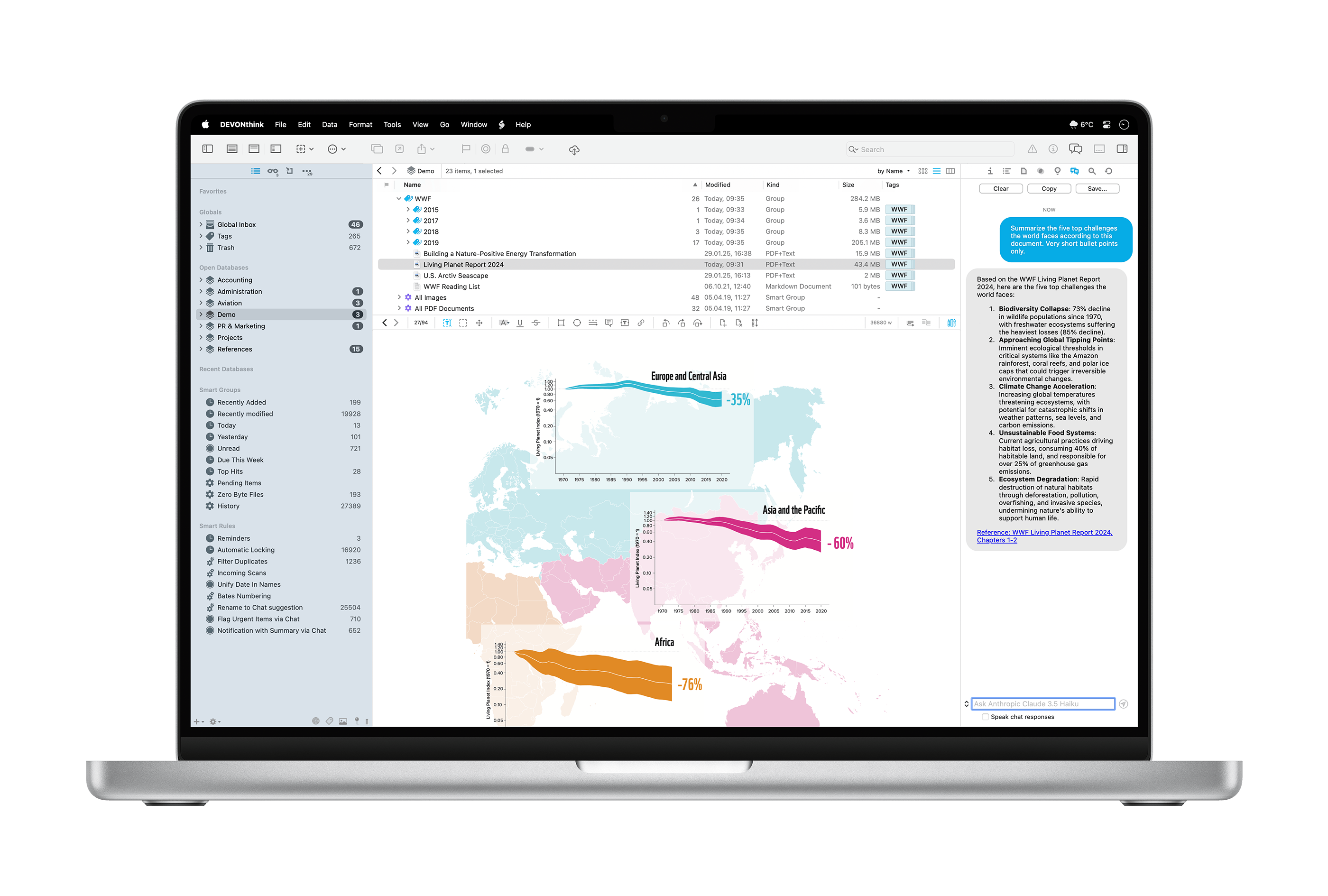
DEVONthink 4

DEVONthink 4 includes new tools for managing documents, which is the core use of the application for me, as a huge percentage of the resources I have saved are PDFs and text files. Now, DEVONthink supports versioning, so changes to these files can be undone later. You’ve got full control over how many version are kept, and how much space versioning can take up in your databases.

Markdown documents are also much nicer to work with in version 4. For Apple events, I tend to take Markdown-formatted notes, then drop them into DEVONthink for Future Stephen to refer to later.

As you could have probably guessed, AI plays a huge part in this release. Unlike making weird and terrible images of your friends, this application of AI promises to be useful in actual work. DEVONthink 4 supports numerous models, including Claude, Mistral, and ChatGPT for tasks like summarization, text recognition, searching, and transforming text.

If you prefer your models to run offline, Ollama and LM Studio are also supported, and of course, these features are optional if you would like to avoid them all together.

(John Voorhees has an in-depth look at these features.)

Search in DEVONthink 3 was already really powerful, and in my initial use of version 4, it’s even better. Previous versions required OCR to be run on PDFs and images to make the text searchable.

Version 4 is a paid update, but with it, the pricing structure is changing:

Starting with DEVONthink 4 we switch from a slow product cycle with large, feature-laden upgrades to a more flexible, more modern model. With the purchase of a software license you receive the app itself including one year of updates. When the year is up, you can extend your license to continue receiving updates — but you don’t have to. 

Should you choose to not extend the license, you can continue to use DEVONthink; the app just no longer downloads and installs newer updates. The license will neither become deactivated nor restricted in any way. You own the app, we will never take it away from you.

Here’s the pricing, as sent to me in a press release:

  • DEVONthink Standard: $99 (new license), $49 (upgrade, extension, or additional seat)
  • DEVONthink Pro: $199 (new license), $99 (upgrade, extension, or additional seat)
  • DEVONthink Server: $499 (new license), $149 (upgrade or extension), $99 (additional seat)

  1. Disclosure: DEVONthink is a sponsor of both 512 Pixels (including this week) and Relay, but as always, you’ll know when you’re seeing or hearing an ad. This post isn’t one; I’m just pumped about a tool I rely on getting such a nice update. 

A Fresh Coat of Paint

Later this year, 512 Pixels will turn seventeen years old. Over the years, it has had several looks, and today there’s a new one.1

Serifs?!

The overall structure of the site is unchanged, but the colors and some of the typefaces are all new. For the first time in a long time, there is no orange used in the design. In its place is #213A49, a dark blue that I love. To go with it is EB Garamond for titles, navigation, and even the site logo.

Speaking to the logo, gone is the simple outline of a compact Mac, replaced by a friendly Mac rendered by my friend Jelly. He does all the artwork for Relay’s St. Jude campaign, and it’s a thrill to have his work here on the site as well.

I adore this new look, and I hope you will too.


  1. If you are reading this via RSS, now is the time you should click through to the site

Exploring Apple’s Accessibility Efforts

The history of Apple’s accessibility work dates back to the early days of the Mac, and while the iPhone took a little while, it’s now the standard-bearer when it comes to accessibility in the smartphone world.

Technologies like VoiceOver that shipped on the iPhone 3GS and the Apple Watch’s ability to detect and warn you about loud noises are important for everyone, even as the impact of those features is felt in different ways for different people.

The newest episode of Twenty Thousand Hertz explores these technologies and features, and covers Apple’s current work to inform users about hearing loss, and then give them tools to combat it. That comes in the form of hearing aid integration, but also things like the multiple audio modes present on the AirPods Pro 2, including protection from loud noises and assistance when in a conversation. Pretty remarkable for the earbuds that I always have in my pocket.

This sort of work is Apple at its very best.

Sponsor: DEVONthink: Store, Organize, and Work the Smart Way

Today more than ever we’re all drowning in a flood of information. News, research, social media. And while most of it is probably less important, we need to identify what actually is, keep it, and organize it. Only then it becomes “knowledge” that we can work with to create something new.

DEVONthink is the tool and the place for this. It keeps all your documents in databases right on your Mac, iPad, or iPhone, and gives you an environment full of pro-grade tools that let you work with them right inside the app.

DEVONthink

The possibilities are almost endless: Integrate live content from the web and make scan searchable. Cross-references make your document collection a true knowledge network, your personal Wiki. Use smart groups, smart rules, AppleScript, and much more to automate repeating tasks. DEVONthink’s search function is legendary, and so it its focus on privacy.

Don’t spend hours on searching — again — for the research paper that would make your thesis a masterpiece or that web page that’d help you save the oceans. Download DEVONthink today and try it. And then use it to make the world a better place.

Readers of 512 Pixels can get 20% off of DEVONthink. Go check it out!