
St. Jude will build a nearly $190 million medical tower that will be a mirror image of the seven-story, 340,000-square-foot Chili’s Care Center and will be attached to that facility.
The new tower will include replacement facilities for St. Jude’s surgical department and intensive care unit. It will also house a department of computational biology and the Global Education and Collaboration Center.
The tower will also house a new $68 million proton-beam radiation therapy center for cancer treatment. Proton-beam therapy is an advanced form of radiation therapy that can be precisely guided to target cancer tumors and create less damage to the areas around them.
St. Jude patients now travel to Jacksonville, Fla. for the treatment where they are seen by St. Jude doctors.
512 Pixels
Old Mac of the Month: The 12" PowerBook G4
Editor’s Note: This “Old Mac of the Month” entry is by Shadoe Huard, the writer of SmarterBits, where he covers the world of Apple. Neil Gaiman:
You will hear that she has left the country, that there was a gift she wanted you to have, but it is lost before it reaches you. Late one night the telephone will sign, and a voice that might be hers will say something that you cannot interpret before the connection crackles and is broken.
Sometimes I struggle to find the perfect set of tools. At least where gadgets are concerned, I can be rather erratic. Case in point, my road setup for an entire college semester in 2005 consisted of a Palm Tungsten E with an attachable keyboard as my computer. At the time, it seemed like a perfect, and frankly much more portable, alternative to the secondhand, requires AC power to function, Dell Latitude I had at home. Before the notion of combining an iPad and a bluetooth keyboard sparked lightbulbs into millions of minds, Palm was offering a similar combination, with all the accoutrements a student might need for school: Dataviz’s Documents to Go and solitare.
Solitaire is great on a Palm Pilot.
In all the wrong ways, my setup was ahead of its time. While I’m all for eccentric setups, the lack of bare necessities (MSN messenger at the time,) was increasingly becoming a deal breaker. Eventually, I purchased a Compaq Presario laptop in lieu of my Palm Pilot, but that just opened up a whole new can of worms. You could pick your poison with the Presario: battery life, weight, cords and cables,performance. None of them provided a pleasant experience for an arts student who spent most days away from home and needed a computer that could keep up. For many students growing up in the mid 2000s, most of this must sound all to familiar.
Little did I know at the time that Apple already had all the right answers for me.
Power is not a means, it is an end
2003 was a productive time for Apple. It may not have seemed that way at the time but, with the help of hindsight, it’s hard to ignore the importance of that particular year. To wit, here is a brief list of products and technologies Apple introduced in a 365 day span: The PowerMac G5, Keynote 1.0, iSight Camera, iTunes Music Store, Safari 1.0, Mac OS X 10.3 Panther, Airport Extreme, FireWire 800, the iLife bundle, Final Cut Express, Xcode 1.0, and last but certainly not least, the 3rd generation iPod.
Apple had power and it had it in gobs.
(Just consider the legacy of these releases. The iTunes Store revolutionized entire industries single handedly. Safari and it’s Webkit underpinnings now power the majority of mobile smartphones (not to mention desktop browsers) in the world today. iSight cameras are now built into most Apple computers. Xcode fuels one of the biggest growing developer communities in the world and is of course built right into Mac OS X, an operating system that is still pushing the bounds of traditional computing even today. For conspiracy theorists, there’s a case to be made for pinpointing 2003 the year Steve Jobs’s started his global domination of anything having to do with technology.)
Amid all these landmark advancements, there is one other 2003 offspring that may be even more fondly remembered than the aforementioned: The 12-inch PowerBook G4, a device of many firsts in its own right. Apple’s miniature workhorse(and its 17-inch brother) ushered in Apple’s love affair with aluminum along with technologies like FireWire 800 and 802.11g networking. Launching only into Mac OS X, Apple’s then smallest notebook laid the groundwork for the next decade of Mac notebooks.
Ultra-compact. Full Featured.
Those were the words chosen to describe the 12-inch PowerBook on Apple.com’s product splash page. “Uncompromising” might have been an even simpler descriptor. Featuring the same internals as its bigger siblings, this PowerBook made little sacrifice to achieve its tiny footprint. Ever so slightly thicker than the 15 and 17-inch PowerBooks (Hey, you gotta fit all those components somewhere.), this 12-inch notebook provided everything a creative professional could need on the road: Superdrive DVD burning, dedicated graphics, a long-lasting removable battery, Airport Extreme networking and a then generous 1024 x 768 matte display. The MacBook Air may now be the reigning most portable Mac notebook but in its heyday, the 12-inch PowerBook was the pinnacle of both size and power, something the Air still can’t claim.
I’d be remiss in not mentioning the classic and unmistakable all aluminum design co-introduced by this computer. Encased in stunning silver, the simple and elegant design of the PowerBook endures even today, while also serving as the blueprint informing the unibody construction of the MacBook Pro and the MacBook Air.
Continuing a rich tradition of leaving the past behind, the 12-inch PowerBook was the first Mac computer to boot exclusively in Mac OS X, originally shipping with Mac OS X 10.2. Future revisions hit in stride with the releases of 10.3 and 10.4, melding its state of the art hardware with a desktop operating system itself maturing into arguably the best OS around. Truly a long-tail machine, later generations of the device were even powerful enough to install and run Leopard, the last revision of OS X supporting the PowerPC architecture.
The 12-inch PowerBook was finally retired in May of 2006 upon the release of the 13-inch white MacBook. The little PowerBook’s particular blend of size, power and versatility hasn’t been reincarnated in an Apple notebook since.
More Neil Gaiman
Several years later, from a taxi, you will see someone in a doorway who looks like her, but she will be gone by the time you persuade the driver to stop. You will never see her again.
Even today, I still act erratically in search of the perfect workflow, though I’ve come to embrace that aspect of my personality. Five years after my Palm Tungsten, I finally got the machine I should have had all along. Needing a quick and cheap laptop to carry to and from work, I picked up a 12-inch PowerBook off of Craigslist — five years after its official retirement, and put it to work full-time as my writing and publishing machine. Having missed each other 6 years ago, the reunion is bittersweet; the PowerBook having been left behind in the past next to the ever growing demands of technology. The experience of it will never be the one we were truly meant to have.
In many ways, my 12-inch PowerBook is a pleasure to use. Easy on the eyes and still as portable as it ever was, writing articles in WriteRoom or Text Editor is a breeze. HD content is perhaps too much to ask of the dated G4 processor, but simple email and web browsing on Safari doesn’t pose too much of a threat, so long as it isn’t overwhelmed by graphically intense sites. If you’re patient, you can even power through some light Photoshopping. In short, for the right person, even an ancient PowerPC notebook can be a serious computer in 2011.
Yet, so much of the PowerBook reminds us how far we’ve come since the “year of the notebook”. Notebooks today are even thinner while simultaneously having longer lasting batteries. The boxing of the 12-inch PowerBook, beautifully packaged and designed by most standards, seems bloated and decadent compared to the minimalist, environmentally conscious packaging of MacBooks today. Perhaps worst of all, most third party software has moved on from the PowerPC era. Finding apps to fill my PowerBook involves an equal mix of hope and prayer, if not persistent sleuthing through the annals of the internet. Despite the ravages of time however, my square-ish notebook endures, thanks in part to the legacy of its pedigree.
The 12-inch PowerBook, more than any personal computer I’ve ever owned, is an object which people really emote with. As a newly minted owner I’ve had the chance to witness this first hand, observing the fond and gleeful reactions of strangers, co-workers, friends and Mac enthusiasts. I can understand; since becoming my full-time publisher slash typewriter, I’ve grown to appreciate the personality of my PowerBook: discrete, reliable, and austere. For former owners, when PowerPCs were de rigeur, it might have also felt otherworldly; a portent of a future only beginning to realize itself.
Back in its 2003 introductory commercial, Apple paired up its smallest PowerBook with one of the biggest sports figures of that year, Yao Ming. While pairing the world’s tallest sports celebrity with the smallest Mac has great comedic potential, Apple couldn’t have guessed just how revolutionary this duo would become in their respective arenas. Both were once-in-a-generation phenomena in their fields: awe inspiring blends of size, agility and power. They offered us a glimpse into the future, Yao ushering in a new era of globalization in the NBA and the 12-inch PowerBook paving the way for a new breed of powerful compact notebooks. Finally, it’s possible there has never been two more beloved ambassadors of a large community of people. Or nation, if you’ll indulge the hyperbole.
I’m uncertain there’s any one distinguishing feature of the 12-inch PowerBook that could explain its enduring popularity. Perhaps the answer lies in it’s adeptness at striking through almost any bullet-point feature list one could imagine; it’s hard to come up with any Achilles heel it could have had at the time. Of course, there’s a good chance I’ll never find out for myself, having missed out on its prime years. Yet as I sit here, typing away on my PowerBook outside a cafe on a breezy summer afternoon, it’s hard to imagine anyone ever having needed anything more.
Interested in writing an “Old Mac of the Month” post? Get in touch.
San Francisco Daily Papers to Fold
MediaNews Group will combine 11 of its daily newspapers in the San Francisco Bay area into two to save money.
The shake-up announced Tuesday at the company built by Dean Singleton will affect newspapers located across the bay from San Francisco. Beginning Nov. 2, those newspapers will shed their distinct identities and adopt one of two new brands, the East Bay Tribune and The Times.
Terrible news. Memphis was a two-newspaper town until the Memphis Press-Scimitar closed back in 1983. The city isn’t any better for it.
Tron: Duct Tape Commercial
Samsung Cites ’2001’ in Lawsuit
File this story under “Crap you can’t make up.”
‘A Trusted System’
I couldn’t decide what to block quote, since this whole thing is so damn good.
Turning Screws
I’m getting ready to expire.
Well, not me. Let me rephrase that.
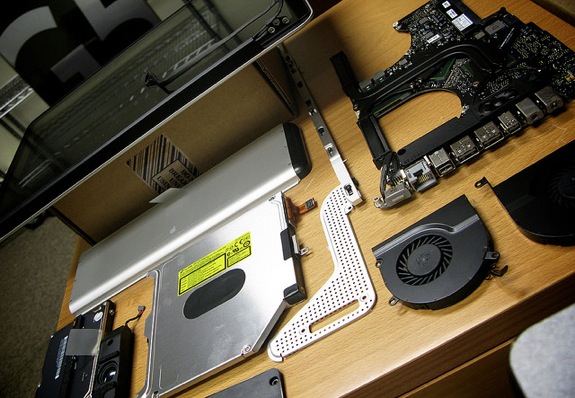
I’m about to let my ACMT expire. This is the certification Apple requires technicians to have to work on in-warranty Macs. I will be an “Apple-Certified Macintosh Technician” for just a few more days.
I’ve carried this certification for years. All Mac Geniuses have it (although it is named differently for Apple employees), as do any techs working at third-party Apple Authorized Service Providers. Both are line items on my resume.
There are several reasons I’m not renewing it this year, but the big one is that I simply don’t spend much time taking apart Macs anymore. Sure, I do out-of-warranty hard drive upgrades and that sort of thing on a freelance basis, but I’m not taking apart more than half a dozen machines a month. Since no one but Apple Stores and Apple-Authorized Service Providers can get parts like logic boards, my repairs are fairly limited in scope these days.
In short, the time (and money) required to study for and pass the ACMT test just isn’t worth it anymore.
Being an ACMT means being a mechanic. Computers are just machines that need fixing. At their core, computers are just interlocking components and connectors, and that kind of thing breaks. All the time. Even in Apple’s hardware.
There’s something that’s very satisfying about taking something apart, spending time with it, and having it work properly again. Besides the immediate results that come with a successful repair, there’s something strangely peaceful about working with one’s hands.
Another great part of being an ACMT (at least to me) is seeing how Apple refines its hardware over time. The pre-unibody MacBook is probably the best example of this. While Apple never got around to fixing the top case cracking issues, it did work hard on the inside of the MacBook over several generations to make the machine stiffer and lighter.
The MacBook was a very balanced machine. With some models, removing the optical drive would cut enough weight for the machine to rock back on its hinge, due to the LCD’s weight. As display panels shed weight over the years, so did the insides of the MacBook. The RAM release levers, for example, started out as solid pieces of metal, and eventually were replaced with groove plastic parts which weighed less. Cable routing became neater, and Apple moved to smaller connectors and fewer internal metal components.1
Many people look at this type of work and consider it boring, or beneath them. That’s a sad statement on how many people view manual and skilled labor, honestly.2
Being an ACMT can be draining. The work can be repetitive and tiring, for sure. It involves bleeding and cursing. Things break. Parts don’t work. Screws get lost. Customers yell.
Working in that chaos, I found something therapeutic that I haven’t been able to replace.
I’m happy with my current work. It is exciting, and covers a wide variety of topics. But there’s something about having a screwdriver in hand that I just can’t get over.
I don’t think I ever will.
-
Ask any Apple hardware guy about the C-Channel on the early MacBooks, and start counting the curse words. ↩︎
-
If you don’t understand this concept, watch this video of Mike Rowe at TED. Be warned — you’re going to need headphones. Skip to the 15:19 mark if you just have a few moments, or don’t care to hear a lot about how to castrate sheep. ↩︎
‘A Bicycle for our Minds’
I get chills every time I come across this quote.
On the LED Cinema Display’s Guts
Ever wonder why Apple’s displays are so pricey? Wonder no more.
‘iTunes 10.4.1 Fixes Problems’
Peter Cohen wins the for headline for the day. I love it.
Evernote 4.1 for iOS Released
Evernote’s biggest change on iOS is the possibility of creating and editing notes with rich text styles. Whereas previous versions of the mobile app forced users to always edit notes in plain text — thus breaking styles coming from the desktop app — Evernote 4.1 allows basic creation of numbered and bulleted lists, as well as sections, paragraphs and blockquotes straight from an iPhone or iPad. Obviously, users can now also select text to make it bold, italic or underlined, with more options such as strikethrough and highlight available in a new formatting bar.
It is about time. This always held me up from using Evernote in the past. I like the idea of the application, but since falling in love with .txt files, I’m just not sure I could ever try it again.
The $99 Touchpad
This morning, the HP Touchpad’s price was slashed to $99 at most resellers.
Within hours, most resellers had sold out of the ill-fated device.
This is a pretty crazy situation. This week, HP announced it would no longer be shipping any webOS-powered hardware, including the Touchpad, which is less than 2 months old. And yet, at $99, most nerds I know seriously considered pulling the trigger on one.
So, would the Touchpad have succeeded at a lower price, or was today’s rush simply a scramble at what is probably the best — and last, at least for now — webOS device?
Whatever the truth may be, I still think HP’s shuttering of the division — and the spinning off of its consumer PC division — is still pretty shocking. Maybe HP can see that its future is most secure in the enterprise end of things. Or maybe everyone over there has lost their minds.