Apple Closing Its Infinite Loop Store

Some sad Apple Retail news broke this afternoon. Here’s Joe Rossignol:

“After many years of serving customers at our stores in the Bay Area, we plan to close our store at Infinite Loop,” an Apple spokesperson said, in a statement shared with MacRumors. “All of our valued team members will have the opportunity to continue their roles with Apple. We look forward to welcoming our customers at our nearby Apple Park Visitor Center and other locations, on Apple.com, and the Apple Store app.”

For years, this location was known as “The Company Store,” and was a place for employees and users alike to pick up merchandise with Apple’s branding on it. I visited the store way back in 2007 when I was training to be a Mac Genius, and it was something special. Since its reopening in 2015, it’s been a fairly typical Apple Store, with the addition of some t-shirts and the lack of a Genius Bar.

In both of its incarnations, the Infinite Loop location was a neat place to visit, but was very clearly just the first floor of a very busy office building, complete with a shortage of parking. For the picky enthusiast, the Apple Park Visitor Center has been a much better place to visit since it first opened in the fall of 2017.
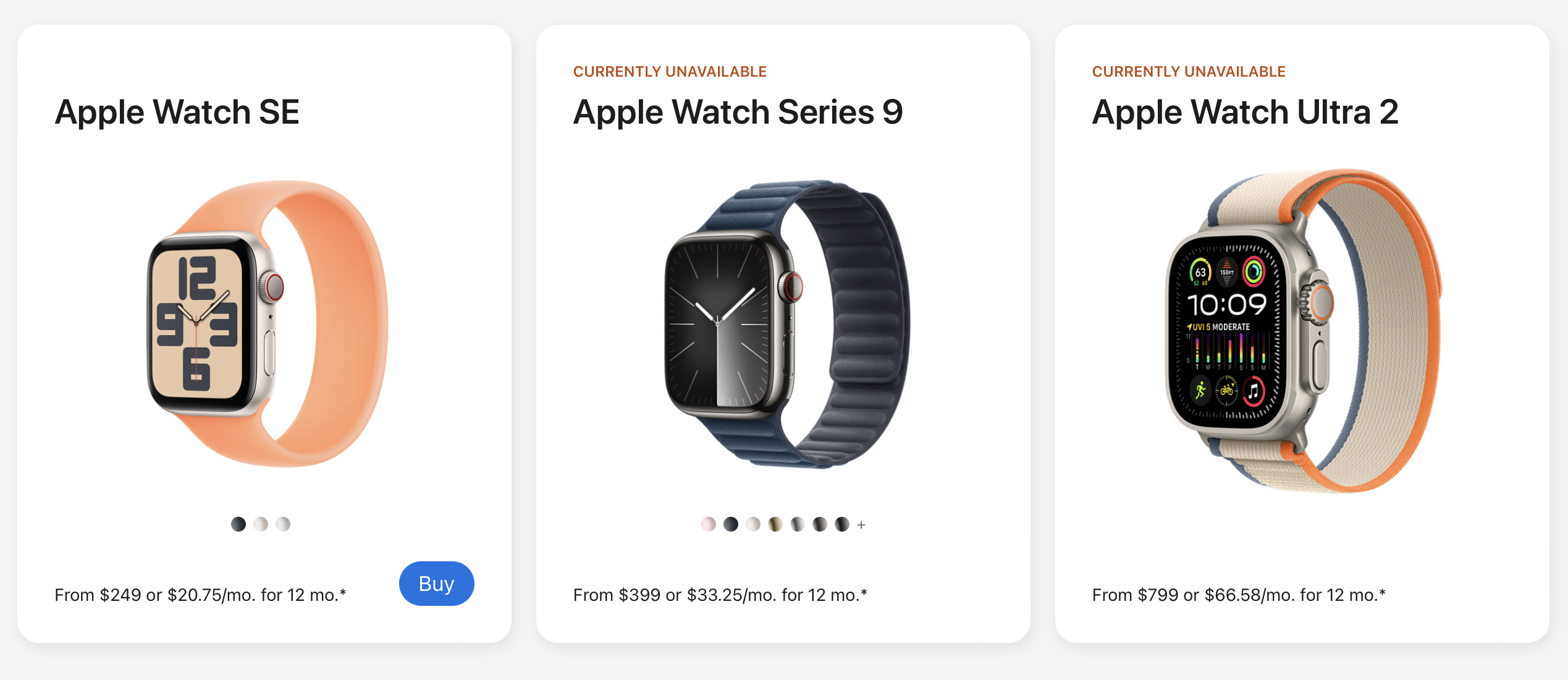
Apple Watch Series 9, Ultra 2 are ‘Currently Unavailable’ on Apple’s Website

As foretold, customers can not currently order these two Watch models directly from apple.com:

No Apple Watches

The White House has until Christmas Day to veto the import ban, and if it doesn’t, Apple will either need to settle with patent-holder Masimo or find a work around, as noted in the company’s statement to 9to5Mac earlier this week:

Apple’s teams work tirelessly to create products and services that empower users with industry-leading health, wellness, and safety features. Apple strongly disagrees with the order and is pursuing a range of legal and technical options to ensure that Apple Watch is available to customers.

Here’s what John Gruber wrote when that statement was released:

My guess, and it’s just a wild guess, is that they’re playing chicken with the Biden administration, hoping President Biden will issue a veto on this ITC import ban. President Obama issued a similar veto back in 2013 that would have been banned the import of the iPhone 4 and some iPad models. The Biden administration, I’m guessing, was hoping that Apple would just write a check to Masimo to settle this dispute, and doesn’t want to be seen putting its thumb on the scale favoring a “big tech” company, all of which are considered villainous to some degree on the left.

I honestly didn’t expect things to get to this point. Not being able to have older Apple Watches replaced is a real bummer, too.

Beeper Mini is Just About Done

Eric Migicovsky, writing on the Beeper blog:

Each time that Beeper Mini goes ‘down’ or is made to be unreliable due to interference by Apple, Beeper’s credibility takes a hit. It’s unsustainable. As much as we want to fight for what we believe is a fantastic product that really should exist, the truth is that we can’t win a cat-and-mouse game with the largest company on earth.

With our latest software release, we believe we’ve created something that Apple can tolerate existing. We do not have any current plans to respond if this solution is knocked offline. The iMessage connection software that powers Beeper Mini and Beeper Cloud is now 100% open source (github.com/beeper/imessage). Anyone who wants can use it or continue development.

That latest update is wild, according to Tim Hardwick:

In its latest effort to keep the service afloat, Beeper will suggest that users get hold of an old iPhone to get iMessage working on their Android phone. Users will then be asked to install a free Beeper tool to generate an iMessage registration code that will reinstate the ability to register phone numbers on the service. The catch is that the iPhone must first be jailbroken, and it must be kept plugged into power, at home, and connected to Wi-Fi for periodic registration re-requests.

Regardless of what you think about Apple’s control over iMessage, it’s clear this party is over.

They Did The (CarPlay) Thing

Josh Rubin has some big CarPlay news:

The next generation of Apple‘s CarPlay is a leap forward in the integration of the iPhone with your car, offering seamless integration with the vehicle’s multiple displays and providing a holistic and intuitive user interface that’s unique to each car brand. This evolved version of CarPlay extends beyond the central infotainment system to include the driver’s information cluster and all other screens in the car, providing all vehicle information and interaction through a singular interface paradigm that also supports the user’s ability to select widgets to appear in predetermined areas on the screen—much like customizing the iPhone lock screen today. This version of CarPlay appears the moment the car is turned on and combines locally rendered content with features powered by the iPhone’s wireless connection to the car. Today Apple announced the first two partners on board to integrate this new generation, Aston Martin and Porsche, and showed us preliminary screens.

The example images are way more sane then what Apple showed at WWDC 2022, as Chance Miller points out:

Porsche and Aston Martin’s implementation of next-generation CarPlay will span multiple in-car screens, showing CarPlay’s iconic grid of apps, now playing information, Apple Maps integration, and more. CarPlay also controls the gauge cluster, showing the speedometer and other details.

Kbase Article of the Week: If an Error Occurred While Updating your Apple Studio Display

Sometimes I forget there’s a whole dang computer in the Studio Display, then I come across a link like this one:

If a warning symbol appears on your Studio Display, your display is in recovery mode and needs to be updated.

If an error occurs while updating your Studio Display, a warning symbol and support.apple.com/display/restore appear on your screen. Use the built-in display on your Mac or another display connected to your Mac to update your Studio Display.

Sponsor: TextExpander

TextExpander’s customizable and shareable snippets of text allow your team to fly through repetitive tasks quickly by expanding the things you type regularly — all you have to do is type a short abbreviation and TextExpander does the rest of the work for you.

Here’s How It Works:

  • Create It: Collect your most commonly used emails, phrases, messaging, URLs, and more to create snippets and templates in TextExpander that are always accessible with a quick search or abbreviation.
  • Share It: Give your team or different departments across your company access to the content they need to use every day.
  • Use It: Expand the content you need with just a few keystrokes on any device, across any app you use — no APIs or integrations needed.
  • Optimize It: Add customizations like fill-ins and optional sections to keep that human touch. Anytime you make changes to snippets they update everywhere so your team is always on the same page.

It’s that easy!

Check out TextExpander and say goodbye to repetitive typing.

Facades 2

Michael Steeber:

Today I’m launching a major update to Facades, the field guide to Apple Retail Stores. I’ve added detailed timelines filled with store history, new ways to track and share your store visits, custom lists, and much more. This update is the product of feedback from readers like you, and I hope you’ll enjoy what I’ve made.

I’ve been using the updated version for a while via TestFlight, and it is delightful. The title design touches are fabulous.