The Power and Legacy of Virginia Tech’s Mac-Based Supercomputers

When we think about data centers today, we often picture rows of GPU-packed racks run by companies like Microsoft, Google, Amazon, and Meta, and used by AI labs such as OpenAI and Anthropic. Much of that hardware does one of two jobs: training new models or running finished ones to answer requests from millions of people around the world.

A supercomputer is built from many of the same parts but for a different purpose. It is typically owned by a government lab or university and designed for scientific simulation, such as modeling climate, nuclear physics, or new materials. That work demands high-precision math and very fast communication between processors. Rather than serving the masses, a supercomputer is shared among researchers, whose large jobs wait in a queue and run according to a schedule.
Continue reading ⇢

A Forgotten Apple Network Server Prototype⇢

Thanks to Cameron Kaiser’s excellent blog Old Vintage Computing Research, I have a growing interest in the Apple Network Server line of computers. One of Kaiser’s posts mentions the ANS 300, a model I wasn’t familiar with at the time.

Turns out, it is wild. Tom Owad wrote about it back in 2004:

The Apple Network Servers are high end servers built by Apple that run IBM’s AIX variant of UNIX. Pictured above is the Apple Network Server 700, Apple’s top-of-the-line server with a 180 MHz PPC 604e processor, two power supplies, 7 removable drive bays and 2 fixed drives. The ANS 500 had a slightly lesser configuration, with a 132 MHz 604e, only one power supply, and 7 removable drive bays. Both have locking wheels on the bottom (handy since the unit weighs about 80 pounds!) and a locking/sliding 3-position translucent door to cover the drive bays. The power supplies are removable via a handle behind the purple removable “grille” in the bottom. These units were specifically designed to be highly serviceable yet very secure.

The ANS 300 had the same architecture as the 500 & 700, but was an easily rack-mounted unit intended for Internet/FTP/Mail/Web serving, departmental and small database servers, etc, and consequently had less expansion. It has two removable drive bays and one fixed drive (behind the LCD). Much of the serviceability & security was abandoned for the sake of size. For instance, there is no obvious way to secure the drive bays, or the motherboard tray from being removed. The power supply is fixed and would be slow to field repair. The fixed hard drive mounted behind the LCD is very hard to reach, etc. The key lock on the front controls only the “on, lock, service” options, unlike the multiple key lock controlling those functions plus doors and security on the full size 500/700 units. These issues ceased to be important, however, as the ANS 300 never shipped.

Continue reading ⇢

Hello Again, Ten Years Later

A post from November 2021 titled The 14-inch MacBook Pro Resets the Timeline is one of my favorite things I’ve written in the 18-year history of 512 Pixels. In it, I reviewed the first 14-inch MacBook Pro as if the 2016-era MacBook Pros never existed.

But of course, they did exist, and were announced ten years ago this week. Here’s a bit from Apple Newsroom back on October 27, 2016:

Apple today introduced the thinnest and lightest MacBook Pro ever, along with a breakthrough interface that replaces the traditional row of function keys with a brilliant, Retina-quality Multi-Touch display called the Touch Bar. The new MacBook Pro features Apple’s brightest and most colorful Retina display yet, the security and convenience of Touch ID, a more responsive keyboard, a larger Force Touch trackpad and an audio system with double the dynamic range. It’s also the most powerful MacBook Pro ever, featuring sixth-generation quad-core and dual-core processors, up to 2.3 times the graphics performance over the previous generation, super-fast SSDs and up to four Thunderbolt 3 ports.

The Touch Bar places controls right at the user’s fingertips and adapts when using the system or apps like Mail, Finder, Calendar, Numbers, GarageBand, Final Cut Pro X and many more, including third-party apps. For example, the Touch Bar can show Tabs and Favorites in Safari, enable easy access to emoji in Messages, provide a simple way to edit images or scrub through videos in Photos and so much more.

Continue reading ⇢

Happy 25th, iPod⇢

Jason Snell:

In researching the Designed in California series, I was struck by just how quickly the iPod’s importance was overshadowed by the iPhone. There are barely more than five years between the launch of the iPod and the launch of the iPhone. While both products took time to grow into their markets, I think it’s still the case that the true “iPod era” was only a handful of years long, and it’s been entirely overshadowed by the product that came after it.

That’s a shame, in a way, because I think people who didn’t live through this era don’t understand just what a hit the iPod was. It completely changed Apple’s fortunes, rehabbed its brand identity, gave people reasons to go into Apple’s relatively new retail stores for the first time, and taught Apple lessons that it needed to learn before it could build a smartphone. (The iPhone’s hardware was largely built by the iPod team, even if the software came from the Mac.)

Continue reading ⇢

The Performa’s In-Store Demo⇢

Doug Brown has dug up something previously lost to time. In working with an early Performa, he discovered a true gem on its hard drive:

This Performa 410 was a store demo unit! This is the kiosk software that would have been running on a demo Mac inside a store like Sears or Circuit City. The machine was never wiped back to factory state before being sold, and the original owner kept the demo software the entire time they had the machine. Such a cool find!

It includes a comparison between the Performa 410 and the Performa 466, so clearly those two models must have been sold side-by-side at the same retailer.

Aside from that, there is a tutorial about how to use a mouse, info about a few Apple accessories, and a ton of software demonstrations about several included software and devices such as ClarisWorks, Quicken, the Global Village fax modem, AOL, American Heritage Dictionary, and SuperMunchers. There are also several demos of other software you could buy including Lotus 1-2-3, WordPerfect, Yearn2Learn, and Battle Chess.

Continue reading ⇢

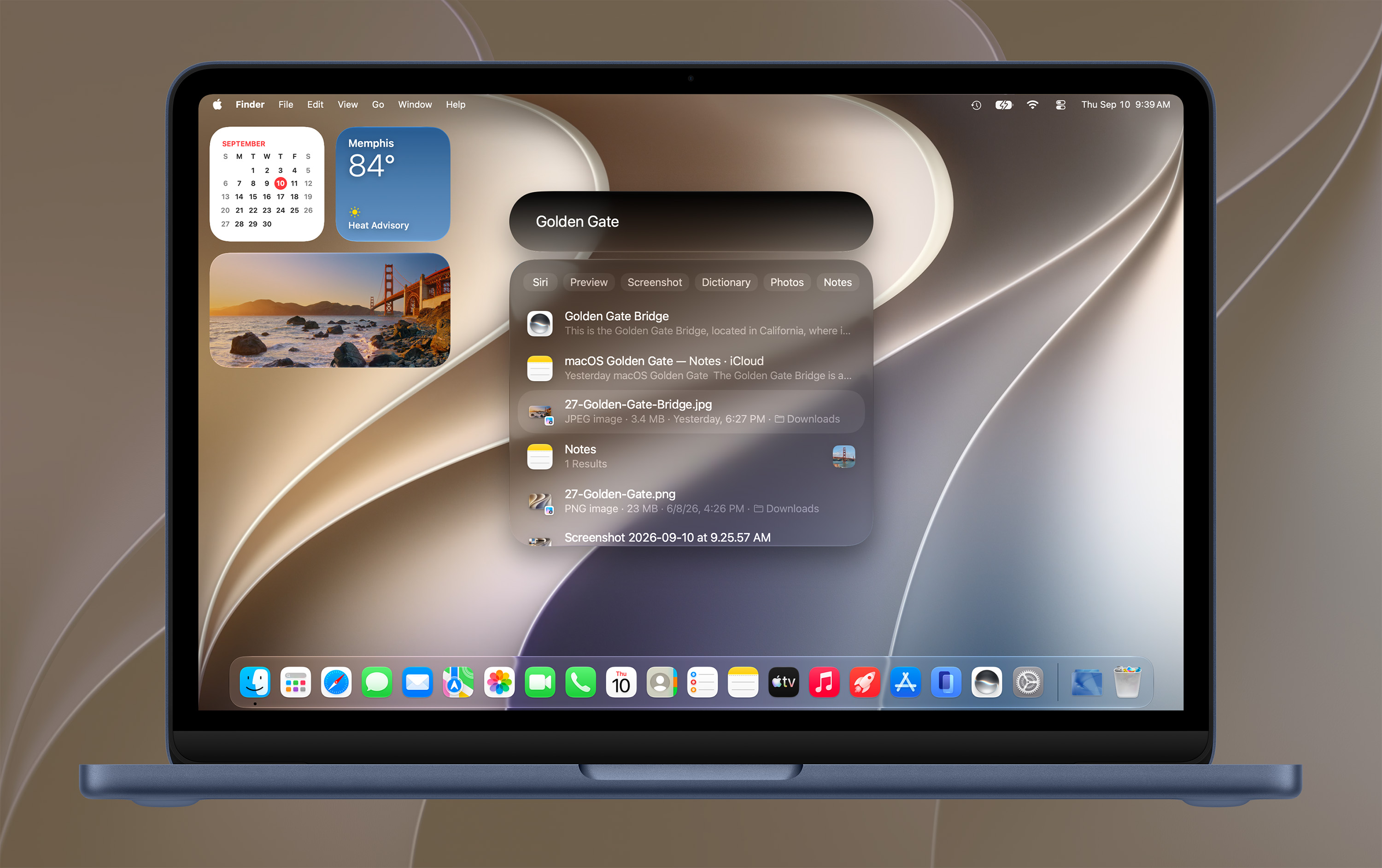
Golden Gate Added to the macOS Screenshot Library⇢

As is tradition, I have made and cataloged a whole bunch of screenshots of the new version of macOS.

Golden Gate

Golden Gate is the 24th version of macOS that I have documented this way. It’s a lot of work, but I love having the screenshot library as a resource for folks to use and enjoy.

If you haven’t looked through the library in a while, you should check out my new-ish comparison tool. You can type what you are looking for, and the page will surface related screenshots, sorted by age. It is a lot of fun.

Continue reading ⇢

Lion Was Weird⇢

Sam Gold on Mastodon, writing about the one version of OS X that allowed a user to put something to the left of the Finder icon in the Dock:

[In] Lion DP1, you could set defaults write com.apple.dock springboard-left-of-finder -bool YES and get this.

that first Lion beta build is absolutely chock full of experimental UI behind flags.

This makes me feel weird inside.

Continue reading ⇢