
I’ve already got The Verge’s bookmarked.
Category: Apple
Growing iCloud⇢
Neven Mrgan doesn’t think 5 GB will be enough for iPad 3 users.
Next Tablet Named iPad HD?⇢
Omni Sync Server out of Beta⇢
Howdy, friend-os! Today, I get to do something we’ve been looking forward to for a while now: announce that the Omni Sync Server is coming out of beta.
We’ve had the server up for almost two years now - it launched way back in April of 2010. In that time, the server has been scaled up from a Mac mini here in our offices to a collection of machines in our colocation facility, all working together to help you move your Omni apps’ data back and forth between your OS X and iOS devices, as well as to store backup copies of that data just in case things go totally diggstown and you need them.
iPad Usage
I use my iPad like an iPad. When I pick up my iPad I don’t think that I’m missing out because I’m not using my Mac. I chose the iPad because it fit the task I’m doing at the time.
I agree with Jim, and think about my iPad in a similar way. Here are some common uses for my iPad:
- Light email work
- Reading RSS feeds
- Checking Twitter
- Writing short posts for 512 Pixels
- Gaming
- Watching TV
I can do all of these things on my MacBook Pro, or even my Mac mini at home. The iPad, however, makes these tasks not only easier, but more enjoyable … especially on the couch, with a beer.
Rene Ritchie, on Rumors and Linkbait
I had the pleasure of having dinner with Rene at Macworld, and have to say, his views on covering Apple news are pretty damn good.
The 10.7.3 Supplemental Update
This update resolves an issue when restoring a Mac from a Time Machine backup.
The company recommends it for any user “running 10.7.3 with Time Machine backups.”
It weighs in at 24.55 MB if downloaded at the link above or in Software Update. On my fully-updated MacBook Pro, the update is a measly 38 KB.
"We Simply Don’t Know."
Craig Grannell speaks truth in to a world filled with iPad 3 rumors.
The IIc G4
Someone should help me do this to my IIc.
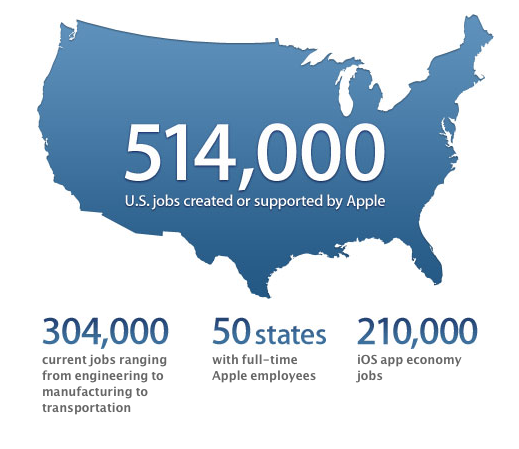
Apple, on Job Creation
On the iPad Home Button
There are eight functions the iPad Home button performs. As far as replacing it with a touch-sensitive area on the bezel, that’s just impractical. The main problem is orientation. Where is it? Since there’s no “wrong” way to hold an iPad, the Home button could be at the top, bottom, left or right at any time. I often find it by feel, a tactic that a touch area would eliminate.