
I sat down one day with one thing on my mind. I was going to find a way to easily put weather on my desktop using GeekTool. I had seen others in the past that had gotten weather data on their desktop. When I began looking around for it though, I found that some of them required a degree in command line kung-fu to get it to work. I didn’t want to jump through all of those hoops, just for the weather. I knew that there had to be an easier way. GtWthr is what I came up with.
Category: General Tech
On the Pre 2
But in a way, we can’t forgive it. The Pre 2 is a good phone. It deserves its moment in the spotlight, not a press released followed by what amounted to a footnote in the announcement presentation of other products months later. Instead HP and Verizon are content to let it sit in the back of their stores and warehouses where potential customers have to know that the phone exists and actually want to see it to get a demo. If the Pre 2 had come out on Verizon in October when it was first announced, then we might be singing a different tune. But with the release landing so many months later than we suspect was intended, it’s like HP and Verizon are just going through the motions because they couldn’t afford to stop the wheels of distribution. “We’ve got the phone, we might as well release it,” seems to be the overwhelming attitude.
Dan Benjamin’s Podcast Rig
Dan Benjamin’s 5by5 network of podcasts is simply fantastic. It turns out his podcasting equipment is pretty awesome, too.
‘Used Several Times per Day’
Ian Hines, on what lives in his menubar. In case you missed it, I posted details on mine yesterday.
Creating Symlinks in Automator
Symlinks are a great way to use Dropbox to sync application data that normally is restricted to one Mac. These can be set up in Terminal, but not everyone is comfortable in the command line.
Thankfully, the guys over at Junecloud have put together an Automator actions that make this task as simple as drag and drop. Simply select the folder you want to sync — make sure it’s already on your Dropbox — and then point Automator where the link should go — usually in your ~/Library/Application Support folder.
More on Sameness
I got several emails and tweets asking questions about yesterday’s post, “On Sameness,” so I thought I’d just answer them all here.
The Wallpaper
That wallpaper is by John Carey over at fiftyfootshadows. It’s part of his “Dust” collection, which he posted in January of last year. If you’re looking for high-quality, stunning wallpaper images, look no further than his site.
The Menubar
My menubar is slightly different on my two machines, but here’s the basic set I keep on both boxes:
‘Access Main Computer File’
Ben Brooks linked to this awesome collection of screen captures of made-for-movies computer UIs. Most of them are fantastic — and terrible — all at once.
On Sameness

I — like many of you — spend a ton of time in front of a Mac. Probably too much time.
I have two Macs that I bounce between — a 27-inch iMac at home, and a 15-inch MacBook Pro at work, which is usually in clamshell mode, hooked up to a 27-inch LED Cinema Display.
I like keeping these computers as alike as possible. I use an Apple Extended II and a Magic Mouse at home, with the same keyboard and a Magic Trackpad at home. I use the same wallpaper, show generally the same folders on the desktop and arrange the Dock the same way on both computers. Both machines have use the same screen saver, same user name and same password. I use the majority of the same apps at home and at work, and if there’s anything unique that I need, LaunchBar is just a keystroke away.
‘Above That Minimal Level’
Up until yesterday the income I got from this site was all “extra” income. I had a full-time job and didn’t need the income this site was generating. The Fusion ads and RSS sponsorships covered the hard costs (primarily hosting and my internet service provider) and then what was left over I used to pay for software, hardware, and the other things I write about here.
But now that I’ve quit my full-time job, the income this site makes has a new priority: food and shelter. Or, put another way, the RSS Sponsorships help me buy food to eat instead of software to write about.
On iPhone Home Screen Organization, Targets and the Opposable Human Thumb
A few days ago, Ben Brooks wrote a piece on how he organizes his home screen, based on usage. I do the same thing, but in a very different way. Here’s a screenshot of my iPhone’s home screen:
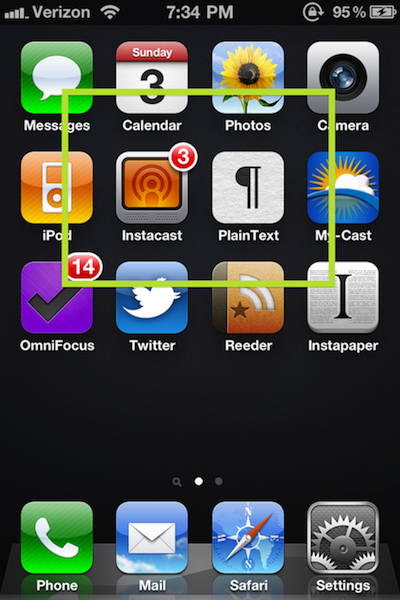
I’ll explain that green box in a second.
As you can see, I keep things simple.
I keep an empty row between my apps and the Dock. This not only de-clutters my home screen, but gives me substantial space in which to swipe to Spotlight or to my second page, without accidentally opening an app.
What’s Next for the Engadget Crew
David Carr at the New York Times:
Like many of its peers covering Silicon Valley, Engadget worked as a kind of permanent start-up, with 16-hour days to compete in the always-on news cycle, but AOL treated it as one more niche site. “We have been working on blogging technology that was developed in 2003, we haven’t made a hire since I started running the site, and I thought we could be more successful elsewhere,” said Joshua Topolsky, who was the editor of Engadget until the middle of last month.
Getting Stuff Into OmniFocus
David Sparks has created a great screencast about how to get stuff into OmniFocus. I just finished watching it, and learned several new tricks. This really goes to show just how flexible OmniFocus is.
I’m looking forward to the next episodes of the series.