
After hearing the podcast being played from a floppy disk, the guys dive into what WWDC26 could bring for Apple Intelligence and revisit what John Ternus could bring to the CEO role at Apple.
512 Pixels
MacBreak Weekly 1017: We Found a Google, and Put It In⇢
It was my pleasure to hang out on MacBreak Weekly earlier today:
Apple announces June 8th - June 12th for WWDC 2026. Tim Cook announces that the Mac had its best launch week for first-time Mac customers. And a dispute is brewing between the two Halide co-founders as one of them files suit against the other!
OpenAI Shuttering Sora⇢
Will no one think of the slop?!
AgentBridge⇢
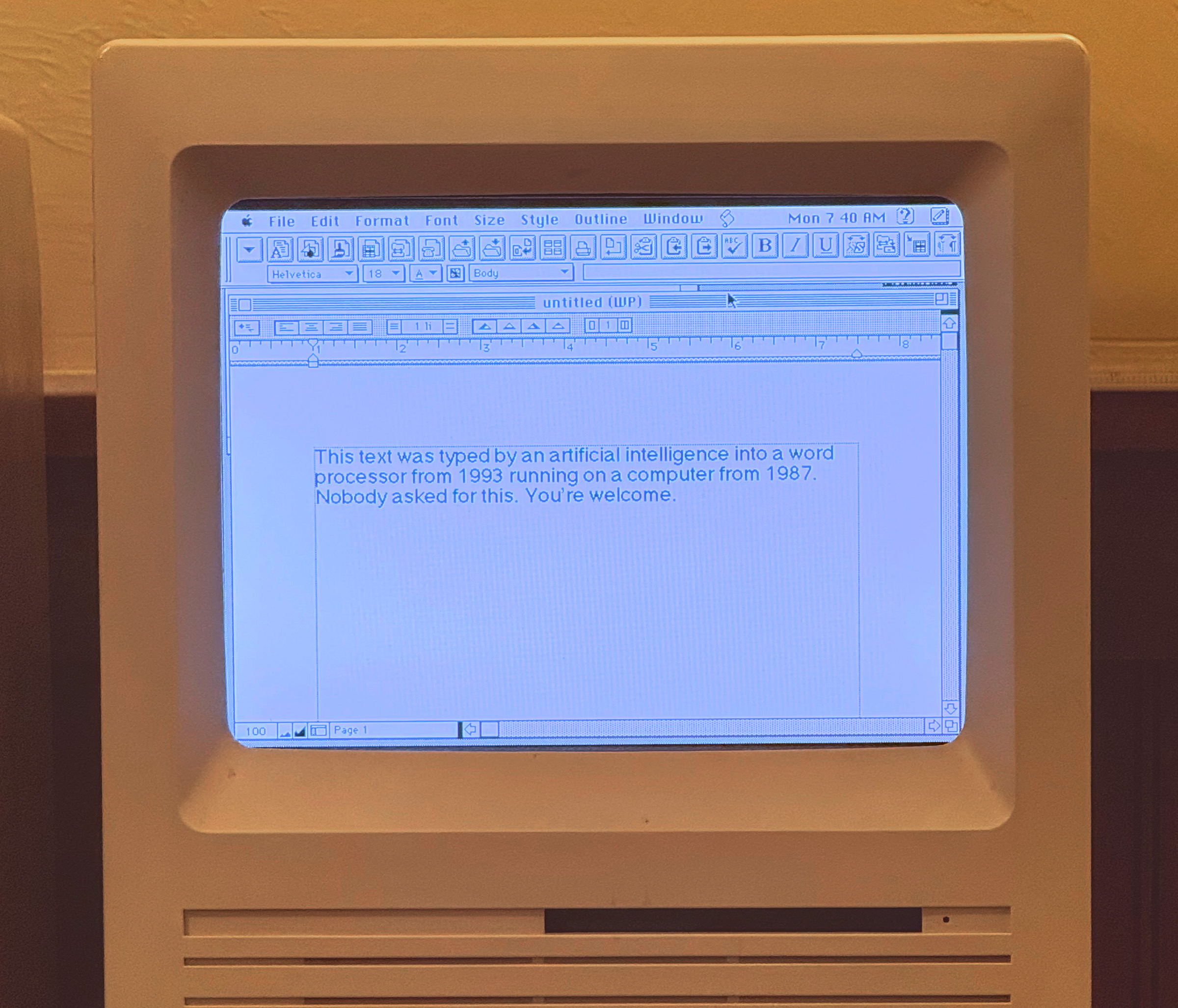
If you want your classic Mac to interact with Claude, Sean Lavigne has the project for you:
AgentBridge is a native Classic Mac OS application that lets AI agents (like Claude) interact with Mac OS 7–9 through structured commands and responses. It works on real hardware and emulators — no modifications to your Mac required.
Drop AgentBridge into a shared folder, launch it on your Mac, and an AI agent can list windows, open apps, type text, read the clipboard, browse files, and more — all through a simple text-based protocol.
This image in the Github documentation cracked me up:
Mac OS X Shipped 25 Years Ago
Apple Newsroom, back in 2001:
“Mac OS X is the future of the Mac, and we hope it will delight our customers with its unrivaled power and ease of use,” said Steve Jobs, Apple’s CEO. “The Public Beta has generated incredible feedback and support from Mac users and developers, which has helped us to make Mac OS X the most advanced operating system ever.”
If you didn’t get to use the first version of Mac OS X, these screenshots can give you a good feeling for what it was like.

That original Aqua interface came with a cost, as John Siracusa wrote in his review of the operating system:
Despite the official release status of 10.0, The Mac OS X user interface is still clearly a work in progress. The biggest lapses are the system-wide interface responsiveness issues and the hobbled Finder. The Dock is a close third, presenting a sort of UI logic puzzle in which optimizing its usage for one of its functions (application switching, launching, Apple menu replacement, Control Strip functionality, etc.) causes it to become sub-optimal for one or more of its other functions. Thankfully, third party utilities are quickly arriving on the scene to help experienced users create the environment they need to be productive.
Overall, the user experience of OS X is not as pleasant or as simple as that of classic Mac OS. The number and severity of bugs alone would likely turn a novice off, especially those surrounding the still-necessary classic environment. Novice users shouldn’t have to know or care what classic is, why it’s frozen, and how to recover. And much of the time, the provided GUI methods (force quit, etc.) don’t work as expected anyway, leaving a trip to the command line and the
killcommand as the only alternative.The unresponsive interface will be noticed by everyone. Many features are slow enough that even plodding grandmothers will be confused by the apparent lack of response to their input (when resizing a list-view window, for example). And there’s still the “why can’t I do anything now?” experience, especially in the Finder during network-related operations. Grandma doesn’t care that she can still switch to another application and continue working if the next thing she needs to do is in the Finder, which is currently locking her out because she chose to mount her iDisk.
As in every one of the previous OS X releases, the score-card remains the same. Even taking into account the increased stability and superior multitasking potential, Mac OS X does not yet live up to the level of user interface excellence set by the technically inferior Mac OS 9.
Over the years, Mac OS X’s user interface matured as Mac hardware was able to catch up with what Apple’s designers were doing. We’ve since seen Brushed Metal, linen and stitched leather, and now Liquid Glass.
Of course, user interfaces — both good and bad — come and go. What Mac OS X really did was set Apple’s entire software organization on solid ground. Rebuilding the Mac’s operating system atop the technology developed at NeXT not only saved the Mac itself, but paved the way for iOS and Apple’s other platforms we love and use to this day.
WWDC26: June 8-12⇢
Apple has announced dates for this year’s WWDC:
Apple today announced it will host its annual Worldwide Developers Conference (WWDC) online from June 8-12, bringing developers together from around the world for a week of connection, exploration, and innovation. In addition to the online experience, developers and students will also have the opportunity to celebrate in person during a special event at Apple Park on June 8.
WWDC26 will spotlight incredible updates for Apple platforms, including AI advancements and exciting new software and developer tools. As part of the company’s ongoing commitment to supporting developers, WWDC will also provide unique access to Apple engineers and designers, and insight into new tools, frameworks, and features.
WWDC kicks off with the Keynote and Platforms State of the Union on Monday, June 8. The conference continues online all week with over 100 video sessions and interactive group labs and appointments, where developers can connect directly with Apple engineers and designers to explore the latest announcements. The conference will take place on the Apple Developer app, website, and YouTube channel; and on the Apple Developer bilibili channel in China.
See you there.
Hide macOS Tahoe’s Menu Icons With This One Simple Trick⇢
I really dislike Apple’s choice to clutter macOS Tahoe’s menus with icons. It makes menus hard to scan, and a bunch of the icons Apple has chosen make no sense and are inconsistent between system applications.
Steve Troughton-Smith is my hero for finding a Terminal command to disable them:
Here’s one for the icons-in-menus haters on macOS Tahoe:
defaults write -g NSMenuEnableActionImages -bool NOIt even preserves the couple of instances you do want icons, like for window zoom/resize.
Your apps will respect this change after relaunching. I ran this a few minutes ago and already appreciate the change. I really think Apple should roll this change back in macOS 27, or offer a proper setting to disable these icons for those of us who find them distracting.
The Case for an Ultralight Mac⇢
David Sparks is a fan of the MacBook Neo, but it’s not the Mac notebook his heart truly desires:
Think about it. Apple has covered the pro market with the MacBook Pro lineup. The Neo is about to cover the mainstream and budget-conscious buyer.
But there’s a gap at the top. A premium ultralight for people who travel constantly, who want the absolute minimum weight and footprint, and who are willing to pay for it. A MacBook that weighs two pounds or less, with a stunning display and all-day battery life. Not a compromise machine. A showcase.
The technology is ready. Apple silicon was basically designed for this. The question is whether Apple sees the market opportunity, or whether they think the Air (or whatever it becomes post-Neo) already fills that slot.
I don’t think it does. There’s a difference between a laptop that happens to be light and a laptop that’s built from the ground up to be as light as physically possible. Apple used to understand that distinction. The original Air proved it.
With the Neo handling the mainstream, there’s room in the lineup for Apple to go back to that idea.
I’ve been thinking a lot about this since the Neo was announced. In many ways, it frees the MacBook Air up to return to its thin-and-light roots, but I think that would be a mistake.
Among the many sins Apple committed with the 12-inch MacBook is that it was priced like a mid-range laptop, confusing the product line. If Apple were to return to this market, slotting in an ultra-portable machine in a more premium price point would avoid that confusion and let Apple go wild with what it could do with such a machine.
I’m not sure Apple wants to sell four laptop models1 but if they do, I think Sparks is on to something.
‘Twenty Years of Me’⇢
Myke Hurley, reflecting on Apple’s 50th birthday:
It’s getting close to 20 years since I decided that what I wanted most in my life was to be a technology podcaster, and that the thing I wanted to talk about more than anything was Apple. Through many attempts, and many homes, I eventually reached the point where this could be the way I make a living.
I launched my business on a Mac. For many years, I ran it using my iPad Pro, and all the while I’ve used my iPhone for everything in between. But for me, it’s not just about using these products — my business has also depended on Apple making them. What I create is about them.
My interest in technology has always been broad, but what I’ve always cared about most is whatever Apple is making. It’s been that way since I was 18 years old and got my first Apple product — the iPod mini — and it remains that way to this day.
Apple and I do not always see eye to eye, and there are times when the thing I’m most enthusiastic about is trying to take them down a peg. But no matter how passionate I may get, at the core of it I always believe in what this company is capable of.
It’s Been a Big Week for the Mac⇢
Tim Cook — on X (gross) — with some news:
Mac just had its best launch week ever for first-time Mac customers. We love seeing the enthusiasm!
Connected 595: Federico Says “He Will Gone”⇢
Stephen has been a menace all week with Lil Finder, Myke keeps thinking about the MacBook Neo, and Federico shares his most recent thoughts on foldable phones.
NASA Reportedly Starting the Process to Move Away From the SLS⇢
NASA’s SLS rocket program has been a mess for a long, long time. Many industry-watchers have wondered why NASA would spend billions of taxpayer dollars on its own rocket while the private space industry is working on their own heavy-lift vehicles that could accomplish similar things.
It seems that NASA’s new administrator Jared Isaacman may be asking the same question, according to Loren Grush, Ed Ludlow, and Julie Johnsson at Bloomberg:
Under the original plan set years ago, Boeing’s Space Launch System rocket would have launched a crew of four riding inside the Lockheed Martin Corp.-built Orion crew capsule to the moon, with the spacecraft then putting itself in the moon’s orbit. A [SpaceX] Starship lander would then meet up and dock with the capsule around the moon, before taking astronauts down to the lunar surface.
With the new proposal, SLS would no longer be used to boost Orion close to the moon — previously a key task for the rocket. Instead, Starship and Orion would dock in Earth orbit, giving Starship the pivotal role of propelling the capsule to the moon’s orbit, before taking astronauts down to the surface.
NASA Administrator Jared Isaacman plans to meet on Tuesday with the companies working on Artemis and human landing system program (HLS), including Blue Origin LLC, Boeing and SpaceX, to discuss their progress and the latest plans at the agency. Any changes to the mission could face Congressional scrutiny, and the agency could reverse and alter its plans, said the people, who asked not to be identified as the matter is confidential.
Under this new plan, the SLS would fly four more missions (at an estimated cost of $4 billion each) while HLS partners got up to speed. After that, astronauts would get to the lunar surface via a SpaceX or Blue Origin rocket. This would leave the SLS as it is today, with none of its future, more powerful versions being built. Its use would be diminished to potentially be used to launch the Orion crew capsule into Earth orbit and no further.
That would be a slow, sad ending to what could have been an amazing story, but I think NASA is finally seeing the writing on the wall. The SLS is simply too complicated and too expensive to become a reliable, long-term launch vehicle.