Apple is hard at work making 1 million face shields a week for medical workers on the front line of the COVID-19 pandemic.
So, naturally, there’s a new support page up detailing how to assemble them, complete with a video:
Apple is hard at work making 1 million face shields a week for medical workers on the front line of the COVID-19 pandemic.
So, naturally, there’s a new support page up detailing how to assemble them, complete with a video:
This time on Ungeniused, things get salty:
Not all bodies of water are blue, and not all saltwater is the same. On this episode, Myke and Stephen belly flop into the weird world of pink lakes.
My thanks to our sponsor:
Apple Support, explaining a problem no one has had or thought about in a long time:
In a multi-zone network, when you select the last zone, the list of printers in the “Printers” box does not get updated and continues to display the printers that belong to the previous zone that was selected.
The fix?
The original Apple Printer Utility v1.0 had an issue working with printers in the last zone of a multi-zone network, as well as networks that only have one zone (as that zone is effectively the last zone).
This issue is fixed in later versions of the Apple Printer Utility. To find the most recent version of this software, refer to the Apple Software Updates Library at http://www.apple.com/swupdates.
All of a sudden, many people are working from their homes for the first time. This week, Stephen and David tap into their combined decade of experience to share some of what has worked well for them at home.
My thanks to our sponsors:
If you use audio on your Mac in any way, SoundSource is for you. It lives in your menu bar, and provides you with superior control over all your audio.
Take control of audio on a per-application basis. Now you can change the volume of any app relative to others, and play individual apps to different audio devices.
Add effects to any audio too. The Magic Boost and Volume Overdrive features, let you hear your audio even in loud environments, and the built-in equalizer can sweeten the sound. Advanced users will love the ability to apply Audio Units to any audio.
SoundSource also provides fast access to the settings for your Mac’s Output, Input, and Sound Effects audio devices. Adjust levels, tweak the balance, and even switch sample rates, right from the menu bar. You may never need to open the Sound System Preference again!
SoundSource is made by Rogue Amoeba, the masters of Mac audio who bring you Audio Hijack, Airfoil, and more. Download the free trial, then purchase today. Through May 10th, 512 Pixels readers can save 20% with coupon code 512TWENTY.
The original NASA insignia is one of the most powerful symbols in the world. A bold, patriotic red chevron wing piercing a blue sphere, representing a planet, with white stars, and an orbiting spacecraft. Today, we know it as “the meatball.” However, with 1970’s technology, it was a difficult icon to reproduce, print, and many people considered it a complicated metaphor in what was considered, then, a modern aerospace era.
Enter a cleaner, sleeker design born of the Federal Design Improvement Program and officially introduced in 1975. It featured a simple, red unique type style of the word NASA. The world knew it as “the worm.” Created by the firm of Danne & Blackburn, the logo was honored in 1984 by President Reagan for its simplistic, yet innovative design.
NASA was able to thrive with multiple graphic designs. There was a place for both the meatball and the worm. However, in 1992, the 1970s brand was retired – except on clothing and other souvenir items – in favor of the original late 1950s graphic.
Until today.
NASA Administrator Jim Bridenstine:
The worm is back! When the @SpaceX Falcon 9 lifts off carrying @NASA_Astronauts aboard #CrewDragon, it will sport the iconic symbol to mark the return of human spaceflight on American rockets from American soil. More: https://t.co/jQQv5ZcTY0 #TheWormIsBack pic.twitter.com/9Ltk1nMa8j
— Jim Bridenstine (@JimBridenstine) April 2, 2020
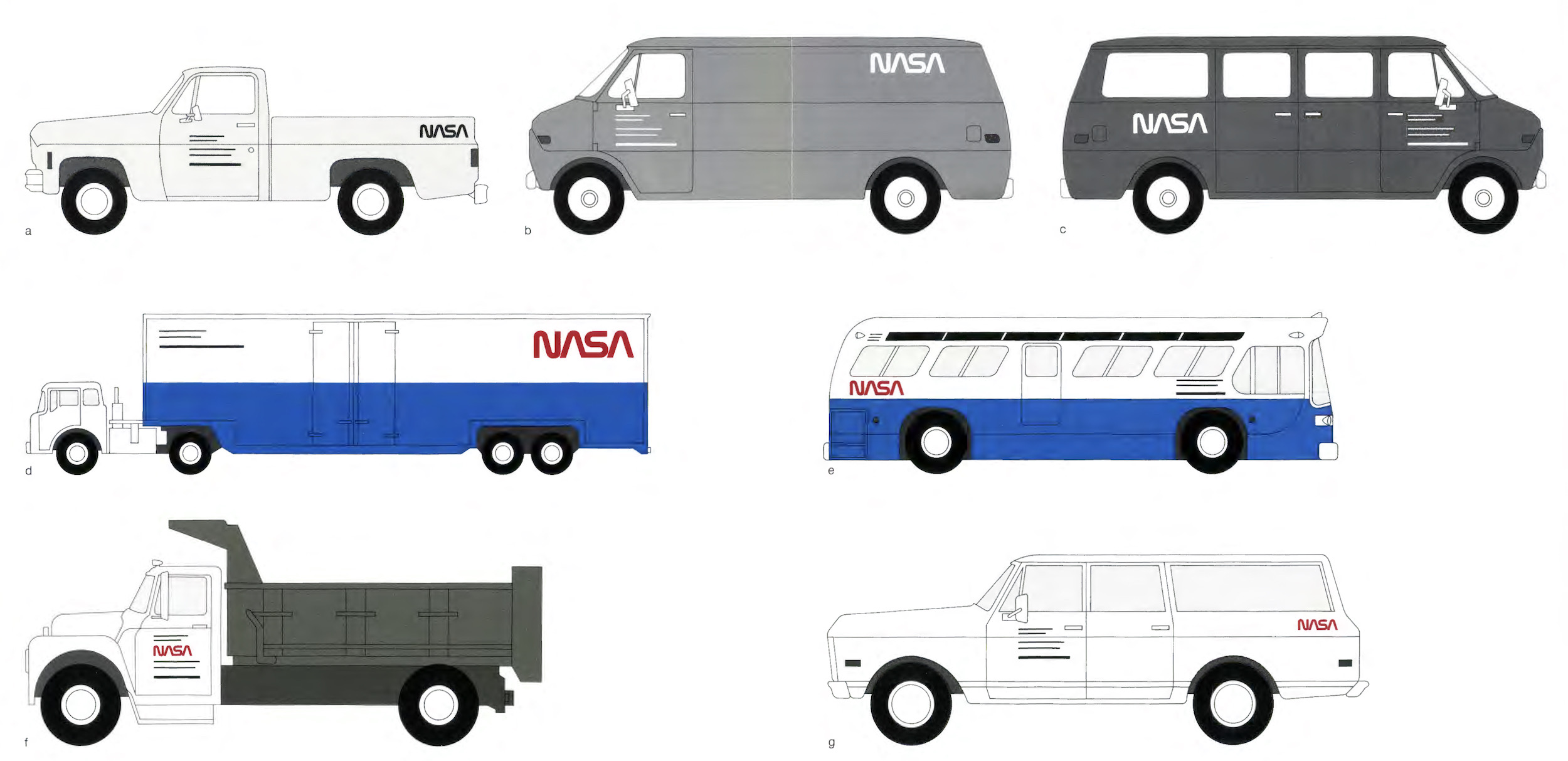
Don’t miss the 1976 NASA Graphics Standards Manual linked on that page. This page is my favorite:
Thanks to TextExpander for sponsoring the site this week. It makes creating and using snippers across all of your devices super easy, making you more productive and accurate across all sorts of work. I’ve used it for years, and don’t want a Mac without it. As a 512 Pixels reader, you’ll get 20% off by signing up here.
I would hate to be someone with a repaired product locked up inside one of these stores.
After nearly three weeks and 15,000 votes, you have chosen your favorite Mac:
Coming in with 51.3% of the votes placed in the final round, the Power Mac G4 Cube has won, narrowly defeating the 2012-2015 Retina MacBook Pro.
Here is what the final, full bracket looks like:
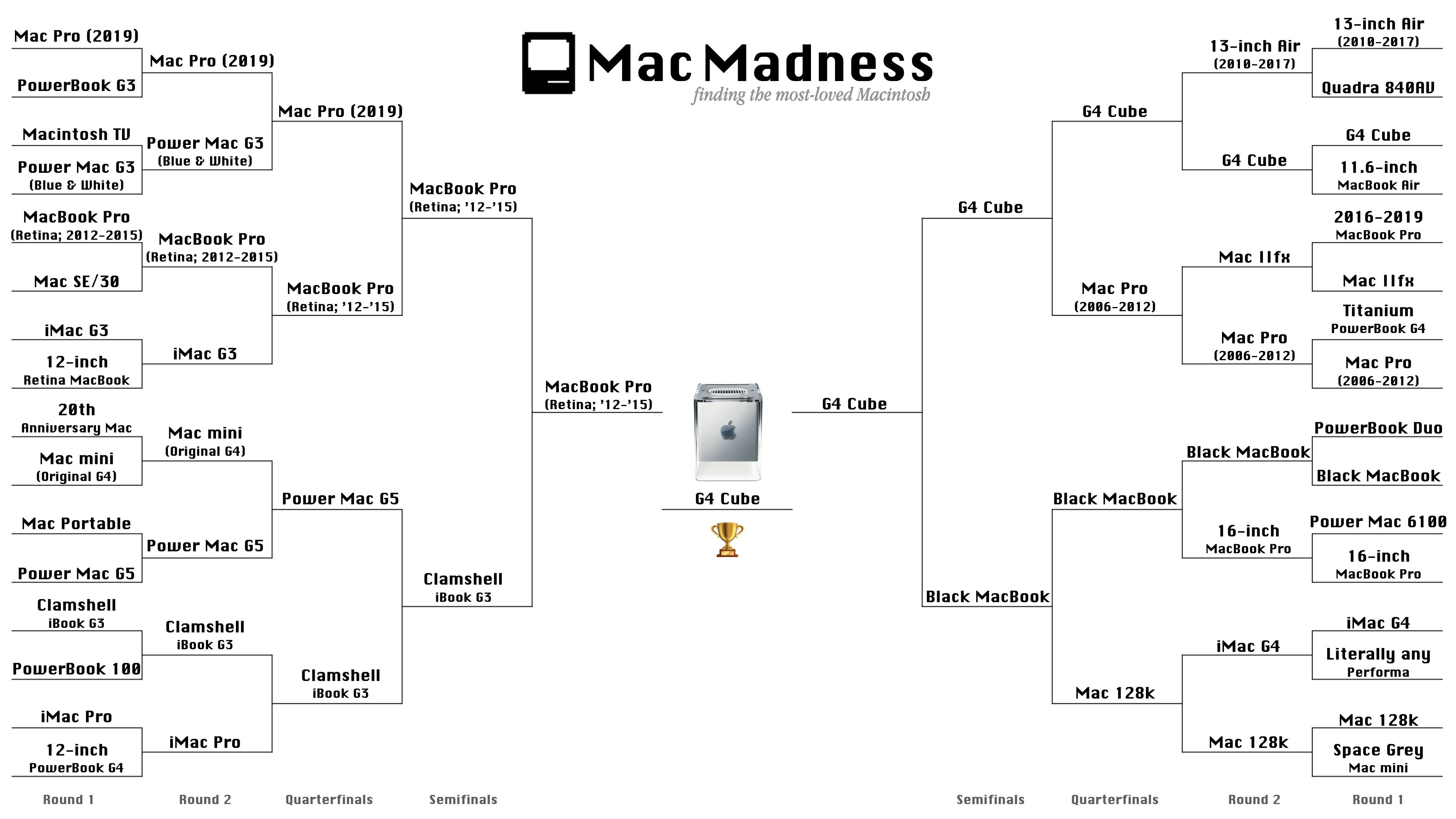
click image to enlarge
There is a lot to process here, and I’ll be talking about the results and how I would have voted on next week’s Connected, so keep an eye out for episode 289.
In the meantime, thank you all for taking part of this. Mac Madness went from idea to reality very quickly, and I could not be happier about the responses it got, even the cranky ones. I hope this has been as much fun for you as it has been for me.
Long live the Cube!
Cory Hixson was kind enough to have me on his podcast, Talking to the Internet. We discussed the founding of 512 Pixels, Relay FM and a whole lot more.
Mac Madness is down to the final two machines, and Myke explains why it is all Stephen’s fault. Then, Federico takes everyone on a tour of high-resolution audio apps for the iPhone and iPad … which are all wild. Lastly, we check the temperature of the room on Apple’s Dark Sky acquisition.
I hope you enjoy this episode. It’s one for the books, I think. My thanks to our sponsors for making it possible: