‘Foxconn Did Not Respond to a Request for Comment’

Josh Dzieza and Nilay Patel at The Verge, with an update to a truly bizarre story. Foxconn has been buying up properties around the state of Wisconsin, but hasn’t told anyone what it is doing with the space.1

When The Verge poked around, it turned out most of the buildings were empty. Foxconn’s Alan Yeung told The Verge it would issue a statement to “correct” The Verge’s reporting on the empty office space. Here’s where the current story starts:

Yeung made those comments on April 12, 2019. It is now April 12th, 2020, making it exactly one year since Foxconn promised a statement or correction regarding The Verge’s report of empty buildings in Wisconsin. That statement or correction has never arrived.

And the buildings are still empty.

And:

The Green Bay innovation center has also made no progress. In October of 2019, WPR reported that the projects appeared to be on hold. Several days later, Foxconn said it still planned to develop the innovation centers, and the company appeared to restart at least some of the projects, selecting contractors to renovate a floor of its Green Bay building. At the time, the company said it planned to renovate 4,800 square feet of office space to host company events and recruitment drives. It had originally planned to have 200 employees working in a 16,000 square foot space.

According to Kevin Vonck, the development director for Green Bay, Foxconn submitted plans towards the end of 2019 for an even smaller space: 3,500 square feet of office space for 49 people. But no permits have been taken out and construction has yet to begin.

Those innovations were supposed to push forward the company’s “AI 8K+5G ecosystem.”

Whatever that means.

Ground as broken on a factory for building LCDs, but experts said the construction plans couldn’t support the technology needed to build the panels, and no LCD-making equipment has been spotted on the site.

Also, Foxconn promised a giant glass dome building that would house a data center. So there’s that.

Foxconn is now saying that ventilators will be built in Wisconsin with the support of Medtronic.


  1. Other than making a lot of noise to appeal to the Trump administration, which took place in the factory’s groundbreaking where Trump called the factory “eighth wonder of the world.” There’s also the tax incentive angle; Wisconsin cut a $4.5 billion deal with Foxconn for their investment in the state economy. Whoops. 

Weird Al, on Writing

Sam Anderson has a wonderful profile of Weird Al in The New York Times Magazine. I read through it all this morning, and when Yankovic talks about his writing process, it really jumped out at me:

But it turns out that Weird Al approaches the composition of his music with something like the holy passion of Michelangelo painting the ceiling of the Sistine Chapel. Looking through the “White & Nerdy” file felt like watching a supercomputer crunch through possible chess moves. Every single variable had to be considered, in every single line. The song begins with a simple sentence — “They see me mowing my front lawn” — and even here Yankovic agonized over “lawn” versus “yard” and “my” versus “the.” He sifted through phrases in gradations so small, they were almost invisible:

Escher’s really still my favorite MC.
Tell ya Escher’s still my favorite MC.
Escher is my favorite MC.
Escher’s still my favorite MC.
MC Escher’s still my favorite MC.
MC Escher is my favorite MC.
Y’know Escher is my favorite MC.
Y’know Escher’s still my favorite MC.

For weeks at a time, Yankovic told me, he goes into a creative trance — what he calls “the zombie phase.” “I walk around the house with a thousand-mile stare,” he said. “My wife asks if I’m OK.”

This attention to detail clearly pays off in Weird Al’s music, and is something I’d love to be able to do in my writing, but rarely get to do.

So why does he work this way? The answer speaks volumes about how the musician thinks about projects:

“I could have written a whole second ‘White & Nerdy’ based on the alt lines,” Yankovic said. “I figure I’m going to be living with this song for a long time. We’ll probably be doing it onstage for the rest of my life. It’s got to be right.”

Connected #289: Let Me Remember My Opinion

This week on the show:

This week, Myke talks about a sale on Cinema Displays, then the guys move on discuss Federico’s recent iPad article on modularity, the possibilities of widgets in iOS 14 and Stephen’s Mac Madness winner and picks.

My thanks to our sponsors:

  • Pingdom: Start monitoring your website performance and availability today, and get instant alerts when an outage occurs or a site transaction fails. Use offer code CONNECTED to get 30% off. Offer expires on January 31, 2021.
  • Squarespace: Make your next move. Enter offer code CONNECTED at checkout to get 10% off your first purchase.
  • Boll & Branch: The Softest Organic Sheets & Luxury Bedding. Save $50. Try them for 30 days in a risk free trial.

Apple Releases 10.15.4 Supplemental Update

The update addresses these issues:

  • Fixes an issue where Mac computers running macOS Catalina 10.15.4 could not participate in FaceTime calls with devices running iOS 9.3.6 and earlier or OS X El Capitan 10.11.6 and earlier
  • Resolves an issue where you may repeatedly receive a password prompt for an Office 365 account
  • Fixes an issue where MacBook Air (Retina, 13-inch, 2020) may hang in Setup Assistant or when disconnecting and reconnecting a 4K or 5K external display
  • Resolves an issue where a USB-C port in your Mac may become unresponsive

No word on if this will fix some of the Finder issues that many users (including myself) have seen, but this is available in Software Update now.

Mac Madness 2020: My Bracket

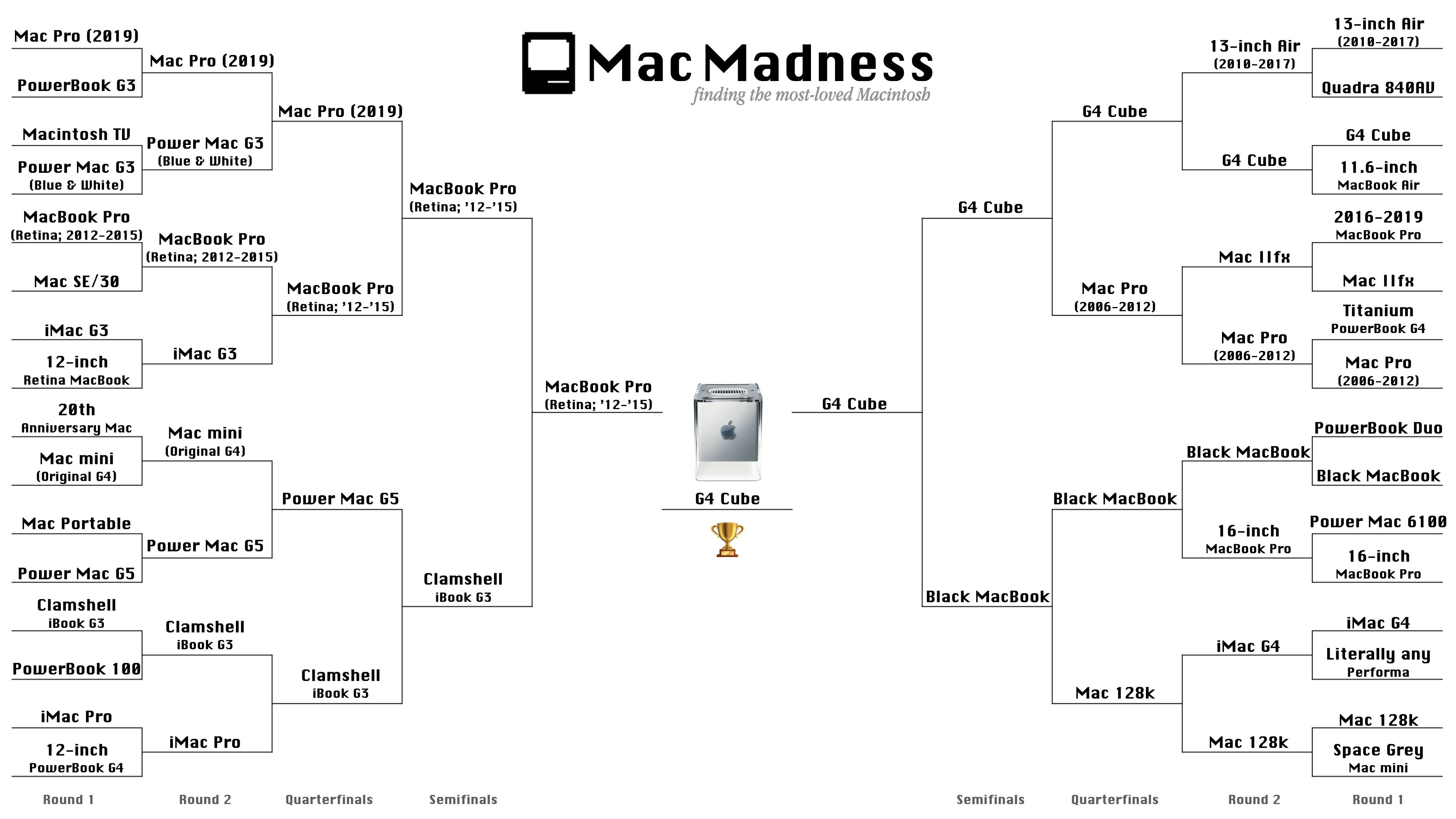
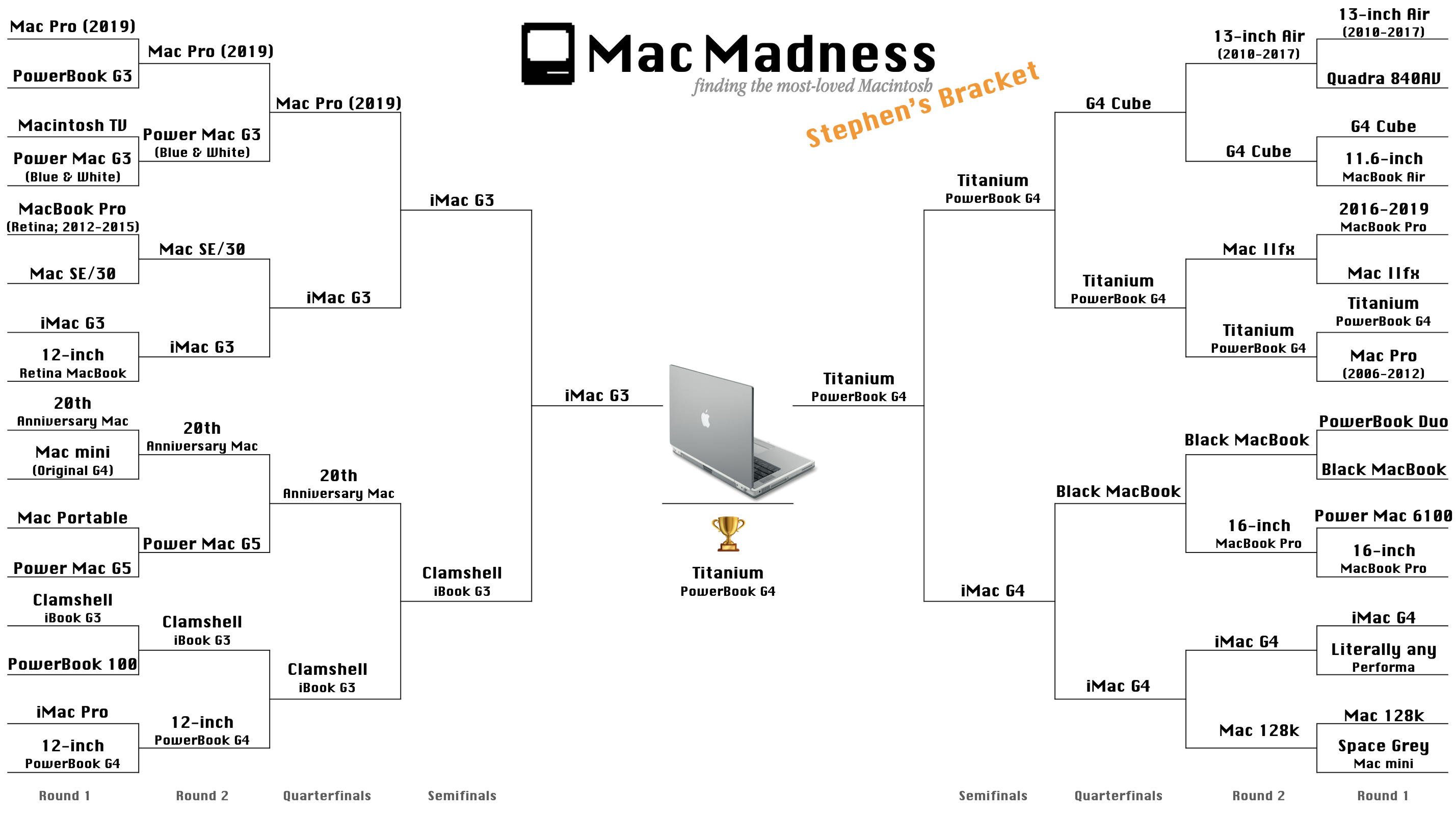
As discussed on this week’s Connected, I am sharing how I picked my winners on the Mac Madness Bracket. There are some real differences as you will see. For example, I had the 2019 Mac Pro and the 20th Anniversary Mac going further than the public did. However, I was right on the money with the Cube passing the MacBook Air, and the public and I voted the Clamshell iBook along to the same round. You can see all the differences here, and click on the images to enlarge them.

The Public Final Bracket

My Bracket

My winner — the Titanium PowerBook — is my favorite Mac of all time:

Watchsmith

Underscore David Smith has launched a new Apple watch app that — quite frankly — blows my mind. Named Watchsmith, it makes Complications a lot more useful and flexible, as he writes on his blog:

First, it provides a wide array of complications. Each of these is completely customizable, with controls for things like font, color, hand type and location. The initial set is just over 50 unique complications, with dozens more planned down the road. My goal is to provide a complication for just about every use and let you make it look just how you want. In the absence of 3rd-party watch faces, this is the closest I can get to making my own watch faces.

A rich collection of customizable complications would be enough to check this app out, but the real magic comes when you set Watchsmith up to change out complications based on time. In his review of the app at MacStories, Ryan Christoffel explains the feature:

Based on the schedule you set for a given complication type, that complication slot on your watch face will automatically update per your schedule. So you can have certain complications occupy that slot at relevant times of day, getting the most out of each slot on your watch face. If you want to get really crazy, you can even have a different complication show up every hour of the day.

This means if you want to see a calendar on your Watch’s screen from 9 AM to 5 PM, but want to hide it after work, Watchsmith can handle that for you. If you just want to see the Weather for the first few hours of the day, no problem.

Then there’s this magic:

Smith says he is already working on new complication types, and I expect Watchsmith will continue to grow in features over time. Few people know watchOS development like he does, and it shows with this app.

Watchsmith is a free download with a $1.99/month or $19.99/year subscription to unlock all the complication types.

New Apple Magic Keyboard for iPad Pro Available for Pre-Order on Amazon

I didn’t expect this, but here they are, in both 11-inch and 12.9-inch sizes.1 Amazon doesn’t list a ship date, but Apple has said the new keyboard/trackpad combo will arrive in May.

These pages show the weights of the new keyboards at 1.81 pounds (822 grams) for the small one, and a whopping 2.41 pounds (1,093 grams) for the 12.9-inch model.

If we assume that these weights include the iPads in their totals (and doesn’t include the box), the new Magic Keyboards should weigh in at:

  • 11-inch: .77 pound (349 grams)
  • 12.9-inch: 1 pounds (453 grams)

The existing Smart Keyboard Folios are 297 and 407 grams, according to 9to5 Mac. Those were heavier than their predecessors as well, by 52 and 67 grams, respectively.

(For comparison, the Brydge Pro+ keyboards, which include trackpads, weigh 1.14 pounds or 550 grams and 1.51 pounds or 690 grams.)

If those Amazon numbers don’t include the iPad, but the box, the true weight may still be unknown.

No matter what the final numbers are, I think these things are going to make the iPad Pro more like a laptop than ever in terms of weight. Maybe this is why Apple hasn’t wanted to talk about this.

It’s fun to spend an evening obsessing over this instead of the news, right?


  1. Yes, those are totally Amazon affiliate links ;) 

Liftoff #121: Apollo 13

A very important episode of Liftoff this week, marking the 50th anniversary of Apollo 13:

In the spring of 1970, NASA launched what would be the third mission to walk on the moon, but almost nothing went to plan, putting the crew in peril until the moment they splashed down.

It is a true miracle that this crew made it home alive.

My thanks to our sponsors:

  • Squarespace: Make your next move. Enter offer code LIFTOFF at checkout to get 10% off your first purchase.
  • Tuparev Technologies: Modern tools for the astronomy community. Sign up to the email newsletter now.