512 Pixels

On That Face ID Keynote Goof

I’ve gotten a couple of iMessages from people mocking Craig Federighi’s struggle to get Face ID to work on his demo iPhone X in today’s keynote.

As you can see around the 1:35:58 mark in this video, Federighi picked up the phone but Face ID didn’t unlock the iPhone, mere moments after he praised its ease of use.

He put the phone back to sleep and looked at it again, but the phone greeted him with this screen:

iPhone X unlock fail

Federighi has become a real pro, and quickly moved to the backup phone. He picked up the second phone, looked at it, and it unlocked right away.

At first glance, its easy to think that Face ID just fell down on his first attempt, which would be … less than stellar.

It may be the case that Face ID never got a chance to work. Check out the message on the iPhone’s screen:

Enter Passcode

Your passcode is required to enable Face ID

It’s easy to end up in this state, as it Touch ID and Face ID both require a PIN to be entered after an iPhone is restarted. The Verge’s Chris Welch guessed the phone had been rebooted, but I’m not so sure.

On the latest iOS 11 Public Beta, the PIN prompt after a reboot includes the text:

Enter Passcode

Touch ID requires your passcode when iPhone restarts

I’m not sure what happened with the demo phone. It’s possible that Apple has changed the text string for this message since the beta I’m on was pushed out, and that’s what we saw on stage.

It’s also possible that the phone prompting the PIN after a software update. For example, I saw “Your passcode is required to enable Touch ID” right after I updated my iPhone 7 Plus to the iOS 11 GM build that was released today. It also shows up after entering SOS Mode or after Touch ID can’t match a fingerprint after several tries. Heck, a SpringBoard crash can cause it. In short, falling back to the PIN isn’t all that uncommon.

Whatever happened, not entering the PIN before the keynote was just a simple mistake. If something happened to the phone that made it require the PIN as it sat waiting for a demo, it’s just bad luck.

While embarrassing for Apple and its event team, I don’t think whatever went wrong today bodes poorly for Face ID. Federighi’s subsequent demos went quickly and smoothly, and I can’t imagine the security system on Apple’s new, $1,000 iPhone would be a dud. It’s funny today, but ultimately will just be a footnote for nerds to bring up from time to time.

Apple TV 4K ⇢

A new, 4K and HDR-equipped Apple TV will be available for preorder on September 15. In addition to the increased screen resolution, it supports both HDR10 and Dolby Vision. If you have a TV that supports either of those standards, this thing is going to look great.

4K content on iTunes will be priced the same as existing HD content, which is a surprise after rumors said these files would be more expensive. The best part? Any 1080p content you have purchased from iTunes can be upgraded for free to 4K resolution.

Streaming content at 4K will be ready from Netflix, with Amazon Prime Video support coming “later this year.”

The Siri Remote has gotten a small update as well. There is now a white ring printed around the MENU button to make it stand out a bit more. The button itself appears to be a part of the touch surface, which would also help by providing some asymmetry.

tvOS will be gaining live streaming sports and news via the TV.app, if you have a cable login that supports such madness.

The Apple TV 4K starts at $179 for 32 GB of storage, and is $199 for 64 GB. If you’re a muggle like me with a 1080p TV, you can get the previous Apple TV for $149.

Apple Announces LTE-Equipped Apple Watch Series 3 ⇢

The new Apple Watch comes with a lot of goodies, including a much-faster CPU, support for streaming Apple Music and an altimeter.

The biggest upgrade is the inclusion of LTE. Using the same phone number as its paired iPhone, this allows the Watch to receive and make calls on its own. For those of us who run and bike with an Apple Watch, this is a big deal. If I upgrade, I can leave my iPhone behind and know that people can get ahold of me via text or phone call if needed. Moreover, I could call 911 if needed.

In a clever move, the Series 3 uses the display as the antenna. The watch is the same size as the outgoing Series 2, despite the addition of the LTE radio, antenna, embedded SIM and more. Sadly, all LTE Watches use the red Digital Crown, which I don’t think I like.

This data connection also means Siri is always available, and thanks to the new hardware, it can now reply with its voice, not just text on the screen.

Here’s how the pricing breaks down for Series 3 aluminum models:

  • 38mm - From $329
  • 42mm - From $359
  • 38mm with LTE - From $399
  • 42mm with LTE - From $429

The Series 1 is still around, from $249.

Stainless steel models are only available with LTE, and start at $599 and $649 for the two sizes.

The Edition models are still for sale. The white ceramic Watch is joined by a gray ceramic model for 2017. The 38mm is $1,299 and the 42 is $1349.

Apple also spoke about watchOS 4, which will be released on September 19. For the first time, Apple shared that the update includes an updated Heart Rate app that includes and shows your heart rate during resting, workout, recovery, walking and even Breathe sessions, if you haven’t rage-quit those things yet. It can even send a notification if a user’s heart rate reaches a certain point without the user being active and detect an irregular heartbeat as part of a forthcoming Apple Heart Study in conjunction with Stanford.

‘Designing for iPhone X’

Apple has put together a bunch of resources for developing apps for the iPhone X, including a video, an updated version of the Human Interface Guidelines and template files.

This bit out of the new HIG jumped out at me:

Don’t attempt to hide the device’s rounded corners, sensor housing, or indicator for accessing the Home screen by placing black bars at the top and bottom of the screen. Don’t use visual adornments like brackets, bezels, shapes, or instructional text to call special attention to these areas either.

Liftoff #55: Fireflies ⇢

This fortnight on Liftoff:

Stephen and Jason are back to discuss the end of Cassini and Jim Bridenstine, who appears to be Trump’s pick for NASA Administrator. After that, they journey into orbit with John Glenn and Scott Carpenter.

My thanks to our sponsors this week:

  • Blue Apron: A better way to cook. Get three meals free with your first purchase, and free shipping.
  • Eero: Never think about WiFi again. Use code LIFTOFF for free overnight shipping.

September: Thank You ⇢

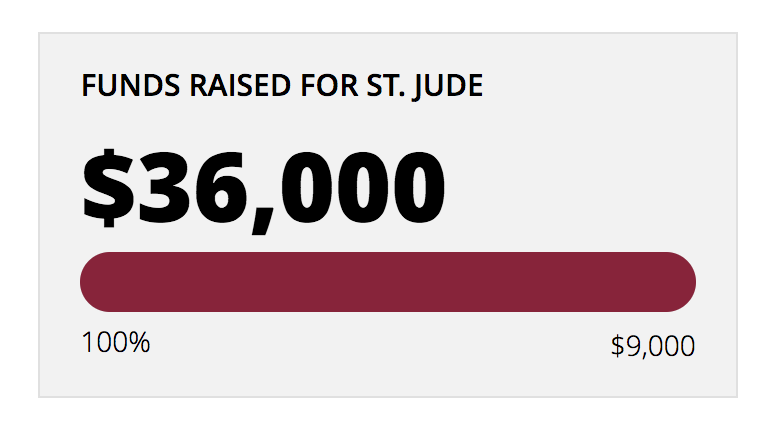
A week ago, I announced that once again this year, I’d be taking the revenue from 512 Pixels and donating it to St. Jude, and would be encouraging you to donate to the hospital that has saved the lives of thousands and thousands of kids with cancer, including my son.

I’m humbled and blown away that in just a week, we’ve met our goal of $9,000.

I know there’s a lot of hurt in our world right now, and a lot of things that are worth donating money to, which makes your generosity all the sweeter to me.

I will continue to talk about Childhood Cancer Awareness Month for the rest of September, so there will be several more reminders about St. Jude and the important work being done on its campus here in Memphis. But for today, I just want to say thank you.

The History of the iPod touch

In September 2007, the world was a very different place. The iPhone had been for sale in the United States just a few months, and not yet taken over the world.

For nearly a decade, Apple held a fall event focused on music. Most of the major iPods you’d recognize got their start at events like this.

Over time, these events — and the music players they featured — faded in importance. In 2007, however, they still mattered, and Jobs was there to prove it.

He unveiled a new iPod nano with an unfortunate shape and what would prove to the be the final form of Apple’s full-sized music player, the iPod classic.

Nano and Classic

These two product lines would live for several more years before the Classic was killed in September 2014 and the nano in July 2017.

They weren’t the only two iPods announced that day ten years ago, however.

No … there is another. The iPod touch.

Original iPod touch (September 2007)

Jobs opened his pitch by quoting himself. In January of that year, in his famous iPhone keynote, he called the new device “the best iPod ever.”

“iPhone owners agree with us,” he exclaimed. “It’s incredible with it’s Multi-Touch user interface, its incredible album artwork and video, it is the best iPod ever.”

He said people had been asking when that technology would be brought to the iPod line, then answered it, pulling an iPod touch out of his pocket.

Today, a decade into the iPhone, it’s a little wild to think that people were clamoring for technology to be stripped from the iPhone and applied to the iPod line, but it’s true. In doing so, Apple was able to introduce more people to iPhone OS and its revolutionary user interface. It shipped internationally before the iPhone did; many people first interacted with iPhone OS via the iPod touch, not the iPhone.

Side by side with an iPhone, the family resemblance is strong. The front shared the same 3.5-inch screen set above the Home button. Without all the electronics required to be a phone, the iPod touch was just 8 mm thick, compared to the 11.6 of the original iPhone.

Touch and phone

There were some other physical differences as well. The back was all chrome. Around front, the touch used a matte black chamfer around the edges of the device, as opposed to the chrome ring found on the iPhone. To my eye, it has helped this product age more gracefully than the original iPhone.

Bezels

Jobs turned to the iPod touch’s software. He lingered in the Music app, praising the design and Cover Flow. He went on show Videos and Photos. After disclosing that the iPod touch’s chrome back included a small black Wi-Fi antenna window in the upper corner, he showed off Safari on the device.

This was before the days of apps being discrete things. The language here is “built-in,” reflecting the truth that Safari wasn’t so much an app on the iPod, as it was part of the iPod’s firmware. The distinction is minor, but really dates the presentation.

The iPod touch also included the YouTube client from the iPhone, as well as Calendar, Contacts, Clock and Calculator.

There was one more thing, however. Jobs used the iPod touch to introduce it: the iTunes Wi-Fi Music Store.

The store was very much like what we have today: users could search for and browse music and purchase music on the go. It was the entire iTunes Music Store, right in the palm of your hand. There was a content deal with Starbucks that made downloading the coffee shops’s music picks over their Wi-Fi quick and easy.

This felt like a huge deal at the time. I remember freaking out after this was added to my iPhone with a software update. It was the first step on the way to an iPhone free of the Mac or PC.

After being purchased, songs and albums would download — over Wi-Fi — directly to the device. Purchased music would then be synced over USB back to iTunes the next time the iPod was plugged in to its host Mac or PC.

The original iPod touch came in two configurations: 8 GB for $299 and 16 Gb for $399.

2nd & 3rd Generation (September 2008 & 2009)

A year later, Apple unveiled the second-generation iPod touch.

It’s design would span two generations, and featured external volume controls via a new rocker switch on its side, an external speaker (for “casual” listening) and a new contoured back. Even though this design is slightly thicker than the one before it, it felt smaller in the hand. Sadly, the dark metal band around the front of the device was gone.

Gen 2 and 3 iPod touch

The second-generation iPod touch holds the title of fastest iPhone OS device in its day. The first Touch, and both the iPhone and iPhone 3G had a 620 MHz processor, but it was under-clocked to just 412 MHz. The second-gen Touch had the same chipset, but was run at a faster 532 MHz.

It was also the first iPod touch with Bluetooth.

This iPod touch shipped with iPhone OS 2.1, complete with the then-new App Store, which had debuted a few months earlier. It also came with the Nike+ running software built-in. Unlike the nano, the Nike+ receiver was built into the product; a user just needed the little puck for their shoes and they’d be set.

2008’s iPod touch also included the Genius Playlist feature from iTunes and the iPhone. With this, the Touch could build a playlist based on the currently-playing music.

Much of this keynote was dedicated to gaming on the iPod touch. This push would only grow over time, but it started with this slightly-faster device. “It’s the funnest iPod ever,” Steve Jobs quipped. “We think people are going to love it!”

Apple offered this iPod touch in three models. The 8GB model came in at $229, a to-date low price for an iPhone OS device. 16GB would set you back $299, while 32 GB could be had for $399.

For 2009, Apple stayed with the same design. In the two years since its launch, the iPod touch had become very important to Apple. Phil Schiller said it had become a big seller, with 20 million units sold already.

For 2009, Apple split the product line a little. The $199 8 GB model came with the same GPU as before, but two other models didn’t.

The two upper models (32 and 64 GB capacities, for $299 and $399, respectively) were some 50% faster than the previous year’s model. In addition to the higher-clocked CPU, this iPod touch shipped with a more powerful GPU for the first time ever.

This was pitched with a heavy push into mobile gaming. For the first time, Apple took swipes at dedicated mobile game consoles. With iOS 3 onboard, developers were able to take advantage of this new product with the same ease they did the iPhone.

4th Generation (September 2010)

In September 2010, Apple introduced the 4th-generation iPod touch. It was a huge update, bringing a non-IPS version of the the iPhone 4’s Retina display to the music player for the first time.

Additionally, it came with front and back cameras. This brought FaceTime to the iPod touch with the front-facing camera. The new rear 720p video and 960 x 720 still photos. It was all powered by the new A4 chip found in the iPad and iPhone 4 for smooth performance, coupled with a 3-axis gyroscope.

The design was even thinner than before, with a cleaner look smaller chrome edges at the front and the addition of that camera in the back, not to mention a small speaker port on the bottom that greatly improved the sound out of the device.

4thgen-touch

All this new hardware did come with a price, however. The 8 GB model was back up to $229, with a 32 GB model at $299 and a 64 GB model at $399. All three models shipped with iOS 4.

This “iPhone without the phone” had become the “most popular portable game player,” outselling portable consoles from Nintendo and Sony combined. In fact, 1.5 billion games and entertainment apps had been downloaded just to the iPod touch by this 2010 event rolled around.

5th Generation (September 2012)

Apple took a year off with the iPod touch in 2011, but was back in 2012 with all-new device. After the unveiling the iPhone 5, Apple’s Greg Joswiak shared that the new iPod touch had a lot in common with the company’s new phones.

It came with the same 4-inch, IPS Retina display as the iPhone 5. It was powered by a dual-core A5 chip from the iPhone 4S, but was much faster than the outgoing model with a new, more powerful GPU. Shipping with iOS 6, was also the first iPod touch to support Siri and use the Lightning connector.

The rear camera was updated to capture 5 megapixel stills and 1080p videos. This was a significant improvement over the old model, and even included features like an LED flash and a sapphire crystal cover over the lens. With this new camera system and CPU, the 5th-generation iPod touch gained the ability to shoot panoramic images.

For the first time, the Touch came in colors. The silver, yellow, blue, pink and PRODUCT RED models used white glass around front, while the Space Gray used black.

Each iPod touch came with a small circle on the back, opposite the camera. With a firm push, it would pop up, allowing a user to slip on a Wii-like wrist strap Apple called the “iPod touch loop.” Each iPod came with a color-matched Loop in the box.

5th-gen iPod touch

This iPod touch came in just two models: $299 for 32 GB and $399 for 64 GB. Apple left the 4th-gen models on sale at $199 and $299 for 16 and 32 GB, respectively.

This was a weird move, and Apple corrected it in May 2013, adding a 5th-generation, 16 GB model for $199. This touch only came in silver, lacked the rear camera as well as the Loop. At WWDC 2013, I knew a lot of developers who picked them up at the San Francisco Apple Store to sacrifice them to the first iOS 7 beta.

This low-end, $199 iPod touch earned a camera and case color options in June 2014.

6th Generation (July 2015)

After three long years, Apple revised the iPod touch in July 2015, albeit via press release. The industrial design was very similar to as before, just without the iPod touch loop. It retained the 4-inch screen from the iPhone 5, but came in more vibrant colors than before.

6th-gen iPod touch

Inside, though, this touch was all-new. It packed the A8 processor from the iPhone 6, bringing the iPod touch into the 64-bit era. It also included more RAM, faster graphics, the M8 motion co-processor, improved cameras, better Wi-fi and Bluetooth 4.1 support. The rear camera got bumped to an 8 megapixel shooter.

This iPod touch came in four SKUs initially: 16, 32 and 64 GB. Prices ranged from $199 to $299.

The iPod touch, Today

The 2015 model is still the most current iPod touch sold. Today, it still comes in a bunch of colors, but just two capacities: 32 GB for $199 and 128GB for $299.

It still has the small 4-inch screen, despite living in a world of large phones. Many say that this is because the iPod touch makes a great kid gadget, but I’m sure part of it is just neglect on Apple’s part.

It is the only iPod touch supported by iOS 10 and 11. Moreover, it is the only iPod left on sale. I can’t help but think the clocking is ticking on this line, too.

Kennedy Space Center Prepares for Hurricane Irma ⇢

Loren Grush at The Verge, writing on how NASA KSC is preparing for the massive hurricane:

Fortunately, KSC is built to handle hurricanes. The large Vertical Assembly Building, once used to assemble the Space Shuttles prior to launch, is able to withstand winds of 125 miles per hour. And after KSC was hit by Hurricane Andrew in 1992, all new buildings constructed were built to withstand winds between 130 and 135 miles per hour. Irma is now a Category 4 storm, with 150 mph winds, but it’s expected to downgrade by the time it reaches Cape Canaveral.

To get ready for the storm, KSC uses an alert scale designed for the US armed forces called HURCON. Yesterday — 48 hours before Irma’s arrival — the center was at HURCON III, the preparation phase. NASA and the various aerospace companies that lease buildings at KSC, such as SpaceX and Boeing, were at work protecting all of their hardware — such as covering their computers with plastic to protect them from flooding. “Each organization has specific checklists they need to go through,” Al Feinberg, a NASA communications officer at KSC, tells The Verge.

Godspeed, Florida.