This corporate video from 1990 highlights Apple’s manufacturing and assembly plant the company once had in Fremont, California.
The site was the birthplace of the original Macintosh, among other products.
This corporate video from 1990 highlights Apple’s manufacturing and assembly plant the company once had in Fremont, California.
The site was the birthplace of the original Macintosh, among other products.
Steven Troughton-Smith is a wizard.
I spent some time this week going through the various subscriptions I pay for and seeing if there any adjustments I need to make heading into 2017.
As these things often do, that quickly turned into a full-scale evaluation of the primary services I use every day to store and access data.
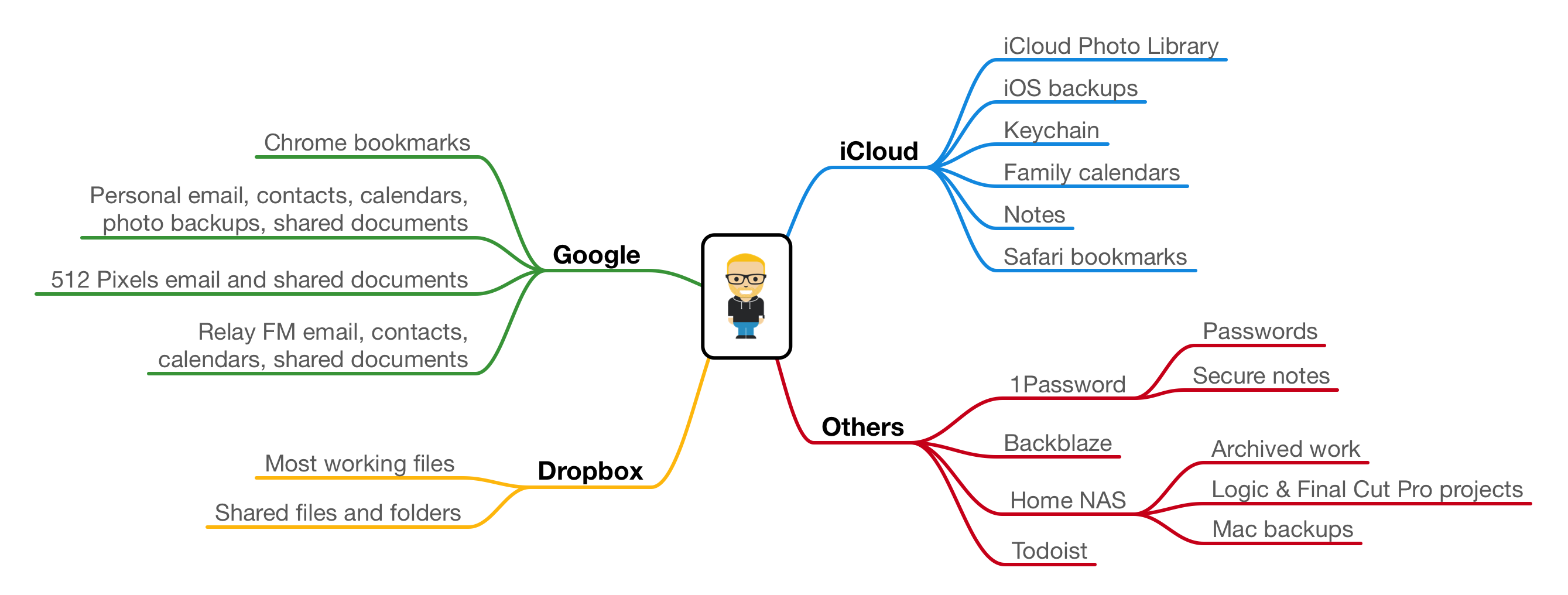
Here’s where I currently have information stored:
iCloud:
Google:
Dropbox:
Others:
My personal Gmail account is free, but I pay for almost everything else on that list, including additional iCloud storage space, Google Apps for two companies, Dropbox Pro, 1Password for Teams and Todoist Premium.
Platform vendors would like their customers to keep all of their data on their service. In reality, both Google and Apple offer just about everything a person needs in terms of cloud services.
That said, Google and Apple are good at different things. Dropbox beats them both as far as storage, and 1Password is in a different league than things like iCloud Keychain. I could live just in iCloud, or just with Google’s services, but blending them means using the best of what’s out there.
When it comes to that blending, I really have to give Apple credit. Both macOS and iOS do a great job when it comes to using non-iCloud services.1 Apple rightfully holds some things back — like device backups — but using Google for my email, contacts and calendars with my device’s built-in apps is pretty damn seamless.2
I can use Dropbox as a document provider, using it as my de-facto file system on my iPhone, as I do on my Macs. If I used streaming music, iOS and macOS don’t care too much if I use Apple Music or Spotify.
I’m not sure how much of this will change in 2017. I really like almost everything about my current arrangement, but I’m a nerd, so I’m sure I’ll burn it all down sooner or later.
Tim Cook, addressing students at the University of Glasgow in Scotland:
Steve’s DNA will always be the core of Apple. Steve is deeply embedded in the company. We celebrate him and we celebrate his philosophy. His philosophy … will be at Apple 100 years from now … the philosophy is sort of passed down with every generation … so yes, he’s very much at Apple.
Jobs’ greatest creation wasn’t the Mac, iPod, iPhone or iPad. It was Apple.
As spotted by Pike’s Universum, Apple has dropped the “Late” from the current MacBook Pro’s full “AppleCare” name.
This may seem like a silly topic for a blog post, but it is a break with tradition, and I do love traditions.
In the PowerPC days, model names would be set by the processor speed or a new feature found in the product. For example, my college roommate had a PowerBook G4 (15-inch FW800) while I had a slightly-newer — and slightly-faster — PowerBook G4 (15-inch 1.5/1.33 GHz).
After the switch to Intel, Apple moved to a more sane naming scheme that used the time of the product’s release in the name, as you can see from this list of iMacs in Mactracker:
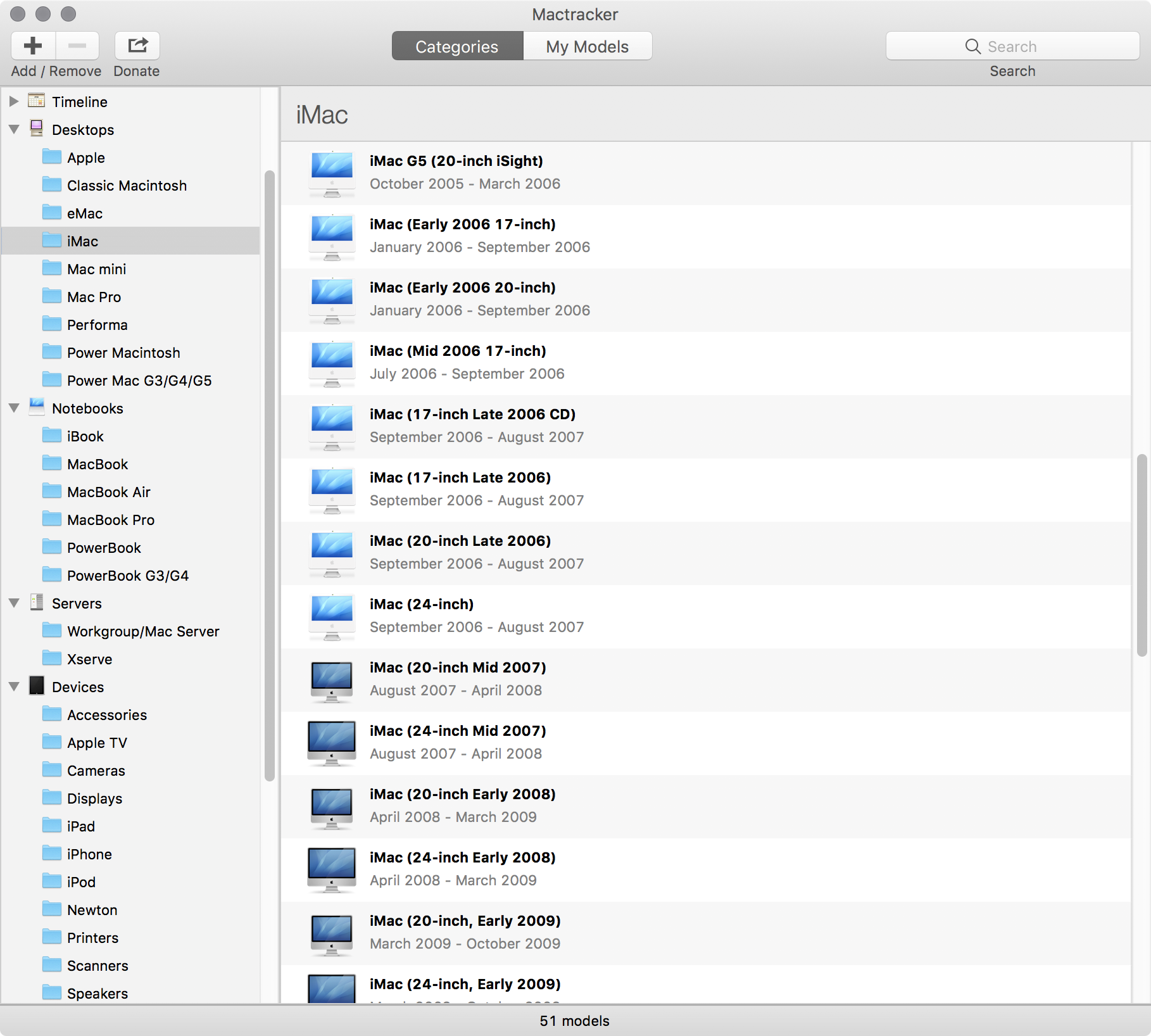
By removing the “Late” label, Apple’s broken that tradition a little bit. Since there weren’t any other MacBook Pros released in 2016, maybe Apple felt that the exact classification wasn’t needed.
Joe Rossignol at MacRumors brings this point up:
Apple has also yet to remove “Mid” from its “Mid 2014” MacBook Pro, despite the fact that it was the only MacBook Pro model released in 2014, so this appears to be a clear deviation from the company’s traditional nomenclature.
There you go.
You lose some preferences when updating to Mac OS X 10.1 with CD-ROM part number 1Z691-3184-A.
The following preferences are lost after updating to Mac OS X 10.1:
- Date & Time control panel settings
- ColorSync
- Monitor Color Calibration
- Classic
- Desktop Picture
- Keyboard Menu
- ScreenSaver
(If you haven’t checked out their current Kickstarter to fund three live shows in 2017, you should.)
When we first looked at launching an app for Windows we thought it was just that, the launch of an app for Windows to go with our apps for Mac, iPad and iPhone. But, the more we spoke with our customers and saw how they were using TextExpander, the more we thought about it, the more we came to realize it’s bigger than that.
Today, we launch TextExpander for Windows 1.0, and today, we open up TextExpander to the computing world.
I would have killed for this back when I was using Windows at work. This looks great.
I’m not a big game player, but I’ve been enjoying Stagehand a lot over the last few days.
Made by the unstoppable duo of Matt Comi and Neven Mrgan, who also created The Incident and Space Age, Stagehand takes the standard scrolling platformer game mechanic and turns it on its head, as Federico Viticci writes:
You don’t maneuver a character with meticulously timed jumps across retro-styled stages filled with floating platforms and spikes; rather, you sloppily modify the stage itself with touch, dragging platforms to accommodate the hero’s run and making sure he doesn’t run headfirst into cliffs, fall into pits, or get eaten by the inexorable advance of the left side of the stage.
It’s incredibly addicting and frustrating. I don’t keep many games on my iPhone at any one time, but Stagehand has already earned a place in that hallowed homescreen folder.
Bradley Chambers recently had his iPhone repaired and got locked out of his Apple ID after realizing he didn’t have his recovery key:
I gave Apple a call, and I assumed this would be a quick fix. They’d unlock it, and I could then sign in. They quickly realized I was in a weird state of lockout. According to this support article, I should be able to get in. I remembered the password, and I had the device. The problem was I was still locked out. Apple can’t unlock it without the recovery key.
Thankfully, the account was mostly used for some old purchases. It is definitely a good reminder to make sure any recovery keys or backup codes are saved someplace safe.
A month or so before introducing the original iPod, Steve Jobs and Phil Schiller stood on stage at Seybold and announced that Mac OS X 10.1 was shipping shortly:
“Now is the time to upgrade,” said Jobs, “this is the mainstream release.”
Jobs continued with the clock metaphor, saying that Mac OS X’s original release was noon, and that we are now at six o’clock. He ended his part by saying that he has been impressed with the speed of Apple’s OS division’s development of Mac OS X 10.1. “Most programmers go on vacation after a major release,” said Jobs, “but Avie Tevanian and his team have kept working to improve Mac OS X.” Jobs said that Mac OS X already has one major update before Windows XP even ships.
In that keynote — which has been mostly forgotten today — Schiller said that Mac OS X was designed to power the Mac “at least fifteen years, or more.”
We now live in that more timeframe. I don’t think a huge change like the OS 9/OS X transition is coming anytime soon, but that macOS will continue to slowly and quietly evolve and improve over the next many years. As recently as the OS X Mavericks keynote, Apple has talked about the future of the operating system in terms of a “decade or more.”
Mac OS X 10.1 was an important releases, but it is not the only thing worth noting in this announcement. Before the 10.1 demo, Schiller discussed the goals Apple had for Mac OS X beyond its desired longevity.
I think this list is really interesting to consider today. Sierra and Puma have a lot in common, but it’s clear that the 15 years between them have brought a ton of change and a lot of improvements.
Let’s look at a few of these goals1 with that timeframe in mind:
At the time, there was a lot of concern that Mac OS X left behind a lot of the design elements (and quirks) that made the classic Mac OS so lovable.
That OS came with a cost. It could prove unstable and didn’t offer a lot of modern technologies found on other systems. OS X really was an all-new operating system.
Aqua was a big departure from OS 8 and 9’s Platinum theme, but the company worked to return some of old OS’ features — like spring-loaded folders — to OS X.
As time has moved on, most users have come to think of Mac OS X’s features and behaviors as “Mac-like,” forgetting how it used to be.
Schiller said that Apple did not just support open standards, but wanted to embrace them in Mac OS X.
While Apple’s services are chock-full of purpose-built, closed standards, macOS makes use of numerous open standards on the system level
Quartz, OS X’s 2D rendering engine, uses PDF and PostScript in the windowing system. Today, Quartz is still hard at work.
Beyond the display layer, macOS is full of open standards. AppleTalk gave way to TCP/IP. Even AFP has lost out to SMB/2 as of Mavericks.
The Digital Hub drove Apple’s software direction for many years. The Mac became the central device for photos, video, music and more. Now, a lot of that has shifted to the iPhone and iCloud, but in its heyday, iLife was a huge deal on the Mac.
As important as the Halo Effect was in the early 2000s as iPod owners flocked to the Mac, I think programs like iPhoto, iMovie and GarageBand had a lot to do with it, too.
In 2001, Apple was shipping Titanium PowerBook G4 and a range of iBooks. Even then, the company was working to make Mac OS X a good mobile OS. Battery life was a concern even then, as was having good support for wireless and eventually Bluetooth.
This would would pay off in the iPhone. Instead os building atop the iPod’s embedded operating system, Apple started with OS X. In that famous Macworld 2007 keynote, Jobs said:
Software on mobile phones is like baby software. It’s not so powerful, and today we’re going to show you a breakthrough … software that is at least five years ahead of what’s on any other phone.
So, how do we do this? We start with a strong foundation. iPhone runs OS X.
Why would we want to run such a sophisticated operating system on a mobile device? Because it’s got everything we need. It’s got multitasking. It’s got the best networking. It already knows how to power manage; we’ve been doing this on mobile computers for years. It’s got awesome security, and the right apps. It has Cocoa, and the right graphics and Core Animation built in. And it has the audio and video that OS X is famous for. It’s got all the stuff we want.
This was a big deal during the OS X transition. Every time an Apple executive got on stage, there would be an update about the number of apps for OS X, and sometimes even an update or demo from someone like Adobe or Microsoft. Schiller recalled the past, when many apps would have Mac-specific or even Mac-only features, and painted a picture of the future, where that would be true again.
While today the Mac’s app ecosystem is somewhat stagnant compared to that of iOS, it is still rich and broad. While there will always be Windows-only enterprise tools, almost everyone else can get by with a Mac and a modern web browser.2
Some will say macOS is the past. They may or may not be right, but today, it’s still a vital part of many people’s work. It doesn’t enjoy the spotlight it once did, but Apple continues to work on it. Apple has kept it updated to work well with iOS, while keeping the Mac the Mac.
In hindsight, the goals Schiller shared in 2001 seem completely reasonable, and I think Apple met them all. Some of them aren’t relevant today, and some new ones have surely been added to the list, but I think macOS is still an important part of Apple’s overall strategy, 16 years into its life.
Myke has caused a chain-reaction of purchases, Stephen talks about the PowerPC transition and Federico tries some apps.
My thanks to this week’s sponsors: