September is National Childhood Cancer Awareness Month

Every September, I forgo running RSS sponsorships on 512 Pixels to highlight and raise money for a cause — and an organization — that is very close to my heart.

September is National Childhood Cancer Awareness Month.

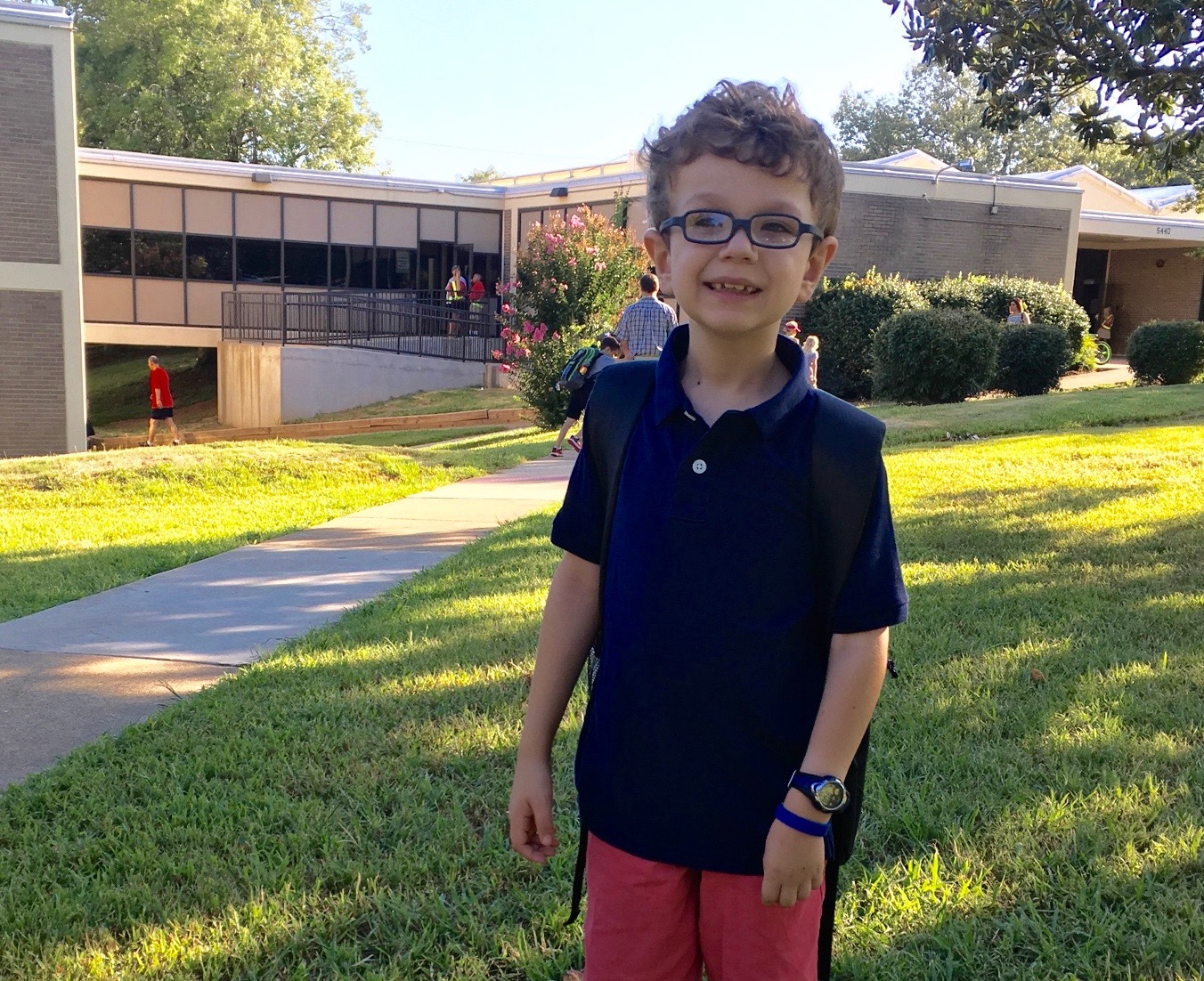
It’s a month that’s of vital importance to my family. As some of you may know, our oldest son was diagnosed in May of 2009 with a malignant brain tumor. In the blink of an eye, we went from a young family with a seemingly-healthy six month old baby to a young family facing the reality that our son was gravely sick.

Time stood still, but raced forward, all at once. He had a CT scan, blood tests, an MRI, then surgery, within 48 hours.

Then the diagnosis came.

It was bad.

Josiah had brain cancer. His particluar cancer is exceedingly rare in children, and almost unheard of in infants. To beat it — to save his life — would take the very best science and medicine had to offer.

Thank God for St. Jude Children’s Research Hospital.

At St. Jude, Josiah underwent 18 rounds of chemotherapy. He had several subsequent surgeries, and still has regular MRIs to check on things. His cancer hasn’t grown, but as it is not a type that “goes away” with chemo, his disease is considered “stable.” He still has cancer, and always will. The hope is that it simply never grows again. So far, that’s been the case.
J

We’re lucky. We’re blessed. We’re thankful that we get many more days with our child than some of our friends have had with theirs. Childhood cancer is a stain on our humanity.

Josiah turns 8 later this year. To honor his upcoming birthday and the amazing care he has been given at St. Jude, my goal is to raise $8,000 this month for the hospital — a symbolic $1,000 for every year.

I know many of you have donated in the past. Last year’s fundraiser was amazing, raising over $18,000. I’d like to go even higher this year.
Donate now.

On ‘Statewide Emergency Alert Tests’

This morning, anyone with a smartphone in the state of Tennessee got two back-to-back emergency alerts:

The alerts were part of a statewide test:

“This year, in Tennessee and across the nation, natural and human-caused disasters have taken lives, destroyed homes and damaged roads and infrastructure,” said TEMA Director Patrick Sheehan. “While we live in some of the safest times in history, these fires, storms, flash-floods, heatwaves, tornadoes, accidents, and active shooter tragedies serve as reminders of the importance of being aware of the potential threats around us and to prepare ourselves and our loved ones. This statewide EAS test message will recognize National Preparedness Month and emphasize the importance of emergency preparedness.”

While the state claims the test was “designed to have limited impact on the public,” I call bullshit. It’s like the boy who cried wolf; emergency alerts should be used for emergencies.

Having two back-to-back alerts1 that most people will consider spam will tempt some to disable the feature. If Tennessee — or any other state — can’t see that as an obvious outcome, I just don’t know what to say.

Update: Tennessee has issued an apology for the tests:

We have received calls and messages from hundreds of Tennesseans letting us know about problems with receiving messages and the concerns caused by the messages received. In many instances the caveats that the message was part of a test were not received, making it seem like an emergency was imminent. While many are understanding, knowing that we need to test our systems, many have voiced their concerns about the angst this test cause. Please accept my sincerest apologies for any inconvenience today’s test caused.

SpaceX Falcon 9 Explodes on Pad

News broke this morning that a Falcon 9 rocket due to launch later this weekend exploded on the launch pad at Cape Canaveral.

There are few details known at this point, but early reports say the failure occurred leading up to a static fire test, in which the rocket’s motors are fired while the vehicle is clamped down to the pad. Some tweets have indicated the explosion took place during a “catastrophic abort” of the test.

Here is SpaceX’s initial comment on the accident:

SpaceX can confirm that in preparation for today’s static fire, there was an anomaly on the pad resulting in the loss of the vehicle and its payload. Per standard procedure, the pad was clear and there were no injuries.

This is the second failure SpaceX has seen in 14 months.

The payload for this weekend’s launch was a $200 million Internet.org satellite.

Update: US Launch Report has published video of the accident.

Pastebot for Mac Public Beta

Tapbots has a new project:

Pastebot is a versatile clipboard manager for your Mac that stores what you recently copied so you can quickly retrieve them later. Create custom pasteboards for frequently used clippings. Build powerful filters that you can apply as you paste.

While I’m using Alfred’s built-in clipboard manager, this looks very promising. I’ll be giving it a go.

Harry Potter iPod Follow-Up

Back in January, I wrote about the Harry Potter Collector’s iPod:

The iPod was engraved with the Hogwarts crest on the back, and was revved to a 30 GB, 5th-generation iPod shortly after release.

It could only be purchased with the audiobooks, for a combined cost of $548, and there were some special terms and conditions that applied to the offer. It’s important to note that the iPod didn’t come pre-loaded with the audiobooks; this was a digital purchase alongside an iPod. Customers had to download the files and sync them over themselves.

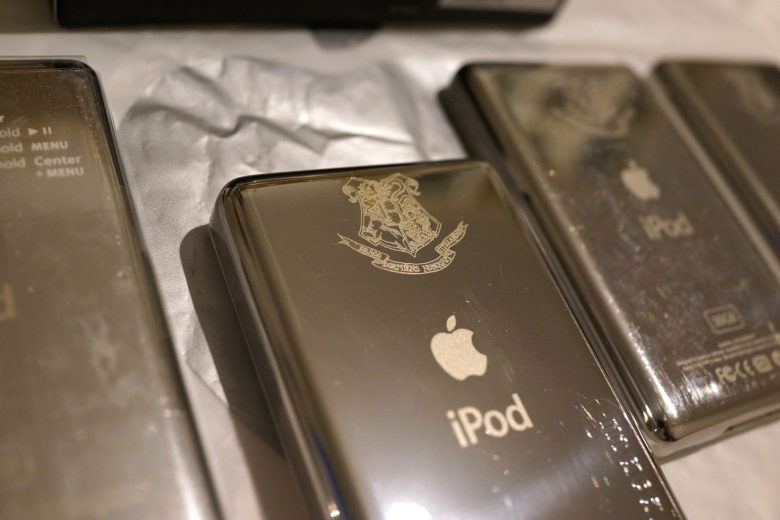
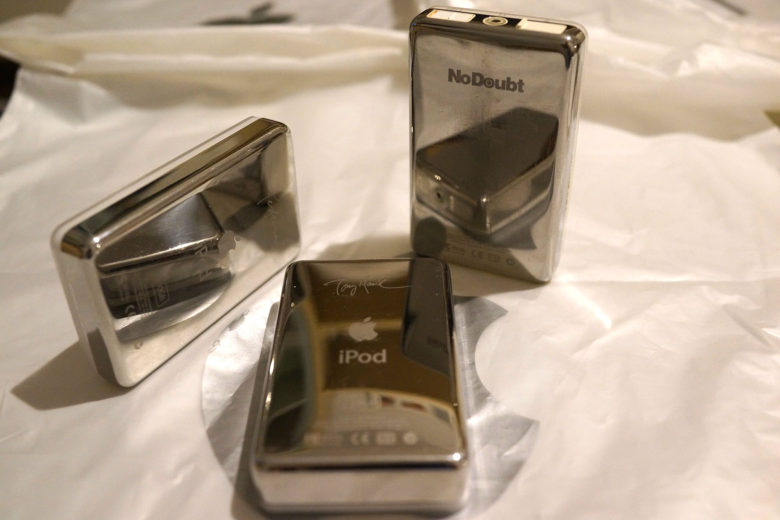
512 reader Ivan emailed me, pointing me to this article over on Cult of Mac about his iPod collection. The post contains photos of several rare iPods:

Harry Potter iPod

More Rare iPods

Wild.

Photos courtesy of Ivan Chernov

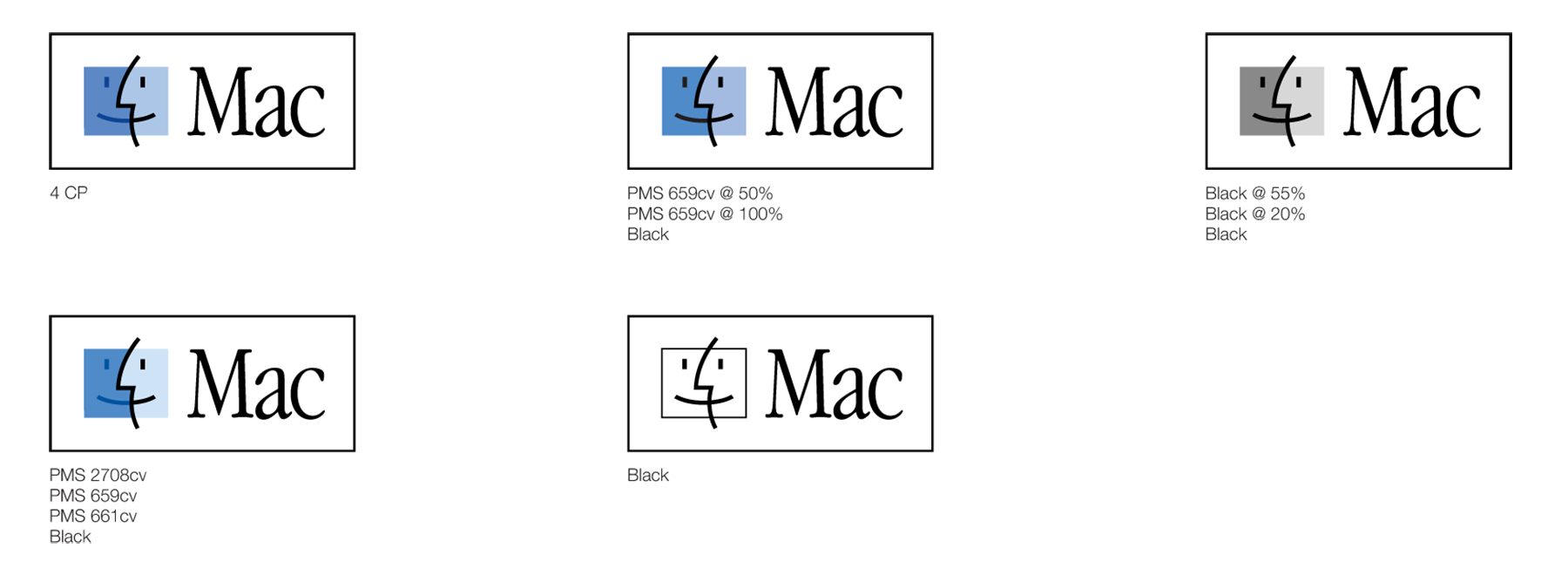
1999’s Artwork and Guidelines for the Mac Logo

512 reader Marc Robinson mailed me me a bunch of Apple marketing materials from the late 90s and early 00s. There was a ton of good stuff in his package, but there was one that I thought I should share first: a CD containing artwork and guidelines on how to use the then-new Mac logo.

A lot of companies publish style guides on how their logos should and shouldn’t be used.1

In the late 90s, Apple made a push for developers to standardize how they showed the Mac logo.

1999 Mac logo

Here’s how the artwork was introduced:

Apple Macintosh computers are legendary for bringing technology to a human level. Elegance of design, innovation, and ease of use make Macintosh computers and the Mac OS operating system the platform of choice for people who think and work creatively. The graphic symbol in the Mac OS Logo—the “Happy Mac” computer screen with a super-imposed human profile—provides a strong visual image of this principle. This symbol represents a dialog between user and technology that is unique to Macintosh and the Mac OS.

The Mac OS Logo has become an essential element in identifying the Macintosh operating system. It has also been a signal to customers that hardware and software products are compatible with Macintosh computers. Correct and consistent use of the Mac OS Logo has always been important in building recognition of and demand for the Mac OS and Macintosh-compatible products.
To make this identification even easier, we’ve simplified things.

We’ve created the new Mac Logo, using the familiar “blue face” image and the word “Mac,” that will clearly indicate compatibility with all Macintosh products. Now hardware and software that’s compatible with Macintosh will use the same language our customers have always used: “Mac.” The Mac Logo will replace the Mac OS Logo on all communications moving forward. These guidelines will help you to apply the new logo in your communications.

This is the art I remember clearly on software boxes in my local Apple Store and even on Mac software in places like Best Buy. It made it easy to spot, which was the whole point, I guess.

I’ve zipped up the contents of the CD (a whopping 1.2 MB worth) here for download.


  1. Here is Dropbox’s, for example. 

Even with GPS on the Watch, I Won’t Be Leaving My iPhone Behind

Rumor has it that the next Apple Watch will include a GPS chipset. Assumedly, this would allow apps like Map My Run, Strava and others to track walks, runs and bike rides without relying on the iPhone for location data. With Apple Watch 2, people could just go for a run and have complete stats about it afterwards, all with their iPhone safe and sound back home on the kitchen table.

I do a fair amount of bike riding, on and off of paved streets. I use my Apple Watch to keep tabs on things like speed or distance mid-ride without needing to dig my iPhone out of the back pocket of my jersey.

Having the Watch on bike rides is great, but I always keep my iPhone with me in case of emergency. If I or someone I’m with are in an accident, someone needs to be able to call 911. If I get lost, I need Maps. If I’m out later than I expected, my wife wants to see where I am via Find my Friends.

GPS on the Apple Watch doesn’t solve any of these use cases, but cellular data would. According to Mark Gurman, that’s not in the cards quite yet:

Apple Inc. has hit roadblocks in making major changes that would connect its Watch to cellular networks and make it less dependent on the iPhone, according to people with knowledge of the matter. The company still plans to announce new watch models this fall boasting improvements to health tracking.

Assuming it doesn’t cost me another $30/month for service, I’d be very interested in having my Watch be able to talk to a cellular network when I go out for a ride. Until then, my iPhone will be tucked in my back pocket.

Connected #106: Running in Gucci Shoes

With a week to go before Apple’s fall event, the Connected Trio gather from their respective lands to discuss the possibilities of new Apple Watch models, new Macs and Apple’s situation in Ireland.

My thanks to our three sponsors this week:

  • Freshbooks: Online invoicing made easy.
  • Pingdom: Start monitoring your websites and servers today. Use offer CONNECTED for 20% off.
  • Eero: Blanket your home in fast, reliable WiFi.

Kbase Article of the Week: Rhapsody Developer Release Filesystem

Rhapsody was Apple’s initial attempt to combine Mac OS and NeXTSTEP to form the company’s next-gen operating system:

The Rhapsody Developer Release (RDR) has a fundamental incompatability with OPENSTEP/Mach (and NeXTStep) that you should be aware of when planning how to install and evaluate this software. Specifically, RDR/Intel uses a different file system format than either RDR/PPC or OPENSTEP/NeXTStep. You will not be able to set up systems to dual-boot RDR/Intel and previous Mach/Intel operating systems. You will also not be able to exchange external hard disks and/or removable media between RDR/Intel and other versions of Mach. Rhapsody/PPC will be able to read (mount read-only) media created on previous versions of Mach. Read/write access to older media is not supported.

Rhapsody would surface as a few developer builds and as the backbone of Mac OS X Server 1.0, but it would be replaced by an updated strategy that birthed OS X as we know it today.

Also, there’s a typo in the article’s title.

Amazon Echo Will be Able to Control Sonos Speakers

Chris Welch at The Verge:

Several months ago, Sonos revealed plans to bring voice control to its popular home audio speakers. Today at an event in New York City, the company shared more on its approach to letting users play music by speaking commands aloud instead of controlling everything by thumbing through the Sonos app. In short, it’s all about Alexa and Echo. Beginning in 2017, anyone with an Alexa-enabled device — right now that’s he Echo, Tap, or Dot — will be able to control Sonos speakers with voice commands.

When Sonos made that announcement, the company praised the Amazon Echo heavily. At the time, I thought that Sonos may try to compete with the Echo, Siri and Google Now directly by developing their own system. While that may still happen, Sonos is hooking their wagon to Amazon for now. I’m curious to see how this plays out, or if Amazon ends up buying the company outright at some point.

More on the Rumored ‘Dynamic Function Row’

Mark Gurman, writing about how the buttons on the next-generation MacBook Pro’s OLED keyboard display may vary based on usage:

For example, if a user is on their desktop, the screen will show a virtual representation of the standard function row, which includes brightness and media controls. When in an application, the virtual row will show options specific to the task at hand, but volume controls and a switch to show the default functions will always be present. The Safari web browser would enable controls for finding and defining terms, while the iMovie video editor would offer controls for cutting clips and a more-precise volume slider, the people said.

This fits with earlier reports, but I still have questions. If these buttons are changing every time I jump between apps, how distracting will that prove? Do I have to be in Finder to adjust my screen’s brightness? What happens if I’m in an app that doesn’t support the display?

I guess we’ll find out in October.