512 Pixels

RSS Sponsor: PDFpen for iPad from Smile⇢

Sign and return documents without printing or faxing, directly from your iPad. Fix typos and correct price lists immediately while an issue is foremost in your mind. Take PDF documents with you, and add notes, highlighting, and other markup during your mobile downtime. Sync with your Mac via iCloud or Dropbox. Retrieve and save documents via Evernote, Box, and Google Drive.

Edit your PDFs anywhere you are with the complete, feature rich, mobile editing power of PDFpen for iPad.

Get $5 off PDFpen for iPad, only $9.99 on the iTunes App Store, this week only.

Sponsorship by The Syndicate.

Jobs: A Review

As a long-time Apple nerd, I was more than a little nervous when I heard about the Jobs movie for the first time.

It wasn’t just that I was afraid it’d be some sort of Kelso Builds Computers, either. While everyone knows who Steve Jobs was, the true nerd heroes — guys like Woz, Jef Raskin, Burrell Smith and Andy Hertzfeld — aren’t household names. Having the Apple story told in movie theaters across the globe is a rare chance that people like me have to see our interests be placed on a huge platform.

Jobs starts with Steve Jobs introducing the iPod to Apple employees in 2001. The talk he gives is similar to the one he gave the press at the company’s on-campus event for the product.

The timeline of the movie is relatively straight-forward after the iPod flash-forward. We see Steve and company move from college and a trip to India to building the Apple I in the garage. We see the company explode with the success of the Apple II after Mike Markkula’s investment.

Jobs spends a lot of time on the Lisa — more than I had anticipated. We see Steve fire a top engineer for mouthing off about how typefaces are unimportant, then go on and on about how the Lisa’s discrete keyboard would change the industry forever. All the while, we see the board’s growing frustration. While they allow Jobs to take over the Macintosh project, that too falls flat, and Jobs is ousted.

All of that takes what feels like hours and hours. The NeXT hours and Apple’s troubled years are blown through as a montage with headlines being read. We suddenly see Steve in his garden and taking a walk with then-CEO Gil Amelio.

In this time frame, we see Steve at home. His wife Laurene Powell and son Reed make a brief appearance, as does his daughter Lisa.

Lisa’s story is well-known to Apple history nerds, but isn’t as heavy-handed as I feared it would be. We see Steve kick a pregnant Chris-Ann Brennan out his house and discuss it with his lawyer, but that’s about it.

By this time, Apple and NeXT are already in talks, and we see Jobs return to Apple’s campus — complete with gratuitous helicopter shots of 1 Infinite Loop.

There, Jobs meets Jonathan Ive, whom he tells to “take the day off and invent something you want to exist” after Ive shares with Steve his passion for what the latter “stood for” when he was the company.

The movie closes with Ive and Jobs discussing the original iMac, Steve becoming CEO of Apple, and firing most of the board. “Put the speakers inside!” Jobs tells the young designer when discussing the iMac. When told the board won’t go for it, Jobs replies that they won’t be asking permission. It’s all rushed, which is disappointing.

Of course, this isn’t the first time the story has been told publicly.

Walter Isaacson’s Steve Jobs aside, Pirates of Silicon Valley is probably the most famous rendition.

I think a lot of nerds love Pirates of Silicon Valley for it’s rather accurate telling of not only the Apple story, but Microsoft’s as well. In comparison, Jobs is very one-sided. In fact, the only mention of the Apple/Microsoft lawsuit is in a scene where Kutcher yells into a phone then slams it down, shattering the handset.

Produced as a made-for-TV-movie for TNT in 1999, it featured Noah Wyle as Steve Jobs. I’m not sure why people who make these films insist on picking actors who look like Steve Jobs, but it’s weird. Jobs hits viewers over the head with it, showing photos of major cast members and their real-life counterparts, side by side, before the credits.

We don’t ever see Ashton Kutcher as the 2001-era Jobs. It’s hard to buy him as a early–40s Steve during the portion of the film that takes place in the late 90s.

However, the majority of the film takes place from the late 1970s to the mid 80s, when Steve was younger than Kutcher is now. And, my goodness, do they look alike.

The similarities push further than just looks, however. Kutcher has reported that he spent a lot of time studying Steve’s mannerisms. For the most part, it paid off in the film. Kutcher nailed Steve’s way of walking and staring through people.

(In preparation for the film, Kutcher was admitted to the hospital after eating only fruit for several weeks. The scary part? Kutcher said his “pancreas levels were completely out of whack” after the experiment.)

Kutcher does a good job with the weird quirks and pauses Steve spoke with, but struggles with the emotional scenes. I found the similarities between he and Jobs interesting, but uncomfortable in some scenes.

By all accounts, Steve Jobs felt and showed a wide range of emotions, often in the same conversation. Kutcher just can’t pull that off. Every time he cries or yells in the movie, it feels … fake.

Jobs isn’t the only two dimensional character in the film. Woz has been all but stripped of his amazing sense of humor, and the only person to show any type of anger in the board room scenes is Jobs. When guys like Gil Amelio, Mike Markkula and even Daniel Kottke are snubbed or kicked out of Apple, their reactions are shallow and simple. Everything gets a nice bow put on it because no one ever makes a mess.

Almost as to cover for the emotional shallowness throughout the film, there’s sweeping music or acting-school-level pauses anytime something important happens. To make matters worse, instead of building a case through his actions, Steve just blurts out to Woz “I can’t work for other people.”

Major, famous sentences like Steve’s “selling sugar water” bit to John Sculley have so much attention drawn to them, it’s painful. There’s no finesse in this film whatsoever.

When Woz tells Steve he’s leaving Apple — an interaction that never actually happened — The Bearded One throws his oldest friend under the bus. Again, instead of exploring how “small and lonely” Steve’s world must be, Woz just says it. Everyone wears their emotions on their sleeves because they aren’t capable of taking things any deeper.

The biggest side effect to all of this is that Jobs just isn’t a good movie. Historically, it’s mostly accurate, which makes the nerd in me happy, but it’s a lackluster film. It’s as if an amateur theatre club acted out several sections of Steve Jobs’ Wikipedia page.

The whole thing feels more made-for-TV than Pirates, I don’t think Jobs will age as well. Would Jobs have been stronger without Kutcher? Perhaps. The failures of the film don’t all belong at his feet, however. I’m positive Aaron Sorkin can do better than Joshua Stern did with this thing.

HACKmemphis 2013⇢

HACKmemphis is a community-run event focused on bringing together the Memphis tech community — developers, coders and designers alike — to formulate amazing ideas, creative code, and awesome hardware hacks.

If you’re in the Mid-South and a nerd, you need to check this out.

On iOS 7 App Design and Uniformity

iOS 7, of course, is bringing sweeping UI changes like the operating system has never seen before. Many developers are currently hard at work, building iOS 7 versions of their apps.

From what I’ve seen, it’s paying off. I’m currently running several betas of iOS 7-only apps, 1 and many of the apps in my SECRETS! folder feel right at home on my sacrificed-to-the-beta-gods iPhone.

But they all feel awfully similar.

I can take a look at screenshots of them and tell them apart, mind you. Developers are using color in some very exciting, unique ways on iOS 7, but white frosted glass is everywhere, as are the standard UI controls found in Apple’s first-party apps.

While I don’t have an app for sale, I can appreciate the tough spot developers are in with all of this. Not embracing iOS 7’s new UI will make apps instantly feel old, leading some users to look at alternatives that might feel more updated.

I think many developers are staying close to what Apple has done in apps like Mail, Messages and Safari.

In all honesty, it’s probably a good move. Time will tell what will remain fashionable or acceptable, and staying in Cupertino’s shadow for a bit should be safer for now.

(Of course, the fact that most of what Apple has done with UIKit looks pretty damn good doesn’t hurt, either.)

Federico Vitcci chimed in on this earlier on Twitter:

I wouldn’t be surprised if it took until iOS 8 for 3rd party devs to experiment more. So much stuff still in flux.

A repeat of 2008 (App Store) and 2010 (iPad launch) seems likely. Follow Apple’s model, then start iterating and experimenting more.

As Freddie V. brings up, this phenomenon isn’t new. Looking back at apps from the early days of the App Store, it’s clear the developers and users both have gotten more comfortable with UIs that branch out from the conventions outlined by Apple.

I’m looking forward to see what sort of creativity iOS 7 sparks within designers. Until then, I suppose, things will be a little more uniform than what we’ve all gotten used to over the last couple of years.


  1. hashtag humblebrag ↩︎

Revisiting My Dropbox-Powered Photo Management System

My buddy Bradley’s article on smartphones and photo management has been making the rounds this week. Here’s his premise:

If you grab a co-worker’s iPhone and they have 2500 photos on the camera roll, then you know they don’t. They’ll just keep taking photos and assume “the cloud” or whatever is backing it up. For a time, it is. That is until their backup hits the mythical 5GB mark and iCloud starts pestering them to remove data or buy more space. Some people buy more space, but most just continue to ignore it and hope Apple has their back. I hate to break it to them after their iPhone takes a swim in the lake, but they don’t. Multiple companies are stepping up and trying to solve this problem in different ways, though.

Bradley lists Dropbox, Google+ and Everpix as solutions to the problem of backing up the iPhone’s Camera Roll.

About a year ago, I exported all my photos form Aperture and started storing them on Dropbox.

I’ve really come to enjoy this setup. I have access to all of my photos as long as I have an Internet connection. They are safe and sound not only in Dropbox, but on both of my Macs, their Time Machine Backups and their respective CrashPlan accounts.

I’ve gotten several questions about organization. I’ll admit that sorting images into folders isn’t as powerful as combining things like Events and Faces in iPhoto, it’s simple. Yes, I can’t easily find all the photos of my daughter, but by breaking them into folders like “Allison’s 3rd Birthday Party” or “Florida 2013,” I can usually find what I’m looking for quickly enough.

(It’s the only thing I use Cover Flow for in Finder.)

When I initially moved to Dropbox for my photo management, I was letting Photo Stream and some AppleScript import my photos into a folder that Hazel would watch. The app would rename the photos based on the time they were taken automatically.

Today, my upload system is a little different. I still have Photo Stream enabled on my iPhone, but I use Dropbox’s iOS app to upload my images directly to the service.

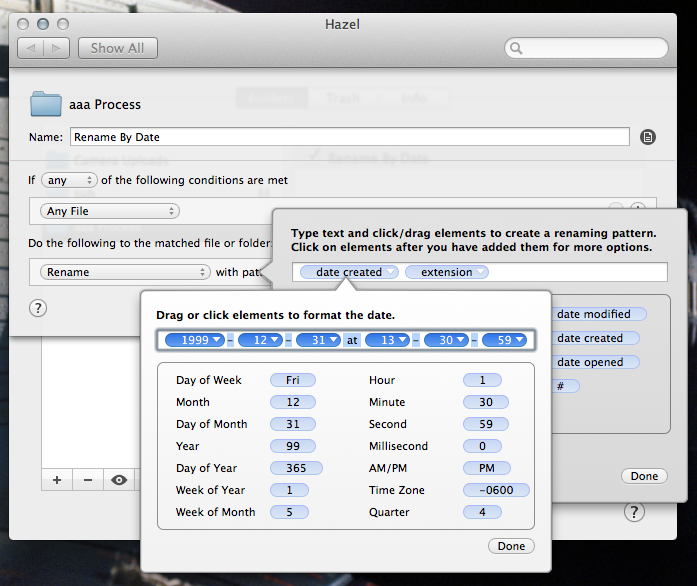
When enabled, the feature creates a “Camera Uploads” folder on the root level of the Dropbox folder. I have Hazel watching that folder, and set to automatically move images and movies into a folder inside my Photo Library folder named “aaa Process.” Once a file appears in that folder, Hazel renames it in this format:

2013-08-15-hazel.png

This system lets me open the Dropbox app and simply wait a moment to have all of my pictures in the Process folder, ready to be sorted, shared and/or deleted. I don’t have to find a cable or worry about iCloud. (I do still have to manually clear the Camera Roll, but Dropbox is smart enough to only upload new images.) I also don’t get duplicate file names, unless I’ve shot something in HDR mode on the phone. Those files simply have a –1 added to the file name.

Since buying my first micro four-thirds camera earlier this year, I’m shooting with my iPhone less and less.

To get those images into my system, I have Image Capture on my Mac set to import from the SD card right into my aaa Process folder. Hazel sees them and they get named with the exact same rule iPhone-shot images are.

I know this setup is nerdy, but it’s not all that complicated. I get all of the benefits of using Dropbox and Finder, and don’t have to worry about dealing with iPhoto or Aperture, both of which need some serious attention from Apple. I can edit my images in whatever app I want, save them and know they are synced to my computers and being backed up with no extra effort on my part.

On Hackers and Depression⇢

Adrianne Jeffries:

Of course, depression can be difficult to synthesize into a math problem. The cause is usually a combination of cascading factors that are often difficult to trace. The solution can be even harder to pin down.

A fascinating read about a truly tragic phenomenon.

On the Comma Splice⇢

Brent Simmons steps to the chalkboard to discuss the grammatical error that drives me more insane than any other. It is shocking how many people get this consistently wrong.

The Sculpt Ergonomic Keyboard⇢

Marco Arment, writing about the Microsoft Natural Ergonomic Keyboard 4000:

The 4000 had two major flaws: its keys were too mushy, and its right side extended out so far that I practically had to keep my mouse in New Jersey, which isn’t great for ergonomics.

[…]

The Sculpt Ergonomic Keyboard looks nice, is wireless,2 and appears to fix the size issue by splitting off the numeric keypad, but those keys have me worried: they look like cheap laptop-style scissor keys, and have a good chance of being too mushy.

I had the same issue with the 4000 as Marco. It was great on my hands and wrist, but the mouse being so far to the right really killed my shoulder and elbow, especially after my surgery last year. I’m looking forward to giving this new keyboard a spin when it ships this fall.

ZDNet Reviews iOS 7⇢

Zack Whittaker:

For 30 days, I ran a pre-release version of iOS 7 (which iteratively improved when newer updates were released and installed) on my iPhone 4S. While first impressions are important — these were covered in part in the review of the user interface and experience changes — the critical check is the test of time.

The purpose of this particular review was to see how an average user’s productivity and user experience altered, if at all, over the course of a longer-term period, such as one month.

Uhhhhhhhhh…