This week’s Conduit had a pretty mediocre guest:
Jay is gone away again, so Kathy brings in Stephen Hackett as a guest host and they can actually talk about Yearly Themes!

This week’s Conduit had a pretty mediocre guest:
Jay is gone away again, so Kathy brings in Stephen Hackett as a guest host and they can actually talk about Yearly Themes!
This week: Myke shares some news, Federico covers iOS 18.2, and I launch a new awards program.
iOS 18.2 is rolling out today, bringing the next wave of Apple Intelligence features with it.1
The splashiest feature is Image Playgrounds, which allows users to create images based on photos in their image libraries:
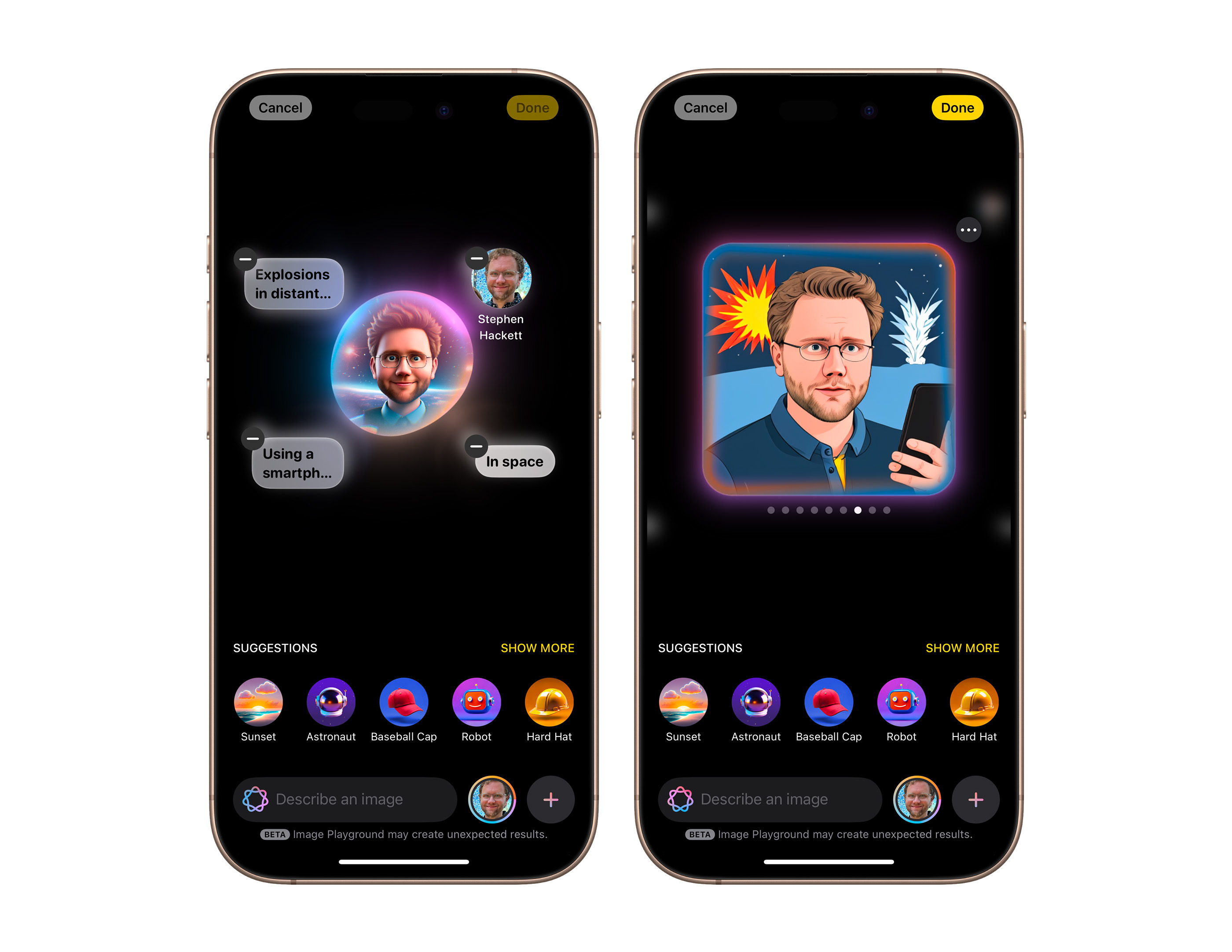
(Don’t look too closely at my hand in the image on the right.)
Apple’s system will not create realistic images, and is instead limited to two styles: “Animation” and “Illustration,” as you can see here:

I suspect Apple didn’t want to go anywhere near the issues that arise when your AI can generate lifelike images, but I also suspect their technology can’t pull it off anyway.
I find Genmoji — the feature for creating custom emoji within Messages — to be much more compelling and fun. I honestly wish the Image Playgrounds app would make images in this style:
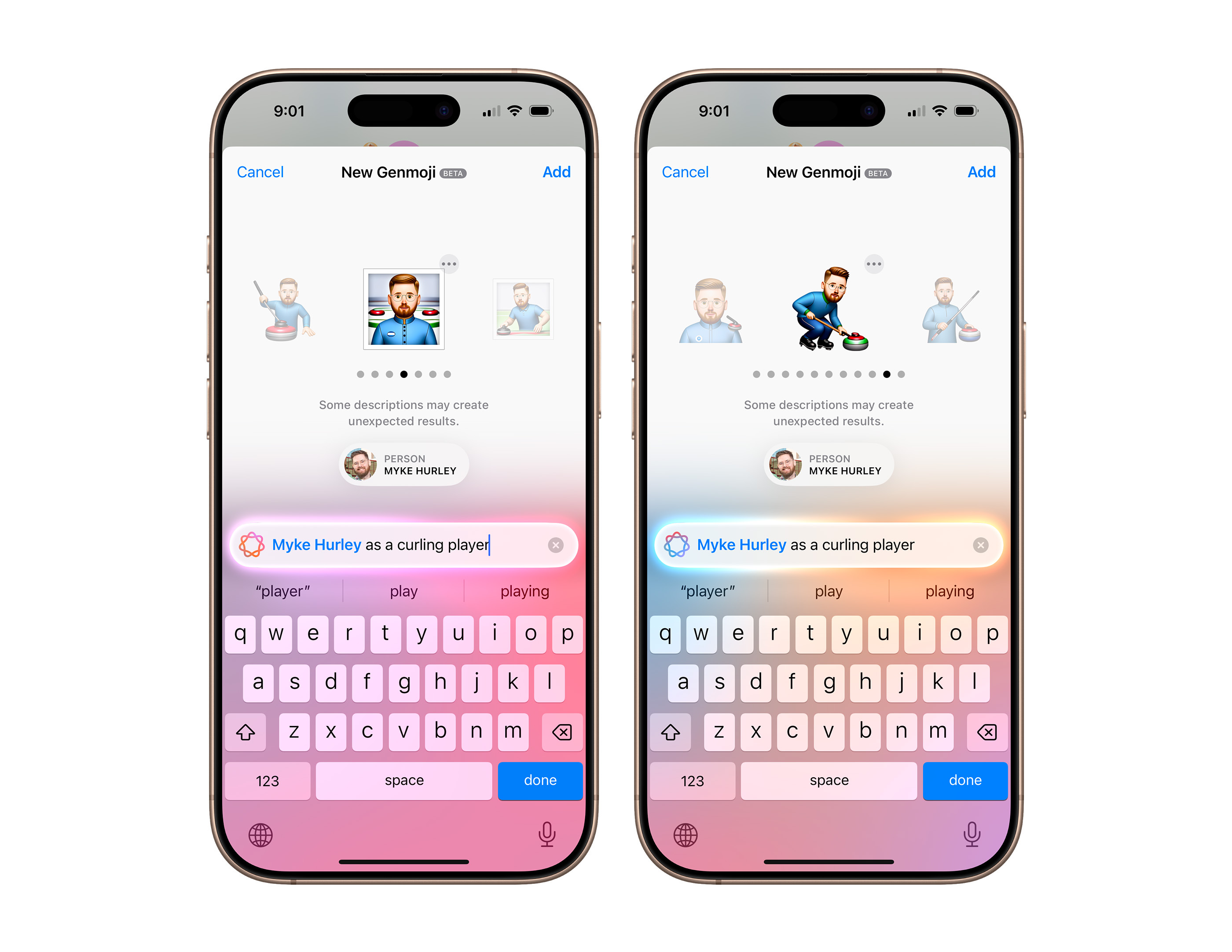
Here’s a collection of Genmoji I have made over the last several weeks, with my personal favorite, which Apple Intelligence generated when I used a prompt that said “AI on the mind.”

(Federico Viticci in a cowboy hat is a close, close second.)
I’m not that impressed with what Apple has done here, but I think that’s okay.
I am glad Apple is not creating lifelike images with these tools, but of course, many services are doing that. This week, OpenAI launched SORA, its video creation tools. We are all running headlong into a world where being able to tell real news apart from the fake is going to be harder than ever, and that’s troubling. But hey, at least I got to make a ripped John Voorhees Genmoji with my iPhone!
In November 1996, Apple released the Power Macintosh 4400 with a starting price of $1,725. Also sold as the Power Macintosh 7220, it’d be easy to write this machine off as just another grain of sand on the beige beach that was Apple’s product line in the 1990s. I mean, just look at this thing, pictured here with an Apple-branded CRT:

If you were around the Mac line in the late 1990s, your blood probably ran cold when you saw the 4400’s name in the above headline.
The 4400 was introduced as an inexpensive “small business” computer. As a way to cut costs, Apple did everything it could to bring its manufacturing costs down. Instead of using a pre-existing enclosure, as was the company’s go-to move, it used something much worse.
We looked at a pre-release version of the 4400 and found it to be a strange bird, indeed. Strange, that is, in the Apple brood; when compared with PCs it fits right in with the flock. It is contained in a stock desktop PC case fitted with Apple’s distinctive curved nose piece. The back (featuring one each of SCSI, modem, printer, ADB, microphone, sound-out, RJ-45 Ethernet and monitor ports) is industrial-looking, while bent sheet metal fills the case’s insides, sharp edges and all. The IDE drive sits on end, while the Comm II slot (occupied with an Ethernet card) and two PCI slots reside in a riser card. For the first time, Apple has abandoned automatic switching in the power supply, a small cost savings at the expense of international users’ convenience.
Mac users were used to a certain level of fit and finish that this model lacked. The 4400 felt cheap, and with the floppy drive on the left side, it looked almost alien to the Mac faithful. Even worse, it lacked the auto-inject feature found on other Mac models.
In 2009, Macworld put the 4400 on a list titled “Six Worst Apple Products of All Time,” reflecting on the case design. Here’s Adam Engst:
The Power Macintosh 4400 was Apple’s feeble attempt at a cheap Mac knockoff. It had a sharp-edged metal case and more industry-standard components than other Macs, and it was horrible. It crashed all the time, had a particularly loud fan, and (oddly) had its floppy drive on the left side-convenient for maybe 10 percent of the population.
While the outside was undoubtedly terrible, Apple also cut corners inside the machine. The 4400 was built around the “Tanzania” motherboard design, which was used in numerous Mac clones of the era. The board supported the PowerPC 603e processor and up to 160 MB of RAM, but it came with some odd features, as Eric Schwarz wrote about in 2005:
The motherboard … only had one EIDE bus, so you could only have the CD-ROM drive and the hard drive internally, despite the power supply’s extra strength. Other clones, such as the Motorola StarMax, also used a similar motherboard (the Tanzania architecture), but added things such as PS/2 ports or VGA.
Seeing PS/2 ports on the back of a Mac is next-level weird, so we can be thankful Apple didn’t include them on the 4400. The IDE bus meant that drives were slower than those in SCSI-equipped Macs.
The 4400 could run System 7.5.3 through Mac OS 9.1, but even there, there is fine print to pay attention to, as System 7.5.5 wouldn’t boot on this machine. In 1998, Apple released an update for Mac OS 8.1 to patch issues associated with the Tanzania design:
The Power Macintosh 4400 Update contains two patches for Mac OS 8.1. The first patch corrects a memory corruption problem caused by Mac OS Extended (HFS+) that results in systems that will not boot after being upgraded to Mac OS 8.1. The symptom is a hang during startup (for example, when the Happy Mac icon appears, or when the “Welcome to Mac OS” screen appears, or while the extensions are loading). This problem can occur even if there are no Mac OS Extended volumes in use.
The second patch corrects an obscure problem with the ATA Manager. The symptom is what appears to be a hung system — the mouse pointer will move but the system does not respond (it is in an infinite loop). If you are using a PC Compatibility Card, you will not be able to switch back to the Mac OS environment. This update also corrects this problem. This update modifies the system file to correct the Mac OS Extended problem and installs the “4400 ATA INIT” extension to correct the ATA Manager problem.
When the update is installed, the system version in the “About This Computer” window will be listed as “Mac OS 8.1” and “System Enabler 4400 Update”.
Some folks have gotten Mac OS X to run on the 4400, but I can’t imagine how slow that must be, even with hardware changes like drop-in CPU upgrades, a faster GPU, and even swapping the hard drive for something like a CF or SD card.
Apple would eventually ship a few different models of the 4400, including the original 4400/160 and the slightly faster 4400/200. The latter could be equipped with an optional 166 MHz DOS card containing 16 MB of RAM and a Cyrix 6x86 processor.
The Power Mac 4400 was discontinued in February 1998 after the Power Mac G3 desktop hit the market. Time has not been kind to this machine, and I think this headline from r/VintageApple sums it up nicely:
Acquired a Power Macintosh 4400/200 today. What in the Gateway 2000 is this thing?
Unite 5 for macOS takes your web experience to the next level, transforming websites into feature-rich Mac apps. Powered by a completely redesigned WebKit browser, Unite 5 offers a more immersive and customizable browsing experience.
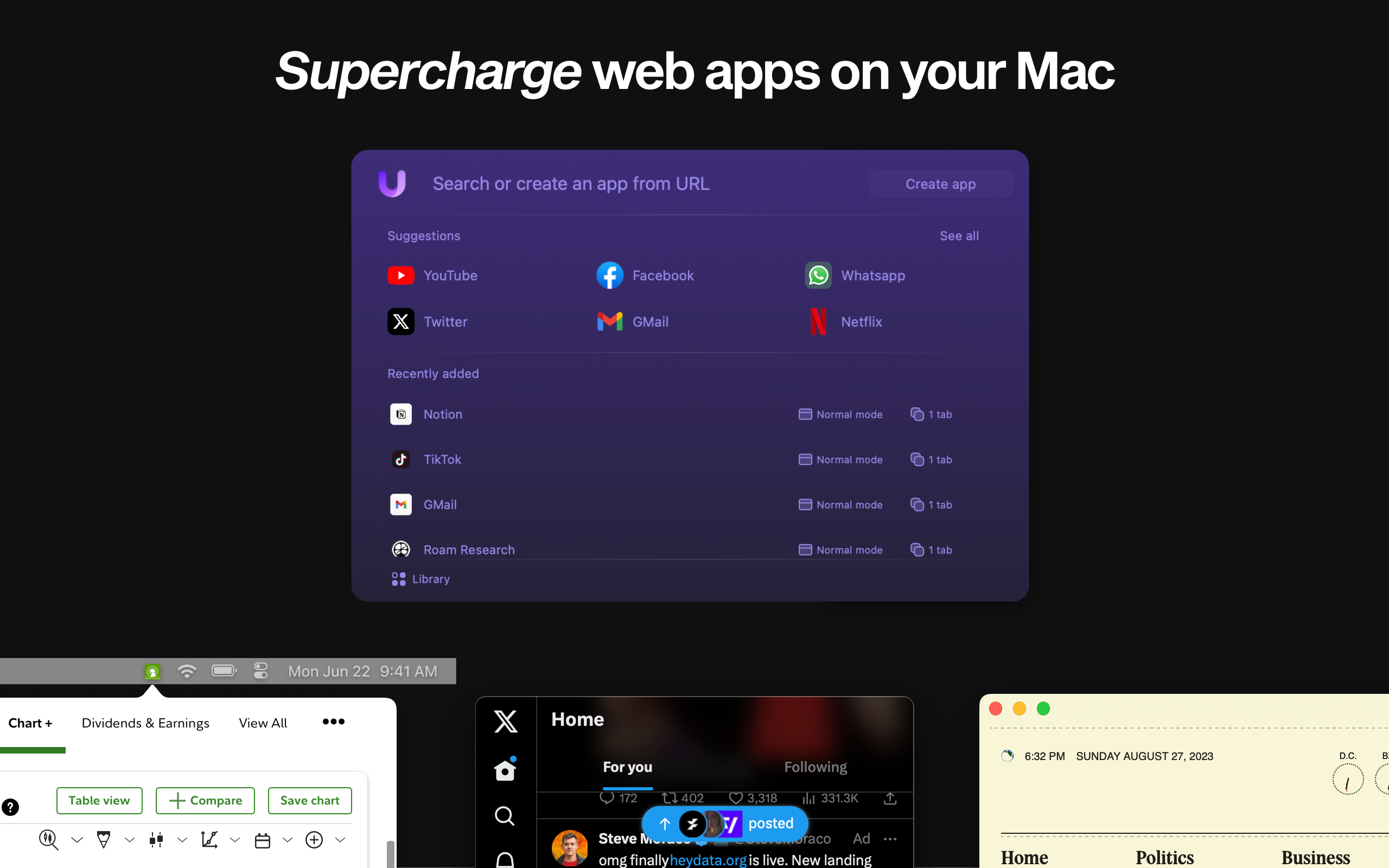
What sets Unite 5 apart? We’ve gone beyond just app conversion. Our new intricate link-forwarding rules give you unparalleled control over web interactions, making your web apps smarter and more integrated than ever before.
Some highlights of Unite 5:
Create powerful web apps in seconds, such as:
512 Pixels readers get an exclusive 20% off this week! Use the promo code 512Pixels at checkout or visit bzgapps.com/unite512.
Experience Unite 5 for yourself with a 14-day free trial, or access it as part of a Setapp subscription.
It’s that time of year again: when relatives come to the family get-together armed with tech questions. On this episode, David and I tackle some of the most common issues asked around the dinner table.
For years, Apple fans have looked at the Surface Studio longingly, wondering what a version of a tilting Mac desktop could look like. Many wondered if Apple would ever do anything like this machine, adding Apple Pencil and touch support to macOS, or doing some wild Mac/iPad hybrid.
I fear Apple won’t ever get that weird with its products, and it seems like Microsoft is backing out as well, according to Zac Bowden:
Over the last several weeks, the Surface Studio 2+ has slowly fallen out of stock in multiple regions. Now today, the company has confirmed that it has no plans to restock the Surface Studio 2+, meaning production on the product line has come to an end.
“Customers can continue to purchase Surface Studio 2+ through retailers and partners with stock” a Microsoft spokesperson told Windows Central when asked for comment. “For areas reaching out of stock, Surface Studio 2+ will no longer be available for new purchases.”
With Myke out this week, Stephen and Federico bravely carry on, discussing the future of web browsers, how iOS 18.2 is shaping up, and a Kickstarter that seems a bit unusual.
Simon B. Støvring has launched a new app:
Festivitas automatically adds festive lights to your menu bar and dock upon launch and you can tweak their appearance to match your preferences.
I love this, and not just because it reminds me of the old Holiday Lights app.
Thomas Kleine Buening, Aadirupa Saha, Christos Dimitrakakis, Haifeng Xu, on Apple’s “Machine Learning Research” blog:
Motivated by the phenomenon of strategic agents gaming a recommendation system to maximize the number of times they are recommended to users, we study a strategic variant of the linear contextual bandit problem, where the arms strategically misreport privately observed contexts to the learner. % under strategic context manipulation. We treat the algorithm design problem as one of \emph{mechanism design} under uncertainty and propose the Optimistic Grim Trigger Mechanism (OptGTM) that minimizes regret while simultaneously incentivizing the agents to be approximately truthful. We show that OptGTM achieves sublinear regret despite the agents being unrestricted in their ability to game the learning algorithm by misreporting contexts. We then also show that failing to account for the strategic nature of the agents results in linear regret. However, a trade-off between incentive-compatibility and regret minimization is shown to be unavoidable. More broadly, this work provides insight into the intersection of online learning and mechanism design.
I’m sure we all understand what all of that means.
In my week of guesting on other people’s Relay podcasts, I’m on today’s episode of Focused, talking about my recent sabbatical. I found the topic surprisingly weird to talk about, but David and Mike helped make it much more comfortable to do so.
Today we’re launching a Verge subscription that lets you get rid of a bunch of ads, gets you unlimited access to our top-notch reporting and analysis across the site and our killer premium newsletters, and generally lets you support independent tech journalism in a world of sponsored influencer content. It’ll cost $7 / month or $50 / year — and for a limited time, if you sign up for the annual plan, we’ll send you an absolutely stunning print edition of our CONTENT GOBLINS series, with very fun new photography and design. (Our art team is delightfully good at print; we’ve even won a major magazine award for it.)
A surprising number of you have asked us to launch something like this, and we’re happy to deliver. If you don’t want to pay, rest assured that big chunks of The Verge will remain free — we’re thinking about subscriptions a lot differently than everyone else.
Let me explain.
I read a ton of stuff on The Verge, enjoy their podcasts, and love full-text RSS. I’m already signed up.
