In January 2006, the first Intel Macs were announced. We’ll deal more with that anniversary in a year, but for now, it’s worth walking through the final full year of PowerPC Macs.
Transitions happen for a reason, and exploring those reasons can tell us a lot about the priorities of the parties involved.
When the Mac moved from x86 to Apple silicon a few years ago, it was partially because Intel wasn’t delivering what Apple needed and partially because Apple was in a place with its own chips that the Mac would be radically better after the transition.
2005 wasn’t all that different from 2019. What had started as an exciting alliance between Apple, IBM, and Motorola to push back against Wintel’s dominance had broken down, with the PowerPC platform hitting a wall when it came to performance and energy consumption.
The clearest example of the problem was the PowerBook, which was never graced with a PowerPC G5 chip, as the thing just ran too hot for a notebook. There’s a reason this Photoshopped image made the rounds of Mac forums for so long:

With all of this said, it would be easy to consider the Mac in 2005 as a lame duck, just biding its time until the first Intel machines came along, but I think that’s selling these machines a bit short.
So, with all that set, let’s look back twenty years and see what Apple was up to in 2005.
January 2005
Updated Xserve
Apple started the year off with an update to the Xserve. The now-defunct server line had been upgraded to the G5 in 2004, but this update brought faster processors, more storage, and updated optical drives.
The updated Xserve retained the huge air intakes on the front required for the G5s to breathe. Just check out the differences between the G4 and G5 models:

The Mac mini
At Macworld 2005, Apple introduced an all-new Mac:
Apple today introduced Mac mini, the most affordable and compact Mac ever. Starting at just $499, Mac mini is the ideal desktop computer for anyone looking to get started with Mac OS X and features iLife ‘05, the latest version of Apple’s innovative suite of software for managing digital photo and music collections, editing movies and creating music. Just two-inches tall and weighing only 2.9 pounds, Mac mini redefines design for the sub-$1,000 desktop.
“Starting at just $499, Mac mini is the most affordable way to enjoy Mac OS X and iLife,” said Steve Jobs, Apple’s CEO. “Just plug in your display, keyboard and mouse and you’ve got an incredibly compact Mac for a price that almost anyone can afford.”
Twenty years later, I still love the look of the original Mac mini:

I remember this keynote well. Several of us were working on a redesign at our college newspaper before the semester started, and we spent most of the afternoon trying to refresh Apple’s site, which was struggling with everyone looking at this new Mac and the iPod shuffle introduced the same day.
At the time, I wasn’t surprised that the Mac mini shipped with a G4 inside. The Mac mini’s biggest feature was its small price, and a G5 would have increased the cost. Even though a G5 powered the iMac and Power Mac, most folks don’t mind having a G4 in Apple’s entry-level desktop aimed at switchers.
Updated PowerBooks
At the end of the month, Apple announced what would be the penultimate update to the PowerBook:
Apple today unveiled the fastest, most affordable PowerBook line ever, featuring PowerPC G4 processors running up to 1.67 GHz, faster hard drives and a faster 8X SuperDrive — all housed in the PowerBook’s signature aluminum enclosure. All new PowerBooks come standard with 512MB memory, faster graphics, integrated AirPort 802.11g, Bluetooth 2.0 wireless networking and two new Apple patent-pending technologies — the scrolling TrackPad and the Sudden Motion Sensor.
The TrackPad update enabled two-finger scrolling, as described on the product page:
Scrolling through web pages or large documents on a trackpad can challenge even the most nimble fingers. That’s why every PowerBook G4 features a new trackpad with scrolling capability. Just drag two fingers over the trackpad to scroll vertically and horizontally or pan around any active window. Change this feature to suit your needs: Customize your trackpad settings or turn off scrolling completely via System Preferences.
(Don’t miss the GIF on that page.)
This feature sounds super basic now, but it was a huge improvement at the time. So much so, that many users ran third-party software that enabled it on older machines.
To add scrolling, the trackpads in these machines used USB internally, as opposed to the older ADB standard, which first appeared in 1986.
If the scrolling trackpad was a feature users would notice every single day, the Sudden Motion Sensor was one that folks hoped never to have to experience:
Now every PowerBook G4 is equipped with Apple’s Sudden Motion Sensor to help protect your most valuable asset: your data. The Sudden Motion Sensor senses change in axis position and accelerated movement. In the event of a drop or fall, the Sudden Motion Sensor instantly parks the hard drive heads so they won’t scratch the disks on impact, lessening the risk of damage and improving your chances of retrieving valuable data. When the Sudden Motion Sensor senses your PowerBook is once again level, it unlocks the hard drive heads automatically.
This update also brought some other goodies:
The new PowerBooks deliver increased performance with both the 15- and 17-inch PowerBook models offering up to 1.67 GHz PowerPC G4 processors and industry-leading ATI Mobility Radeon 9700 graphics processors with 64MB or 128MB of graphics memory. All models now include 512MB of 333 MHz DDR SDRAM and faster 5400 rpm hard drives for demanding professional applications. The 17-inch PowerBook now features Dual Link support to drive Apple’s breakthrough 30-inch Cinema HD Display as an external monitor, and this feature is also available as a build-to-order option on the 1.67 GHz model of the 15-inch PowerBook.
Apple continues to lead the industry in integrated wireless communications, and every PowerBook now includes built-in AirPort Extreme 54 Mbps 802.11g WiFi wireless networking. Apple is the first notebook maker to include integrated Bluetooth 2.0 (Enhanced Data Rate) for up to three times greater data rates, up to 3 Mbps, for faster wireless connectivity to a range of peripherals including cell phones, PDAs, printers and headsets. Bluetooth 2.0 is also compatible with Bluetooth 1.2 devices such as the Apple Wireless Keyboard and Mouse.
April 2005
Power Mac G5 Update
The Early 2005 Power Mac G5 was a speed bump over the June 2004 models. The high-end model moved from 2.5 GHz to 2.7 GHz, but kept the most notorious feature of the previous model:
The Power Mac G5 offers 2.0GHz, 2.3GHz and 2.7GHz dual-processor models with a speed boost at the top of the line. The dual 2.7GHz model packs so much power into tight quarters that Apple designed a liquid cooling system for it, resulting in a cool tower that runs Photoshop nearly two times faster than a Pentium 4-based system. In fact, for most creative endeavors, the Power Mac G5 simply has no competition in its class.
Just look at this thing:

Here’s more on that liquid cooling system:
Take it up a notch without losing your cool. The top-of-the-line Power Mac G5 with dual 2.7GHz processors squeezes outrageous performance into tight quarters. To cool down those steaming circuits, Apple designed a sophisticated liquid cooling system that takes off the heat without bumping up the noise. Mac OS X dynamically adjusts the flow of the fluid and the speed of the fans based on temperature and power consumption.
The dual 2.7GHz Power Mac G5 features an innovative liquid cooling system that’s more efficient than a traditional heat sink. This system provides a continuous flow of thermally conductive fluid that transfers heat from the processors as they work. The heated fluid then flows through a radiant grille, where air passing over cooling fins returns the fluid to its original temperature.
I have a lot of bad memories of these things showing up to my Genius Bar with leaks.
This liquid-cooled, dual-processor 2.7 GHz system is the most striking example of what was going wrong with the PowerPC line. At the Power Mac G5’s launch in 2003, Steve Jobs promised that 3 GHz models were coming, but by the time WWDC 2004 rolled around, it was clear that his promise was going to be broken.
Apple never shipped a Power Mac G5 clocked at 3 GHz.
Mac OS X Tiger
April 2005 also marked the release of OS X Tiger, which introduced features like Spotlight, Dashboard, and expanded 64-bit support.

(See many, many more screenshots of Tiger over here, and you can snag its default wallpaper here.)
Tiger was the first version of Mac OS X to support Intel machines and would end up being the longest-running version, being on sale for two and a half years.
May 2005
“Ambient Light Sensor” iMac G5s Released
In May of 2005, the iMac G5 got a revision:
Apple today unveiled a new iMac G5 line with faster 2.0 GHz PowerPC G5 processors, built-in AirPort Extreme and Bluetooth wireless connectivity and Mac OS X version 10.4 “Tiger,” the latest version of the world’s most advanced operating system. The new iMac G5s also include faster graphics, a new 8X SuperDrive with double-layer support, built-in Gigabit Ethernet for faster networking, and 512MB of memory across the line. Every new iMac G5 comes with iLife ‘05, Apple’s award-winning suite of digital lifestyle applications, making it the ultimate consumer desktop for today’s digital lifestyle.
These systems were the first iMacs to ship with ambient light sensors, allowing the machine to adjust the screen brightness automatically based on room conditions.
June 2005: Switch Announced
WWDC 2005 brought monumental news: the Mac was switching to Intel.

Here’s a bit from the press release:
At its Worldwide Developer Conference today, Apple announced plans to deliver models of its Macintosh computers using Intel microprocessors by this time next year, and to transition all of its Macs to using Intel microprocessors by the end of 2007. Apple previewed a version of its critically acclaimed operating system, Mac OS X Tiger, running on an Intel-based Mac to the over 3,800 developers attending CEO Steve Jobs’ keynote address. Apple also announced the availability of a Developer Transition Kit, consisting of an Intel-based Mac development system along with preview versions of Apple’s software, which will allow developers to prepare versions of their applications which will run on both PowerPC and Intel-based Macs.
“Our goal is to provide our customers with the best personal computers in the world, and looking ahead Intel has the strongest processor roadmap by far,” said Steve Jobs, Apple’s CEO. “It’s been ten years since our transition to the PowerPC, and we think Intel’s technology will help us create the best personal computers for the next ten years.”
“We are thrilled to have the world’s most innovative personal computer company as a customer,” said Paul Otellini, president and CEO of Intel. “Apple helped found the PC industry and throughout the years has been known for fresh ideas and new approaches. We look forward to providing advanced chip technologies, and to collaborating on new initiatives, to help Apple continue to deliver innovative products for years to come.”
I wrote about this back in 2018 for iMore 1:
In his keynote address, Jobs addressed the challenges in front of Apple working with the PowerPC roadmap. Apple hadn’t been able to deliver the 3.0 GHz Power Mac G5 the company had promised:
“We can envision some great products we want to build for you, but we don’t know how to build them with the future PowerPC roadmap.”
(That’s a pretty sick Steve Jobs burn.)
According to Jobs, this all came down to a metric he called “Performance Per Watt.” In short, only Intel could give Apple the power they wanted in an efficient package. PPC was just too hot and too power-hungry for Apple to stay the course.
Despite the CPU change being announced in June, the first Intel Macs were promised for the next year, opening the door to a potential Osborne effect moment for the Mac. Jobs headed this off by promising that “some great” PowerPC Macs were still in the pipeline.
By my count, there was only one great PowerPC Mac left to come, but we’ll get to that shortly.
July 2005
Updated iBook G4
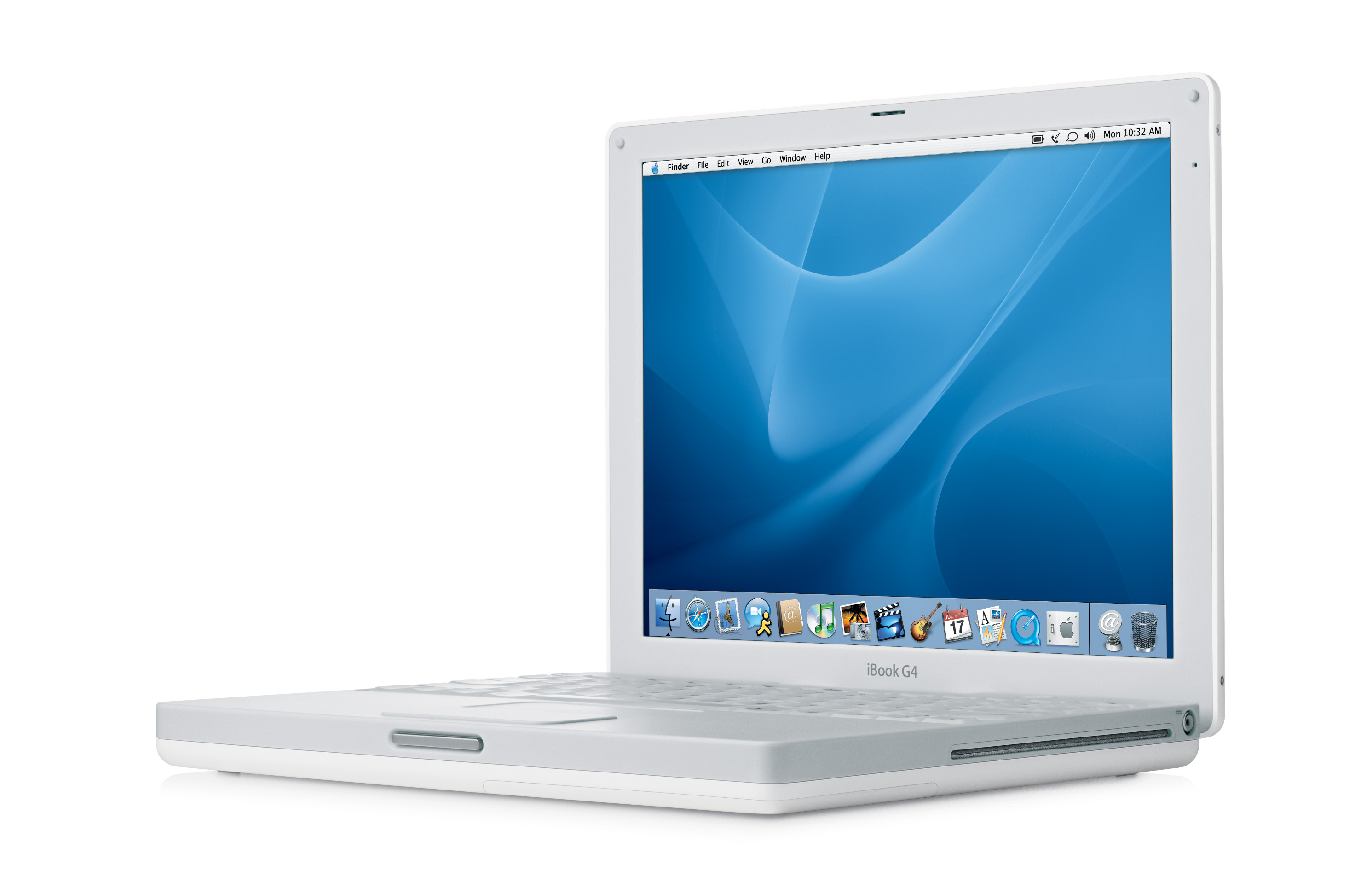
A month after the switch to Intel was announced, Apple revised its iBook G4 line, borrowing some of the features introduced earlier in the year in the PowerBook family:
Apple today enhanced its affordable iBook G4 line for consumers and education customers with faster Power PC G4 processors running up to 1.42 GHz, 512MB memory across the line, higher performance graphics and built-in AirPort Extreme and Bluetooth wireless connectivity. The new iBooks feature two patent-pending Apple technologies made popular in the PowerBook G4 line, the scrolling TrackPad and the Sudden Motion Sensor, with prices starting at an affordable $999.
I find it a little funny that Apple’s press release didn’t include comments from Steve Jobs or Phil Schiller:
“The new iBook is the perfect portable for the go anywhere, do anything digital lifestyle of consumers and students,” said David Moody, Apple’s vice president of Worldwide Mac Product Marketing. “With improved performance, double the memory, and new mobility features like the scrolling TrackPad, Sudden Motion Sensor and Bluetooth, the new iBooks are an amazing value.”
This would be the last update to the iBook; it was replaced by the MacBook in 2006.
Revised Mac mini
The same day, Apple “enhanced” the Mac mini by doubling the default memory to 512 MB, building in AirPort Extreme and Bluetooth, and offering an optional SuperDrive:
The Mac mini lineup includes three models: 1.25 GHz Mac mini, 1.42 GHz Mac mini and the new 1.42 GHz Mac mini with SuperDrive for burning DVDs and CDs. The Mac mini with SuperDrive is the most affordable Mac for quickly and easily creating your own professional quality DVDs using iLife ‘05, Apple’s award-winning suite of digital lifestyle applications. The top two models of the Mac mini now include built-in AirPort Extreme for 54 Mbps 802.11g fast wireless networking along with an internal Bluetooth module. With wireless networking, customers can place Mac mini almost anywhere and still have fast, convenient access to the Internet. Built-in Bluetooth enables cable-free communication with Bluetooth-equipped mobile phones and PDAs as well as popular peripherals such as the Apple Wireless Keyboard and Apple Wireless Mouse.
September 2005
A Silent Mac mini Revision
In September 2005, Apple silently revised the Mac mini to use 1.33 and 1.5 GHz G4s. This revision also doubled the VRAM to 64 MB, and updated the pitiful 4200 RPM drives to faster-but-still-slow 5400 RPM units.
Weirdly, Apple did not update the Mac mini’s packaging or its website to reflect this change. The whole thing was weird.
After initial reports of the update surfaced, Apple did confirm the revision, issuing a statement to Jim Dalrymple:2
Some Mac mini systems may contain components that slightly exceed the published specifications. There are no changes to the published specifications or part numbers.
I think this is the weirdest product update in Apple’s modern history.
October 2005
The iMac with iSight
At an event at San Jose’s California Theatre in October, Apple announced a major revision to the iMac G5:
Apple today unveiled the new iMac G5 which features a built-in iSight video camera for out-of-the-box video conferencing and the debut of Apple’s breakthrough Front Row media experience. Front Row gives users a simple, intuitive and powerful way to play their music, enjoy their photo slideshows, and watch their DVDs and iMovies, as well as popular movie trailers from apple.com and music videos and television shows purchased from the iTunes Music Store, on their iMac from up to 30 feet away using the new bundled Apple Remote. The new iMac G5 comes in a sleek, new design that is even thinner than its predecessor, and starts at just $1,299.
“The new iMac G5 debuts our amazing Front Row media experience, and we think users are going to love it,” said Steve Jobs, Apple’s CEO. “Plus, the built-in iSight video camera delivers out-of-the-box video conferencing with friends and family, as well as hours of fun with our new Photo Booth application.”

When I mentioned that I thought there was one great PowerPC release after the switch to Intel was announced, I had this iMac in mind. It packed so many cool features, all highlighted on Apple’s site:
You’ve got the best seat in the house. The full-screen Front Row media experience — with its intuitive menus, large text and brilliant graphics — lets you browse the music, photos and videos on your iMac as easily as you browse music on your iPod. And the new Apple Remote lets you do your browsing from anywhere in the room. So gather your friends and dazzle them with a slideshow of your vacation pics, a home movie or a DVD. iMac G5 was born to entertain.
There’s an iSight camera built into every new iMac, so you can start a video chat (or join one) at a moment’s notice. There’s nothing to buy, nothing to attach, no cords to fumble with, no software to install or configure. Simply start up iChat AV, click your buddy’s video icon and you’re ready to chat with sight and sound — with up to three friends at once. Proper attire suggested.
The new Photo Booth application (included) turns your iMac into a modern-day arcade photo booth (minus the coin slot). Just pick a special effect like sepia tint, x-ray, bulge or squeeze. And smile. Presto — instant high-quality photo. Once you have the perfect pic, take advantage of Photo Booth’s connections to share it via Mail, save it in iPhoto or use it as your Address Book or iChat buddy picture.
Front Row is long gone, but its legacy lives on in the Apple TV. In fact, the original Apple TV’s operating system looked a lot like Front Row.
When Apple added a webcam to the iMac, it was mind-blowing, and it spread to notebooks when they switched to Intel the following year. Twenty years later, the MacBook Pro I’m currently typing on has an iSight camera.
This was an exciting iMac release, but it was quickly overshadowed by the Intel iMac that was announced just 87 days later. The Intel machine looked and cost the same as the G5, but was twice as fast.
The iMac G5 with iSight was sold for a couple of months after the Intel models hit store shelves, but quietly went away by March.
I can’t imagine many buyers of these machines were thrilled about how quickly Apple replaced them in the lineup.
It’s a weird situation, and I don’t know why Apple had such a great revision for the PowerPC iMac mere weeks before the Intel model was announced. Part of me thinks Apple hoped to ship this iMac in the summer of 2005, but that’s conjecture on my part.
The Final PowerBook G4
Just one week after the press event that included the iMac, Apple announced an update to the PowerBook G4:
“The Apple PowerBook continues to deliver the ultimate in portability, performance and innovative features,” said Philip Schiller, Apple’s senior vice president of Worldwide Product Marketing. “Our mobile customers are going to love working on the new high-resolution PowerBook displays and appreciate the added productivity that one more hour of battery life delivers.”
The new higher-resolution PowerBooks provide significantly more screen real estate and include the 17-inch PowerBook with a 1680-by-1050 pixel resolution — 36 percent more than the previous generation — and the 15-inch PowerBook with a 1440-by-960 pixel resolution — 26 percent more than the previous generation. Ideal for business and creative professionals, the new 15- and 17-inch PowerBooks make reading text and viewing images even easier with brighter displays — up to 46 percent brighter on the 17-inch model. The 15- and 17-inch PowerBooks also provide up to an additional hour of battery life to get even more work done while on the road.
Given that the MacBook Pro was announced the same day as the Intel iMac, these systems had an even shorter lifespan, but that doesn’t mean that they were bad. Sure, this revision was less exciting than what the iMac received, but the displays on the final PowerBooks were quite nice:
With millions more pixels than previous models, each new 15-inch and 17-inch PowerBook gives you a brilliant workspace that rivals many desktop monitors. Spread out your tools, palettes, and timelines. Bounce from one productivity application to another. View your work from the top or side — easily share your work with clients or team members. Now you have a whole new reason to love your PowerBook.
A buddy of mine had one of these machines, and even though the MacBook Pro smoked it in terms of performance, he used and loved his PowerBook for years.
The Final Power Mac G5
The same day Apple revised the PowerBook, it announced an update to the Power Mac:
Apple today unveiled its new Power Mac G5 desktop line featuring the Power Mac G5 Quad, providing quad-core processing with two 2.5 GHz dual-core PowerPC G5 processors. All Power Mac G5 models now feature dual-core processors, a new PCI Express architecture and higher performance graphics options including NVIDIA’s Quadro FX 4500, bringing the industry standard for workstation graphics to the Mac.
“The Power Mac G5 Quad delivers the workstation performance our creative and scientific customers demand,” said Philip Schiller, Apple’s senior vice president of Worldwide Product Marketing. “With quad-core processing, a new PCI Express architecture, and the fastest workstation card from NVIDIA, the new Power Mac G5 Quad is the most powerful system we’ve ever made.”
Gone was the 2.7 GHz G5, but the quad-core 2.5 machine was a beast. Here’s a bit from Apple’s site:
Enter the dual-core PowerPC G5 processor: one silicon chip with two independent 2.5GHz processor cores. Now take two of those chips and you have the Power Mac G5 Quad, for groundbreaking quad-core processing.
With four processing cores, you’ll have more 64-bit resources: more L2 cache, more Velocity Engines, and more double-precision floating-point units. Videographers can edit more footage, filmmakers can produce more real-time effects, designers and photographers can process more higher-resolution images, and researchers can crunch through data sets for faster results. Compare a quad-core Power Mac G5 to the fastest dual-processor G5 ever built, and you’ll experience up to 69 percent faster performance running popular professional applications. Or make that up to three times faster, if you’re comparing with a Power Mac G4.
The new dual-core PowerPC G5 combines two processor cores on a single silicon chip, providing double the computational power in the same space as a single-core processor. With four processor cores, applications can take advantage of four 1MB L2 caches, four 128-bit Velocity Engines, and eight double-precision floating-point units for a radical increase in desktop performance.
The last Power Mac G5 was also the first Mac to ship with PCI Express:
The new Power Mac G5 introduces a modern PCI Express architecture to the Mac platform. A future-savvy choice for your lab or studio, PCI Express opens up a world of high-performance system technologies and peripherals — and paves the way for emerging solutions for media and networking.
The all-new PCI Express architecture allows you to customize your Power Mac G5 to the needs of your workflow — providing tremendous power and productivity in a single system. As your needs change, you’ll have the flexibility to add solutions for emerging workflow scenarios, such as video capture cards from Blackmagic Design or AJA Video, data acquisition devices from National Instruments, or the Apple Fibre Channel PCI Express Card for connecting to Apple’s Xserve RAID storage solution.
This Power Mac would remain on sale much longer than Apple’s other October 2005 models, as the Mac Pro wouldn’t be announced until August 2006.
Something Between a Bang and a Whimper
As I wrote 4,000 words ago, writing off the final year of PowerPC Macs isn’t really that fair. 2005 saw the introduction of the Mac mini, a more powerful Xserve, updates to Apple’s entire notebook line, and meaningful improvements to both the iMac and Power Mac.
Yes, the Intel Macs that followed these releases were much faster and more flexible, but the 2005 announcements more than held their own. Even as it was working to move the line to Intel, Apple was paying attention to its PowerPC products. Apple did a better job with late-model PowerPC Macs than it did with the machines released in the run-up to Apple silicon, but that’s a story for 2040.
-
I’ve saved that entire column as a PDF in case iMore goes away. ↩︎
-
Let’s talk about the heartbreaking state of the Macworld website for a moment. The original URL for that Dalrymple article is broken, as are most URLs from that time frame. I resorted to that Wayback Machine URL because I couldn’t find it via Google or Macworld’s own site search.
I initially thought the latter was my fault, as Macworld’s search doesn’t work if you run an ad blocker. I disabled mine in Safari, just to be served with this monstrosity. Even then, the site search didn’t surface this article.
Macworld has been around since 1984, and could be an amazing resource for the Apple community, but instead an endless parade of terrible decisions made by corporate types have left it a broken shell of what it once was. ↩︎