Apple Vision Pro Repair & Service Prices

Michael Potuck, writing at 9to5Mac:

Apple has published its Vision Pro repair/replacement costs for issues like cracked front glass as well as a full replacement due to other damage. Replacing the $3,500+ headset for “other damage” will run $2,399 without Apple’s extended warranty and the front glass alone is a $799 repair.

Apple has two options for now when requesting repair/replacement for Vision Pro – “Cracked cover glass” and “Other damage.”

Apple Vision Pro: Ordered

Well, I’ve given Apple a pile of cash for an Apple Vision Pro.

Vision Pro

I did it all through the iOS Apple Store app, and things went pretty smoothly, except for my payment being rejected twice due to my in-store pickup window time suddenly being unavailable. I had to back out of the Apple Pay screen, select a new time, then restart the payment process.

I would have liked that part to have been a little less stressful.

The process was fairly straightforward. The iOS app did two Face ID-like scans,1 then I could select what model I wanted and add any accessories.

There are three SKUs of the Vision Pro:

  • 256 GB – $3,499
  • 512 GB – $3,699
  • 1 TB – $3,899

I went with the base model, and was directed to upload a PDF of my glasses prescription online2 after the order went through. I did not elect to pay $499 for the AppleCare. We’ll see if that comes back to bite me.

On the accessories front, there are a few options worth noting:

I opted for the travel case, as there doesn’t seem to be any storage included in the box. ZEISS Optical Inserts and additional Light Seals, Light Seal Cushions and bands and are also available.

Apple Vision Pro has also picked up a Tech Specs page on Apple’s website. It’s nice to finally see some numbers for the hardware. There’s also a lovely Guided Tours page.

If you are outside of the U.S., Apple has some warnings for you about buying a Vision Pro then using it elsewhere:

Apple Vision Pro is only available for sale in the U.S and is designed for customers in the U.S. to use at home, at work, and while traveling. We look forward to bringing Apple Vision Pro to more countries later this year.

  • Apple Vision Pro only supports English (U.S.) for language and typing and English for Siri and Dictation.
  • App Store requires an Apple ID with region set to the U.S.
  • Purchases on Apple Music and TV app require an Apple ID with region set to the U.S.
  • For customers with vision correction needs, ZEISS will only accept vision prescriptions written by U.S. eye care professionals, and will only ship to U.S. locations.
  • Customers may not be able to access certain apps, features, or content due to licensing or other restrictions in those countries or regions.
  • Apple Support is only available in the U.S.

I’d imagine most people getting these from outside of the United States are all set with an American Apple ID, but it’s worth pointing out.


  1. Seeing yourself at 7 AM is always a real treat. 
  2. I did not choose to engrave my lenses, but it’s a nice touch if you have more than one prescription or plan on sharing the device with someone. 

Connected #485: A Mobile Hamburger Menu Three Feet Wide

This week on the podcast:

Vision Pro pre-orders are just a few days away, and the guys have very different plans to get their hands on the product. In the meantime, Federico is getting weird, Myke is getting worked up and Stephen is busy helping his fellow content creators.

On Connected Pro:

Phil Schiller is on Threads and is very good at it. Also: feelings on keyboards and Vision Pro pre-orders.

U.S. Developers Can Now Offer Payments Options Outside of App Store

In response to the Supreme Court declining to hear its case with Epic, Apple has opened up the U.S. App Store to third-party payment options, as it has in select situations around the world in response to regulation in various markets.

Like in other places around the world, Apple has pretty tight restrictions on how links to external payment systems can look, and what a user will encounter on their way out to the web. That includes this screen, which is really something:
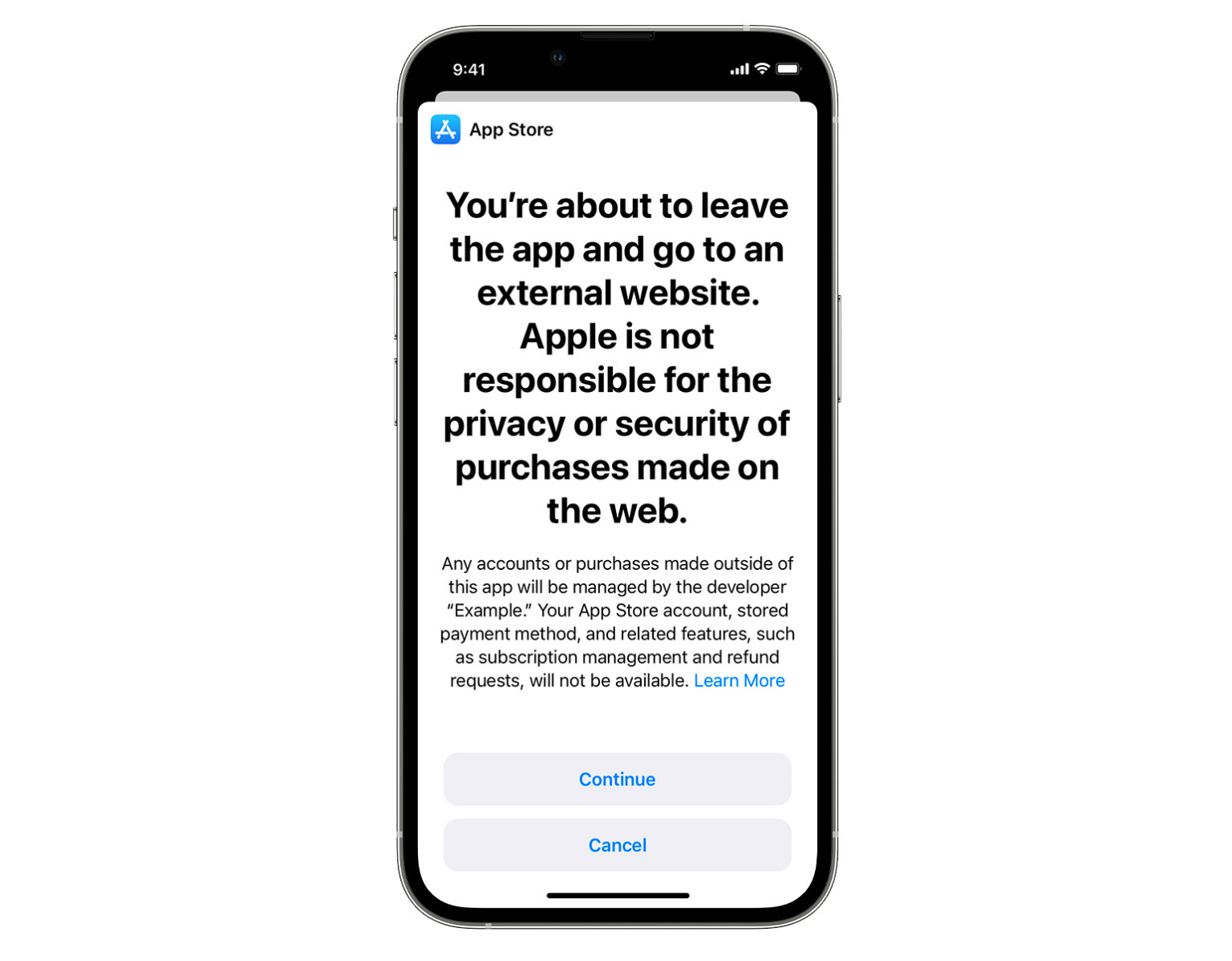
System Disclosure Sheet

These changes are outlined in Section 3.1.1(a) of the App Store Review Guidelines, which points to the StoreKit External Purchase Link Entitlement (US), which developers can request from Apple.

In her piece on MacRumors, Julie Clover includes a list of key points about Entitlement Links that cover things like where developers are allowed to place their single outbound link on a single screen of their app. That page cannot be “an interstitial, modal or pop-up” and the link cannot be “displayed on any page that is part of an in-app flow to merchandise or initiate a purchase using in-app purchase.”

Apple wants users to be informed when they are leaving the bounds of the App Store and its protections, which is fair, but I think Apple’s restrictions give too little credit to consumers and too little trust to developers.

Purchases made outside of those bounds still have a percentage that will wind up back with Apple. Here’s more from the developer site:

Apple’s commission will be 27% on proceeds you earn from sales (“transactions“) to the user for digital goods or services on your website after a link out (i.e., they tap “Continue” on the system disclosure sheet), provided that the sale was initiated within seven days and the digital goods or services can be used in an app. This includes (a) any applicable taxes and (b) any adjustments for refunds, reversals and chargebacks. For auto-renewing subscriptions, (i) a sale initiated, including with a free trial or offer, within seven days after a link out is a transaction; and (ii) each subsequent auto-renewal after the subscription is initiated is also a transaction.

If you’re a participant in the Small Business Program, or if the transaction is an auto-renewal in the second year or later of an auto-renewing subscription, the commission will be 12%.

It is up to developers to collect those commission dollars and pay them to Apple:

These commission rates apply to all amounts paid by each user net of transaction taxes charged by you. You will be responsible for the collection and remittance of any applicable taxes for sales processed by a third-party payment provider.

If you adopt this entitlement, you will be required to provide transaction reports within 15 calendar days following the end of each calendar month. Even if there were no transactions, you’re required to provide a report stating that is the case.

If Apple builds an API to automate some of this reporting, developers will have to adopt it within 30 days, and the company reserves the right to review those reports, telling developers that it can audit “the accuracy of your record of digital transactions, ensuring the appropriate commission has been paid to Apple.”

On the customer support front, things seem fair to both Apple and developers:

If you use this entitlement, it will be your responsibility to provide timely support to customers if questions or issues arise with payments that take place outside of the App Store. Apple will not be able to assist customers with refunds, purchase history, subscription management, and other issues encountered when purchasing digital goods and services. You will be responsible for addressing such issues with customers.

Like I said, these restrictions are not new; they are just new to the U.S. market, meaning many customers may comes across them for the first time, if developers are willing to use a payment option beyond Apple’s. As important as App Store revenue is to Apple, it’s not surprising how restrictive this all seems, as John Gruber writes:

I’ve said it before, I’ll say it again now, and I’m sure I’ll have to say it again in the future: Apple’s 30/15 percent commissions from App Store purchases and subscriptions are not payment processing fees. They include payment processing fees, but most of those commissions are, in Apple’s view, their way of monetizing their intellectual property. And they see the entire iOS platform as their IP.

So developers who want to process payments on their own websites are still on the hook to pay Apple the same effective commissions, minus only 3 percent for the actual payment processing. And the truth is most of the time credit card processing costs more than 3 percent overall, after chargebacks and fraud are taken into consideration. Do more work and save no money — sounds appealing, no?
Kbase Article of the Week: MacBook Pro Video Update 1.0 (Snow Leopard)

Apple Support:

This update addresses an issue where MacBook Pro (15-inch Mid 2010) computers may intermittently freeze or stop displaying video.

For detailed information about this update, please visit: http://support.apple.com/kb/TS4088.

Here is a bit more from TS4088, via the Wayback Machine:

Apple has determined that a small number of MacBook Pro (15-inch, Mid 2010) computers may intermittently freeze or stop displaying video on the built-in display or on an external display connected to the MacBook Pro. In this situation, you may also see a restart warning message before the video is lost or the display turns black or gray. Affected computers were manufactured between April 2010 and February 2011.

The NVIDIA GeForce GT 330M was at the heart of this issue, and is one reason Apple and NVIDIA still don’t work together.

Sponsor: MarsEdit 5

MarsEdit 5 is a major upgrade to the preeminent Mac app for editing WordPress, Micro.blog, Tumblr, and many other types of blogs.

The new Microposting feature makes it “as easy to post to your own blog as it is to post to Twitter.” When MarsEdit 5 is running on your Mac, just press a configurable global keyboard shortcut, write out your latest thoughts, and instantly publish to your blog.

MarsEdit supports editing posts in rich or plain text, and the latest update is especially great for Markdown fans. Now when you’re writing Markdown in plain text mode, MarsEdit applies live, beautiful syntax highlighting to make it easier to focus separately on the content and style of your posts.

MarsEdit is used by top bloggers to maximize their productivity and enjoyment of blogging. It’s great for pros like John Gruber of Daring Fireball, and yours truly, while also being simple enough to remove the mystery of blogging for everyday folks who just want to share their thoughts with the world.

MarsEdit 5.1 just shipped and features all-new support for publishing to Mastodon! Now you can use the same app you use to write and publish to your main blog, to write and publish to your Mastodon microblog. Check out the announcement at this link

One app, limitless publishing opportunities.

Download MarsEdit today, and see what all the hype is about. It’ll make you a better blogger!

Kbase Article of the Week: FireWire 2.5 and 2.4: Document and Software

And to think some people believe USB-C is confusing:

FireWire 2.5 is a component of the Mac OS. The FireWire 2.5 software includes three system extensions:

  • FireWire Support: This extension adds services to the Mac OS to support the use of FireWire hardware and software.
  • FireWire Enabler: This extension adds hardware-specific support for certain FireWire interfaces.
  • FireWire CardBus Enabler: This extension adds hardware-specific support for the Newer FireWire 2 Go CardBus interface, for use with PowerBook computers.

FireWire 2.5 fixes two issues that may be experienced by customers who are presently using FireWire 2.4 or an earlier version:

  • FireWire 2.5 supports more devices on a single FireWire bus. FireWire 2.4 and earlier versions often could not handle more than about ten FireWire devices.
  • FireWire 2.5 fixes an issue that could cause FireWire devices to work incorrectly when the computer is shut down.

If you want to use FireWire digital video devices with your computer, you need the latest version of QuickTime, which contains the necessary drivers.

37signals Resubmits Its Calendar App, Includes Dates in Apple History to Get Past App Review

There’s been a lot of news about HEY’s new calendar app being rejected by App Store Review. In a lengthy X thread discussing the issue, David Heinemeier Hansson revealed that HEY has resubmitted the app to Apple, this time with some built-in content that seems awfully familiar:

He goes on:

For each of my three Kickstarters, I’ve included digital versions of the highlighted dates for people to import into their calendar apps.

Here’s HEY’s included calendar data:

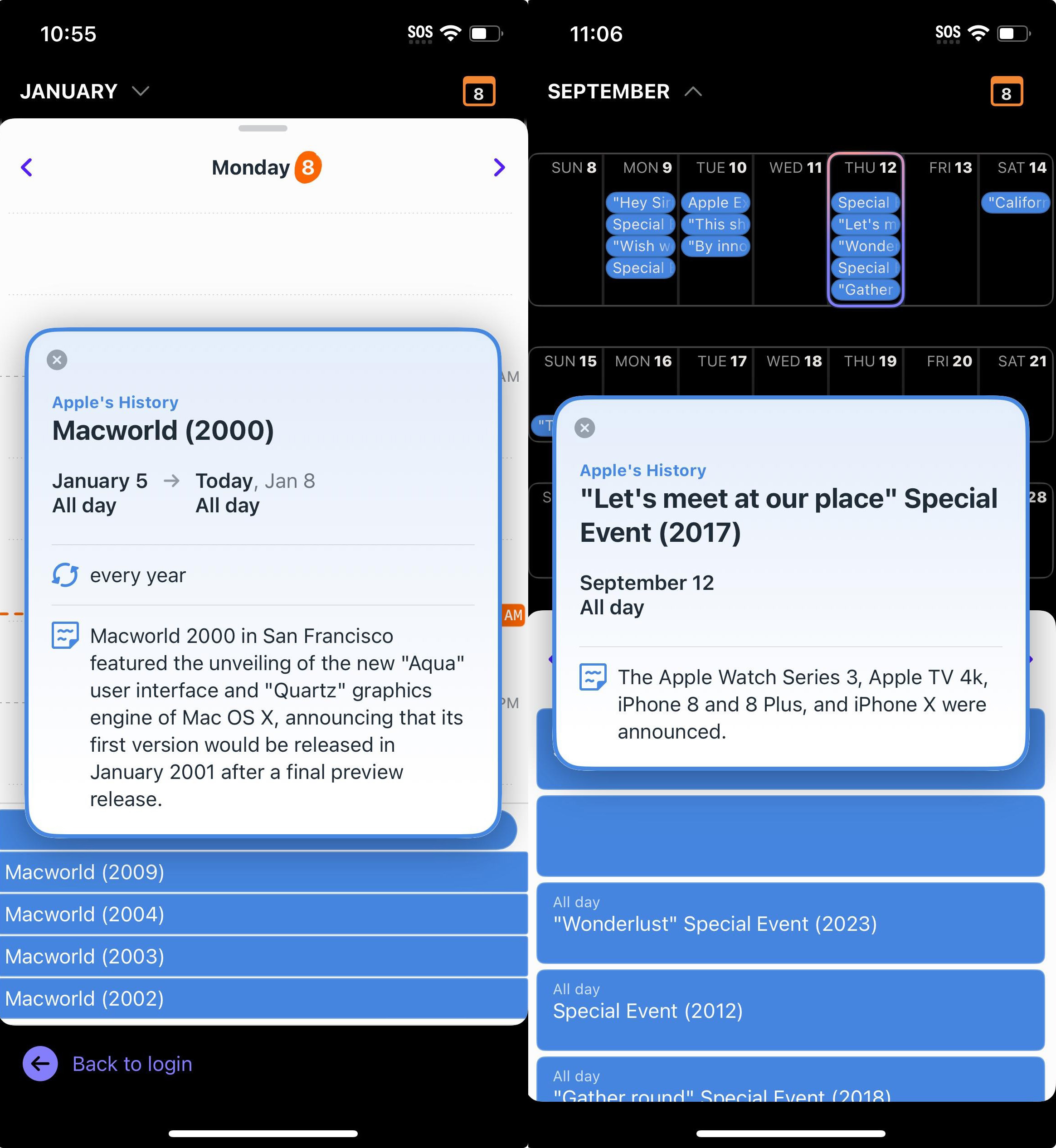
HEY History Calendar

…and some of the work I’ve done over the years:

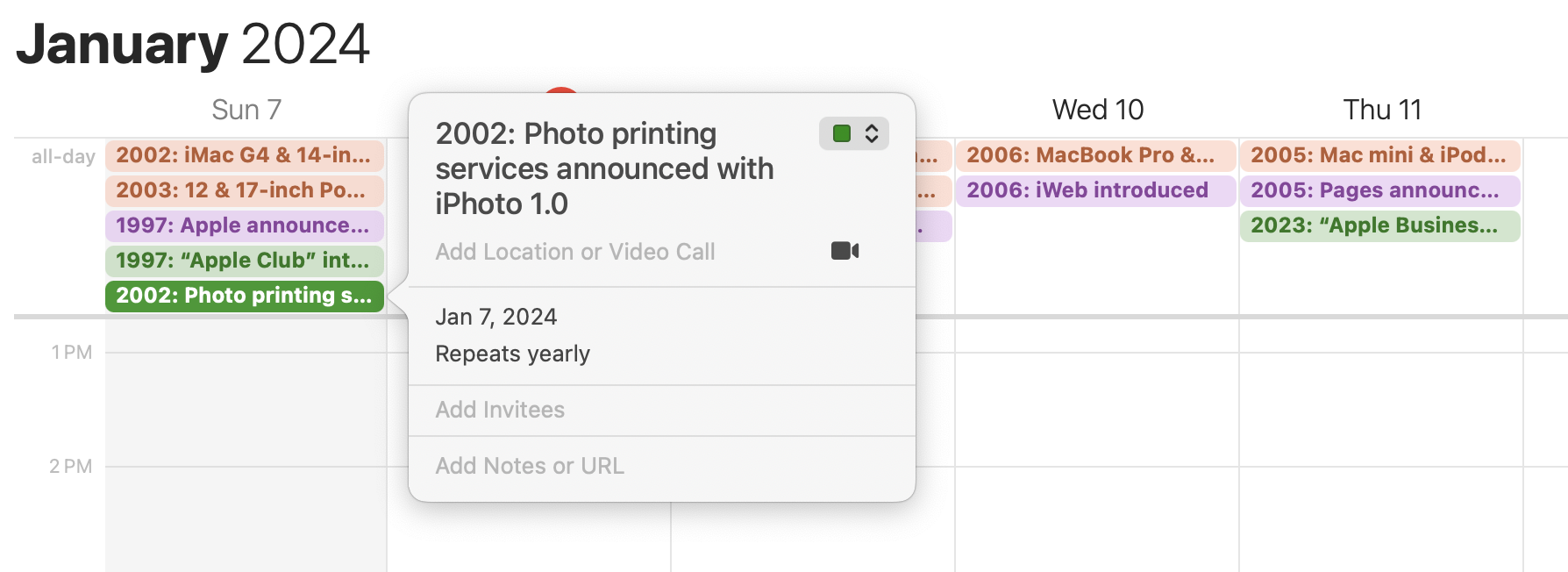
History Calendar Example

To be clear, from these screenshots, it doesn’t seem like HEY copied my direct work or research, and I only came across this after someone sent me a link to DHH’s tweets.

(Also: I think Apple’s rejection of HEY’s app is silly, just as it was last time, despite the company’s history.)

It’s a real bummer to feel like I’ve been ripped off by a much bigger company, seeing them pitch something I’ve worked hard on as a free feature in their app. There’s some irony there.

Update: On January 9, Apple approved Hey Calendar, complete with the demo data.