On Journalism and Morality

Silas Bent, in 1926, on being a recovering yellow journalist:

Undoubtedly newspapers, in those days when they were quick on the trigger and crusaded on slight provocation, did grave injustice to individuals on many an occasion. They realized their power, and sometimes used it recklessly, sometimes for mere display. The present easy-going attitude is more comfortable for them and for their reporters, and certainly it is more comfortable for certain parts of the public. We have a politer daily journalism. It strives more earnestly to please, is more regardful of our wishes. Its morals are more urbane. Its temper is more flexible. It can see good in nearly anything.

[via longform.org]

Some Thoughts on the Rumored iTunes ‘Media Locker’ Cloud Service

With rumors flying and rivals launching semi-crappy products, most people expect Apple to launch some type of “music in the cloud” service this year, possible at WWDC in just a few weeks.

While I’m not sold on any cloud music service at this point, I do see how some people would love such a Apple-backed solution. Let’s look at my hazy crystal ball at what the company may be planning:

The Worst-Case Scenario

Let’s be honest — Apple’s track record with cloud services isn’t great. .Mac was under-powered and parts of MobileMe — mainly iDisk — suck balls. Here are some things that would really bum me out:

  • Only allowing iTunes-purchased songs to be stored on the cloud
  • No 3G streaming (a la FaceTime)
  • No local caching on iOS devices
  • A crappy uploader and/or lack of library sync

The Best-Case Scenario

If Apple called me up, and asked me what I would want out of a cloud music server, these would be the major points:

  • Purchased music automatically being pushed to the cloud and my local library.
  • Let me sync/cache songs from the cloud to my iOS devices on the go. Kill the USB cable, Apple.
  • All music, regardless of origin, can be uploaded.
  • 3G streaming on the go. Pandora, Rdio and others have this working. Hell, it even works via the Dropbox app.

A real pipe dream would be for this cloud service to sync selected media across my Macs, the web and my iOS devices. What a crazy world it would be if I could rip a CD on my iMac, let the sync app do its thing and then download those files on my MacBook Pro or iPad later.

The word magical comes to mind.

What about MobileMe?

I have no idea what Apple is going to do with MobileMe. I’m a fan of the service, and really hope Apple leaves the syncing and email alone.

However, like Shawn, I think Apple could do a lot more. Why not let app developers sync app data across Apple’s cloud?

Whatever Apple released on June 6 — if anything — is almost guaranteed to work better and have more polish than Amazon’s and Google’s current offerings. And that can only be a good thing.

The Mac is Just a Tool

Patrick Rhone:

My Mac is nothing more than a overpriced pocket knife for me to scrawl stuff into it. And if I did not have that I would find a way. Because I have something to say. It’s what I do.

Find that thing that you do and do it. If it is, in fact, what you do, no tool will make you and no tool will stop you.

What I believe in.

[via Surat Lozowick]

Markdown is the new Word 5.1

Editor’s Note: This guest post was written by friend Kevin Lipe, after a discussion over beer and pizza about writing on the Mac, and how it has changed over the years. Longtime reader may remember that Kevin is the guy I bought this domain name from. Kevin is a native Memphian, a musician and a great writer.

The First Cut is the Deepest
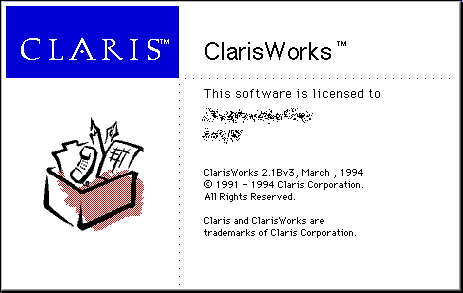
The first word processor I ever used seriously for any amount of time was ClarisWorks 2.1. We had a Performa 578 running System 7.5.5, and ClarisWorks was all I had. I spent hour after hour writing “books” — usually twenty pages or so of fiction, or, well, a seven-year-old’s idea of fiction — and printing them out, reading them to my parents and to myself and to anyone else who would listen. I was a writer, the world’s youngest important author. I knew how to do everything ClarisWorks could do. I even tried to wrap my head around Publishers, which were a weird feature I still don’t understand.

When Apple killed its Claris subsidiary, ClarisWorks was rebranded as AppleWorks and a new version was released. I still have a copy of AppleWorks installed on my MacBook Pro, and occasionally I’ll fire it up and try to rip out page after page of derivative, syntactically-horrific prose the same way I did when I was seven. But if you look at it, actually look at the way the words look on the page, everything is “off.” It’s a time warp to that weird period in Mac history where our computers were weird bright colors and ran two operating systems at the same time (usually 9.2.2 and Jaguar, although 8.5 was still floating around). Laptops looked like toilet seats (God bless ‘em) and fonts in AppleWorks looked like garbage. The whole thing feels weird in a way that ClarisWorks didn’t, because it doesn’t fit with either user interface because it’s trying to fit with both. It mostly stays out of the way, except it’s so limited in its capabilities as to be an exercise in masochism.

There were contemporaries to AppleWorks, though. Around the end of the Classic era,1 Microsoft came out with Office 98, which was an awful abortion, but it was also a direct result of a terrible moment in Macintosh history: the replacement of Word 5 by Word 6. It was at this point that “standard word processors” stopped being minimal and work-oriented and started pandering to mothers making sixth-grade-class newsletters. This is the first point at which word processors started mirroring the increasing complexity and distraction of computing environments in general, and the point at which I started having trouble using them for writing.

The One True (Microsoft) Word
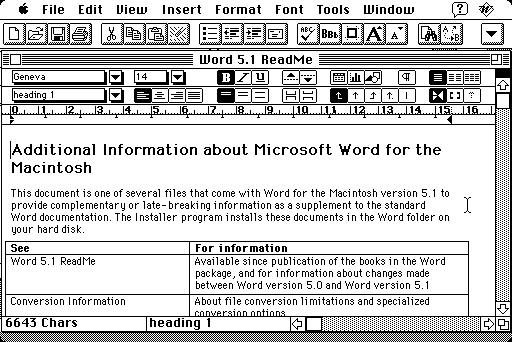
Figure 2: Microsoft Word 5.1 in Action

According to this Wired piece, Microsoft Word 5.1 came out in October of 1991. It was the culmination of six years of Mac Word versions (version 1 and 3; there was no Word 2 for Mac because it skipped version numbers to match up with the DOS version), a minimalist interface with just enough window chrome to let you align text, pick a font, space your lines—do the simple things you need to do when composing a document. No multimedia here, no fine-grained control over typeface features (if only because there weren’t any fine-grained typeface features), no nothing that didn’t need to be there.

Pretty much the only thing you can use this program to do is type words. It doesn’t have a full screen mode, it doesn’t let you generate charts from an attached Excel spreadsheet, it doesn’t let you export a webpage, it doesn’t have thirty-seven different newsletter templates, it doesn’t make coffee, it doesn’t offer next-day shipping on purchases over $100, it doesn’t, well, it doesn’t get in your way.

I’ve written an entire novel (seriously!) in this program, and it’s a beautiful experience. I have a PowerBook 180, running System 7.6, literally only for running Word 5.2 The program is responsive, and it stays out of your way, forcing you to think about what you’re typing rather than how it looks, or what format you’re going to save it in, or whether or not it will work on multiple platforms (it probably won’t, unless that platform is a Mac) — you just write your words. It’s called Word. There’s a reason for that.

Off the Rails on the Crazy Train
Figure 3: Clippy, may God rest his soul

I’ve tried almost every word processor in existence, and compared to Word 5, and even to the old ClarisWorks (also known as MacWrite II or MacWrite Pro), most of them are terrible.

Most modern apps are cluttered, they’re fiddly, and they’re trying to tell me what to do before I even start typing. Their default formatting settings on new documents are horrendous (especially on the Office 2007 or later versions), or they have weird file formats (or RTF, which is such a vague standard as to barely be interoperable between programs, resulting in crazy formatting weirdness even when using different programs to edit the same files).

Clippy gets a lot of criticism, but Clippy was a symptom, not a problem. Word processors, around 1993 or so, started getting crappy, and they haven’t really started getting better—not for long-form writing. Writing a novel in a word processor now is filled with fiddling—getting the font right, getting the header right, getting everything in manuscript format, getting everything just so so you feel comfortable enough to worry about the writing and not the computer. They started trying to help—and helping a writer while he or she is writing is impossible.

Distraction-Free Writing
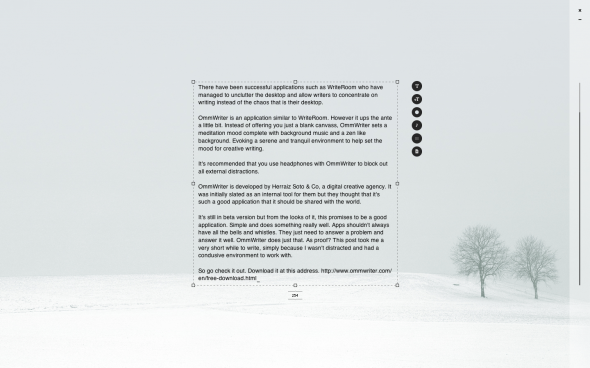
Figure 4: OmmWriter Tries Not To Harsh Your Mellow

The Mac is at a weird place right now. We have a lot of tools, like Scrivener and Ulysses and WriteRoom and others I’m sure I’m forgetting, designed to make writing long pieces easier, and designed to do exactly what Word 5.1 does: get out of the writer’s way, and let them worry about making the clackety sound with their keyboards instead of fiddling with application settings because they’re scared to write. These tools—“writing environments” or whatever else you want to call them—have an inherent problem: they’re designed around the writing workflows and processes of the people who wrote them. The author of Scrivener really only knows one way to write a book: the way he writes a book. The author(s) of another program write differently, and thus their programs operate differently.

They’re all sort of tailored to the way certain people write, and this can be a problem when, like me, they don’t really fit the way you write. I’ve bought all of them, and they all almost get there, but I still end up wishing things worked differently than they did, that they needed less fiddling to operate the way I want them to.

It’s telling that many of these programs bill themselves as “distraction free,” some of them going to absolutely ridiculous lengths to try to keep the user from being able to get sidetracked while drafting text. It’s ridiculous, really, and the further these programs go in that direction, the less useful they really are for dealing with novel-length material. If you’re going to show me a sentence at a time, I can’t possibly work with a 100,000 word manuscript. These things are getting so ridiculous that the best way I can prove it to you is to point you at Merlin Mann’s parody thereof.

Slouching Toward Gruber, or, A New Hope

There’s a way out of this loop of bouncing between cluttered word processors and process-centric writing tools, a way to avoid having cater to Clippy’s every whim while not having to hide your own work from yourself in order to concentrate. People have been saying for years that Word 5.1 needs to be ported to Mac OS X; that having that program running on current hardware would be the ideal solution to all of these problems with writing tools.

The truth is, there’s a solution now that’s most of the way there: Markdown and a good text editor. That’s the new Word 5.1. Think about it: a program like TextMate3 has almost no window chrome, and opens almost instantly. You start typing, and that’s all you have to do. I bring up Gruber because he invented Markdown, which lets you do basic formatting of text without really having to sweat much else. The types of formatting you don’t need aren’t even available to you when writing Markdown in a text editor, so you never have to deal with them.

Markdown will never be unreadable by a program, because it’s just ASCII text. It’s formatted, but if you’re reading the raw text, it’s not obscured the way a raw HTML file is. Any decent editor will give you a word count and can use headings as section and chapter breaks. With MultiMarkdown the options get even crazier: render your text file as a LaTeX document, or straight to PDF, or any number of other things. All from a text file and an editor with a minimal interface.

Word 5.1 will never come back. It can’t even be run on a current Mac; the only even halfway modern Macs that will run it are the few PowerPC machines left still running Tiger (which, I assume, are mostly within school districts and homes with people over forty). No one will ever rewrite it on OS X the way you and all your friends (and I, deep down) wish it would be. Writing environments are nice, if they fit your workflow, but if they don’t, they just get in the way, and trying to keep yourself distracted by torturing yourself with limitations seems like the kind of thing Thomas More4 would be into, wearing the hair shirt as penance for not being able to keep yourself on task.

All you need is a good text editor. Really. That’s all.

It should do exactly what Word 5.1 did best: get out of the way. Once you realize this and you let go of your System 7 nostalgia, you will realize this. You’ll miss Word 5, sure, but you won’t miss having to make sure your TCP stack extension is loaded.

Trust me: John Gruber will save us all—has already saved us all. You don’t have to wade through the billions of toolbars and the forty-second load times, and you don’t have to punish yourself for wanting to run more than one program.5

Markdown is the new Word 5.1. Seriously.


  1. I hate that term, “Classic,” because what it really is is the Mac OS era, rather than the Mac OS X era. And to really be pedantic, even Mac OS is a retroactive renaming, because originally it was just called the System, which is much cooler and futuristic-sounding. 
  2. Also running Dark Castle but that’s neither here nor there. 
  3. Currently in the running with Duke Nukem Forever in a “most depressing abandonware/vaporware” showdown. 
  4. Author of Utopia, that is. 
  5. Anybody else remember MultiFinder

On the iMac Hard Drive Thing

Marco Arment, on the recent changes to Apple’s stance on replacing iMac hard drives:

The iMac is a very clear, known tradeoff to the types of geeks like us who would even think about replacing its internal hard drive ourselves (or having an unauthorized place do it to save money or add unsupported parts):

You get a beautiful, slim, all-in-one, high-end Mac, with one of the best LCD panels on the market built in, for a very good price relative to PCs and an excellent price relative to the other Macs. For these benefits, you give up all after-purchase internal customization, expansion, and self-repairs, except RAM. If you want a more customizable desktop, you can either get a Windows PC (which, if you want a Mac, isn’t an alternative), you can spend a lot more money for a Mac Pro, or you can just deal with the iMac’s limitations.

As one of the geeks who want to — and actually can, thanks to years of being a certified Apple tech — swap out hard drives in my iMac, I find this change hard to swallow, but Marco’s right on how Apple views and positions the iMac to its customers.

I love OWC, and have been a customer for years, but I have a problem with this statement:

Is this planned obsolescence at work, or is the freedom promised in 1984 being revoked?

The original Macintosh was viewed by Apple as an appliance, a simple box that functioned without the user having to dig around inside the case. Frankly, I’m a little surprised it’s taken this long for Apple to make such a move with the iMac. The glass panel and display are a pain to remove, and even more of a pain to clean for replacement. Once inside, the machine isn’t a piece of cake to work on.

I think the iMac is in a different category than the MacBook and MacBook Pro line. On these models, replacing a drive is actually quite simple. I’m not sure that will change in the future, even though the Air and the iMac are basically “hands off” at this point. Hell, the new MacBook Air’s crazy SSD module is so foreign to most users, they won’t even attempt it.

I think the only reason Apple would make such a change in its non-Air notebooks would be for performance. If they can apply custom firmware to squeeze more speed out of a spinning hard drive, I’ll think they’ll go for it.

But I’m keeping my fingers crossed that they won’t.

Thirty Percent

Surat Lozowick:

The problem is, this isn’t a small fee. It not 5% or 10%. It’s 30%, almost a third of all revenue. Not profit, revenue. And this isn’t an independent store that needs to make a lot on each transaction. With an economy of scale like the App Store, Apple could make significant profit with a fee of only a few percent.

On the other hand, many of the apps in the App Store are from small independent companies, which can’t afford 30% with every single transaction. The problem is that it’s 30% across-the-board, regardless of the type of app, the type of subscription, etc. 30% may make sense for some apps, but certainly not for all, like those that distribute others’ content and therefore don’t have as much control over the pricing. Otherwise, the kind of apps that can afford to be on the App Store will continue to be restricted, with eBook sellers, music subscriptions services, and others being excluded unless they can cut a deal with Apple.

I really am having trouble making up mind on this issue — which is back in the news after iFlowReader-gate.

One on hand, developers are all aware of the thirty percent cut Apple takes when they are forming their business plans. It’s a known, fixed cost. If they don’t build in a buffer, then part of me thinks “too bad.”

The other part of me just wants to give Surat a high five for standing up for the little guy.

Obama in Memphis

From his commencement speech at the Booker T. Washington here in Memphis:

Yes, you’re from South Memphis. Yes, you’ve always been underdogs. No one has handed you a thing. But that also means that whatever you accomplish in your lives, you’ll have earned it. Whatever rewards and joys you reap, you’ll appreciate them that much more because they will have come through your sweat and tears; the product of your efforts and talents. You’ve shown more grit and determination in your childhoods than a lot of adults ever will.

That’s who you are.

So, Class of 2011, the hard road doesn’t end here; your journeys have just begun. And your diploma isn’t a free pass – it can’t protect you against every setback or challenge or mistake. You’ve got to keep working hard. You’ve got to keep pushing yourselves. But if you do, I am confident about your futures. I am hopeful and excited about all that you can achieve. And I know that, armed with the skills and experiences you’ve gained at Booker T. Washington High School, you are ready to make your mark on the world.

‘Not a Netbook’

Thomas Brand:

The eMate is not a netbook. Wikipedia defines a netbook as a category of small, lightweight, legacy-free, and inexpensive laptop computers. Although the eMate has a small 6.81 inch display, weights just 4 lbs., lacks an optical drive, and cost $800 in 1997 it is not a netbook. The word netbook implies a clamshell computer with a network connection, and out of the box the eMate 300 has none.

The origins of the netbook can be traced to the Network Computer (NC) concept of the mid-1990s, but the eMate has no ethernet jack for dependable wired access, and no wifi for convenient wireless internet. Its IrDA infrared port is best used for beaming small snippets of information, and the Newton 2400 bps fax modem was an optional accessory. Even Apple’s Internet Enabler software, vital for deciphering a TCP/IP connection, was never preinstalled. It takes a complicated bootstrap process with a “old world” Mac to get the eMate online, and once you have struggled through that mess you have all of the eMate’s 25MHz ARM processor, 1MB of RAM, and no browser to surf the internet with. The eMate is a hobby of a network computer at best but still Wikipedia lists it as an example of one of the very first netbooks.

I have an eMate, and use it from time to time just for typing. I can export .RTF files to my iMac via a cable. It’s a great little machine, and it’s a damn shame that it’s been mostly forgotten.

Bad Reasons

Thomas Husson:

The mobile Web and apps offer different benefits and serve different audiences. For now, mobile apps make the most of smartphone features because they integrate more deeply and more widely with the unique features of smart mobile devices that use an operating system. However, mobile websites cost less to reach a wider audience. The majority of consumers don’t own a smartphone and don’t access app stores; they are more likely to use a mobile browser and to access the Internet from their mobile phones. The barriers to accessing a site via a browser are lower than those to downloading an app—even for smartphone owners. Also, the fragmented nature of the mobile industry means that porting apps to different platform environments costs money—particularly when including maintenance and promotion costs.

The first point is vastly more important to most than the second. Until mobile browsers have the power that SDK-built mobile apps do, mobile-formatted websites will always be second class citizens.

The Grizzlies

LZ Granderson on ESPN.com:

But if you live here, you know the Grizzlies’ rallying cry of “Grit and Grind” is not just some cool marketing catchphrase to sum up its magical season. It is the autobiography of Memphis, Tenn. If you live here, you know that resilience is the sound of the blues on Beale Street, and you know that long-suffering is the flavor of the barbecue that’s a Memphis specialty.

“That’s why it’s been so good to see so many people wearing ‘Believe Memphis’ T-shirts. It’s not just about believing in the team. It’s also about believing in each other and this city and all that it can become. It’s about believing we can turn this thing around,” said said Jason Potter, the Grizzlies’ director of promotion and event presentation.

I love basketball, and I love this city. I’m so excited I can love them both at the same time this season.