512 Pixels

New OmniFocus Theme

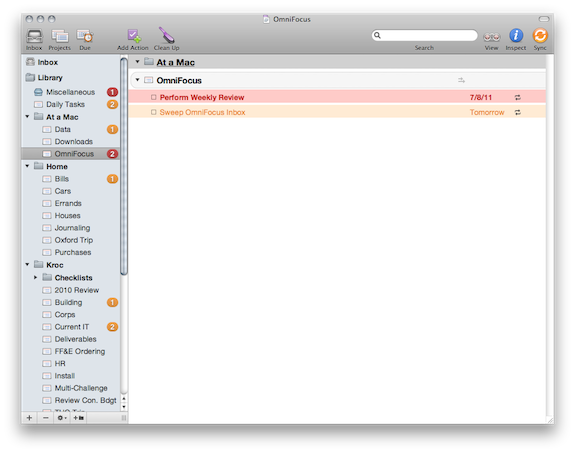
Screen shot 2011 07 10 at 4 09 47 PMI love OmniFocus, but the Mac app lacks a certain amount of polish. Thankfully, creating themes for OmniFocus is quite easy.

I’ve created one that I have been using for a while, and decided it was time to share it. It uses Helvetica Neue all over the place, with red background and red type for overdue items, with orange for upcoming items, like the default theme.

You can download the .zip file here. To install, unzip and load it using the Style section of OmniFocus’ preference pane.

‘Nothing Doesn’t Go in Here’

Notes

I have a pair of failed notebooks on my nightstand.

Both are Moleskines. Both have about eight pages of writing, in blue ink.

Both are failed attempts at writing for my own good.

Recently, I’ve been realizing that writing for me would be a healthy thing.

(Read: my doctor told me to do it.)

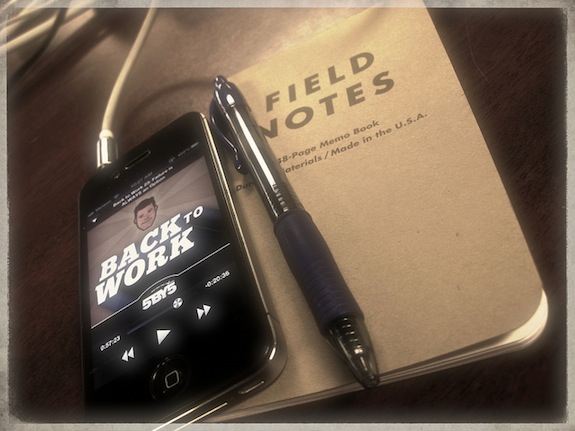
I got my first batch of Field Notes notebooks in the mail last week. Being so much smaller, my thought was that I would be more likely to carry one with me at all times.

I’ve written less than a page.

I’m not really sure why. Part of me still feels nervous about writing personal things in a non-digital format, even though I plan on scanning my notebooks when filled. I am fearful of losing valuable words (and time, maybe) if something were to happen to the notebook before it is a scanned PDF, safe and sound, on my iMac, Time Capsule and offsite backup drive.

Part of doesn’t like the messy feeling of handwriting and bent pages. I always have my iPhone, but I don’t always have a pen. Despite all of this, however, I’m drawn back to writing in a notebook.

I was thinking about this all week, then I heard the latest episode of Merlin Mann and Dan Benjamin’s show Back to Work.

In it, Merlin has some great advice about writing in a notebook. I can’t give it justice by quoting just part of it — just go listen to the first half of this show.

The point of a notebook shouldn’t be the point of a .txt file, at least for me. I need to start feeling more free to jot down ideas, quotes and thoughts, without worrying so much about my page margins being even or my writing being neat enough. I want to be free enough I can tape things into it, tear out parts of pages and maybe even spill a little coffee on it.

But, alas, even typing that makes me somewhat apprehensive. I really wish it didn’t.

Shawn Blanc, on the HP TouchPad

In his extensive review:

As a tech writer it was great to be able to use and live with the TouchPad for a while. There are many things I appreciate about webOS, and I’m glad I was able to spend some time with a non-Apple device for once. But, alas, the TouchPad is far less likable than I expected it would be. As it is I would not recommend it to anyone I know — even my friends with webOS phones.

This is the most in-depth review I’ve seen of the TouchPad. It was a ton of fun to read.

It’s a real shame the TouchPad seems like somewhat of a misfire. I want webOS to succeed, and Apple needs a good competitor in this space.

Who is Google’s Product?

Mike Elgan:

Google makes billions of dollars in revenue each fiscal quarter. That money comes about by the same process that all companies use: They sell a product to their customers. Their customers pay money for that product.

Who’s Google’s customer? You? Really? When’s the last time you paid Google for anything?

Advertisers are Google’s customer. What do they sell to advertisers? They sell you. Or, at least, they rent you out, or provide access to you.

Print this out, and tape it to your laptop.

[via Daring Fireball]

Tap to Focus: Videos, Flash and Sorrow

I’ve been experimenting with different options for uploading video to Tumblr. The service’s built-in video player with play Flash on the desktop, and H.264 for iOS devices, but it will not play H.264 for those of you who don’t have Flash installed on your Mac.

Vimeo Plus looked like a great option, but it doesn’t play nice with Tumblr.

Moving forward, I’ll be posting videos for Tap to Focus to YouTube, then embedding them within Tumblr’s dashboard. That way, they will play in Flash, or in H.264 for iOS devices.

If you run a Mac without Flash installed, I highly recommend the YouTube5 plugin for Safari.

Another Look Back at the Cube

Charles Moore:

In practical terms, the closest analog Apple makes to the Cube today is the Mac mini, which it’s made in various iterations since 2005, and which has has been a lot more successful than the Cube was - for good reason. It’s much more versatile, genuinely minuscule, and development of wireless peripherals and data connectivity technology has helped, as has the mainstream shift to reasonably-priced flat screen monitors, which were just beginning to gain traction in the desktop world a decade ago - and, as we’ve noted, they were still prohibitively expensive during the Cube’s short time on the market.

The Cube concept was seductive, but it left a fair bit to be desired in practical execution. For me, while I admired my Cube, I soon determined that it wasn’t quite what I needed - not the compact desktop laptop substitute I’d been hoping for, and of course it didn’t have the option of battery power. I ended up swapping it after about six months for a year-old but immaculate Pismo PowerBook. A good decision as it turned out.

Tap to Focus

I’ve launched a new side project, named Tap to Focus. It’s a tumblelog full of short, hopefully adorable — or at least odd — videos shot with my iPhone 4.

Sadly, Tumblr’s video player is Flash only on the desktop. Sorry about that. See update.