512 Pixels

iCloud and Apple IDs

David Sparks:

I’ve been thinking about how to take advantage of this iCloud love and am afraid I may have some trouble. My iTunes account is really old and affiliated with an older e-mail address. When I joined .Mac so many moons ago, I created a separate Apple ID, my .MAC account (which later became my MobileMe account). This has never been a problem. I’ve bought lots of apps, books, music, and video with the old iTunes account and the MobileMe account handles e-mail, calendar, and address book.

I am in the same boat. My wife and I share a family account. I’ve used the main ID for years to purchase content on both of our devices, with our family accounts for MobileMe syncing. This has worked great, since MobileMe and iTunes have been separate. However, with iCloud’s smash-it-all-together philosophy, I think I’m going to be going back to my main account for sync, and be buying apps under my wife’s account very soon.

Which bums me out.

Need to Burn a Lion Boot Disc?

According to Thomas Brand, it’s pretty easy:

  • Purchase and download Lion from the Mac App Store on any Lion compatible Mac running Snow Leopard.

  • Right click on “Mac OS X Lion” installer and choose the option to “Show Package Contents.”

  • Inside the Contents folder that appears you will find a SharedSupport folder and inside the SharedSupport folder you will find the “InstallESD.dmg.” This is the Lion boot disc we have all been waiting for.

  • Copy “InstallESD.dmg.” to another folder like the Desktop.

  • Launch Disk Utility and click the burn button.

  • Select the copied “InstallESD.dmg.” as the image to burn, insert a standard sized 4.7 GB DVD, and wait for your new Lion Boot Disc to come out toasty hot.

I’m going to test this tomorrow, but if its true, I will be a very happy IT guy.

‘A Goddamned Sea of Notifications’

Michael Lopp:

The problem with notifications is that the cost to create them is close to zero — just hit that Like button or go ahead and click that retweet button. As their creation cost approaches zero, notifications rapidly become spam-like as the noise of their quantity masks the quality of their signal. But we learned our lesson with spam. We knew what happened when we lost control of our inboxes and spent our time sorting through the useless noise searching for the signal. We learned how to curate. Curation is social-media-douche-speak for “deliberately choosing and pruning the content you care about” and I think part of the next Internet is curation at scale thanks to notifications.

While I’ve talked about my issue with notifications, I haven’t discussed the flip side of it — being part of the problem.

The reality is that I am the cause of notifications for many people. Between this website, my Twitter account and emails, I’m pushing content out every day. Publishing is a mighty power. And one that can be welded easier than ever with things like Twitter, WordPress and Facebook. Curating1 is key, not only in choosing what to read — as Lopp discusses — but in choosing what to write.

In a world full of content and notifications, I want what I create to be worthwhile and meaningful. I don’t want to be just another badge that my readers have to click through to get to what they want.

It’s the reason I tweet less than I did a year ago. It’s why I stopped using Tumblr. It is one of the reasons that I write less about technology news here on Forkbombr. It’s why I am so humbled every time someone new reads this site.

I really hope I’m not creating anxiety for anyone out there.


  1. I have come to hate this word when used on the Internet. Most people don’t really live up to the demands of what it really should mean. ↩︎

iCloud and Time Capsule Predictions

My buddy Dave Caolo has posted some thoughts on what iCloud may do with the Time Capsule. Dave suggests that Apple could use the Time Capsule to assist in streaming media and backing up media to the cloud and accessing it from any device.

For the sake of this argument, let’s assume that Apple can use existing Time Capsules and Airport Extremes with external USB hard drives attached. While the rumors of an iOS-powered Time Capsule ring true, I can’t imagine Apple making its new cloud service dependent on a new piece of hardware.

Lion’s New Tricks

Lion is set to include two new features that relate with saving data. One, named Auto Save does exactly what you think it would:

Say good-bye to manual saving. Auto Save in Mac OS X Lion automatically saves your work — while you work — so you don’t have to. Lion saves changes in the working document instead of creating additional copies, making the best use of available disk space. The lock feature prevents inadvertent changes from being saved and automatically locks documents after two weeks. And the revert feature returns you to the state the document was in when you last opened it, so you can feel free to experiment with confidence.

The second is named Versions:

Versions records the evolution of a document as you create it. Mac OS X Lion automatically creates a version of the document each time you open it and every hour while you’re working on it. If you need to revert to an older version or retrieve part of a document, Versions shows you the current document next to a cascade of previous versions — in an interface similar to that of Time Machine — so you can see how your work looked at any given time. You can revert with a click, or quickly copy and paste work from a previous version into the current version.

I think these two new features are about much more than keeping your local data safe.

Cloud Backups

I think that iCloud is going to be the glue that helps Apple’s products work together better. iDisk can be used for data transfers between iOS and the Mac, but only for people who are into pain. And suffering … maybe even meth.

Dropbox, on the other hand, is just magic. And Apple could crush it, if it leverages Auto Save and Versions.

With these two new OS X features, there would never be any doubt about which version is newer. Sync conflicts with files could be a thing of the past. Just imagine saving a Pages document, and being able to pick up an iPad and keep working on it, without having to sync iDisk or via iTunes. That would be killer. Data could be backed up as soon as it the system saves it.

Dolly Drive may be in trouble.

Taking the human element out of backups is what makes the Time Machine and Time Capsule combination so great. Auto Save, Versions and iCloud seem like the natural next step. If a backup is waiting on me to hit Save, it is a backup that might not happen.

Cloud Access

I’d love to see Back to my Mac get tied into this. Getting files is possible with the service now, but just in Finder. And just if the stars are aligned.

If this is moved to the cloud, it could not only be faster — since Apple probably has better bandwidth pretty much anyone — but more reliable.1

Having access to all of my files, via the web — and iOS devices — would make living with multiple Macs much easier.

This could be about more than individual files, though. What if developers could sync app data, preferences and more across iCloud? Dropbox is used by some apps to do this now, and there are hacks floating around to use the service to sync things like Safari history and MarsEdit drafts, but it feels a tad janky. I’d love to see Apple come out with something that works much better.

So, Why the Time Capsule?

Putting the Time Capsule in charge of this is genius, really. By letting it mirror data to the cloud — even backups — it takes risks out of data security for the end user. It is always on, and always connected to the Internet. Unlike most Macs, which go to sleep and get stuffed into backpacks.

Streaming Media

I like Dave’s idea that iTunes streaming could live on a Time Capsule.

But I don’t have a need for streaming media. I have an iPod and an iPhone. And my iTunes already lives on a RAID. So I don’t have much to say about this particular bit of conjecture.

The Big Disclaimer

Of course, all of this is just dudes with websites tossing stuff at the wall at this point. We’ll see what sticks tomorrow.

  1. As it stands today, it is often faster to Screen Share via Back to my Mac into my home iMac and copy something into Dropbox from there and let it sync than to user Finder to copy files across the web to my office at work. ↩︎

‘A Fashion Accessory’

Zach Epstein at BGR, on the HP Veer 4G:

In the end, I’m having a hard time figuring out who HP built this phone for. It’s obviously not for power users, so to think of it from the perspective of a tech savvy smartphone lover is a waste of time. Is it for tweens and teens? Maybe. AT&T’s $15 smartphone data plan makes this phone a great affordable option for parents looking to save some money but still get a cute and capable smartphone for their child. Is it for high school or college students? Possibly. Affordability is still a huge factor with that demographic, and the Veer can can definitely keep up with a fast crowd, though the lack of apps could be more of an issue here. Is it for young professionals? That’s doubtful. WebOS is strong where productivity and PIM are concerned, but the tiny display on the Veer 4G is not good at all when it comes to email and other text-heavy functions.

As a fashion accessory, the Veer is great. It’s cute phone phone that will definitely attract attention when it’s pulled out. The problem is that people looking for a smartphone and a fashion accessory typically opt for the iPhone, and I’m not sure there are many valid arguments for the Veer 4G over an iPhone in the eyes of a consumer looking for a fashion accessory.

Why can’t they put WebOS on a touch-only slate device? It’s killing me to see WebOS continue to be strangled by bad — or in the Veer’s case, silly — hardware.

On Some Recent Changes

Over the last few weeks, I’ve made a few changes here on the site, and I wanted to share them with you.

New Host

My old host simply wasn’t cutting the site’s growing traffic. After weeks of research, I decided to move Forkbombr to MediaTemple.

The move went fairly well. I collected my theme and plugins, and then exported my WordPress database from the old host. I moved my static files to the new server, installed a fresh copy of WordPress, and re-imported my posts. I had to re-enable my plugins and change some settings, but after a few hours, everything was in place.

Mint blew up when I tried to move it, but that’s a different post altogether.

The first day on the new server, I got fireballed for the first time. And everything ran like a champ.

A Realignment

I launched a redesigned Forkbombr late last year. It was the result of months of work, but even so, there have been a few things I wanted to revisit.

Here is the changelog:

  • FF Tisa Web Pro is now used for post and page titles, as well as subtitles within posts. Yay, Typekit!
  • The post metadata is now smaller, lighter and hopefully less intrusive.
  • Body copy got bumped a notch bigger.
  • I resolved some CSS and PHP issues that have been lingering for a while.

Since the majority of you read the site via RSS, you don’t get to see the new changes I’ve made on the site. You should come swing by sometime.

Advertising

Several months ago, I opened up an ad space on Forkbombr. I’ve had a handful of advertisers, and would love to see this grow. If you are interesting in reaching some great people, click here for more information.

A Look Back

Offline

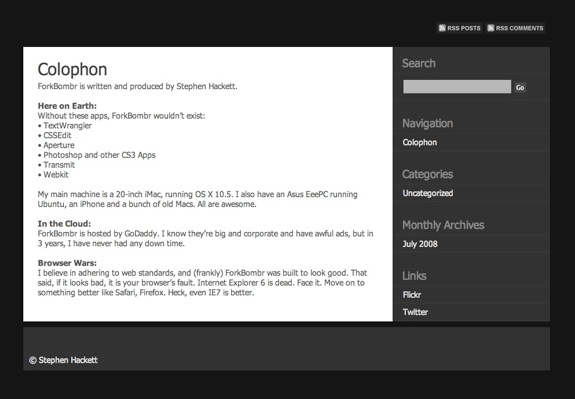
This screenshot is from the one of the very first builds of Forkbombr, back in the summer of 2008. Back then, the site had a very dark look, with a chunky sidebar and footer. It worked well until people actually started reading my content.

I realigned that theme several times, making it more readable, but eventually, that late–2010 relaunch was needed.

It is hard to believe that the site will be three years old on September 12. It has been a wild ride, and I look forward to years of writing to come.

Captain Obvious Strikes Again

Apple Insider:

A new investor report from J.P. Morgan on Wednesday indicates that Apple’s competitors in the tablet market have reduced their build plans after receiving an “early dose of reality” in the form of lackluster sales.

According to analyst Mark Moskowitz aggregate tablet build plans have declined by roughly 10 percent since early March. Moskowitz took the reduction to mean that “non-Apple tablet hopefuls have adjusted to the weak showing so far.”

Shocking stuff here.