512 Pixels

More on Sameness

I got several emails and tweets asking questions about yesterday’s post, “On Sameness,” so I thought I’d just answer them all here.

The Wallpaper

That wallpaper is by John Carey over at fiftyfootshadows. It’s part of his “Dust” collection, which he posted in January of last year. If you’re looking for high-quality, stunning wallpaper images, look no further than his site.

The Menubar

My menubar is slightly different on my two machines, but here’s the basic set I keep on both boxes:

  • Spotlight (even though I use the far-superior LaunchBar 5)
  • User Accounts
  • Clock, with the date and time shown
  • Airport
  • Bluetooth
  • Volume
  • Time Machine
  • MobileMe sync
  • Keyboard Maestro, for mapping the Fn keys on my Extended II keyboard
  • Cinch
  • Droplr
  • Dropbox
  • Backblaze

I know that’s not minimal, but having these items just a glance away is more important to me than keeping my menubar minimal.

The only additional items that live up there at home are the OpenDNS and DynDNS updaters.

Why not use MobileMe to sync all of this junk?

MobileMe is great for a lot things. I use it to keep my bookmarks, calendars, contacts and keychains synced across my devices. And while MobileMe can be used to sync some apps, it’s not universally supported, and doesn’t sync preferences for most apps. I wish it could become a more integral player in sameness, but it just lacks the horsepower at this point.

On Sameness

I — like many of you — spend a ton of time in front of a Mac. Probably too much time.

I have two Macs that I bounce between — a 27-inch iMac at home, and a 15-inch MacBook Pro at work, which is usually in clamshell mode, hooked up to a 27-inch LED Cinema Display.

I like keeping these computers as alike as possible. I use an Apple Extended II and a Magic Mouse at home, with the same keyboard and a Magic Trackpad at home. I use the same wallpaper, show generally the same folders on the desktop and arrange the Dock the same way on both computers. Both machines have use the same screen saver, same user name and same password. I use the majority of the same apps at home and at work, and if there’s anything unique that I need, LaunchBar is just a keystroke away.

Keeping two machines this closely setup can be tricky. Often, I take screenshots or copy .plist files to make sure I have settings the same across both Macs.

So why do this? In a word, efficiency.

Having my two machines setup the same means I don’t have to think about where I am before I use a custom shortcut or try to launch an app from the Dock with just the corner of my eye. It means I feel at home, no matter what screen I’m looking at.

Some people may think this is a little extreme. I’m not going to deny that. But it helps me be a better worker, and helps me concentrate on what needs to be done. And that’s what the Mac is all about.

Here’s a larger version of that screenshot.

‘Above That Minimal Level’

Shawn Blanc:

Up until yesterday the income I got from this site was all “extra” income. I had a full-time job and didn’t need the income this site was generating. The Fusion ads and RSS sponsorships covered the hard costs (primarily hosting and my internet service provider) and then what was left over I used to pay for software, hardware, and the other things I write about here.

But now that I’ve quit my full-time job, the income this site makes has a new priority: food and shelter. Or, put another way, the RSS Sponsorships help me buy food to eat instead of software to write about.

Thankfully, the membership numbers have gone above that minimum level needed for me to sustain this site as my full-time gig. Moreover, people are still signing up — every day the membership base grows a little bit more. (Thank you!)

Congrats, my friend.

87% of Android Developers Concerned About Fragmentation

Zach Epstein, at BGR:

According to Baird analyst William Powers, roughly 87% of Android developers believe that fragmentation is a problem for the Android platform. 57% feel Android’s fragmentation problem is either “huge” or “meaningful,” and about 30% agree that it is a problem to a lesser degree. Google said this past November that the overwhelming majority of Android devices — 77% — run Android 2.1 or Android 2.2, but developers apparently still feel that the existence of multiple Android versions in the market at the same time is less than ideal. What’s more, the company’s recent decision to provide limited early access to upcoming Android builds for partners whose plans for the software are approved by Google suggests that the company views fragmentation as more of a problem than it might convey publicly.

Fragmentation is a nasty side effect of having an open1 operating system.


  1. By “open” I mean “having OEMS and carriers be in control of updates and OS releases.” ↩︎

Shawn Blanc, on Writing

From his first post after going full-time with his site:

Writing should be about standing behind your work and truly caring about what it is you have to say. If you happen to be good with words then congratulations. Dispassionate beautiful prose, however, is still dispassionate. Or, as Anatole France put it, “a tale without love is like beef without mustard: insipid.”

Emotion, honesty, truth, passion. These are the backbones of writing. And these are the very things that can be the hardest to put into our writing. I often find myself caring more about how I say things than what I am saying. The how and the what are certainly important, but not equally so.

On iPhone Home Screen Organization, Targets and the Opposable Human Thumb

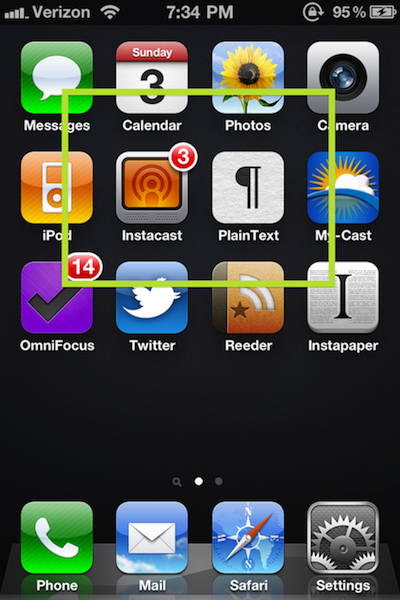
A few days ago, Ben Brooks wrote a piece on how he organizes his home screen, based on usage. I do the same thing, but in a very different way. Here’s a screenshot of my iPhone’s home screen:

I’ll explain that green box in a second.

As you can see, I keep things simple.

I keep an empty row between my apps and the Dock. This not only de-clutters my home screen, but gives me substantial space in which to swipe to Spotlight or to my second page, without accidentally opening an app.

I almost always use my iPhone with one hand. I cradle it in the palm of my right hand, and use my thumb to most anything that doesn’t include lots of text entry.

Since I use my thumb, it’s very easy to reach the center of the iPhone’s display without too much effort, or feeling like I’m going to drop the phone.

As such, I place my most-used applications in the center of the screen, with less vital ones further out. The green box I overlaid on the screen shot shows the primary target area I can reach with my thumb, while cradling the phone. Since my apps just take up the top three rows, they form a great little rectangle, making it easy to tap the top of the OmnniFocus icon, for example, to launch the app.

So, why are Phone, Mail, Safari and Settings in the Dock? I’d rank my usage of these 4 apps on my iPhone as lower than the apps I have above the Dock (even on the outer edges of the rectangle), but above the apps I’ve mercilessly stuffed into folders on my second home screen.

Also, I rarely use the apps in my Dock while walking down the hall, so it’s not a big deal to use both hands while at my desk or on the couch.

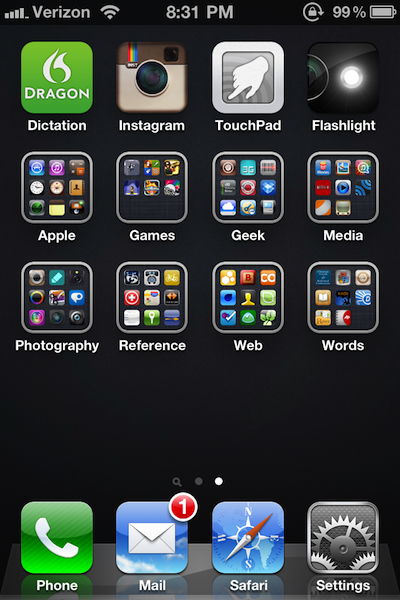
Just for kicks, here’s what my second home screen looks like:

I know all of this is pretty silly. But by tweaking my setup over the years, I’ve gotten to a point where I can easily and simply hop into an app, do what I need to do, and get out, all with one hand. That saves time, which adds value to my life. Isn’t that what all of these fancy gizmos and apps are supposed to do?

What’s Next for the Engadget Crew

David Carr at the New York Times:

Like many of its peers covering Silicon Valley, Engadget worked as a kind of permanent start-up, with 16-hour days to compete in the always-on news cycle, but AOL treated it as one more niche site. “We have been working on blogging technology that was developed in 2003, we haven’t made a hire since I started running the site, and I thought we could be more successful elsewhere,” said Joshua Topolsky, who was the editor of Engadget until the middle of last month.

So Mr. Topolsky and as many as eight of the more prominent editorial and technology staff members at Engadget have left or are leaving AOL and are about to build a new gadget site by joining forces with, yes, you guessed right, their old friend Mr. Bankoff, who now runs a federation of sports sites called SB Nation.

Jim Bankoff was working at AOL in 2005, and helped bring Engadget into the AOL fold.

Joshua Topolsky, on his personal blog:

Of course, the natural question I’m sure a lot of people have is: why SB Nation? The easy answer is that the people at SB Nation share my vision of what publishing looks like in the year 2011. They think that the technology used to create and distribute news on the web (and mobile) is as important as the people who are responsible for the content itself. And that’s not just pillow talk — SB Nation is actively evolving its tools and processes to meet the growing and changing needs of its vast editorial teams and their audience communities. They’re building for the web as it is now. From the perspective of a journalist who also happens to be a huge nerd, that’s a match made in heaven. SBN isn’t just another media company pushing news out — it’s a testbed and lab for some of the newest and most interesting publishing tools I’ve ever seen. In short, I was blown away when I saw what kind of technology they’re using to get news on their front page and engage audiences, and even more blown away when I started talking to them about what could come next.

[…]

In the coming months I’m going to be laser focused on one thing: building the best tech site in the world — and I would love to hear what you guys think the next phase in technology and gadget news should look like.

I’m excited. Guys like Topolsky and Nilay Patel are some of the best tech journalists in the industry, and I can’t wait to see what they have up their sleeves at this new gig.

Tech journalism is a roller coaster world. It revolves heavily around breaking stories and page views. Engadget simply used its journalistic weight and excellent coverage to build its reader base. I have no doubt SB Nation will enjoy similar success as AOL’s tech site.

The iPad, a Year Later

Federico Viticci:

One year later, the iPad has been a terrific commercial success for Apple. More than 15 million copies sold, over 75,000 native apps available in the App Store, long lines around the globe to get the chance of buying an iPad 2. The iPad has become an iconic device in 12 months; and for those who believe, it’s become more than a simple piece of glass and aluminum. One year of iPad has changed everything for Apple, and the millions of consumers who get things done with it every day. The doctors, the journalists, the school teachers, the students, the writers and the sports fans. A single device with simple hardware features (touch, large screen, thin design) has proved that apps and a well-designed operating system can make a huge difference. And one year later, I still have the feeling we’re just getting started.

Viticci is right — the iPad has changed the game in so many ways, it is hard to believe that its only been around for just a year.

Apple and Intel Take Stand on Conflict Minerals

Michael J. Kavanagh at Bloomberg:

Rules backed by Apple Inc. and Intel Corp. to stop sales of minerals used in electronics from funding war in Central Africa took effect today, forcing miners from the region to seek new buyers in Asia, according to exporters.

“There is a de-facto embargo, it’s very clear,” said John Kanyoni, president of the mineral exporters association of North Kivu, in the Democratic Republic of Congo. “We’re committed to continue with all these programs. But at the same time we’re traveling soon to Asia to find alternatives.”

Good for Apple and Intel. Sadly, sometime corporations are far more effective than governments when it comes to changes that need to be made.