From my new favorite tumblelog:
Shit from the fucking Mac App Store, ‘designed’ by people who think they get interface design.
[via @Cocoia]

From my new favorite tumblelog:
Shit from the fucking Mac App Store, ‘designed’ by people who think they get interface design.
[via @Cocoia]
One of our writers purchased The Incident and emailed me the application file. I copied it to my Applications folder, and ran it without a hitch: No iTunes verification needed.
[…]
It’s starting to look like this lack of “DRM” is falling on the shoulders of the developers. Apple has apparently given them the tools (AppStore receipt validation) to implement security measures for their apps. Whether or not a developer includes it is solely up to them.
Here are some thoughts, in no particular order. I’ll be updating them throughout the day.
Updating to 10.6.6 was crazy fast. Not surprising, since about all the update does is add the Mac App Store.
The Mac App Store looks a lot like its iTunes cousin. Layout is very similar to the iOS App Store on the desktop version of iTunes.
Holy cow, why so many gradients?
It is nice to have an app besides iTunes to use for editing my AppleID.
I wish that the iOS App Store would list purchases as neatly as the Mac App Store does.
Installing an App adds it to the Dock, and it gets a little iOS-like blue progress bar that fills up as its downloads.
Man, Twitter for Mac is terribly ugly. And can’t import account information from Tweetie. And it auto-updates, giving me a little seizure every 45 seconds or so as tweets scroll down.
The App Store knows I have iPhoto installed, but not Pages. My guess is that it can’t see Pages, since the iWork installer puts all three apps in folder, not just in /Applications.
Then again, the App Store couldn’t see I had Text Wrangler installed already. When I installed it from the App Store, it overwrote the copy I had already. Obviously, something is broken in the way the App Store and the /Applications folder talk to each other. I blame Finder. Update: BBEdit got back to me via Twitter with the reason why the App Store didn’t see Text Wrangler. Thanks guys!
Lots of reports of things not working for people on Twitter. The Store itself seems like its working fine for me at home. Weird.
Tomorrow, Apple will open the Mac App Store, and assumedly, a flood of new apps will be available to OS X users.
I fear that most of these apps will be not unlike iOS apps — simple, one-task apps that just re-arrange web data. While that works on mobile devices, I’m not sure it will on the desktop. I don’t want another 45 apps in my Dock to do what I can do now without them.
The main problem with web apps today is that they aren’t granted the same rights as native apps, including integration with calendar, contact and photo information. Web apps continue to be islands. Even with off-line data, they just aren’t the same as SDK-built apps. Until Apple, Google and other mobile OS makers resolve this issue, web apps will always be second-class citizens in this app-driven world.
There’s another reason apps are more popular than the browser for many tasks on smaller devices — formatting. iOS apps usually package online data is much nicer, neater, better-looking ways that web developers do.
Safari on the desktop doesn’t have either problem, but the web isn’t the answer either. Just ask Google.
One thing is clear: Google has a long way to go with the Web Store. It’s still impossible to distinguish applications that are basically just bookmarks from those that are full-fledged web apps. And while the purchase flow itself is pretty simple (you can buy something in a couple clicks, assuming you already have a Google Checkout account), I think Google will have to put some work into educating people on what exactly they’re paying for.
So if a ton of little apps aren’t the answer, and a web-based experience isn’t right either, what is?
On January 28,1 I’ll turn 25 years old.
And I’m giving my birthday away.
I don’t need any more crap. I have way too much stuff. Instead of adding to the noise in my life, I’ve decided to donate my birthday to charity: water, the non-profit group that brings clean water to millions of people a year. My modest $400 goal will bring clean water to 20 people.
That’s a lot more important than me getting an iTunes gift card, so go donate now. I have a friend who is going to match whatever I raise, so go crazy.
I was born the day this happened. ↩︎
The company’s name is noticeably absent:
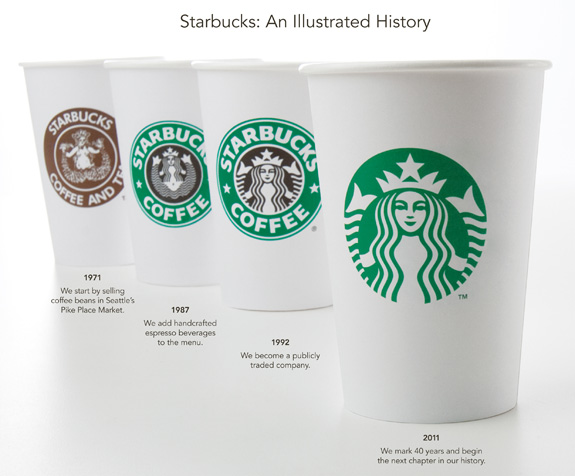 [via Daring Fireball]
Single-core Android tablets like Samsung’s Galaxy Tab won’t meet the minimum requirements for Honeycomb, Google’s tablet-optimized operating system version, according to a manufacturer.
[…]
Samsung’s Galaxy Tab has a 1 GHz Hummingbird processor and a 1024-by-600 resolution display. The company has previously suggested that the Galaxy Tab would update no further than the smartphone-focused Android 2.3 (“Gingerbread”), but Cha’s comments appear to seal the Tab’s fate as a rapidly aging product.
I spent some time with a Galaxy Tab this morning and kept thinking This is a dead end product. Turns out, it is.
Android is just a mess. Without a clear roadmap from Google, products like the Galaxy Tab will continue to disappoint customers,1 whose devices will become more and more outdated as their contracts slowly tick away.
Pretty pathetic for an expensive tablet that has been out just for a few months.
Granted, buying a tablet with a non-standard version of a fragmented smartphone OS is kind of a dumb move, if you stop and think about it. ↩︎
Looks like Asus has a killer tablet — a desktop processor, Windows 7 and a stylus. It’s like they’ve been under a rock for the last 12 months.
People are not flocking to Facebook because they want better email — they flock because they want to see what their ex looks like now. Facebook is not popular because it is a communication tool — nor is it an underutilized communication tool — Facebook is popular because people like to spy on each other.
A few weeks ago, I published a piece about photo editing on the iPad. In it, I said:
…there are a class of photographers that want to do more than just put a heavy filter on top of our photos. Let us tweak — truly tweak — our photos, like we can on the desktop.
I still am frustrated with the lack of a great photo editing suite for iOS. Photoshop Express wins my vote for now, but even it is far from perfect.
The stylish thing right now it to layer heavy-handed filters over photos, blowing the colors out and adding tons of vignette. It’s not a bad look, but its overdone by many people.
On the surface, Instagram seemed no different to me than the other dozen or so apps out there like it. However, this weekend, my view of the app totally changed when I bought an iPod touch.
Up until this weekend, my only iOS device was an iPad1, meaning I had no camera access to such photo apps. And while the still camera on the iPod touch is pretty terrible, its great for down-sized, heavily-filtered photos — just like the ones Instagram spits out. And since the iPod touch is always with me, its convenient.
Instagram is a whole social network, but one that only exists on iOS devices. In fact, the only thing you can do with the service from a desktop computer is to edit account settings. Friend management, updates and more exists only within the app. Much like the iTunes-trapped Ping, only users of the app can interact with the data.
That said, Instagram shares photos easily with services like Twitter, Tumblr and Flickr.
The app — and the network built around it — is brilliant.
While I’m still not in love with the heavily-filtered look for the majority of my photos, it is a lot of fun to play with little snapshots throughout the day. You can see a collection of such snapshots I’ve taken over the last few days2 on Flickr. You can also add me on Instagram — my username is ismh.
While I won’t be using the iPod touch or Instagram for this year’s Project 365, I am still in love with them.
There’s an iPad market, and the iPad could be classified as a tablet, from a hardware-centric viewpoint. But the market for non-iPad tablets is about as big today as it was before the iPad, which isn’t nothing, but it’s close enough to nothing that Apple doesn’t need to worry about it.
Go read (or Instapaper) this right now. Marco’s dead on — the iPad is a stand-alone product, and the tablet market is just as sad today as it was a year ago. If not more so.