iCloud’s Text Expansion Syncing is Busted⇢

Brian Stucki:

Text replacement syncing is completely broken. Sometimes it works, sometimes it doesn’t. Sometimes it will only sync back old snippets that you have deleted. Sometimes the sync will work one direction, but not the other. Every time I ask about this on Twitter, it brings a strong response of similar experiences.

Even though I know it’s broken, I decided to get scientific about it.

Two things: First, this is incredible work; click through and see all the work that went into this. Second, Apple really should fix this feature.

Continue reading ⇢

macOS High Sierra Review: A Modern Snow Leopard?

The Mac has had a stressful time over the past few years.

The professional portion of its user base has been wondering about the future as the Mac Pro grew older and less relevant and notebooks got thinner and lighter.

However, as 2017 unfolded, the company has made a routine out of voicing its love and commitment for the Mac. The iMac Pro and the future-but-not-here-quite-yet-and-oh-God-please-have-card-slots Mac Pro that Casey Liss is super excited about are both part of that message.

I’d argue that the newest release of macOS is part of it, too.

High Sierra

As he was introducing High Sierra and making yet another weed joke at this year’s WWDC, Apple software boss and international Dad Model Craig Federighi said:

We wanted to spend this year perfecting [the Mac].

[…]

High Sierra is all about deep technologies that provide a powerful platform for future innovations on the Mac.

And we couldn’t help ourselves, so we also added some refinements.

Continue reading ⇢

Auto Unlock not Supported by Apple Watch Series 3 on Sierra⇢

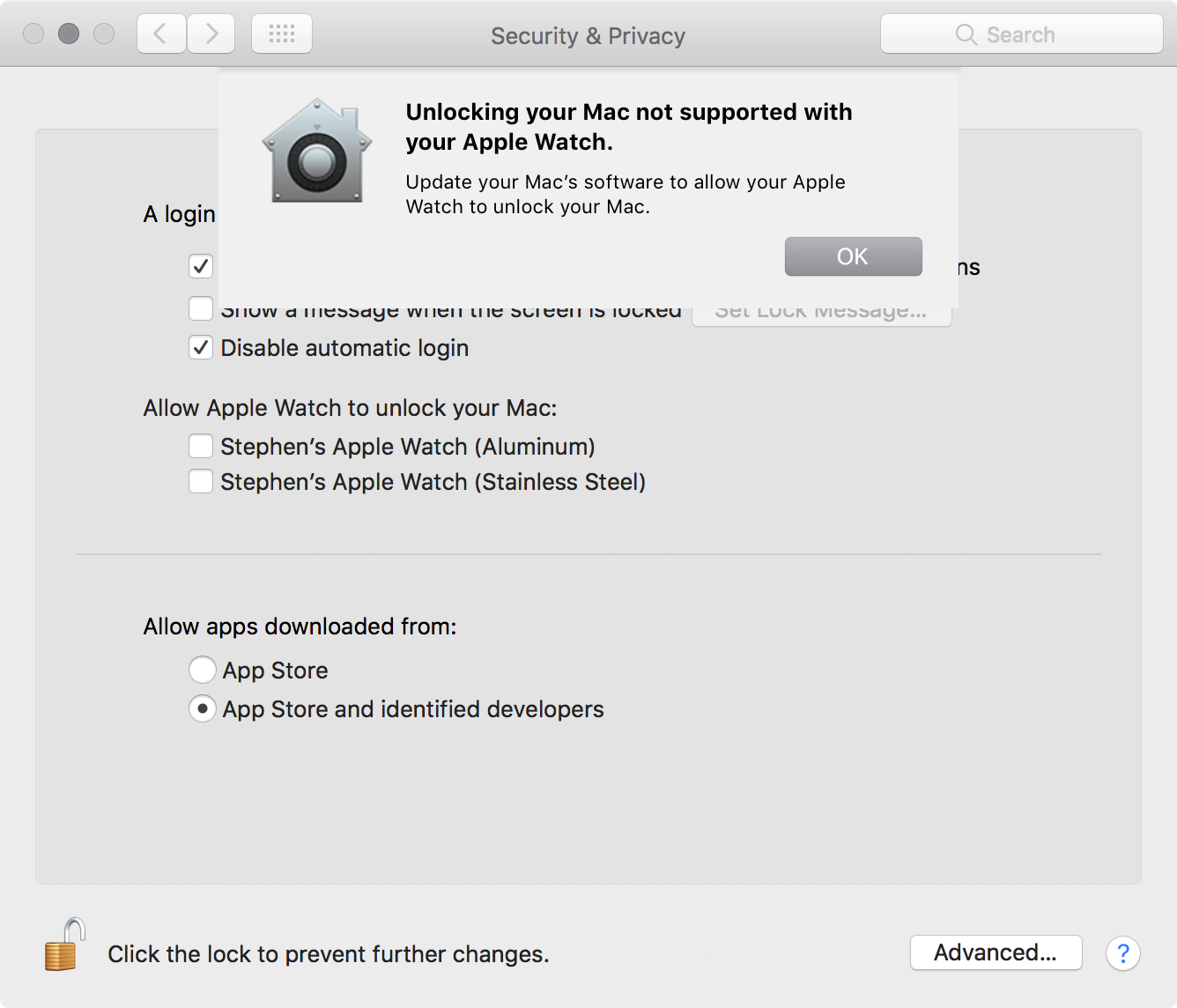
After setting up my new Apple Watch today, I was greeted by this message on my fully-updated iMac, running macOS 10.12.6:

Auto Unlock does work with my Series 3 Watch on my MacBook Pro running High Sierra.

Perhaps the updated hardware in the new Apple Watch makes this all more complicated, and wasn’t able to update Sierra to support things correctly.

With High Sierra due out Monday, I have to guess that LTE Watches won’t ever unlock Sierra machines.

Continue reading ⇢

iTunes and 4K, HDR and Dolby Vision Content⇢

Apple has published a new support page explaining the ins and outs of these updated standards in the iTunes Store:

You can buy or rent movies from the iTunes Store in high-definition (HD) or 4K resolution formats. These videos might also feature high dynamic range (HDR) or Dolby Vision.

When you buy or rent a movie from the iTunes Store, it automatically plays in the highest-quality format available for the device on which you’re watching it.

Continue reading ⇢

LTE Apple Watch Reviews Unveil Connectivity Issues⇢

Apple Watch Series 3 reviews are in and it’s not great news for those of us who have been excited about (and preordered) LTE models.

The promise of this product is clear. Leave your iPhone behind, but still be accessible, as John Gruber writes:

Apple turned Apple Watch into a goddamn cell phone, without making the device thicker or heavier, and it still lasts all day.

That promise hasn’t quite been met, as Lauren Goode writes. Her first review unit behaved so erratically, Apple replaced it:

Continue reading ⇢

The MacStories iOS 11 Review⇢

Federico Vitcci has done it again:

With iOS 11, Apple’s iPad vision feels resolute again. Multitasking is blending with multitouch, giving drag and drop a new purpose; the Mac’s best features – from file management to the dock – have been rethought, simplified, and extended specifically for iOS. The iPad’s mission is to reimagine the very concept of a portable computer by empowering a new generation of users to do their best work wherever they are, whenever they want.

Continue reading ⇢

Face ID and the Mac

Face ID is made possible by a whole range of technology that Apple packed into the notch that defines the look of the iPhone X:Notch Guts

Face ID, like Touch ID before it, stores its information in the device’s Secure Enclave. It is never synced to iCloud servers or included in iOS backups.

Until last year, Touch ID was an iOS-only affair, but that changed with the Touch Bar, which brought a Touch ID sensor to the Mac for the first time.

Continue reading ⇢