
James Galbraith’s benchmarks of the new MacBook Air models are impressive. The morale of the story? Hard drive are really, really slow. Even with low-end processors, these machines are giving the Pro line a run for its money.
Category: Apple
On iPhoto ’11
I think iPhoto ‘11 is a great piece of software for most people, just not for people who are really into working with their photos.
Excuse me, I have some work to do in Aperture 3 this morning.
‘Micro Apps’
Here’s what I’m thinking: one of the most popular apps since the inception of the iPhone App Store has been Pandora. Pandora obviously works through the web browser, but plenty of people would be into a small app that sits somewhere on your desktop running in the background. How do I know? Because Pandora actually already makes such an app — but it runs on AIR and you need a Pandora One premium account to use it. What if Pandora made a free ad-supported Pandora Mac app? Or a paid version (maybe $5 or $10) that gives you premium features? A lot of people would want such an app.
[…]
But a real opportunity may exist in small apps that don’t just fully mimic popular web apps, but instead extend upon them. Imagine a Facebook app, for example, that offered a great photo upload and viewing experience? Again, this is sort of the idea Apple seemed to originally have with their Desktop Widgets, but those never really took off. One reason, undoubtedly, is that distribution was lacking, and developers had no way to make money from them. The Mac App Store solves both of those issues.
A Grand Stand
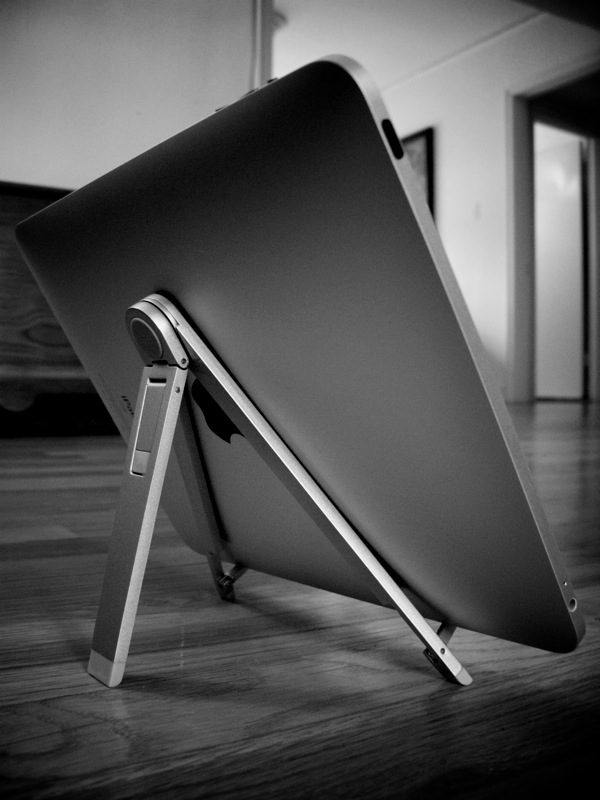
I picked up a Twelve South Compass iPad stand today at the Apple Store. If you use your iPad without a case, you need this little guy in your life. It’s handsome, well-made and a lot heavier than it looks. Which makes it quite sturdy, even when typing on the iPad. The rubber feet and insets grip the iPad to keep it from moving, and keep the stand from scratching it. You won’t regret having it around.
The Problem with iLife
Nine years ago, Steve Jobs announced the new era of computing was about to begin. Pete Mortensen:
It was January 9, 2001. It was the silver anniversary of Apple, and the newspapers were full of stories about the demise of the personal computer. Lots of digital devices had emerged that were tailored to single tasks that they did really well, from digital cameras to DVD players to DVRs to CD players to camcorders to PDAs. Many thought that we would replace our multi-use but often inefficient computers with a bunch of highly effective single-taskers. But not Jobs. As he made clear, the strength of a computer was its ability to control and integrate all these many digital devices. A Mac, in short, could serve as the Digital Hub that unites those disparate points in your digital life.
On Living Without Flash
So, for the last few days, I’ve been running with no Flash plug-in at all, and honestly not really missing it very much.
His post outlines how to setup Safari 5 to run without Flash and without those annoying “Missing Plug-in” alerts.
Apple Stops Bundling Flash with OS X
To be clear, this is a significantly different situation than with iOS. With iOS, Flash not only isn’t preinstalled, it can’t be installed, period. With Mac OS X, users are free to download Flash Player from Adobe and install it themselves.
Apple spokesperson Bill Evans told me: “We’re happy to continue to support Flash on the Mac, and the best way for users to always have the most up to date and secure version is to download it directly from Adobe.”
That’s a big change. I’m not sure exactly when Apple began bundling Flash Player as a standard component in Mac OS, but it was long enough ago that it was not a mistake that I didn’t include the “X” in the name of the OS. If I had to guess, I’d say Mac OS 8.6 — around the time of the deal to bundle IE as the default Mac OS browser, or maybe even earlier. We’re talking ancient history.
A National Nightmare
Federico Viticci at Mac Stories:
As Steve Jobs confirmed at the “Back to the Mac” event, the Mac App Store will be the best way to discover and install apps, but not the only one. You’ll still be able to purchase apps directly from developers’ websites and run installers or .DMG files just fine. Can you imagine what could ever happen if Apple turned the Mac into an App Store-only “closed” system with no possibility to download software from other sources? After 20 years of regular installations?
On the Touchy Subject of Future Macs
At yesterday’s event, Steve Jobs said this about touchscreen Macs:
It gives great demo, but after a while your arm feels like it’s going to fall off. Touch surfaces want to be horizontal.
I think most people assume that the future of the desktop computer is touch.
I got this email from ForkBombr reader Paul S.:
So I’ve been thinking, do you envision a fully touch-based Mac? Imagine two iPads clamshelled together like an 11-inch Air. Top mainly for display, bottom mainly for input.
As an editor, I can imagine a 24-inch (x2) version of this, using FCP full-screen: timeline, bins, controls on a large control surface in front of me, video displays up top.
The design would be clunky though, I think. and an Apple all-in-one in this manner is hard to imagine. I don’t much like the patent leaks for touch-based iMac that have been floating around (with the adjustable stand).
On Software Trials and the Mac App Store
Software trials are loved by customers and developers alike. It’s easy to see why: customers get to try out first hand how an app works risk-free. Developers make their customers happier and reduce refunds. Yet, inexplicably, Apple doesn’t offer trials of any sort. In fact, their developer agreement forbids it. This is questionable policy for a $2.99 game, but inexcusable for a $60 Mac app.
Mac App Store Rules Posted
See the entire PDF here, or just hit the high points courtesy of Nilay Patel.
The Magic Touch of Lion
One thing that I noticed when Mac OS X Lion was being demoed yesterday was how difficult of a time the demo person was having utilizing the multi-touch gestures on the Magic Mouse. Take a look at the video from yesterday, you can clearly see that when he is trying to perform the swipe to the side to change to and from a fullscreen app he has to do it a couple of times to get that gesture to take. Not every time, just some times.
It is also important to note that this is a guy who has theoretically spent a lot of time practicing this very gesture.