
Dan Moren went through Apple’s public webpages to round up details not found in the keynote. There’s a lot of interesting stuff in here.
Category: Apple
The All-New Mac App Store⇢
The Mac App Store made it easy for millions of customers around the world to discover and download Mac apps. Now completely redesigned, the Mac App Store on macOS Mojave offers a richer experience so customers can find apps that help them create, work, play, and develop, even more easily.
I’m cautiously optimistic about the new Mac App Store, if only because BBEdit and Transmit will be back for sale in it. New layouts and editorial content are great, but if high-profile developers don’t move (back) to it, none of that matters all that much.
macOS 10.14 Mojave System Requirements
The next version of macOS will run on these machines:
- MacBook (Early 2015 or newer)
- MacBook Air (Mid 2012 or newer)
- MacBook Pro (Mid 2012 or newer)
- Mac mini (Late 2012 or newer)
- iMac (Late 2012 or newer)
- iMac Pro (2017)
- Mac Pro (Late 2013; Mid 2010 and Mid 2012 model support coming in later beta)
High Sierra ran on select computers stretching back to 2009, so this if you’ve been holding on to an older machine, take note.
How One Apple Programmer Got Apps Talking to Each Other⇢
Jordan McMahon at Wired has a great feature about Sal Soghoian and automation at Apple. It then goes on to cover things like x-callback-url and what the future of automation may hold.
macOS 10.14 Dark Mode Leaked⇢
Well, well, well…
Ladies and gentlemen, I give you Xcode 10 on macOS 10.14. Dark Appearance, Apple News, App Store w/ video previews pic.twitter.com/rJlDy81W4W
— Steve Troughton-Smith (@stroughtonsmith) June 2, 2018
There’s a video of it in action over on 9to5Mac.
I dig it.
Apple Released macOS High Sierra 10.13.5⇢
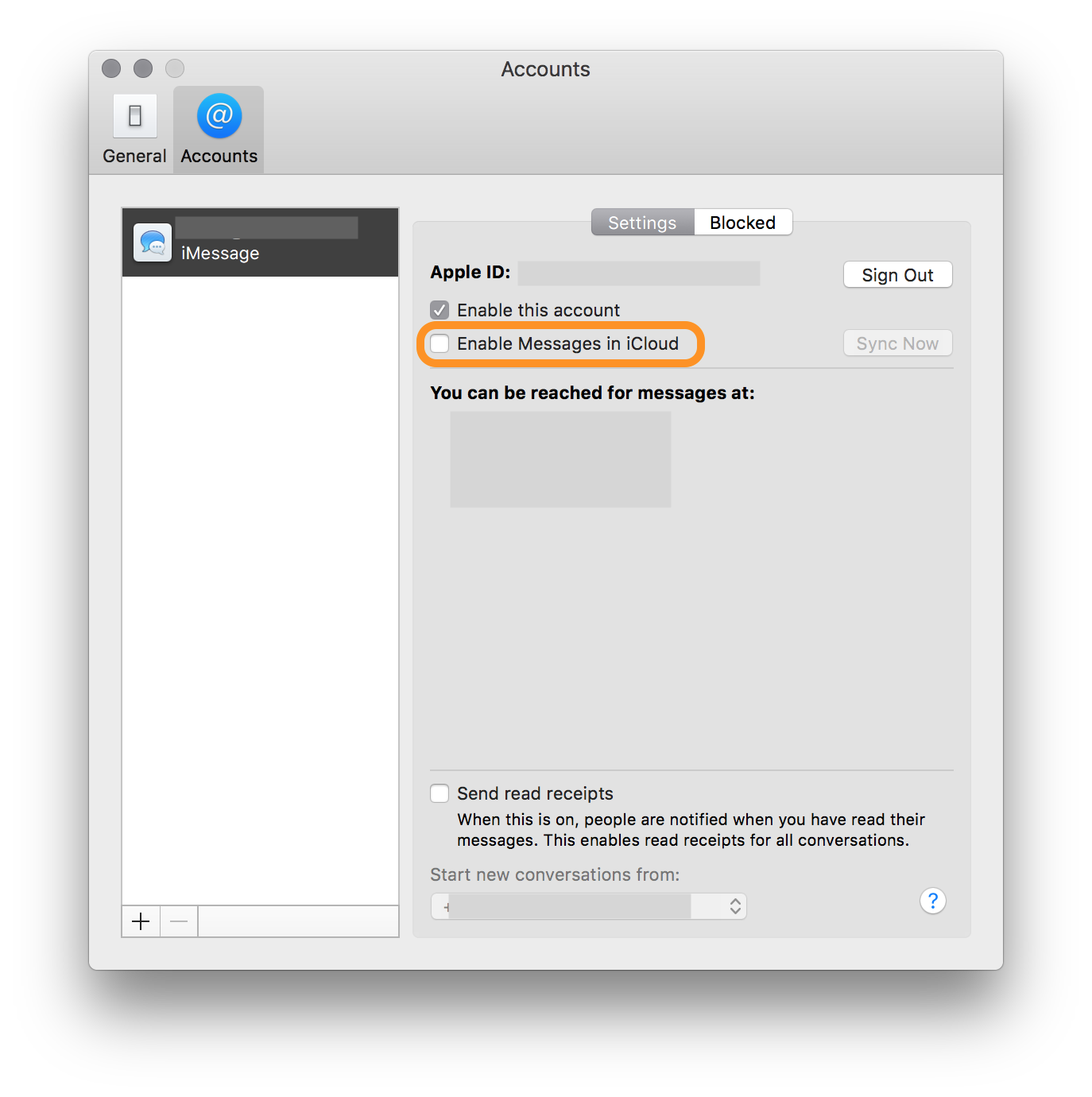
Includes bug fixes and Messages in iCloud. It is in the Mac App Store now, so remember how to launch that and get to it.
Like iOS, enabling Messages in iCloud requires a trip into settings. In this case, it’s the Messages.app Accounts tab:
The 2013 Mac Pro, Five Years Later
On June 10, it will have been five years since Apple first showed off the iteration of the Mac Pro that has come to be known as The Trashcan.
To put that in a little context, it was the same WWDC keynote where iOS 7 and OS X Mavericks were introduced.
Introduction and Release
This section of the keynote wasn’t a full-blown product introduction, but rather a tease of what was to come:
iOS 11.4 Coming Today with AirPlay 2, Messages in iCloud⇢
Today, almost four months after HomePod’s release, HomePod users can access the new features through a now-available software update available through the Home app in iOS 11.4, which includes AirPlay 2, Apple’s wireless audio technology that enables HomePod pairing. HomePods can now sync with other HomePods or third-party, AirPlay 2-enabled speakers, and play music throughout your home. Bose, Sonos, Beats, Bowers & Wilkins, and Libratone are some of the companies that have announced AirPlay 2 compatibility for current and upcoming speakers.
The Sad Case of Quinn Nelson’s iMac Pro VESA Mount Repair (Updated)⇢
YouTuber Quinn Nelson has been through the wringer trying to have his iMac Pro repaired after the butter-soft screws that come with the $80 VESA mount Apple offers for the machine failed:
I haven’t been behind the Genius Bar in almost 10 years, but if one of my staff members had caused that sort of damage to a customer’s machine, I would have worked to replace the computer, with or without my manager approving it. Apple should make this right by Quinn, work to train its AppleCare and Genius Bar employees on this computer’s quirks and ship higher-quality screws in that VESA kit.
Apple Had Numbers on Bending iPhone 6 and 6 Plus Units⇢
Jason Koebler, writing at Motherboard:
Apple’s internal tests found that the iPhone 6 and iPhone 6 Plus are significantly more likely to bend than the iPhone 5S, according to information made public in a recent court filing obtained by Motherboard. Publicly, Apple has never said that the phones have a bending problem, and maintains that position, despite these models commonly being plagued with “touch disease,” a flaw that causes the touchscreen to work intermittently that the repair community say is a result of bending associated with normal use.
Apple Selling Refurbished iMac Pros⇢
The choice between a high-end 5K iMac and the base-model iMac Pro just got a little easier to make.
Apple’s Emoji Search is Bad⇢
Jeremy Burge, before diving into the numerous ways in which Apple’s emoji search on the Mac is pretty broken:
I’ve been aware of this for quite some time, but until recently haven’t sat down to figure out what’s going on.
His blog post is full of examples, but this is a pretty damning one:
To find Person Facepalming you can’t type “facepalm” or “palm” but instead need to type “face palm.”