
The Stream Deck has been a favorite of Mac users who are into automation for a while now, but the device’s utility has grown substantially for a couple of reasons. First, you can use the Stream Deck to run Shortcuts, which expands the device into an entirely new realm of automation.
Second, the Stream Deck opens up new ways to approach all automation on your Mac that aren’t possible with any single Mac app, allowing you to mix and match different kinds of automation in one interface. It’s a powerful combination that unlocks the ability to organize the automation tools you use to fit with the way you think and work.
Category: Apps
FastScripts 3⇢
This is a great update to one of those apps that makes the Mac feel like the Mac.
Triggering Shortcuts via Alfred⇢
Jason Snell, on Building Cross-Platform Shortcuts⇢
As I’ve written about before, building Shortcuts is frequently much easier than building similar workflows on macOS using AppleScript and Automator. Now that Shortcuts is on the Mac, there’s no need to replicate shortcuts from iOS using those technologies! Instead, the same shortcut can run on both platforms. Problem solved.
Err… well… okay. Maybe not solved. While you might have rightfully assumed that not everything that works in Shortcuts on the Mac will work in Shortcuts on iOS—AppleScripts, shell scripts, and the like simply don’t exist on that platform—it might surprise you to learn that the reverse is also true. The Mac’s version of the Share menu is not nearly as sophisticated as the one on iOS, and the Share menu is a major launching point for iOS shortcuts. Safari’s automation interface is, similarly, not nearly as friendly on the Mac as on iOS.
The Saddest Mac UI Element
I am loving having Shortcuts on my Mac, but I really do wonder if using SwiftUI to build it was the right call. A lot of the controls are finicky, but this pop-up is just about the saddest looking thing I’ve ever encountered in a first-party Mac app:
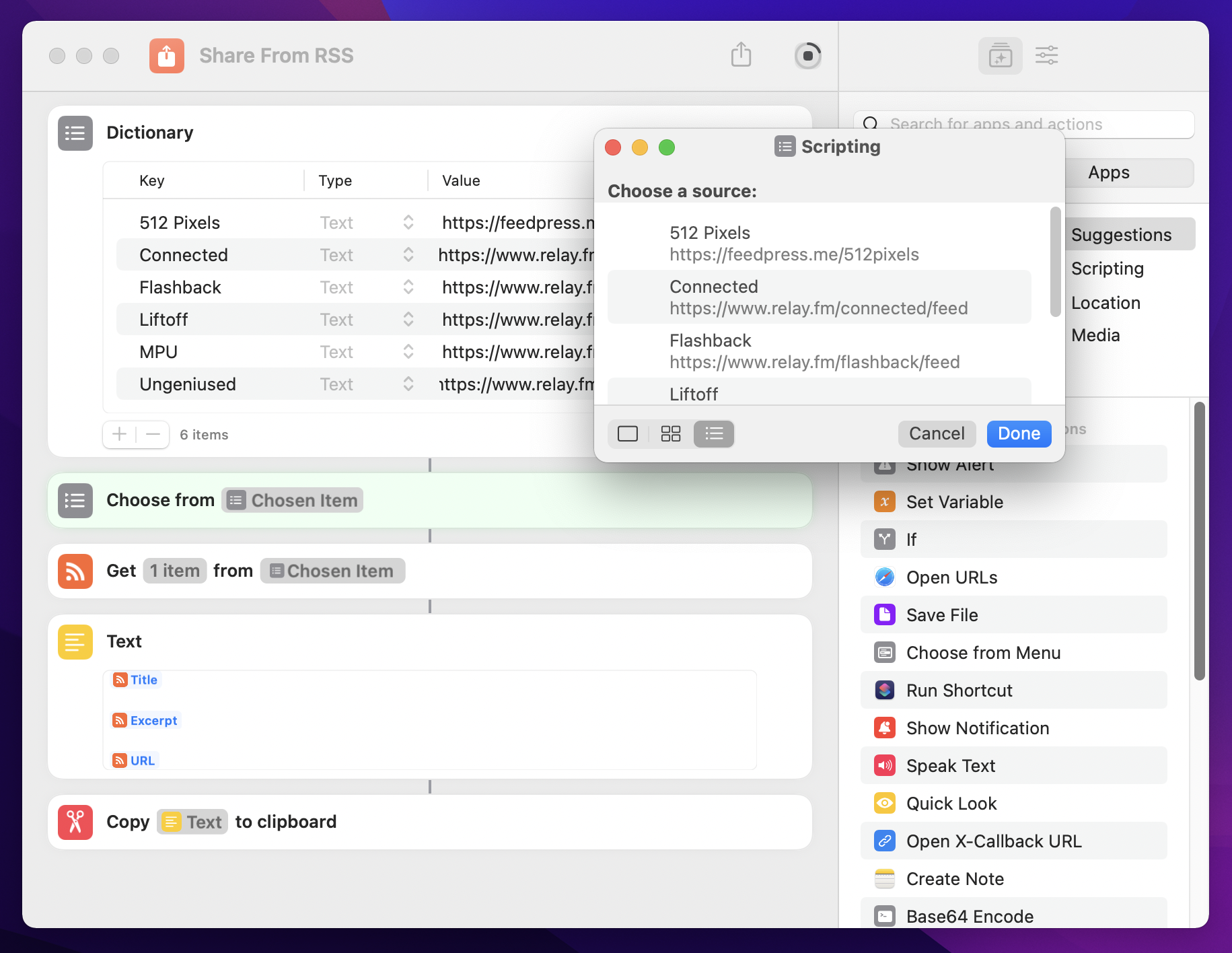
I also have no idea why all the URLs in the Value fields don’t line up.
Rogue Ameoba Announces Monterey Support⇢
Apple’s official release of MacOS 12 (Monterey) won’t be arriving until next week, but our software is already compatible with the new OS. As you can see on our helpful Status page, all seven of our major Mac apps now have compatibility with Monterey. Just make sure you’ve got the latest versions of Airfoil, Audio Hijack, Farrago, Fission, Loopback, Piezo, and SoundSource, and you’ll be good to go on Monterey.
Apple Frames 2.0⇢
If you deal with screenshots, this Shortcut by Federico is a must.
1Password Announces Psst!⇢
Akshay Bhargava, writing on the 1Password blog:
Let’s say I want to share that Wi-Fi password with my in-laws. All I need to do is open the share menu and select “Share” to generate a link.
By default, the link expires in seven days, but I can also choose to let it expire after 30 days, 14 days, one day, one hour, or after a single person views it. I can also choose to let anyone who has the link view the item, or I can restrict sharing to only the people whose email addresses I enter.
Retro Dither⇢
If you were thinking how cool it would be to not only add old-school dithering to your photos, but export them in a format that MacPaint could open, this app is for you.
iWork Updated⇢
New features include live video, pivot tables and more — but the most important part is that the new macOS versions come with much better icons.
1Password for Safari⇢
The Safari web extension I’ve been waiting for is here.
Pull Up Your COVID Vaccination Card with Shortcuts⇢
Matt VanOrmer has written a simple, fast way to quickly show a photo of your vaccination card.