Kbase Article of the Week: Mac OS X: Script Editor Has Two Choices for Saving Compiled Script ⇢

Speaking of weird bugs and scripts, here’s Apple Support on a weird bug that was present in an early version of Mac OS X 10.2:

When using Script Editor to save a new file, there are two choices for compiled script.

When you choose Save As or save a script for the first time, you see two choices for the format:

  • compiled script
  • Compiled Script

The choices produce identical scripts. It does not matter which format you choose; they only differ in the capitalization. This is to expected [sic] to be corrected in a future version of Script Editor.
Continue reading ⇢

Kbase Article of the Week: iMac G5 (iSight): Built-in iSight Camera Produces Blue or Green Pictures ⇢

Apple Support:

When you take pictures with the built-in iSight camera in your iMac G5 (iSight), the resulting images may look blue or green in Photo Booth or iChat instead of full color.

This can happen when your display’s Colors setting is set to “Thousands” in the Displays pane of System Preferences. To fix your photos, just modify the settings to display millions of colors instead of thousands.

Continue reading ⇢

Kbase Article of the Week: Precursors to the Synthesizer ⇢

Today, we have a bit of a history lesson via Apple Support:

The earliest seeds of modern electronic synthesizers began in the twilight years of the 19th century. In 1897, an American inventor named Thaddeus Cahill was issued a patent to protect the principle behind an instrument known as the Telharmonium, or Dynamophone. Weighing in at 200 tons, this mammoth electronic instrument was driven by 12 steam-powered electromagnetic generators. It was played in real time using velocity-sensitive keys and, amazingly, was able to generate several different sounds simultaneously. The Telharmonium was presented to the public in a series of “concerts” held in 1906. Christened “Telharmony,” this music was piped into the public telephone network, because no public address systems were available at the time.

Continue reading ⇢

Kbase Article of the Week: iWeb: Avoid Using Apostrophes in Your iWeb Site/Page Names ⇢

Apple Support:

If you create a site or page name in iWeb 1.0.1 with an apostrophe as part of the name, and subsequently update to iWeb 1.1, then the web addresses (URLs) to your site/page will no longer be valid. This will break any existing bookmarks to the page. This occurs because iWeb 1.1 handles apostrophes differently than iWeb 1.0.1.

People who bookmarked your iWeb 1.0.1 site need to bookmark your new site published with iWeb 1.1.

Continue reading ⇢

Bonus Kbase Article of the Week: Use the Depth app on Apple Watch Ultra ⇢

Apple Support, or rather, Apple Legal:

Underwater activities are risky. The Depth app isn’t a dive computer and doesn’t provide decompression stop information, gas analysis, or other recreational scuba diving functionality. If you’re using Apple Watch Ultra where the failure of the device could lead to death, personal injury, or severe environmental damage, always use a secondary depth gauge and timer/watch. Before going on a dive, be sure your Apple Watch Ultra is free of cracks or other damage.

Continue reading ⇢

Kbase Article of the Week: Macintosh TV: Television Connection Tips ⇢

Apple Support:

Basically, anything that can be attached to a regular TV can be attached to Macintosh TV. There are two ports for a video source: coaxial and RCA. Things that have an RCA plug can also be attached to the coaxial port with the proper adapter, and vice-versa. One restriction is that closed caption must come through the coaxial port.

In the TV Setup control panel, click on Channel Setup and select Cable (as opposed to Antenna for broadcast TV) as the source.

Continue reading ⇢

Kbase Article of the Week: If You See a Cellular, Ultra Wideband, or Apple Pay Issue Message After an iOS Update or Restart ⇢

Apple Support:

If one of these messages appears, iOS or iPadOS diagnostics detected an issue on your iPhone or iPad that might require repair.

Contact Apple Support if one of these messages appears on your iPhone or iPad:

  • Cellular Issue Detected
  • Ultra Wideband Issue Detected
  • Apple Pay Issue Detected

You might see these messages on the Home Screen or in Settings > General > About under Parts and Service History.

Continue reading ⇢

Bonus Bonus Kbase Article of the Week: Use Emergency SOS via Satellite on Your iPhone 14 ⇢

Apple Support:

Emergency SOS via satellite can help you connect with emergency services under exceptional circumstances when no other means of reaching emergency services are available. If you call or text emergency services and can’t connect because you’re outside the range of cellular and Wi-Fi coverage, your iPhone tries to connect you via satellite to the help that you need.

When you use a satellite connection, the experience is different than sending or receiving a message via cellular. In ideal conditions with a direct view of the sky and the horizon, a message might take 15 seconds to send, and over a minute to send under trees with light or medium foliage. If you’re under heavy foliage or surrounded by other obstructions, you might not be able to connect to a satellite. Connection times can also be impacted by your surroundings, the length of your message, and the status and availability of the satellite network.

Continue reading ⇢

Kbase Article of the Week: LaserWriter: Composition of the Drum Coating ⇢

Apple Support:

The LaserWriter drum is an organic photo-conductive layer laid on the surface of an aluminum cylinder. The ingredients of the organic layer are:

wt% OSHA (PEL) ACGIH (TLV)

aluminum alloy 95.0-98.0 - -

titanium dioxide

(13463-67-7) 0.5-2.0 * 15mg/m3(TWA) 10mg/m3(TWA)(Dust)

(20mg/m3)(Stel)

Binder resin 0.5-2.0 - -

Organic semiconductor 0.3-0.8 - -

Carcinogens: no ingredient is listed on the latest NTP Annual Report on carcinogens, IARC Monograph, or OSHA listing.

I have no idea what any of this means.

Continue reading ⇢

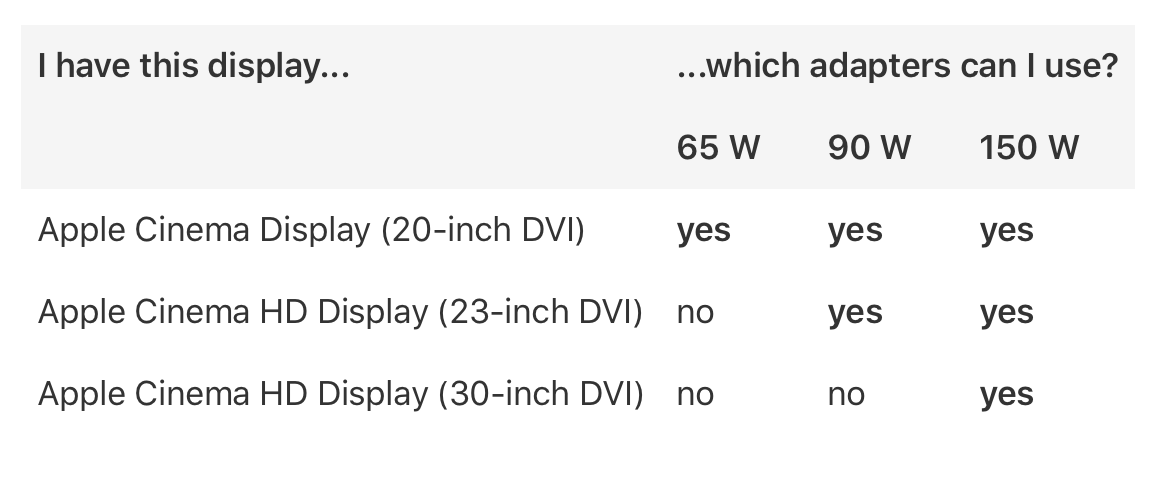
Kbase Article of the Week: Identifying Power Adapters for Apple Cinema Display (20-inch DVI), Apple Cinema HD Display (23-inch DVI), and Apple Cinema HD Display (30-inch DVI) ⇢

Apple Support:

Need to know which power adapter goes with your Apple Cinema Display (20-inch DVI), Apple Cinema HD Display (23-inch DVI), or Apple Cinema HD Display (30-inch DVI)? The following table has your answer!

And what a table it is…

Display Power Adaptors

Related: my history of Apple’s LCD displays over the years.

Continue reading ⇢