Kbase Article of the Week: MacBook Air (Original, Late 2008, and Mid 2009) Hinge Quality Program has Ended ⇢

Apple Support, in a pretty terse document:

The eligibility period for the MacBook Air (Original, Late 2008, and Mid 2009) Hinge Quality Program has ended.

The eligibility period covering this issue has ended.

I had forgotten about this situation, but I linked to a support article about it back in 2009.

The URL I linked to back then now redirects to the short announcement quoted above, but here is what it said:

Learn what you can do if you experience one or more of these issues with the hinges on your MacBook Air.
Continue reading ⇢

Kbase Article of the Week: About QuickTime VR ⇢

Apple Support:

QuickTime VR creates an immersive, photorealistic experience simulating actual or imagined three-dimensional objects and places. Unlike other virtual reality implementations, QuickTime VR does not require special goggles or gloves, and it doesn’t need you to download a custom 3D plug-in to work with any application or web browser. All major applications that play QuickTime movies can also play QuickTime VR movies. There are two main types of QuickTime VR movies - QuickTime VR Panoramas and QuickTime VR Object Movies.

Continue reading ⇢

Kbase Article of the Week: Apple Remote Desktop 2: Software Update for 1.2.4 Still Shows After Client Upgrade to Apple Remote Desktop 2 ⇢

Apple Support:

Installing Apple Remote Desktop 2 on a non-startup volume does not remove the Apple Remote Desktop 1.2.2 Agent. The result is that Software Update still offers version 1.2.4 for that computer after it’s been upgraded to version 2.

Fixes include:

  • Install Apple Remote Desktop 2 on the startup volume where Apple Remote Desktop 1.2.2 is currently installed, or
  • Remove the Apple Remote Desktop 1.2.2 Agent by executing this Terminal command: sudo rm -r /System/Library/CoreServices/ARD Agent.app/

Continue reading ⇢

Kbase Article of the Week: MobileMe: Unable to Select Items for Upload to MobileMe iDisk or MobileMe Gallery via Web Browser in Microsoft Windows ⇢

Apple Support:

The upload utility for MobileMe Gallery and MobileMe iDisk may not display files correctly when accessed from a web browser in Microsoft Windows. In this case, folders that contain files may appear to be empty.

This issue may occur in any supported Windows web browser, such as Safari for Windows, Firefox, and/or Internet Explorer.

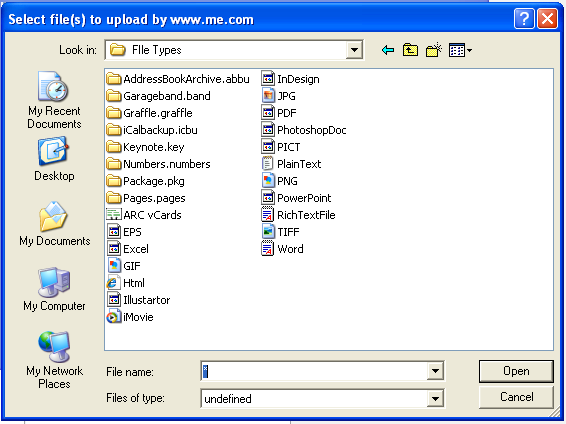
The fix in the article includes this glorious screenshot:

MobileMe iDisk in XP

Continue reading ⇢

Kbase Article of the Week: MacBook: Vertical Lines or Solid Gray, White, or Black Screen After Updating to Mac OS X 10.4.7 ⇢

Apple Support:

After updating to Mac OS X 10.4.7, the MacBook may show a solid grey, white, or black screen or a screen with vertical multi-colored lines.

To resolve the issue temporarily, you may need to reset NVRAM. Once you can use the display again, download and install Mac OS X 10.4.8. You can use the Software Update feature of System Preferences, or download the Update from Apple Software Downloads.

Continue reading ⇢