
If you suddenly find yourself shopping for a Performa in 1995 and want to know which models have ClarisWorks bundled with them, this document is here to help.
512 Pixels
The Worldwide Developer ... Festival⇢
John Voorhees, writing at MacStories, about how WWDC’s new form could continue to evolve:
I’d like to see Apple create a communal space for developers, its engineers and other employees, and media to gather. The trouble is that Apple Park is off-limits unless you have an invitation for an event. Without a convention center or nearby hotel to meet at, a lot of mingling happened at the Visitor’s Center, which wasn’t ideal because it’s a store and not that big when flooded with hundreds of developers. The Visitor’s Center cafe worked well as a gathering and workspace for the media, but it would be too small for everyone.
I’d love to see Apple open up the Developer Center and its parking lot turned into a gathering spot. Throw up some tents, add some tables and chairs, serve snacks and drinks, and I bet it would be a big hit, solving the problem that people can’t meet inside Apple Park and that hotels are spread out, preventing anywhere from becoming a central gathering spot during WWDC. Ideally, though, I’d love to see Apple set up a festival-style space inside Apple Park. I’m sure there are many security and other challenges to overcome, but the fields outside the company’s fitness center would be perfect.
The Friendly Orange Glow⇢
Last night, I finished reading a fascinating book by Brian Dear titled The Friendly Orange Glow: The Untold Story of the Rise of Cyberculture.
The book covers the history of PLATO, a computer system initially designed to bring computers into the classroom back in the 1960s and 1970s. As Dear writes, the culture that came up around PLATO took the technology much farther than spelling tests and multiplication tables.
Before reading this, I had never heard of PLATO, but the truth is that it birthed many of the things we take for granted on the Internet today. PLATO is perhaps the most amazing “it was ahead of its time then it died” stories I’ve ever come across. The Friendly Orange Glow is a long read, but I was engrossed the entire time. Had history been knocked off course by just a few degrees, PLATO would have been the backbone of the early Internet, without a doubt.
Apple Battersea⇢
The more I see of it, the more I love this newest iteration of Apple’s retail design.
Sponsor: Unite 4 for macOS⇢
Unite 4 for macOS allows you to turn any website into an app on your Mac. Using a lightweight, WebKit-powered browser as a backend, you can easily create isolated, customizable apps from any site.

Unite 4 includes dozens of new features, including support for native notifications, new customization options, and much more. Unite apps also serve as a great alternative for resource-hogging Electron apps or half-baked Catalyst apps.
Some examples of apps you could create in mere minutes with Unite:
- A Gmail web client that behaves like a native mail client.
- A status bar app for Apple Music or Overcast
- An isolated workspace for apps that may track you like Facebook
- A Google Meet app that works efficiently without using Chrome
- A fully featured Instagram app that has a resizable window, unlike the M1 version.
- A Robinhood, Figma, or Roam Research app for your desktop.
512 Pixels readers get 20% off this week when you purchase Unite 4 at bzgapps.com/unite512 or when you use the promo code ‘512Pixels’ at checkout.
You can also try Unite for 14 days absolutely free or use it as part of your subscription if you’re a Setapp subscriber!
Mac Power Users #697: A Niche of a Niche⇢
On this feedback episode, David and I keep unpacking WWDC, talk about their time with the new betas and work through some listener feedback.
Steve Huffman’s Inspiration in Ruining Reddit: Elon Musk⇢
In an interview Thursday with NBC News, Reddit CEO Steve Huffman praised Musk’s aggressive cost-cutting and layoffs at Twitter, and said he had chatted “a handful of times” with Musk on the subject of running an internet platform.
Huffman said he saw Musk’s handling of Twitter, which he purchased last year, as an example for Reddit to follow.
“Long story short, my takeaway from Twitter and Elon at Twitter is reaffirming that we can build a really good business in this space at our scale,” Huffman said.
“Now, they’ve taken the dramatic road,” he added, “and I guess I can’t sit here and say that we’re not either, but I think there’s a lot of opportunity here.”
Bonus Kbase Article of the Week: If You See ‘Disk Not Ejected Properly’ on Your Mac Pro (2023)⇢
Certain models of internal SATA drives might unexpectedly disconnect from your computer after your Mac wakes from sleep. This can occur if your Mac automatically goes to sleep or if you manually put your Mac to sleep. If you see a message that your disk was not ejected properly, you can restart your Mac to reconnect to the drive.
Apple is aware of this issue and resolution is planned for a future macOS update.
To avoid the bug, Apple recommends turning on the “Prevent automatic sleeping when the display is off” option in System Settings.
Connected #454: Pipe It In⇢
Stephen breaks some shocking news on the show. Federico had feelings about the Apple Vision Pro. Myke messed up the points. All of this and then a Round Robin of some smaller announcements from WWDC.
Don’t miss the first installment of Smell Talk.

Introducing the 2024 Apple History Calendar⇢
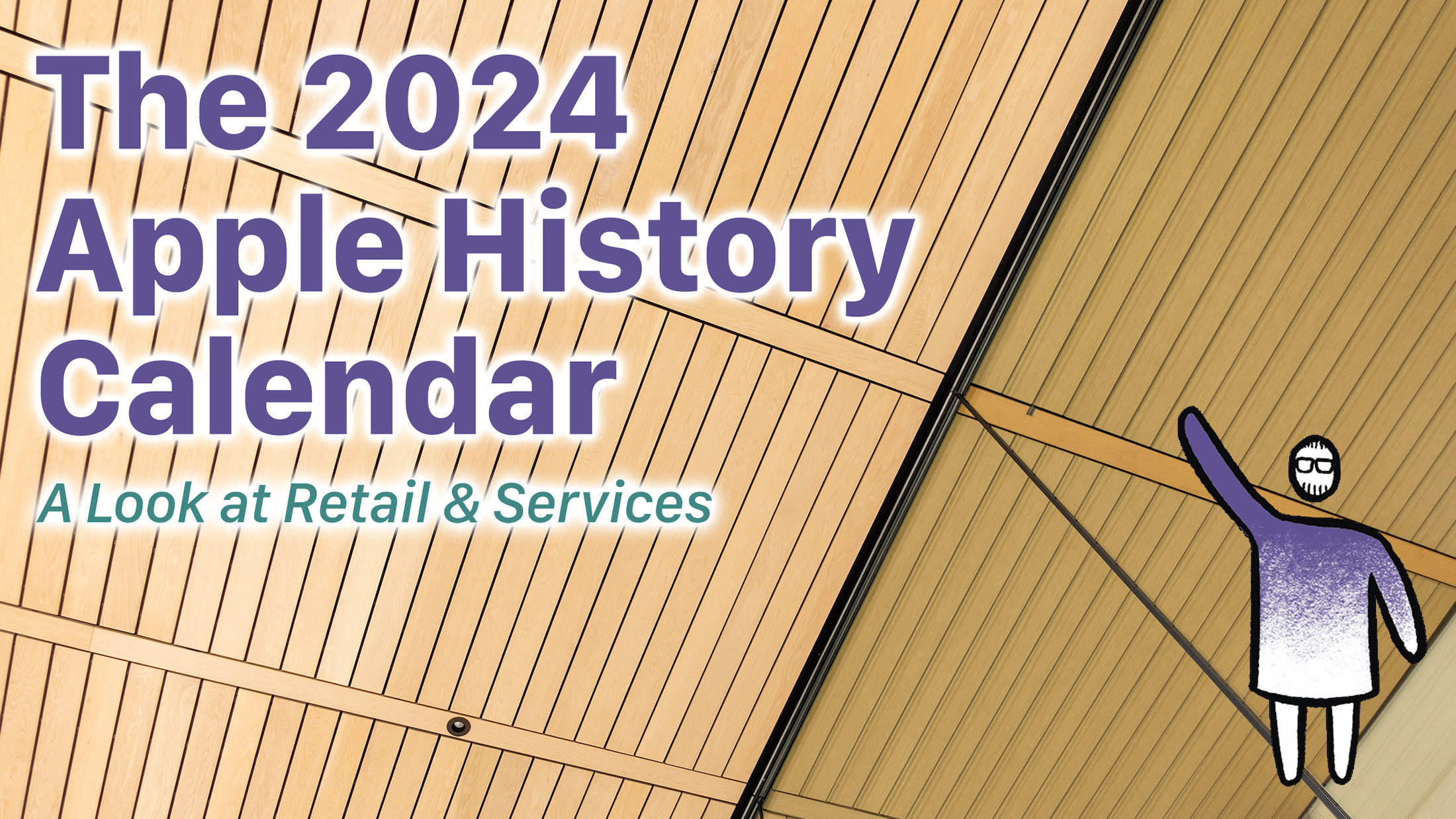
For the last two years, I’ve successfully created beautiful wall calendars focusing on parts of Apple’s business. For 2022 I did hardware, and for 2023, software.
The 2024 Apple History Calendar will complete the trilogy, focusing on Apple retail and the company’s services business.
These dates cover everything from Apple’s earliest ideas about the Internet to the latest in it’s growing collection of services, complete with key dates in the history of the Apple Store as well.
The calendar features a custom design and measures 20x13, and comes with a pre-punched hole to hang it on your wall. Each month highlights a bunch of these important dates, paired with photographs taken by me of items in my Apple collection, a custom illustration for the cover and more.
The calendars will be printed here in Memphis, TN. Campaign orders will fulfilled by me and a small team of family and friends, and shipping will begin in October, in plenty of time for the new year, with digital downloads will go out in November.
If you are one of the 1200 people backed my campaign last year, I hope you’ll enjoy this calendar just as much as you did the previous one. If you’re new to this project, then welcome!
All of the information can be found on the campaign page. Go check it out!
A Watershed Moment⇢
Federico, writing at MacStories:
I’m going to be direct with this story. My 30-minute demo with Vision Pro last week was the most mind-blowing moment of my 14-year career covering Apple and technology. I left the demo speechless, and it took me a few days to articulate how it felt. How I felt.
It’s not just that I was impressed by it, because obviously I was. It’s that, quite simply, I was part of the future for 30 minutes – I was in it – and then I had to take it off. And once you get a taste of the future, going back to the present feels … incomplete.
I really wish I had been able to try it at WWDC. Everyone who did seems changed somehow.
Apple’s Original Vision Products Were a Line of CRTs
The Apple Vision Pro may be ushering in the era of spatial computing, but like many other Apple products, it’s using a name steeped in history.
Ok, steeped may be a little strong, but Apple has had other products with “vision” in their names over the years. Seven products, to be exact, and all of them are long-forgotten CRT displays:
- AudioVision 14 Display
- AppleVision 1710 & AppleVision 1710AV
- AppleVision/ColorSync 750 & AppleVision/ColorSync 750AV
- AppleVision/ColorSync 850 & AppleVision/ColorSync 850AV
The AudioVision 14 Display came out in 1993, and was built around a Sony Trinitron CRT, as were all the other products in that list. The AudioVision 14 Display was Apple’s first “multimedia display,” and was equipped with a microphone, stereo speakers and two ADB ports for plugging in accessories.
Apple published a Q&A on the product that is still on its website today. This part jumped out at me:
Q: How does AudioVision differ from just adding separate high quality speakers and a high quality microphone?
A: While AudioVision’s sound performance is equivalent to many highly priced speaker and microphone alternatives, the all-in-one integrated hardware and software solution offers several advantages you just can’t get by adding on separate components. This integration advantage translates into simplicity of purchase and set-up, convenience in usage, and software Flexibility.
If that doesn’t explain Apple’s love of all-in-one products, I don’t know what does. Heck, that answer could be used to describe my Studio Display.
I even found an ad for the display, which normally sold for $790.
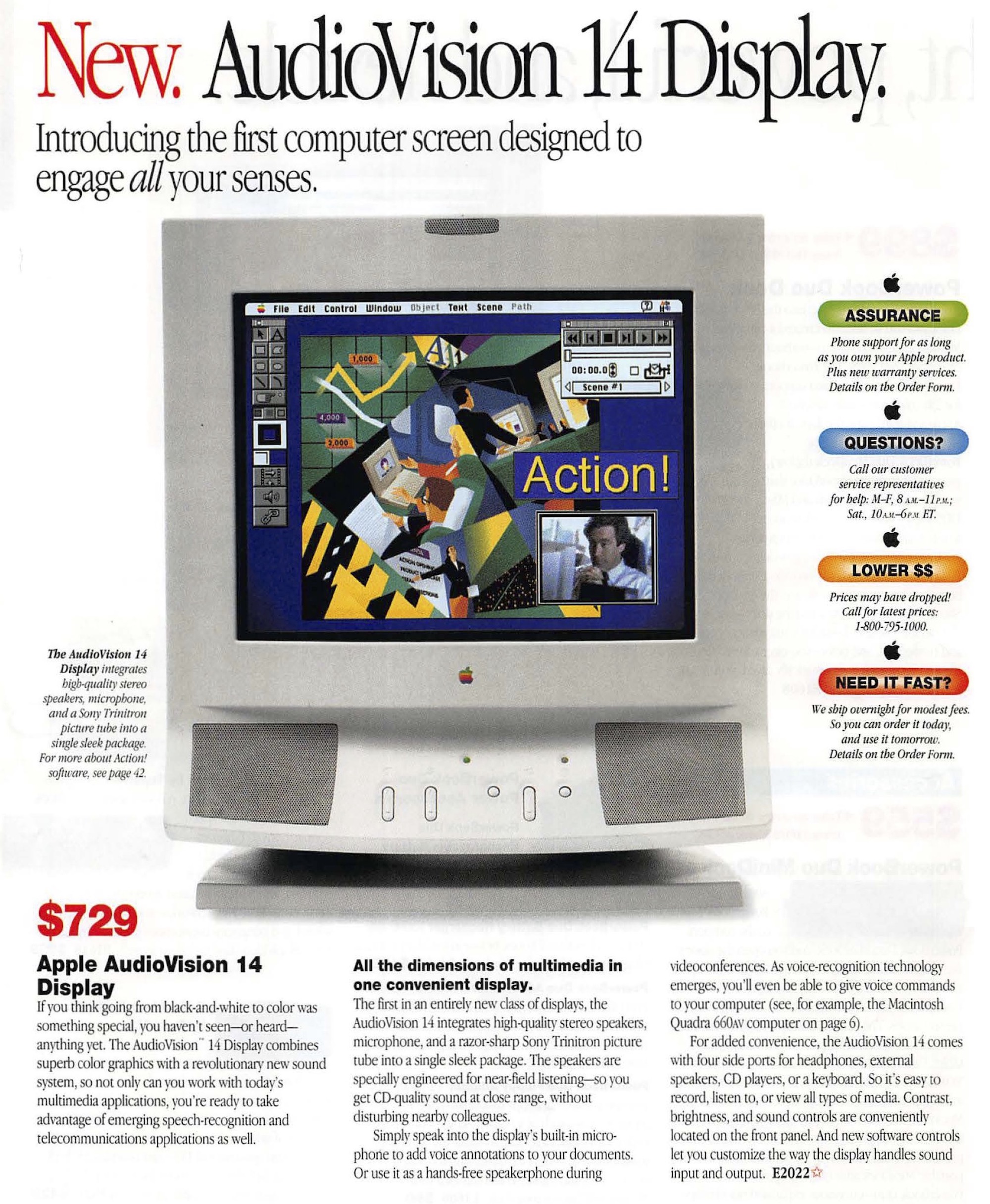
This product used the the HDI-45 connector for getting information to/from the user’s Mac with just one cable. As the name suggests, this was a 45-pin connector, and it carried analog RGB video, analog stereo audio signals (both in and out), ADB and S-video. This connector was found on the back of the the Power Macintosh 6100, 7100 and 8100 and was only ever used with the AudioVision 14 Display.
Yikes.
This display ended up being a one-off, being replaced with the AppleVision 1710 and the AppleVision 1710AV.
Before we get to those, we should talk about the naming of these products. There were three generations of “AppleVision” displays, and models with “AV” in their name included a built-in microphone and a set of speakers and generally cost $200 or so more.
The 1710 line shipped with a color 17 inch (16.1" viewable area) Trinitron CRT and started at $999. The AV model ran $1,159 a big step up from the old AudioVision 14, but in those days, you paid dearly for every inch of CRT on your desk. These two displays were sold from August 1995 to August 1997, alongside the Power Macintosh 7200/75, Power Macintosh 7200/90, Power Macintosh 7500/100 and Power Macintosh 8500/120.
In 1997, Apple released ColorSync, its color management solution for Mac OS. ColorSync is a story for a different time, but to fully support it, Apple replaced the 1710 and 1710AV with two new displays: the AppleVision/ColorSync 750 and the AppleVision/ColorSync 750AV.
These two monitors shipped in August of 1997, retaining the 16-inch (viewable) CRT and required Mac OS version 7.1 or later.
The real highlight of the line was the AppleVision/ColorSync 850 and 850AV, which boasted a 20-inch (19-inch viewable) Trinitron. These shipped in May 1997, for $1,849 and $1,999, respectively. Here’s a bit from the press release:
Apple Computer, Inc. today introduced the new high-performance, AppleVision 850 AV and AppleVision 850 color displays for publishers, multimedia authors, photographers, and other professionals who rely on consistent visual performance and color accuracy, as well as for users of spreadsheet and page-layout applications who require a large display that supports very high resolution. Both displays incorporate Apple’s proven DigitalColor technology for state-of-the-art color accuracy, which is achieved through a patented internal calibration system that adjusts color over time with minimal user interaction. The displays support Apple’s ColorSync technology for color matching across multiple devices such as color printers and scanners by allowing display profiles to be created on the fly. Both displays also feature extensive, easy-to-use software control of screen geometry, mode switching, and color settings.
“The AppleVision 850 AV and AppleVision 850 displays truly complement our professional Power Macintosh computer systems,” said Phil Schiller, Apple vice president of product marketing for desktops, servers and displays. “When you combine one of these new displays with a Power Mac 9600 or 8600 for professional publishing or media authoring, you are getting some of the very best in graphics performance, image quality, color accuracy and industrial design.”
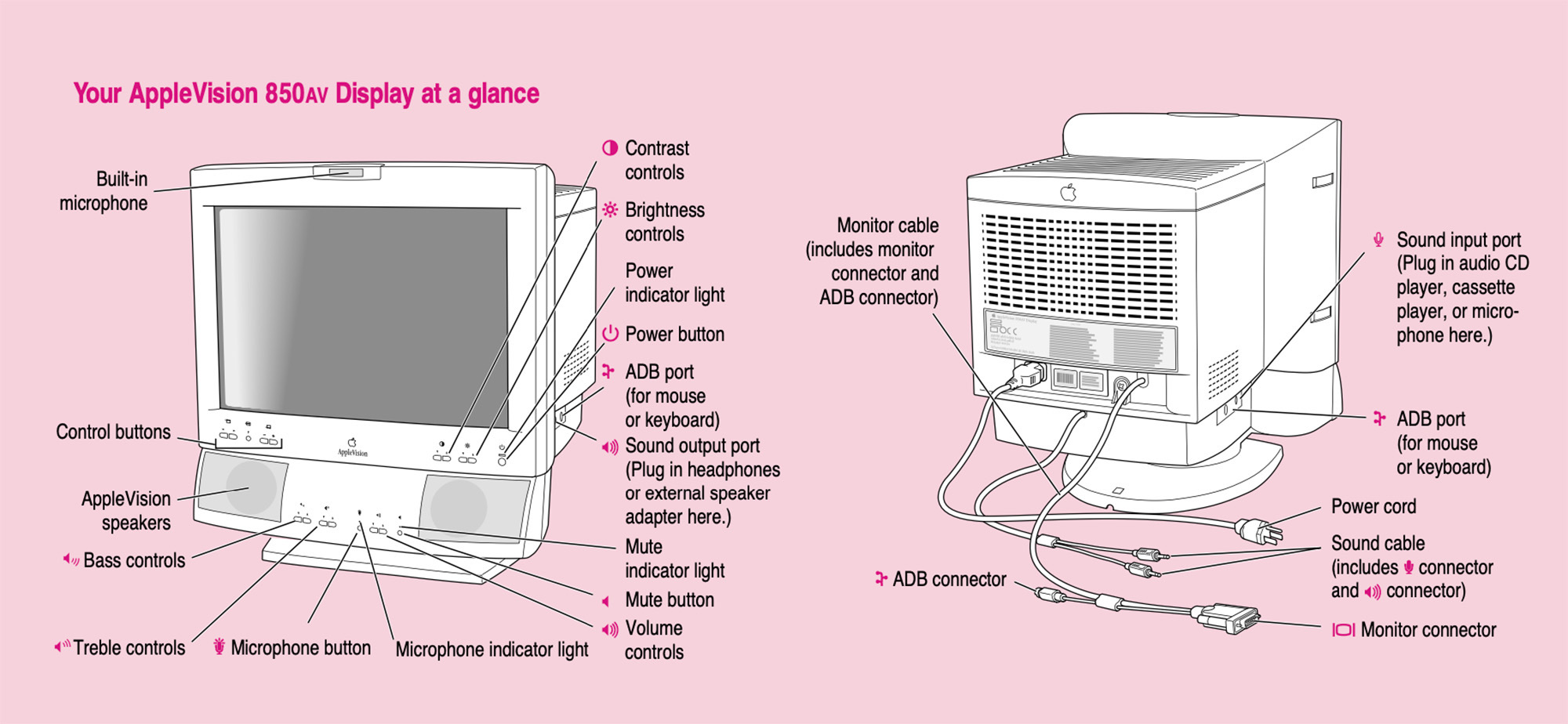
The product’s manual shows off the media controls that appeared on the chin below the display itself, as well as the rest of the display’s features:
You may be wondering what’s up with the rather long “AppleVision/ColorSync” name. This was a bit of a bandage to cover up the fact that Apple changed the name of these products on March 11, 1998:
Apple Computer, Inc. today announced a TCO upgrade to the currently shipping monitors for design and publishing professionals. Available in 17- or 20-inch configurations, the Apple ColorSync Displays now meet the strict international TCO 95 standards for recyclability,1 low emissions and power consumption. Additionally, the announcement completes the renaming of the displays from AppleVision 750 (17-inch) and AppleVision 850 (20-inch) to Apple ColorSync Display. The new naming more effectively communicates the advantages of the systems’ color calibration capabilities to customers.
I wasn’t really paying attention to Apple back then, but the name change makes sense to me. In the 1990s, desktop publishing was Apple’s bread and butter, and ColorSync was a big part of that, even if it did mark the end of the company’s “vision” branding, at least for a while.
-
If you are like me and had no idea what “TCO” means, this should help. ↩︎