512 Pixels

Chromium Boasts Battery Gains for MacBook Users⇢

François Doray, a software developer on the Chrome team:

With the latest release of Chrome, we’ve made it possible to do more on your MacBook on a single charge thanks to a ton of optimizations under the hood. In our testing, we found that you can browse for 17 hours or watch YouTube for 18 hours on a MacBook Pro (13", M2, 2022) And with Chrome’s Energy Saver mode enabled, you can browse an additional 30 minutes longer on battery. Of course, we care deeply about all our users, not just those with the latest hardware. That’s why you’ll also see performance gains on older models as well.

I really hope this pans out in real-world usage.

Kbase Article of the Week: Apple Adjustable Keyboard & Compatibility with A/UX 3.x⇢

Apple Support:

Is the Apple Adjustable Keyboard compatible with A/UX 3.x?

No, the Apple Adjustable Keyboard does not work completely with A/UX 3.0 or 3.0.1.

Because the CommToolbox tool(s) are built into the kernal with the keyboard IDs, some of the keys, such as arrow keys and ‘~’, key do not respond with the same ANSI escape sequences as they do in CommandShell.

The problem has been reported and is known to A/UX engineering.

Amazing.

Sponsor: TextExpander⇢

TextExpander’s customizable and shareable snippets of text allow your team to fly through repetitive tasks quickly by expanding the things you type regularly — all you have to do is type a short abbreviation and TextExpander does the rest of the work for you.

Here’s How It Works:

  • Create It: Collect your most commonly used emails, phrases, messaging, URLs, and more to create snippets and templates in TextExpander that are always accessible with a quick search or abbreviation.
  • Share It: Give your team or different departments across your company access to the content they need to use every day.
  • Use It: Expand the content you need with just a few keystrokes on any device, across any app you use — no APIs or integrations needed.
  • Optimize It: Add customizations like fill-ins and optional sections to keep that human touch. Anytime you make changes to snippets they update everywhere so your team is always on the same page.

It’s that easy!

Check out TextExpander and say goodbye to repetitive typing.

25 Years Ago, Apple Killed the Newton

When Steve Jobs made it back to Apple, the company had dozens of products that would not survive the company’s move to a much simpler product matrix. In a sea of forgettable Macs and accessories, the biggest loss was the Newton.

The Newton MessagePad 2100

Here is the announcement itself, in its entirety:

Apple Computer, Inc. today announced it will discontinue further development of the Newton operating system and Newton OS-based products, including the MessagePad 2100 and eMate 300.

“This decision is consistent with our strategy to focus all of our software development resources on extending the Macintosh operating system,” said Steve Jobs, Apple’s interim CEO. “To realize our ambitious plans we must focus all of our efforts in one direction.”

Apple is committed to affordable mobile computing, pioneered by the eMate, and will be serving this market with Mac OS-based products beginning in 1999.

Apple will continue to market and sell its current inventory of MessagePad 2100 and eMate 300 computers, as well as to provide support for their installed base of users. The Company is committed to working with its customers and developers to ensure a smooth transition to Mac OS-based products.

In hindsight, it’s easy to poke fun of the Newton, but its user base was passionate about the platform, and didn’t take the news well. A small crowd of them showed up at Apple’s Inifinite Loop campus to make their point known, as was reported by CNET at the time:

As Newton developers gathered outside Apple Computer (AAPL) headquarters today to protest the computer maker’s decision to discontinue the handheld device, company executives responded in low-key fashion.

Apple reserved space in its parking lot and supplied cookies, pastries, coffee, and other drinks to Newton protesters on what has turned out to be a crystal-clear day after yesterday’s rainfall.

Perhaps 100 protesters turned up, carrying signs reading “Newton forever,” “Newton is my pilot,” and “I give a fig for the Newton.”

The article goes on:

Apple has scheduled a teleconference Tuesday with Newton developers to answer questions and hear their feedback.

Meanwhile, Apple is offering a number of sweeteners to lure the Newton developers to the Mac platform, including a free membership in the Apple developers program.

[…]

“We understand it was a tough decision and they’re disappointed,” said Apple spokeswoman Rhona Hamilton. “Part of our giving them some space today is to appreciate that it’s a technology that people like and we discontinued it.

“But it is very unlikely that we will change this decision because it was a business decision,” she added. “We hope to convert them to using the Macintosh platform.”

In the June 1998 edition of Pen Computing Magazine, David MacNeill1 wrote a comprehensive history of the platform, then got into some of the possible reasons for its death. He also pointed out that customers weren’t the only ones on the losing end of the decision:

Though Newton owners certainly have good cause to be angry with Apple, developers have been hit the hardest by the untimely death of the Newton platform. Many hard-working companies lost their reason for existing overnight, and have suffered substantial financial losses as a result. Though less visible than commercial software companies, we know of quite a few Newton-specific development efforts involving years of work on vertical market solutions that will never ship due to a lack of hardware.

“Hundreds of businesses have been hurt by Apple’s decision to kill the Newton,” says Newton consultant Josh Weisbuch. “Companies such as Transport Data were well into the development of a ruggedized handheld for the emergency medical and law enforcement industries. Renaissance Digital was working with Children’s Hospital here in Boston to create a completely Newton-based otolaryngology department.”

Many developers rode the “Newton is dead” rumor roller coaster throughout 1997 and 1998, and ended up losing tons of money spent on damage control when their big customers got spooked. Many Newton evangelists reluctantly recommended that Apple remove its logo from Newton devices to make them more palatable to corporations. “Apple never understood the critical importance of vertical markets in creating new markets and still can’t justify investing in creating them,” says John Covington. “It’s one of the reasons I left Apple.”

Many were not happy about this change in direction, but as someone once said, focus is about saying no. If the Apple of 1998 needed to do anything, it was focusing what was working well.

If you want to read more about the Newton, I rounded up some great links a few years ago.


  1. His whole series on the Newton serves as a great time capsule. ↩︎

What Do You Get When You Combine a ThinkPad 701C and Framework Laptop with an iPad Display?⇢

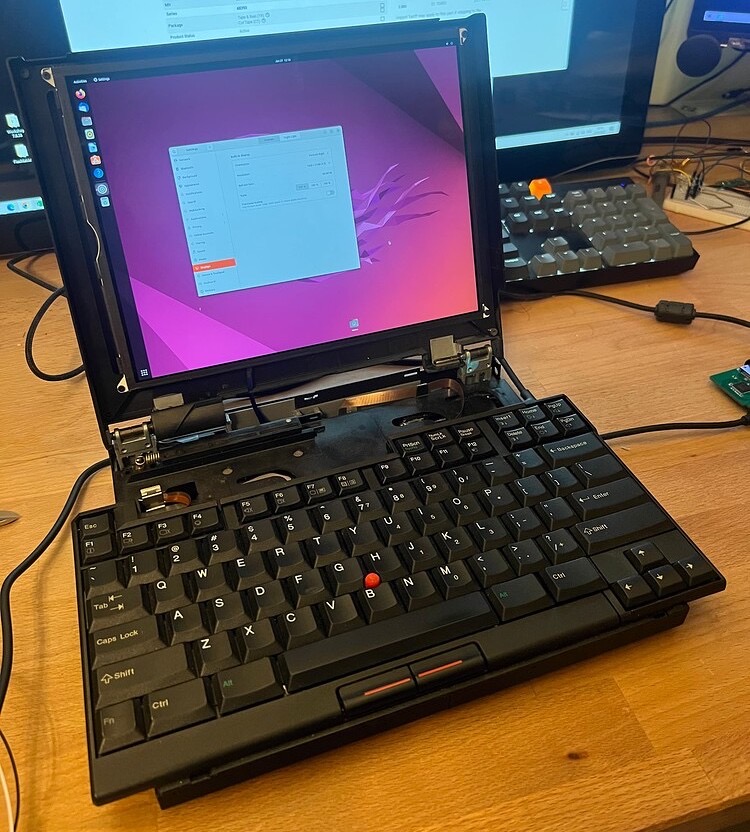
You get something wonderful. Karl Buchka writes:

I’ve been working on this project on and off for the last six months or so. There’s still lots left to do, but I did the first major mock-up today and I’m pretty pleased with the outcome so far.

TL;DR summary:

  • Framework powered Thinkpad 701C
  • iPad 7 display panel (2160x1620)
  • Fully working original keyboard and trackpoint
  • Ports/peripherals: 3x USB-A, 2x USB-C, 1x GigE, headphone jack, Wifi, Bluetooth

Here’s a photo of the project:

ThinkPad 701C

If you aren’t familiar with the ThinkPad 701C, it’s one of my all-time favorite laptop designs for two reasons:

  1. I love ThinkPads.
  2. It’s bonkers.

The 701C came with a foldout keyboard that let the laptop be compact when closed and feature a full-sized keyboard. LGR has a thorough review of the machine on YouTube:

Inside, Buchka stuffed the components from a Framework notebook, which was designed to be as upgradable and repairable as possible. Using an iPad panel as the display is the perfect finishing touch.

via 512 Pixels reader Zac

Bluetooth Database Spills the Beans on New Macs⇢

Rumors about that new 15-inch MacBook Air and the future Mac Pro keep heating up, as Joe Rossignol reports:

Apple this week filed a new listing in the Bluetooth Launch Studio database, a move that sometimes foreshadows the launch of new products. The filing does not mention any specific products, but it lists the latest Bluetooth 5.3 standard and references a prior macOS-related listing, suggesting the filing could be related to upcoming Macs.

Apple is rumored to be planning new versions of the MacBook Air and the Mac Pro for release in the first half of 2023. The new MacBook Air is expected to feature a larger 15-inch display and the M2 chip, while the new Mac Pro is expected to have the same design as the 2019 model with a new M2 Ultra chip. Both new Macs could be announced as early as March or April, potentially alongside the release of macOS 13.3. However, there remains a possibility that the new Macs will not be announced until WWDC in June or later.

Bluetooth 5.3 is present in a bunch of new Apple hardware, including the new M2-based MacBook Pros and the M2 Mac mini. It is not present on the M2 MacBook Air introduced last year. That machine ships with Bluetooth 5.0.

Kbase Article of the Week: iWeb: Menu Items are Unavailable After Reinstall⇢

Apple Support:

Symptoms

When iWeb is opened after a reinstall of the original disc, many of the menu items may be unavailable and new page creation may not be possible. Also the theme selection screen may not appear if there was no existing site in iWeb.

Note: These issues could occur if the iWeb software was updated prior to a reinstall using the original disc.

Solution

When you perform a reinstall from the disc, the original version of iWeb that shipped with the computer is installed, but the Receipts from the updated version of iWeb is still in place causing Software Update not to recognize that an update is needed. To resolve this issue, simply download and install the latest version of iWeb.

KeyboardCleanTool⇢

This weekend, I was using someone else’s MacBook Pro and wanted to clean their keyboard. I could not shut it down for cleaning, as it was downloading a macOS update. This prompted me to look for an app that could lock the keyboard for me to wipe it down.

This led me to KeyboardCleanTool, a free utility by Andreas Hegenberg, the genius behind apps like BetterTouchTool.

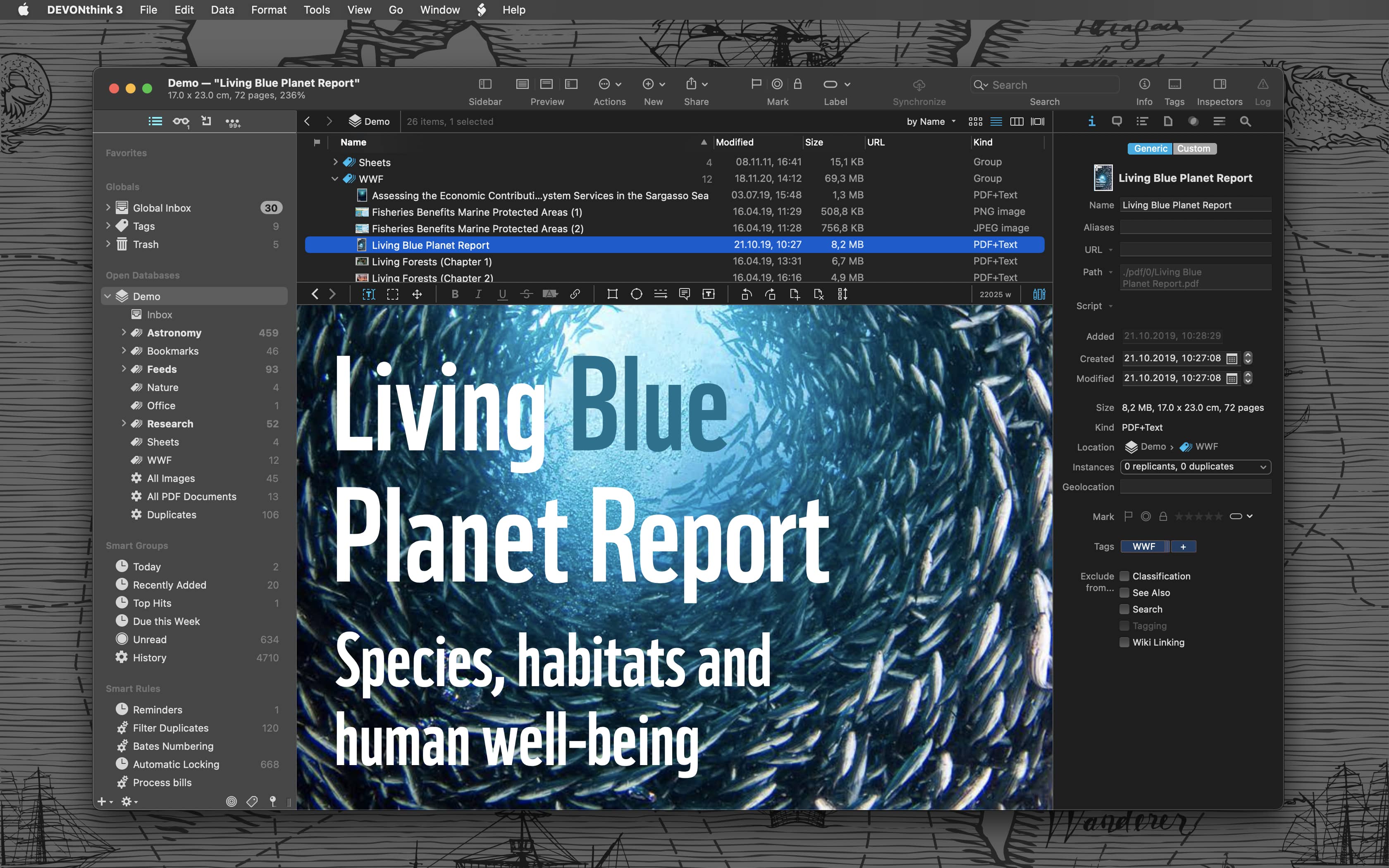
Sponsor: DEVONthink of DEVONtechnologies⇢

Whether you’re in the harbor or at high sea, you need to know where you are or where you’re sailing. If you have all the maps, books, and documents. DEVONthink for Mac and DEVONthink To Go for iOS will not let you down on your mission and help you navigate the “seven seas of information.”

DEVONthink for Mac

Sailor jokes aside … DEVONthink helps you get organized in your office, home office, or on the go. It keeps all your documents, snippets, and bookmarks in one place. Organize them however you need and let DEVONthink’s unique AI assist you all the way with filing and finding. And if that wasn’t enough, smart rules and flexible reminders let you delegate all the boring, repeating daily tasks to DEVONthink too. On iOS, use Shortcuts actions to integrate DEVONthink To Go with your other apps.

Of course, whatever you keep in your databases remains yours. It’s all stored locally, nothing is uploaded anywhere unless you say so. Flexible synchronization technology with strong encryption makes sure that you have all your important documents with you on whatever device you’re working on or taking with you. Use iCloud, Dropbox, any WebDAV service you may have booked. Or synchronize directly over your local network.

And, of course, there’s so much more, from email archiving and scanning to an embedded web server for sharing your data securely with your team. Check out https://www.devontechnologies.com to learn more about DEVONthink, DEVONthink To Go, and more.