
It’s not every day that we get a new system-level productivity application from Apple, but here we are.
512 Pixels
iFixIt Tears Down the Amazon Astro ⇢
The little robot seems surprisingly repairable for something so complex:
PCalc Turns 30 ⇢
This is an updated version of a piece I wrote for the 20th anniversary, with an extra ten years of history!
Many people using PCalc on their shiny devices today don’t realise that the app has been around for a lot longer than they think. In some cases, a lot longer than they’ve been thinking.
PCalc is twenty thirty years old on the 23rd of December 2022, so I thought I should take the opportunity to look back at how it has evolved over the last two three decades.
To celebrate, PCalc is currently 30% off, but make yourself a reminder to buy it tomorrow at full price when the sale is over.
LastPass Customer Password Vaults Stolen ⇢
Goodnight, Insight ⇢
NASA’s InSight mission has ended after more than four years of collecting unique science on Mars.
Mission controllers at the agency’s Jet Propulsion Laboratory (JPL) in Southern California were unable to contact the lander after two consecutive attempts, leading them to conclude the spacecraft’s solar-powered batteries have run out of energy – a state engineers refer to as “dead bus.”
NASA had previously decided to declare the mission over if the lander missed two communication attempts. The agency will continue to listen for a signal from the lander, just in case, but hearing from it at this point is considered unlikely. The last time InSight communicated with Earth was Dec. 15.
Space Explored has a nice article up outlining the lander’s mission and lifespan.
Connected #429: Lucy’s Football Factory ⇢
This week on a Very Normal Episode of Connected:
The boys celebrate the holidays with their annual gift exchange, and then it’s time to make predictions for what will happen in 2023–but first, it’s time to score our picks from the past year and crown a new champion.
MacStories Selects 2022
The team over at MacStories has announced their annual MacStories Selects awards and it’s hard to disagree with any of the choices.
Apple’s Self Service Repair Program Expanded ⇢
The program now covers the M1 iMac, M1 Mac mini, Mac Studio and Studio Display.
With this comes a new batch of Repair Manuals, which I naturally downloaded and looked through. I love this exploded view of my beloved Mac Studio:
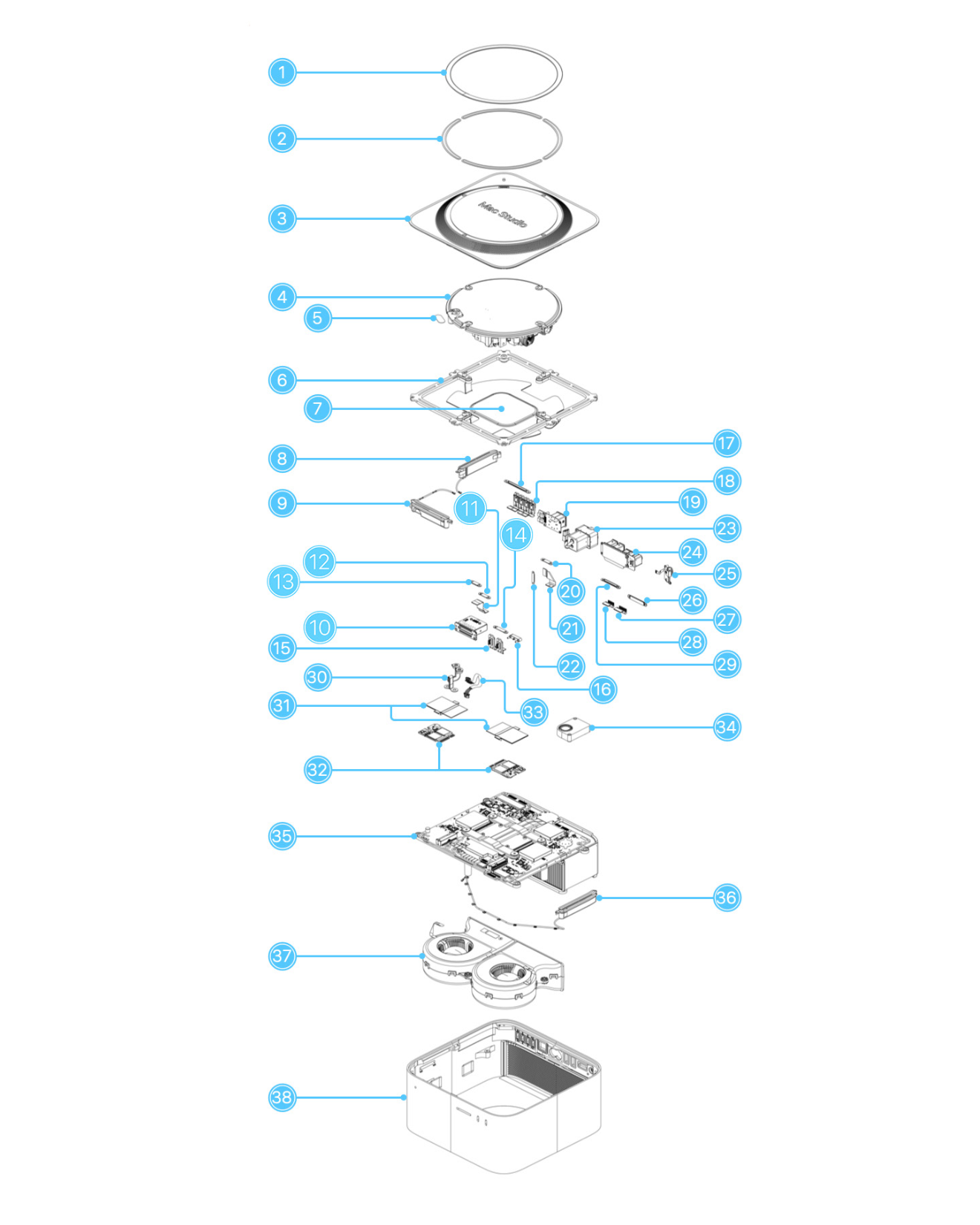
Here’s what all of those parts are:
- Bottom cover screw pad
- Bottom cover screw pad adhesive strips
- Bottom cover
- Power supply
- Bus bar insulator cover
- Internal frame
- Internal frame plate
- Antenna 2
- Antenna 3
- SDXC card slot board
- SDXC card slot board flex cable
- SDXC card slot board connector cowling
- SDXC card slot board connector cowling
- Front USB-C ports connector cowling
- Front USB-C ports
- Front USB-C ports bracket
- Back Thunderbolt 4 ports connector cowling
- Back Thunderbolt 4 ports (2)
- Ethernet board
- Ethernet board connector cowling 1
- Ethernet board flex cable
- Ethernet board connector cowling 2
- Power cord port
- Combination input/output board
- Power button
- Combination input/output board connector cowling
- HDMI flex cable
- USB-A flex cable
- Combination input/output board connector cowling
- Bus bar
- SSD module cover included with a replacement SSD module
- SSD modules (flash storage)
- Power supply signal cable
- Speaker
- Logic board
- Antenna 1
- Fan
- Housing
Compared to this thing, the inside of the Mac mini is downright simple.
Kbase Article of the Week: About the Mini DisplayPort to VGA Adapter Firmware Update ⇢
This firmware update addresses possible intermittent flickering and compatibility issues. In some cases those issues may include no video on some external monitors when using the Mini DisplayPort to VGA adapter with your Mini DisplayPort-enabled Mac.
Sponsor: MarsEdit 5 ⇢
MarsEdit 5 is a major upgrade to the preeminent Mac app for editing WordPress, Micro.blog, Tumblr, and many other types of blogs.
The new Microposting feature makes it “as easy to post to your own blog as it is to post to Twitter.” When MarsEdit 5 is running on your Mac, just press a configurable global keyboard shortcut, write out your latest thoughts, and instantly publish to your blog.
MarsEdit supports editing posts in rich or plain text, and the latest update is especially great for Markdown fans. Now when you’re writing Markdown in plain text mode, MarsEdit applies live, beautiful syntax highlighting to make it easier to focus separately on the content and style of your posts.
MarsEdit is used by top bloggers to maximize their productivity and enjoyment of blogging. It’s great for pros like John Gruber of Daring Fireball and yours truly, while also being simple enough to remove the mystery of blogging for everyday folks who just want to share their thoughts with the world.
Download MarsEdit 5 today, and see what all the hype is about. It’ll make you a better blogger!
Free Speech Champion Elon Musk Bans Links to Alternative Networks ⇢
Twitter is where the public conversation is happening, and where people from all over the globe come to promote their businesses, art, ideas, and more. We know that many of our users may be active on other social media platforms; however, going forward, Twitter will no longer allow free promotion of specific social media platforms on Twitter.
At both the Tweet level and the account level, we will remove any free promotion of prohibited 3rd-party social media platforms, such as linking out (i.e. using URLs) to any of the below platforms on Twitter, or providing your handle without a URL.
Offenders include:
- Facebook, Instagram, Mastodon, Truth Social, Tribel, Post and Nostr
- 3rd-party social media link aggregators such as linktr.ee, lnk.bio
Seems about right.
Update: And a day later, the rule is gone, after Twitter Safety ran a poll on the issue. What a joke.
Mac Power Users #671: Out of the Water ⇢
On this feedback episode of MPU, David and I reflect on the first year of the MacSparky Labs, discuss the recent Eufy camera news and answer a bunch of listener questions.